Simply define it in your `plugins`-section...
```
-
- de.juplo
- hibernate4-maven-plugin
- 1.0
-
+<plugin>
+ <groupId>de.juplo<groupId>
+ <artifactId>hibernate4-maven-plugin<artifactId>
+ <version>1.0</version>
+</plugin>
```
...and there you go!
So, here we go:
Just add the `@Parent`-annotation to the attribute of your associated `@Embeddable`-class, that points back to its _parent_.
-```
+```java
@Entity
class Cat
{
...
}
-
```
## Drawback
You cannot do both, use the [Client-side mode](http://www.lesscss.org/#usage "More about the client-side usage of LESS") of LESS to ease development and use the [lesscss-maven-plugin](https://github.com/marceloverdijk/lesscss-maven-plugin "Homepage of the official LESS CSS maven plugin") to automatically compile the LESS-sources into CSS for production. That does not work, because your stylesheets must be linked in different ways if you are switching between the client-side mode - which is best for development - and the pre-compiled mode - which is best for production. For the client-side mode you need something like:
```html
-
<link rel="stylesheet/less" type="text/css" href="styles.less" />
<script src="less.js" type="text/javascript"></script>
-
```
While, for the pre-compiled mode, you want to link to your stylesheets as usual, with:
```html
-
<link rel="stylesheet" type="text/css" href="styles.css" />
-
```
While looking for a solution to this dilemma, I stumbled accross [wro4j](https://code.google.com/p/wro4j/ "See the documentation of ths wounderfull tool"). Originally intended, to speed up page-delivery by combining and minimizing multiple resources into one through the use of a servlet-filter, this tool also comes with a maven-plugin, that let you do the same offline, while compiling your webapp.
wro.xml tells wro4j, which resources should be combined and how the result should be named. I am using the following configuration to generate all LESS-Sources beneath `base/` into one CSS-file called `base.css`:
```xml
-
<groups xmlns="http://www.isdc.ro/wro">
<group name="base">
<css>/less/base/*.less</css>
</group>
-
+</groups>
```
wro4j looks for `/less/base/*.less` inside the root of the web-context, which is equal to `src/main/webapp` in a normal maven-project. There are [other ways to specifie the resources](http://code.google.com/p/wro4j/wiki/ResourceTypes "See the resource locator documentation of wro4j for more details"), which enable you to store them elswhere. But this approach works best for our goal, because the path is understandable for both: the wro4j servlet-filter, we are configuring now for our development-environment, and the wro4j-maven-plugin, that we will configure later for build-time compilation.
wro.properties in short tells wro4j, how or if it should convert the combined sources and how it should behave. I am using the following configuration to tell wro4j, that it should convert `*.less`-sources into CSS and do that on _every request_:
```properties
-
managerFactoryClassName=ro.isdc.wro.manager.factory.ConfigurableWroManagerFactory
preProcessors=cssUrlRewriting,lessCssImport
postProcessors=less4j
disableCache=true
-
```
First of all we specify the `ConfigurableWroManagerFactory`, because otherwise, wro4j would not pick up our pre- and post-processor-configuration. This is a little bit confusing, because wro4j is already reading the `wro.properties`-file - otherwise wro4j would never detect the `managerFactoryClassName`-directive - and you might think: "Why? He is already interpreting our configuration!" But belive me, he is not! You can [read more about that in wro4j's documentation](http://code.google.com/p/wro4j/wiki/ConfigurableWroManagerFactory "Read the full story in wro4j's documentation"). The `disableCache=true` is also crucial, because otherwise, we would not see the changes take effect when developing with **jetty-maven-plugin** later on. The pre-processors `lessCssImport` and `cssUrlRewriting` merge together all our LESS-resources under `/less/base/*.less` and do some URL-rewriting, in case you have specified paths to images, fonts or other resources inside your LESS-code, to reflect that the resulting CSS is found under `/css/base.css` and not `/css/base/YOURFILE.css` like the LESS-resources.
This parameter lets you specify additional configuration options for the web.xml of your webapp. I am using the following configuration for my jetty-maven-plugin:
```xml
-
<plugin>
<groupId>org.eclipse.jetty</groupId>
<artifactId>jetty-maven-plugin</artifactId>
</dependency>
</dependencies>
</plugin>
-
```
The dependencies to **wro4j-core** and **wro4j-extensions** are needed by jetty, to be able to enable the filter defined below. Unfortunatly, one of the transitive dependencies of `wro4j-extensions` triggers an uggly error when running the jetty-maven-plugin. Therefore, all unneeded dependencies of `wro4j-extensions` are excluded, as a workaround for this error/bug.
And my jetty-web.xml looks like this:
```xml
-
<?xml version="1.0" encoding="UTF-8"?>
<web-app xmlns="http://java.sun.com/xml/ns/javaee"
xmlns:xsi="http://www.w3.org/2001/XMLSchema-instance"
<url-pattern>*.css</url-pattern>
</filter-mapping>
</web-app>
-
```
The filter processes any URI's that end with `.css`. This way, the wro4j servlet-filter makes `base.css` available under any path, because for exampl `/base.css`, `/css/base.css` and `/foo/bar/base.css` all end with `.css`.
All that is left over to configure now, is the build-process. If you would build and deploy your webapp now, the CSS-file `base.css` would not be generated and the link to your stylesheet, that already works in our jetty-maven-plugin environment would point to a 404. Hence, we need to set up the **wro4j-maven-plugin**. I am using this configuration:
```xml
-
<plugin>
<groupId>ro.isdc.wro4j</groupId>
<artifactId>wro4j-maven-plugin</artifactId>
</execution>
</executions>
</plugin>
-
```
I connected the `run`-goal with the `package`-phase, because the statically compiled CSS-file is needed only in the final war. The `ConfigurableWroManagerFactory` tells wro4j, that it should look up further configuration options in our `wro.properties`-file, where we tell wro4j, that it should compile our LESS-resources. The `<cssDestinationFolder>`-tag tells wro4j, where it should put the generated CSS-file. You can adjust that to suite your needs.
With a configuration like the above one, your LESS-resources and wro4j-configuration-files will be packed into your production-war. That might be confusing later, because neither wro4j nor LESS is used in the final war. You can add the following to your `pom.xml` to exclude these files from your war for the sake of clarity:
```xml
-
<plugin>
<artifactId>maven-war-plugin</artifactId>
<configuration>
</warSourceExcludes>
</configuration>
</plugin>
-
```
### What's next?
## Release notes:
```
-
commit 4b507b15b0122ac180e44b8418db8d9143ae9c3a
Author: Kai Moritz
Date: Tue Jan 15 23:09:01 2013 +0100
## Release notes:
```
-
commit 4edef457d2b747d939a141de24bec5e32abbc0c7
Author: Kai Moritz
Date: Fri Aug 2 00:37:40 2013 +0200
I stumbled over a valid construction, that can not be compiled by the [aspectj-maven-plugin](http://mojo.codehaus.org/aspectj-maven-plugin/ "Jump to the homepage of the aspectj-maven-plugin"):
```java
-
class Outer
{
void outer(Inner inner)
}
}
}
-
```
This code might look very useless.
If you put the class `Outer` in a maven-project and configure the aspectj-maven-plugin to weave this class with compliance-level 1.6, you will get the following error:
-```
-
+```log
[ERROR] Failed to execute goal org.codehaus.mojo:aspectj-maven-plugin:1.6:compile (default-cli) on project shouter: Compiler errors:
[ERROR] error at outer.inner(this);
[ERROR]
[ERROR] /home/kai/juplo/shouter/src/main/java/Outer.java:16:0::0 The method inner(Outer.Inner) is undefined for the type Outer
[ERROR] error at queue.done(this, System.currentTimeMillis() - start);
[ERROR]
-
```
The normal compilation works, because the class is syntactically correct Java-7.0-Code.
## Release notes:
```
-
commit adb20bc4da63d4cec663ca68648db0f808e3d181
Author: Kai Moritz
Date: Fri Oct 18 01:52:27 2013 +0200
## Release notes:
```
-
commit f3dabc0e6e3676244986b5bbffdb67d427c8383c
Author: Kai Moritz
Date: Mon Jun 2 10:31:12 2014 +0200
## Boot Into Recovery
-{{< figure align="left" width=300 src="/wp-uploads/2014/02/hama%5F00054807%5Fstock%5Frecovery-300x199.jpg" alt="stock recovery screenshot" caption="stock recovery screenshot" >}}
+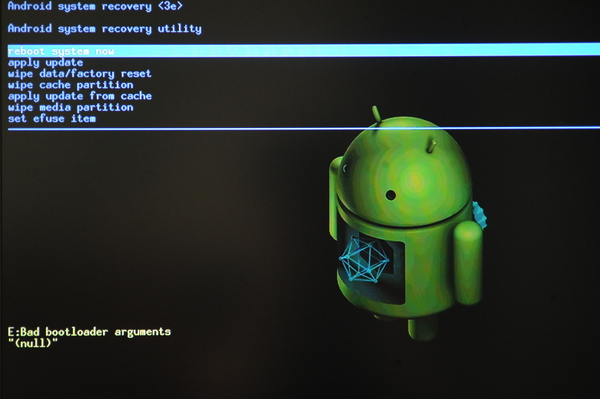
I found out, that you can boot into recovery, by pressing the reset-button, while the stick is booting. You can reach the reset-button without the need to open the case through a little hole in the back of the device. Just hold the button pressed, until recovery shows up (see screenshot).
But I found out, that you can control stock recovery with the help of a file called `factory_update_param.aml`, which is read from the external sd-card and interpreted by stock recovery on startup. Just create a text-file with the following content (I think it should use [unix stle newlines, aka LF](http://en.wikipedia.org/wiki/Newline#Representations "Learn more about line endings")):
```html
-
--update_package=/sdcard/update.zip
-
```
Place this file on the sd-card and name it `factory_update_param.aml`. Now you can place any suitable correctly signed android-update on the sd-card and rename it to `update.zip` and stock recovery will install it upon boot, if you boot into recovery with the sd-card inserted.
If you want to wipe all data as well and factory reset your device, you can extend `factory_update_param.aml` like this:
```html
-
--update_package=/sdcard/update.zip
--wipe_data
--wipe_cache
--wipe_media
-
```
But be carefull to remove these extra-lines later, because they are executed _every time_ you boot into recovery with the sd-card inserted! You have been warned :)
This definition of the plugin does the trick:
```xml
-
<plugin>
<groupId>org.codehaus.mojo</groupId>
<artifactId>aspectj-maven-plugin</artifactId>
</dependency>
</dependencies>
</plugin>
-
```
The crucial part is the explicit dependency, the rest depends on your project and might have to be adjusted accordingly:
```xml
-
<dependencies>
<dependency>
<groupId>org.aspectj</groupId>
<version>1.8.1</version>
</dependency>
</dependencies>
-
```
I hope, that helps, folks!
Firefox, for example, just states, that the download of the font failed:
```bash
-
downloadable font: download failed (font-family: "XYZ" style:normal weight:normal stretch:normal src index:0): status=2147500037 source: file:///home/you/path/to/font/xyz.woff
-
```
Meanwhile, Chrome just happily uses the same font.
Chrome logs an error:
```bash
-
Unsafe attempt to load URL file:///home/you/path/to/project/img/sprite.svg#logo from frame with URL file:///home/you/path/to/project/templates/layout.html. Domains, protocols and ports must match
-
```
...though, no protocol, domain or port is involved.
That is, because I like to place the template-files on a subdirectory of the directory, that contains my webapp ( `src/main/webapp` with Maven):
```
-
+ src/main/webapp/
+ css/
+ img/
+ fonts/
+ thymeleaf/templates/
-
```
I packed a simple example-project for developing static templates with [LESS](http://lesscss.org/ "Read more about less"), [nodejs](https://nodejs.org/ "Read more about nodejs") and [grunt](http://gruntjs.com/ "Read more about grunt"), that shows the problem and the [quick solution for Firefox](#quick-solution "Jump to the quick solution for Firefox") presented later.
You can browse it on my [juplo.de/gitweb](/gitweb/?p=examples/template-development;a=tree;h=1.0.3;hb=1.0.3 "Browse the example-project on juplo.de/gitweb"), or clone it with:
```bash
-
git clone /git/examples/template-development
-
```
## Cross-Browser Solution
In [my case](#my-case "See the directory-tree I use this frameset with"), the frameset-file looks like this:
```html
-
<!DOCTYPE HTML PUBLIC "-//W3C//DTD HTML 4.01 Frameset//EN" "http://www.w3.org/TR/html4/frameset.dtd">
<html>
<head>
<frame src="thymeleaf/templates/layout.html">
</frameset>
</html>
-
```
## Release notes:
```
-
commit ec30af2068f2d12a9acf65474ca1a4cdc1aa7122
Author: Kai Moritz
Date: Tue Nov 11 15:28:12 2014 +0100
## Release notes:
```
-
commit 94e6b2e93fe107e75c9d20aa1eb3126e78a5ed0a
Author: Kai Moritz
Date: Sat May 16 14:14:44 2015 +0200
I programmed a simple [Gruntfile](/gitweb/?p=examples/maven-grunt-integration;a=blob_plain;f=Gruntfile.js;hb=2.0.0 "Download the Gruntfile from juplo.de/gitweb"), that lets you do exactly this:
```javascript
-
module.exports = function(grunt) {
grunt.loadNpmTasks('grunt-newer');
grunt.registerTask('default', [ 'frontend' ]);
};
-
```
This Gruntfile loads the npm-taks [grunt-newer](https://www.npmjs.com/package/grunt-newer "Read more about the npm-plugin grunt-newer").
The whole example can be browsed at [juplo.de/gitweb](/gitweb/?p=examples/maven-grunt-integration;a=tree;h=2.0.0 "Browse the example on juplo.de/gitweb") or cloned with:
```bash
-
git clone /git/examples/maven-grunt-integration
-
```
Be sure to checkout the tag `2.0.0` for the corresponding version after the cloning, in case i add more commits to demonstrate other stuff.
Also, you have to init and clone the submodule after checkout:
```bash
-
git submodule init
git submodule update
-
```
If you run `mvn jetty:run`, you will notice, that the frontend-maven-plugin will automatically download Nodejs into a the folder `node` of the parent-project.
You can verify this and the used version with the mvn-command
```bash
-
mvn dependency:tree
-
```
To enable for example logging of the HTTP-Headers send and received, you then simply can add the following to your logging configuration:
```xml
-
<logger name="org.apache.http.headers">
<level value="debug"/>
</logger>
-
```
## Possible Pitfalls
---
Here is a little trick for you, to replace text by a graphic through pure CSS without the need to add extra markup:
-```java
-
+```css
SELECTOR
{
text-indent: -99em;
text-indent: 0;
content: REPLACEMENT;
}
-
```
`SELECTOR` can be any valid CSS-selector.
You can browse the example-development-environment on [juplo.de/gitweb](/gitweb/?p=examples/template-development;a=tree;h=1.0.3;hb=1.0.3 "Browse the example development-environment on juplo.de/gitweb"), or clone it with:
```bash
-
git clone /git/examples/template-development
-
```
After [installing npm](https://docs.npmjs.com/getting-started/installing-node "Read how to install npm") you have to fetch the dependencies with:
```bash
-
npm install
-
```
Than you can fire up a build with:
```bash
-
grunt
-
```
...or start a webserver for development with:
```bash
-
git run-server
-
```
## Serving The HTML and CSS For Local Development
I realised that goal by implemnting a grunt-task, that spawn's a process that uses the [http-server](https://www.npmjs.com/package/http-server "Read the description of the plugin on npm") to serve up the files and combine that task with a common watch-task:
```javascript
-
grunt.registerTask('http-server', function() {
grunt.util.spawn({
});
grunt.registerTask('run-server', [ 'default', 'http-server', 'watch' ]);
-
```
The rest of the configuration is really pretty self-explaining.
 projects / website / commitdiff