--- /dev/null
+---
+title: Blog
+url: /blog/
+---
+Hallo Welt!
--- /dev/null
+---
+_edit_last: "2"
+author: kai
+categories:
+ - html(5)
+date: "2020-04-10T11:53:39+00:00"
+guid: http://juplo.de/?p=357
+parent_post_id: null
+post_id: "357"
+title: A Perfect Outline
+url: /a-perfect-outline/
+
+---
+## Point Out Your Content: Utilize the HTML5 Outline-Algorithm
+
+HTML5 introduces new semantic elements accompained by the definition of [a new algorithm to calculate the document-outline](https://developer.mozilla.org/de/docs/Web/Guide/HTML/Sections_and_Outlines_of_an_HTML5_document "Read all about the new possibilities to mark up the outline of your document") from the mark up.
+There are plenty of [good explanations](http://www.smashingmagazine.com/2011/08/16/html5-and-the-document-outlining-algorithm/ "This is a very good overview, because it also pointes out, what to watch out for") of these new possibilities, to point out your content in a more controlled way.
+But the most of these explanations fall short, if it comes to how to put these new markup into use, so that it results in a sensible outline of the document, that was marked up.
+
+In this article I will try to explain, how to use the new semantic markup, to produce an outline, that is usable as a real content table of the document - not just as an partially orderd overview of all headings.
+I will do so, by showing simple examples, that will illuminate the principles behind the new markup.
+
+## All Messed Up!
+
+Although, the ideas behind the new markup seems to be simple and clear, nearly nobody accomplishes to produce a sensible outline.
+Even the big players, who [guide us through the jungle of the new specifications](http://www.html5rocks.com/de/ "Great guidance - but bad outline") and are giving [great explanations about the subject](http://www.smashingmagazine.com/2013/01/18/the-importance-of-sections/ "Great explanation - but bad outline"), either fail on there sites (see by yourself with the help of the help of [the h5o HTML5 Outline Bookmarklet](https://h5o.github.io/ "Just drag and drop the bookmarklet to your favorites.")), or produce the outline in the old way by the usage of `h1`- `h6` only, like the fabulous HTML5-bible [Dive Into HTML5](http://diveintohtml5.info/semantics.html#footer-element "A wounderful introduction to the new possibilities of HTML5 - but the tid outline is produced the old way").
+
+This is, because there is a lot to mix up in a wrong way, when trying to adopt the new features.
+Here is, what I ended up with, on my first try to combine what I have learned about [semantic elements](http://www.w3schools.com/html/html5_semantic_elements.asp "Overview of the new semantic elements, available in HTML5") and the [document outline](http://html5doctor.com/outlines/ "An explanation, of what the specs told you about the document outline"):
+
+#### Example 01: Markup
+
+```html
+
+<!DOCTYPE html>
+<title>Example 01</title>
+<header>
+ <h2>Header</h2>
+ <nav>Navigation</nav>
+</header>
+<main>
+ <h1>Main</h1>
+ <section>
+ <h2>Section I</h2>
+ </section>
+ <section>
+ <h2>Section II</h2>
+ <section>
+ <h3>Subsection a</h3>
+ </section>
+ <section>
+ <h3>Subsection b</h3>
+ </section>
+ </section>
+ <section>
+ <h2>Section III</h2>
+ <section>
+ <h3>Subsection a</h3>
+ </section>
+ </section>
+</main>
+<aside>
+ <h1>Aside</h1>
+</aside>
+<footer>
+ <h2>Footer</h2>
+</footer>
+
+```
+
+#### Example 01: Outline
+
+1. Header
+1. _Untitled section_
+1. Main
+1. Section I
+1. Section II
+ 1. Subsection a
+ 1. Subsection b
+1. Section III
+ 1. Subsection a
+1. Aside
+1. Footer
+
+[View example 01](/wp-uploads/2015/06/example-01.html)
+
+That quiet was not the outline, that I had expected.
+I planed, that _Header_, _Main_, _Aside_ and _Footer_ are ending up at the same level.
+Instead of that, _Aside_ and _Footer_ had become sections of my _Main_-content.
+And where the hell comes that _Untitled section_ from?!?
+My first thought on that was: No problem, I just forgot the `header`-tags.
+But after adding them, the only thing that cleared out, was where the _Untitled section_ was coming from:
+
+#### Example 02: Markup
+
+```html
+
+<!DOCTYPE html>
+<title>Example 02</title>
+<header>
+ <h2>Header</h2>
+ <nav>
+ <header><h3>Navigation</h3></header>
+ </nav>
+</header>
+<main>
+ <header><h1>Main</h1></header>
+ <section>
+ <header><h2>Section I</h2></header>
+ </section>
+ <section>
+ <header><h2>Section II</h2></header>
+ <section>
+ <header><h3>Subsection a</h3></header>
+ </section>
+ <section>
+ <header><h3>Subsection b</h3></header>
+ </section>
+ </section>
+ <section>
+ <header><h2>Section III</h2></header>
+ <section>
+ <header><h3>Subsection a</h3></header>
+ </section>
+ </section>
+</main>
+<footer>
+ <header><h2>Footer</h2></header>
+
+```
+
+#### Example 02: Outline
+
+1. Header
+1. Navigation
+1. Main
+1. Section I
+1. Section II
+ 1. Subsection a
+ 1. Subsection b
+1. Section III
+ 1. Subsection a
+1. Aside
+1. Footer
+
+[View example 02](/wp-uploads/2015/06/example-02.html)
+
+So I thought: Maybe the `main`-tag was the wrong choice.
+Perhaps it should be replaced by an `article`.
+But after that change, the outline even got worse.
+Now, _Navigation_, _Main_ and _Aside_ appeared on the same level, all as a subsection of _Header_.
+At least, _Footer_ suddenly was a sibling of _Header_ as planed:
+
+#### Example 03: Markup
+
+```html
+
+<!DOCTYPE html>
+<title>Example 03</title>
+<header>
+ <h2>Header</h2>
+ <nav>
+ <header><h3>Navigation</h333></header>
+ </nav>
+</header>
+<article>
+ <header><h1>Article (Main)</h1></header>
+ <section>
+ <header><h2>Section I</h2></header>
+ </section>
+ <section>
+ <header><h2>Section II</h2></header>
+ <section>
+ <header><h3>Subsection a</h3></header>
+ </section>
+ <section>
+ <header><h3>Subsection b</h3></header>
+ </section>
+ </section>
+ <section>
+ <header><h2>Section III</h2></header>
+ <section>
+ <header><h3>Subsection a</h3></header>
+ </section>
+ </section>
+</article>
+<footer>
+ <header><h2>Footer</h2></header>
+</footer>
+
+```
+
+#### Example 03: Outline
+
+1. Header
+1. Navigation
+1. Main
+ 1. Section I
+ 1. Section II
+ 1. Subsection a
+ 1. Subsection b
+ 1. Section III
+ 1. Subsection a
+1. Aside
+1. Footer
+
+[View example 03](/wp-uploads/2015/06/example-03.html)
+
+After that, I was totally confused and decided, to sort it out step by step.
+That procedure finally gave me the clue, I want to share with you now.
+
+## Step by Step (Uh Baby!)
+
+### Step I: Investigate the Structured Part
+
+Let us start with the strictly structured part of the document: **the article and it's subsections**.
+At first a minimal example with no markup except the `article`\- and the `section`-tags:
+
+#### Example 04: Markup
+
+```html
+
+<!DOCTYPE html>
+<title>Example 04</title>
+<article>
+ Main
+ <section>
+ Section I
+ </section>
+ <section>
+ Section II
+ <section>
+ Subsection a
+ </section>
+ <section>
+ Subsection b
+ </section>
+ </section>
+ <section>
+ Section III
+ <section>
+ Subsection a
+ </section>
+ </section>
+</main>
+
+```
+
+#### Example 04: Outline
+
+1. _Untitled BODY_ 1. _Untitled ARTICLE_ 1. _Untitled SECTION_
+ 1. _Untitled SECTION_ 1. _Untitled SECTION_
+ 1. _Untitled SECTION_
+ 1. _Untitled SECTION_ 1. _Untitled SECTION_
+
+[View Example 04](/wp-uploads/2015/06/example-04.html)
+
+Nothing really unexpected here.
+The `article`\- and `section`-tags are reflected in the outline according to their nesting.
+The only thing notably here is, that the `body` itself is also reflected in the outline.
+It appears on its own level as the root-element of all tags.
+We can think of it as the title of our document.
+
+We can add headings of any kind ( `h1`- `h6`) here and will always get an identically structured outline, that reflects the text of our headings.
+If we want to give the body a title, we have to place a heading outside and before any sectioning-elements:
+
+#### Example 05: Markup
+
+```html
+
+<!DOCTYPE html>
+<title>Example 05</title>
+<h1>Page</h1>
+<article>
+ <h1>Article</h1>
+ <section>
+ <h1>Section I</h1>
+ </section>
+ <section>
+ <h1>Section II</h1>
+ <section>
+ <h1>Subsection a</h1>
+ </section>
+ <section>
+ <h1>Subsection b</h1>
+ </section>
+ </section>
+ <section>
+ <h1>Section III</h1>
+ <section>
+ <h1>Subsection a</h1>
+ </section>
+ </section>
+</article>
+
+```
+
+#### Example 05: Outline
+
+1. Page
+1. Article
+ 1. Section I
+ 1. Section II
+ 1. Subsection a
+ 1. Subsection b
+ 1. Section III
+ 1. Subsection a
+
+[View Example 05](/wp-uploads/2015/06/example-05.html)
+
+This is the new part of the outline algorithm introduced in HTML5: _The nesting of elements, that define sections, defines the outline of the document._
+The rank of the heading element is ignored by this algorithm!
+
+Among the elements, that define sections in HTML5 are the `article` and the `section` tags.
+But there are more.
+[I will discuss them later](#sectioning-elemnts "Jump to the explanation of all sectioning-elements now").
+For now, you only have to know, that in HTML5, sectioning elements define the structure of the outline.
+Also, you should memorize, that the outline always has a single root without any siblings: the `body`.
+
+### Step II: Investigate the Page-Elements
+
+So, let us do the same with the tags that represent the different logical sections of a web-page: **the page-elements**.
+We start with a minimal example again, that contains no markup except the `header`\- the `main` and the `footer`-tags:
+
+#### Example 06: Markup
+
+```html
+
+<!DOCTYPE html>
+<title>Example 06</title>
+<header>Page</header>
+<main>Main</main>
+<footer>Footer</footer>
+
+```
+
+#### Example 06: Outline
+
+1. _Untitled BODY_
+
+[View Example 06](/wp-uploads/2015/06/example-06.html)
+
+That is wired, ehh?
+There is only one untitled element in the outline.
+The explanation for this is, that neither the `header`\- nor the `main`\- nor the `footer`-tag belong to the elements, that define a section in HTML5!
+This is often confused, because these elements define _the logical sections_ (header – main-content – footer) of a website.
+But these logical sections do not have to do anything with the structural sectioning of the document, that defines the outline.
+
+### Step III: Investigate the Headings
+
+So, what happens, if we add the desired markup for our headings?
+We want a `h1`-heading for our main-content, because it is the important part of our page.
+The header should have a `h2`-heading and the footer a `h3`-heading, because it is rather unimportant.
+
+#### Example 07: Markup
+
+```html
+
+<!DOCTYPE html>
+<title>Example 07</title>
+<header><h2>Page</h2></header>
+<main><h1>Main</h1></main>
+<footer><h3>Footer</h3></footer>
+
+```
+
+#### Example 07: Outline
+
+1. Page
+1. Main
+1. Footer
+
+[View Example 07](/wp-uploads/2015/06/example-07.html)
+
+Now, there is an outline again.
+But why?
+And why is it looking this way?
+
+What happens here, is [implicit sectioning](https://developer.mozilla.org/de/docs/Web/Guide/HTML/Sections_and_Outlines_of_an_HTML5_document#Implicit_Sectioning "Read all about implicit sectioning").
+In short, implicit sectioning is the outline algorithm of HTML4.
+HTML5 needs implicit sectioning, to keep compatible with HTML4, which still dominates the web.
+In fact, we could have used plain HTML4, with `div` instead of `header`, `main` and `footer`, and it would have yield the exact same outline:
+
+#### Example 08: Markup
+
+```html
+
+<!DOCTYPE HTML PUBLIC "-//W3C//DTD HTML 4.01 Transitional//EN" "http://www.w3.org/TR/html4/loose.dtd">
+<html>
+ <head><title>Example 08</title></head>
+ <body>
+ <div class="header"><h2>Page</h2></div>
+ <div class="main"><h1>Main</h1></div>
+ <div class="footer"><h3>Footer</h3></div>
+ </body>
+</html>
+
+```
+
+#### Example 08: Outline
+
+1. Page
+1. Main
+1. Footer
+
+[View Example 08](/wp-uploads/2015/06/example-08.html)
+
+In HTML4, solely the headings ( `h1`- `h6`) define the outline of a document.
+The enclosing elements or any nesting of them are ignored altogether.
+The level, at which a heading appears in the outline, is defined by the rank of the heading alone.
+(Strictly speaking, HTML4 does not define anything like a document outline.
+But as a result of the common usage and interpretation, this is, how people outline their documents with HTML4.)
+
+The implicit sectioning of HTML5 works in a way, that is backward compatible with this way of outlining, but closes the gaps in the resulting hierarchy:
+_Each heading implicitly opens a section – hence the name –, but if there is a gap between its rank and the rank of its ancestor – that is the last preceding heading with a higher rank – it is placed in the level directly beneath its ancestor_:
+
+#### Example 09: Markup
+
+```html
+
+<!DOCTYPE html>
+<title>Example 09</title>
+<h4>h4</h4>
+<h2>h2</h2>
+<h4>h4</h4>
+<h3>h3</h3>
+<h2>h2</h2>
+<h1>h1</h1>
+<h2>h2</h2>
+<h3>h3</h3>
+
+```
+
+#### Example 09: Outline
+
+1. h4
+1. h2
+1. h4
+1. h3
+1. h2
+1. h1
+1. h2
+ 1. h3
+
+[View Example 09](/wp-uploads/2015/06/example-09.html)
+
+See, how the first heading `h4` ends up on the same level as the second, which is a `h2`.
+Or, how the third and fourth headings are both on the same level under the `h2`, although they are of different rank.
+And note, how the `h2` and `h3` end up on different sectioning-levels as their earlier appearances, if they follow a `h1` in the natural order.
+
+### Step IV: Mixing it all together
+
+With the gathered clues in mind, we can now retry to layout our document with the desired outline.
+If we want, that _Header_, _Main_ and _Footer_ end up as top level citizens in our planed outline, we simply have to achieve, that they are all recognized as sections under the top level by the HTML5 outline algorithm.
+We can do that, by explicitly stating, that the `header` and the `footer` are section:
+
+#### Example 10: Markup
+
+```html
+
+<!DOCTYPE html>
+<title>Example 10</title>
+<header>
+ <section>
+ <h2>Main</h2>
+ </section>
+</header>
+<main>
+ <article>
+ <h1>Article</h1>
+ <section>
+ <h2>Section I</h2>
+ </section>
+ <section>
+ <h2>Section II</h2>
+ <section>
+ <h3>Subsection a</h3>
+ </section>
+ <section>
+ <h3>Subsection b</h3>
+ </section>
+ </section>
+ <section>
+ <h2>Section III</h2>
+ <section>
+ <h3>Subsection a</h3>
+ </section>
+ </section>
+ </article>
+</main>
+<footer>
+ <section>
+ <h3>Footer</h3>
+ </section>
+</footer>
+
+```
+
+#### Example 10: Outline
+
+1. _Untitled BODY_ 1. Main
+1. Article
+ 1. Section I
+ 1. Section II
+ 1. Subsection a
+ 1. Subsection b
+ 1. Section III
+ 1. Subsection a
+1. Footer
+
+[View Example 10](/wp-uploads/2015/06/example-10.html)
+
+So far, so good.
+But what about the untitled body?
+We forgot about the single root of any outline, that is defined by the body, how we learned back in [step 1](#step-01 "Jump back to step 1, if you do not remember..."). As shown in [example 05](#example-05 "Revisit example 5"), we can simply name that by putting a heading outside and before any element, that defines a section:
+
+#### Example 11: Markup
+
+```html
+
+<!DOCTYPE html>
+<title>Example 11</title>
+<header>
+ <h2>Page</h2>
+ <section>
+ <h3>Header</h3>
+ </section>
+</header>
+<main>
+ <article>
+ <h1>Article</h1>
+ <section>
+ <h2>Section I</h2>
+ </section>
+ <section>
+ <h2>Section II</h2>
+ <section>
+ <h3>Subsection a</h3>
+ </section>
+ <section>
+ <h3>Subsection b</h3>
+ </section>
+ </section>
+ <section>
+ <h2>Section III</h2>
+ <section>
+ <h3>Subsection a</h3>
+ </section>
+ </section>
+ </article>
+</main>
+<footer>
+ <section>
+ <h3>Footer</h3>
+ </section>
+</footer>
+
+```
+
+#### Example 11: Outline
+
+1. _Page_ 1. Header
+1. Main
+ 1. Section I
+ 1. Section II
+ 1. Subsection a
+ 1. Subsection b
+ 1. Section III
+ 1. Subsection a
+1. Footer
+
+[View Example 11](/wp-uploads/2015/06/example-11.html)
+
+### Step V: Be Aware, Which Elements Define Sections
+
+The eagle-eyed among you might have noticed, that I had "forgotten" the two element-types `nav` and `aside`, when we were investigating the elements, that define the logical structure of the page in [step 2](#step-2 "Revisit step 2").
+I did not forgot about these – I left them out intentionally.
+Because otherwise, the results of [example 07](#example-07 "Revisit example 07") would have been too confusing, to made my point about implicit sectioning.
+Let us look, what would have happend:
+
+#### Example 12: Markup
+
+```html
+
+<!DOCTYPE html>
+<title>Example 12</title>
+<header>
+ <h1>Page</h1>
+ <nav><h1>Navigation</h1></nav>
+</header>
+<main><h1>Main</h1></main>
+<aside><h1>Aside</h1></aside>
+<footer><h1>Footer</h1></footer>
+
+```
+
+#### Example 07: Outline
+
+1. Page
+1. Navigation
+1. Main
+1. Aside
+1. Footer
+
+[View Example 12](/wp-uploads/2015/06/example-12.html)
+
+What is wrong there?
+Why are _Navigation_ and _Aside_ showing up as children, albeit we marked up every element with headings of the same rank?
+The reason for this is, that `nav` and `aside` are sectioning elements:
+
+#### Example 12: Markup
+
+```html
+
+<!DOCTYPE html>
+<title>Example 13</title>
+<header>
+ Page
+ <nav>Navigation</nav>
+</header>
+<main>Main</main>
+<aside>Aside</aside>
+<footer>Footer</footer>
+
+```
+
+#### Example 07: Outline
+
+1. _Untitled BODY_ 1. _Untitled NAV_
+1. _Untitled ASIDE_
+
+[View Example 13](/wp-uploads/2015/06/example-13.html)
+
+The HTML5 spec defines four [sectioning elements](http://www.w3.org/WAI/GL/wiki/Using_HTML5_section_elements "Read about the intended use of these sectioning elements"): `article`, `section`, `nav` and `aside`!
+Some explain the confusion about this fact with the constantly evolving standard, that leads to [structurally unclear specifications](http://www.smashingmagazine.com/2013/01/18/the-importance-of-sections/#cad-middle "Jump to this rather lame excuse in an otherwise great article").
+I will be frank:
+_I cannot imagine any good reason for this decision!_
+In my opinion, the concept would be much clearer, if `article` and `section` would be the only two sectioning elements and `nav` and `aside` would only define the logical structure of the page, like `header` and `footer`.
+
+## Putting It All Together
+
+Knowing, that `nav` and `aside` will define sections, we now can complete our outline skillfully avoiding the appearance of untitled sections:
+
+#### Example 14: Markup
+
+```html
+
+<!DOCTYPE html>
+<title>Example 14</title>
+<header>
+ <h2>Page</h2>
+ <section>
+ <h3>Header</h3>
+ <nav><h4>Navigation</h4></nav>
+ </section>
+</header>
+<main>
+ <article>
+ <h1>Main</h1>
+ <section>
+ <h2>Section I</h2>
+ </section>
+ <section>
+ <h2>Section II</h2>
+ <section>
+ <h3>Subsection a</h3>
+ </section>
+ <section>
+ <h3>Subsection b</h3>
+ </section>
+ </section>
+ <section>
+ <h2>Section III</h2>
+ <section>
+ <h3>Subsection a</h3>
+ </section>
+ </section>
+ </article>
+</main>
+<aside><h3>Aside</h3></aside>
+<footer>
+ <section>
+ <h3>Footer</h3>
+ </section>
+</footer>
+
+```
+
+#### Example 14: Outline
+
+1. _Page_ 1. Header
+ 1. Navigation
+1. Main
+ 1. Section I
+ 1. Section II
+ 1. Subsection a
+ 1. Subsection b
+ 1. Section III
+ 1. Subsection a
+1. Aside
+1. Footer
+
+[View Example 14](/wp-uploads/2015/06/example-14.html)
+
+_Et voilà: Our Perfect Outline!_
+
+If you memorize the concepts, that you have learned in this little tutorial, you should now be able to mark up your documents to generate _your perfect outline_...
+
+...but: one last word about headings:
+
+## A Word On The Ranks Of The Headings
+
+It is crucial to note, that [the new outline-algorithm still is a fiction](http://www.paciellogroup.com/blog/2013/10/html5-document-outline/ "Read, why it may be dangerous, to miss that it is not yet real"): most user agents do not implement the algorithm yet.
+Hence, you still should stick to the old [hints for keeping your content accessible](https://dequeuniversity.com/assets/html/jquery-summit/html5/slides/headings.html "Tipps, how to create a logical outline of your document the old way") and point out the most important heading to the search engines.
+
+But there is no reason, not to apply the new possibilities shown in this article to your markup: it will only make it more feature-proof.
+It is very likely, that [search engines will start to adopt the HTML5 outline algorithm](http://html5doctor.com/html5-seo-search-engine-optimisation/ "Read more about, what search engines already pick up from the new fruits, that HTML5 has to offer"), to make more sense out of your content in near feature - or are already doing so...
+So, why not be one of the first, to gain from that new technique.
+
+_I would advise you, to adopt the new possibilities to section your content and generate a sensible outline, while still keeping the old heading ranks to be backward compatible._
--- /dev/null
+---
+_edit_last: "2"
+_oembed_0a2776cf844d7b8b543bf000729407fe: '{{unknown}}'
+_oembed_8a143b8145082a48cc586f0fdb19f9b5: '{{unknown}}'
+_oembed_4484ca19961800dfe51ad98d0b1fcfef: '{{unknown}}'
+_oembed_b0575eccf8471857f8e25e8d0f179f68: '{{unknown}}'
+author: kai
+categories:
+ - explained
+ - java
+ - spring-boot
+classic-editor-remember: classic-editor
+date: "2020-07-02T13:24:07+00:00"
+guid: http://juplo.de/?p=970
+parent_post_id: null
+post_id: "970"
+title: Actuator HTTP Trace Does Not Work With Spring Boot 2.2.x
+linkTitle: Fixing Actuator HTTP Trace
+url: /actuator-httptrace-does-not-work-with-spring-boot-2-2/
+
+---
+## TL;DR
+
+In Spring Boot 2.2.x, you have to instanciate a **`@Bean`** of type **`InMemoryHttpTraceRepository`** to enable the HTTP Trace Actuator.
+
+Jump to the [explanation](#explanation) of and [example code for the fix](#fix)
+
+## `Enabling HTTP Trace — Before 2.2.x...`
+
+Spring Boot comes with a very handy feature called [Actuator](https://docs.spring.io/spring-boot/docs/current/reference/htmlsingle/#production-ready "Show the Spring Boot Documentation for the Actuator Feature").
+Actuator provides a build-in production-ready REST-API, that can be used to monitor / menage / debug your bootified App.
+To enable it — _prior to 2.2.x_ —, one only had to:
+
+1. Specifiy the dependency for Spring Boot Actuator:
+
+ ```
+ <dependency>
+ <groupId>org.springframework.boot
+ <artifactId>spring-boot-starter-actuator
+ </dependency>
+
+ ```
+
+1. Expose the needed endpoints via HTTP:
+
+ ```properties
+ management.endpoints.web.exposure.include=*
+
+ ```
+
+ - This exposes **all available endpoints** via HTTP.
+ - _**Advise:** Do not copy this into a production config_
+
+ (Without thinking about it twice and — at least — [enable some security measures](https://docs.spring.io/spring-boot/docs/current/reference/htmlsingle/#production-ready-endpoints-security "Read, how to secure HTTP-endpoints in the documentation of Spring Boot") to protect the exposed endpoints!)
+
+## The problem: _It simply does not work any more in 2.2 :(_
+
+_But..._
+
+- If you upgrade your existing app with a working `httptrace`-actuator to Spring Boot 2.2.x, or
+- If you start with a fresh app in Spring Boot 2.2.x and try to enable the `httptrace`-actuator [as described in the documentation](https://docs.spring.io/spring-boot/docs/current/reference/htmlsingle/#production-ready-endpoints-exposing-endpoints "Read, how to expose HTTP-endpoints in the documentation of Spring Boot")
+
+**...it simply does not work at all!**
+
+## The Fix
+
+The simple fix for this problem is, to add a `@Bean` of type `InMemoryHttpTraceRepository` to your **`@Configuration`**-class:
+
+```
+@Bean
+public HttpTraceRepository htttpTraceRepository()
+{
+ return new InMemoryHttpTraceRepository();
+}
+
+```
+
+## The Explanation
+
+The cause of this problem is not a bug, but a legitimate change in the default configuration.
+Unfortunately, this change is not noted in the according section of the documentation.
+Instead it is burried in the [Upgrade Notes for Spring Boot 2.2](https://github.com/spring-projects/spring-boot/wiki/Spring-Boot-2.2.0-M3-Release-Notes#actuator-http-trace-and-auditing-are-disabled-by-default)
+
+The default-implementation stores the captured data in memory.
+Hence, it consumes much memory, without the user knowing, or even worse: needing it.
+This is especially undesirable in cluster environments, where memory is a precious good.
+_And remember:_ Spring Boot was invented to simplify cluster deployments!
+
+**That is, why this feature is now turned of by default and has to be turned on by the user explicitly, if needed.**
--- /dev/null
+---
+_edit_last: "2"
+author: kai
+categories:
+ - facebook
+date: "2015-10-01T11:57:11+00:00"
+draft: "true"
+guid: http://juplo.de/?p=532
+parent_post_id: null
+post_id: "532"
+title: 'Arbeitspaket 1a: Entwicklung eines Facebook-Crawlers'
+linkTitle: 'Entwicklung eines Facebook-Crawlers'
+url: /
+
+---
+
--- /dev/null
+---
+_edit_last: "2"
+author: kai
+categories:
+ - java
+ - maven
+date: "2014-07-18T10:32:21+00:00"
+guid: http://juplo.de/?p=302
+parent_post_id: null
+post_id: "302"
+title: aspectj-maven-plugin can not compile valid Java-7.0-Code
+linkTitle: aspectj-maven-plugin & Java 7.0
+url: /aspectj-maven-plugin-can-not-compile-valid-java-7-0-code/
+
+---
+I stumbled over a valid construction, that can not be compiled by the [aspectj-maven-plugin](http://mojo.codehaus.org/aspectj-maven-plugin/ "Jump to the homepage of the aspectj-maven-plugin"):
+
+```java
+
+class Outer
+{
+ void outer(Inner inner)
+ {
+ }
+
+ class Inner
+ {
+ Outer outer;
+
+ void inner()
+ {
+ outer.outer(this);
+ }
+ }
+}
+
+```
+
+This code might look very useless.
+Originally, it `Inner` was a Thread, that wants to signal its enclosing class, that it has finished some work.
+I just striped down all other code, that was not needed, to trigger the error.
+
+If you put the class `Outer` in a maven-project and configure the aspectj-maven-plugin to weave this class with compliance-level 1.6, you will get the following error:
+
+```
+
+[ERROR] Failed to execute goal org.codehaus.mojo:aspectj-maven-plugin:1.6:compile (default-cli) on project shouter: Compiler errors:
+[ERROR] error at outer.inner(this);
+[ERROR]
+[ERROR] /home/kai/juplo/shouter/src/main/java/Outer.java:16:0::0 The method inner(Outer.Inner) is undefined for the type Outer
+[ERROR] error at queue.done(this, System.currentTimeMillis() - start);
+[ERROR]
+
+```
+
+The normal compilation works, because the class is syntactically correct Java-7.0-Code.
+But the AspectJ-Compiler (Version 1.7.4) bundeled with the aspectj-maven-pluign will fail!
+
+Fortunately, I found out, [how to use the aspectj-maven-plugin with AspectJ 1.8.3](/running-aspectj-maven-plugin-with-the-current-version-1-8-1-of-aspectj/ "Read, how to run the aspectj-maven-plugin with a current version of AspectJ").
+
+So, if you have a similar problem, [read on...](/running-aspectj-maven-plugin-with-the-current-version-1-8-1-of-aspectj/ "Read, how you can solve this ajc compilation error")
--- /dev/null
+---
+_edit_last: "2"
+author: kai
+categories:
+ - hibernate
+ - java
+ - jpa
+date: "2013-10-03T09:11:36+00:00"
+guid: http://juplo.de/?p=90
+parent_post_id: null
+post_id: "90"
+title: Bidirectional Association with @ElementCollection
+url: /bidirectional-association-with-elementcollection/
+
+---
+Have you ever wondered, how to map a bidirectional association from an entity to the instances of its element-collection? Actually, it is very easy, if you are using hibernate. It is just somehow hard to find in the documentation, if you are searching for it (look for chapter 2.4.3.4 in the [Hibernate-Annotationss-Documentation](http://docs.jboss.org/hibernate/annotations/3.5/reference/en/html_single/#entity-hibspec-property "Chapter 2.4.3 of the Hibernate-Annotation-Documentation")).
+
+## Hibernate
+
+So, here we go:
+Just add the `@Parent`-annotation to the attribute of your associated `@Embeddable`-class, that points back to its _parent_.
+
+```
+@Entity
+class Cat
+{
+ @Id
+ Long id;
+
+ @ElementCollection
+ Set kittens;
+
+ ...
+}
+
+@Embeddable
+class Kitten
+{
+ // Embeddable's have no ID-property!
+
+ @Parent
+ private Cat mother;
+
+ ...
+}
+
+```
+
+## Drawback
+
+But this clean approach has a drawback: it only works with hibernate. If you work with other JPA-implementations or plain old JPA itself, it will not work. Hence, it will not work in googles appengine, for example!
+
+Unfortunatly, there are no clean workarounds, to get bidirectional associations to `@ElementCollections`'s working with JPA. The only workarounds I found, only work for directly embedded instances - not for collections of embedded instances:
+
+- Applying `@Embedded` to a getter/setter pair rather than to the member itself (found on [stackoverflow.com](http://stackoverflow.com/a/5061089/247276 "Open the Answer in stackoverflow.com")).
+- Set the parent in the property set method (found in the [Java-Persistence WikiBook](http://en.wikibooks.org/wiki/Java_Persistence/Embeddables#Example_of_setting_a_relationship_in_an_embeddable_to_its_parent "Open the Java-Persistence WikiBook")).
+
+**If you want bidirectiona associations to the elements of your embedded collection, it works only with hibernate!**
--- /dev/null
+---
+_edit_last: "2"
+author: kai
+categories:
+ - css
+ - grunt
+ - html(5)
+ - less
+ - nodejs
+date: "2015-08-25T15:16:32+00:00"
+guid: http://juplo.de/?p=481
+parent_post_id: null
+post_id: "481"
+title: Bypassing the Same-Origin-Policy For Local Files During Development
+linkTitle: Bypassing SOP For Local Development
+url: /bypassing-the-same-origin-policiy-for-loal-files-during-development/
+
+---
+## downloadable font: download failed ...: status=2147500037
+
+Are you ever stumbled accross weired errors with font-files, that could not be loaded, or SVG-graphics, that are not shown during local development on your machine using `file:///`-URI's, though everything works as expected, if you push the content to a webserver and access it via HTTP?
+Furthermore, the browsers behave very differently here.
+Firefox, for example, just states, that the download of the font failed:
+
+```bash
+
+downloadable font: download failed (font-family: "XYZ" style:normal weight:normal stretch:normal src index:0): status=2147500037 source: file:///home/you/path/to/font/xyz.woff
+
+```
+
+Meanwhile, Chrome just happily uses the same font.
+Considering the SVG-graphics, that are not shown, Firefox just does not show them, like it would not be able to at all.
+Chrome logs an error:
+
+```bash
+
+Unsafe attempt to load URL file:///home/you/path/to/project/img/sprite.svg#logo from frame with URL file:///home/you/path/to/project/templates/layout.html. Domains, protocols and ports must match
+
+```
+
+...though, no protocol, domain or port is involved.
+
+## The Same-Origin Policy
+
+The reason for this strange behavior is the [Same-origin policy](https://en.wikipedia.org/wiki/Same-origin_policy "Read more about the Same-origin policy on wikipedia").
+Chrome gives you a hint in this direction with the remark that something does not match.
+I found the trail, that lead me to this explanation, while [googling for the strange error message](https://bugzilla.mozilla.org/show_bug.cgi?id=760436 "Read the bug-entry, that explains the meaning of the error-message"), that Firefox gives for the fonts, that can not be loaded.
+
+_The Same-origin policy forbids, that locally stored files can access any data, that is stored in a parent-directory._
+_They only have access to files, that reside in the same directory or in a directory beneath it._
+
+You can read more about that rule on [MDN](https://developer.mozilla.org/en-US/docs/Same-origin_policy_for_file%3A_URIs "Same-origin policy for file: URIs").
+
+I often violate that rule, when developing templates for dynamically rendered pages with [Thymeleaf](http://www.thymeleaf.org/ "Read more about the XML/XHTML/HTML5 template engine Thymeleaf"), or similar techniques.
+That is, because I like to place the template-files on a subdirectory of the directory, that contains my webapp ( `src/main/webapp` with Maven):
+
+```
+
++ src/main/webapp/
+ + css/
+ + img/
+ + fonts/
+ + thymeleaf/templates/
+
+```
+
+I packed a simple example-project for developing static templates with [LESS](http://lesscss.org/ "Read more about less"), [nodejs](https://nodejs.org/ "Read more about nodejs") and [grunt](http://gruntjs.com/ "Read more about grunt"), that shows the problem and the [quick solution for Firefox](#quick-solution "Jump to the quick solution for Firefox") presented later.
+You can browse it on my [juplo.de/gitweb](/gitweb/?p=examples/template-development;a=tree;h=1.0.3;hb=1.0.3 "Browse the example-project on juplo.de/gitweb"), or clone it with:
+
+```bash
+
+git clone /git/examples/template-development
+
+```
+
+## Cross-Browser Solution
+
+Unfortunately, there is no simple cross-browser solution, if you want to access your files through `file:///`-URI's during development.
+The only real solution is, to access your files through the HTTP-protocol, like in production.
+If you do not want to do that, the only two cross-browser solutions are, to
+
+1. turn of the Same-origin policy for local files in all browsers, or
+
+1. rearrange your files in such a way, that they do not violate the Same-origin policy (as a rule, all resources linked in a HTML-file must reside in the same directory as the file, or beneath it).
+
+The only real cross-browser solution is to circumvent the problem altogether and serve the content with a local webserver, so that you can access it through HTTP, like in production.
+You can [read how to extend the example-project mentioned above to achieve that goal](/serve-static-html-with-nodjs-and-grunt/ "Read the article 'Serving Static HTML With Nodjs And Grunt For Template-Development'") in a follow up article.
+
+## Turn Of Security
+
+Turning of the Same-origin policy is not recommended.
+I would only do that, if you only use your browser, to access the HTML-files under development ‐ which I doubt, that it is the case.
+Anyway, this is a good quick test to validate, that the Same-origin policy is the source of your problems ‐ if you quickly re-enable it after the validation.
+
+Firefox:
+ Set `security.fileuri.strict_origin_policy` to `false` on the [about:config](about:config)-page.
+ Chrome:
+ Restart Chrome with `--disable-web-security` or `--allow-file-access-from-files` (for more, see this [question on Stackoverflow)](http://stackoverflow.com/questions/3102819/disable-same-origin-policy-in-chrome "Read more on how to turn of the Same-origin policy in chrome").
+
+## Quick Fix For Firefox
+
+If you develop with Firefox, there is a quick fix, to bypass the Same-origin policy for local files.
+
+As the [explanation on MDM](https://developer.mozilla.org/en-US/docs/Same-origin_policy_for_file%3A_URIs "Read the explanation on MDM") stats, a file loaded in a frame shares the same origin as the file, that contains the frameset.
+This can be used to bypass the policy, if you place a file with a frameset in the topmost directory of your development-folder and load the template under development through that file.
+
+In [my case](#my-case "See the directory-tree I use this frameset with"), the frameset-file looks like this:
+
+```html
+
+<!DOCTYPE HTML PUBLIC "-//W3C//DTD HTML 4.01 Frameset//EN" "http://www.w3.org/TR/html4/frameset.dtd">
+<html>
+ <head>
+ <meta http-equiv="content-type" content="text/html; charset=utf-8">
+ <title>Frameset to Bypass Same-Origin-Policy
+ </head>
+ <frameset>
+ <frame src="thymeleaf/templates/layout.html">
+ </frameset>
+</html>
+
+```
--- /dev/null
+---
+_edit_last: "2"
+author: kai
+categories:
+ - tips
+classic-editor-remember: classic-editor
+date: "2020-01-13T16:13:13+00:00"
+guid: http://juplo.de/?p=1025
+parent_post_id: null
+post_id: "1025"
+tags:
+ - bash
+ - git
+title: Cat Any File in Any Commit With Git
+url: /cat-any-file-in-any-commit-with-git/
+
+---
+Ever wanted to do take a quick look at the version of some file in a different commit without checking out that commit first? Then read on, here's how you can do it...
+
+## Goal
+
+- **Take a quick look at a special version of a file with _git_ withou checking out the commit first**
+- Commit may be anything denominatable by git (commit, branch, HEAD, remote-branch)
+- Branch may differ
+- Pipe into another command in the shell
+- Overwrite a file with an older version of itself
+
+## Tip
+
+### Syntax
+
+```bash
+git show BRANCH:PATH
+
+```
+
+### Examples
+
+- Show the content of file `file.txt` in commit `a09127`:
+
+ ```bash
+ git show a09127a:file.txt
+
+ ```
+
+ _The commit can be specified with any valid denominator and may belong to any local- or remote-branch..._
+ - Same as above, but specify the commit relativ to the checked-out commit (handy syntax):
+
+ ```bash
+ git show HEAD^^^^:file.txt
+
+ ```
+
+ - Same as above, but specify the commit relativ to the checked-out commit (readable syntax):
+
+ ```bash
+ git show HEAD~4:file.txt
+
+ ```
+
+ - Same as above for a remote-branch:
+
+ ```bash
+ git show remotes/origin/master~4:file.txt
+
+ ```
+
+ - Same as above for the branch `foo` in repository `bar`:
+
+ ```bash
+ git show remotes/bar/foo~4:file.txt
+
+ ```
+- Pipe the file into another command:
+
+ ```bash
+ git show a09127a:file.txt | wc -l
+
+ ```
+
+- Overwrite the file with its version four commits ago:
+
+ ```bash
+ git show HEAD~4:file.txt > file.txt
+
+ ```
+
+## Explanation
+
+If the path (aka _object name_) contains a colon ( **`:`**), git interprets the part before the colon as a commit and the part after it as the path in the tree, denominated by the commit.
+
+- The **commit** can be specified by its reference, or the name of a local or remote branch
+- The **path** is interpreted as absolut to the origin of the tree, denominated by the commit
+- If you want to use a relative path (i.e, current directory), prepend the path accordingly — for example **`./file`**.
+_But in this case, be aware that the path is expanded against the checked-out version and not the version, that is specified before the colon!_
--- /dev/null
+---
+_edit_last: "2"
+author: kai
+categories:
+ - java
+ - jetty
+date: "2014-06-03T09:55:28+00:00"
+guid: http://juplo.de/?p=291
+parent_post_id: null
+post_id: "291"
+title: Changes in log4j.properties are ignored, when running sl4fj under Tomcat
+url: /changes-in-log4j-properties-are-ignored-when-running-sl4fj-under-tomcat/
+
+---
+Lately, I run into this very subtle bug:
+my logs were all visible, like intended and configured in `log4j.properties` (or `log4j.xml`), when I fired up my web-application in development-mode under [Jetty](http://www.eclipse.org/jetty/ "Lern more about Jetty") with `mvn jetty:run`.
+But if I installed the application on the production-server, which uses a [Tomcat 7](http://tomcat.apache.org/ "Lern more about Tomcat") servlet-container, no special logger-configuration where picked up from my configuration-file.
+_But - very strange - my configuration-file was not ignored completely._
+The appender-configuration and the log-level from the root-logger where picked up from my configuration-file.
+**Only all special logger-configuration were ignored**.
+
+## Erroneous logging-configuration
+
+Here is my configuration, as it was when I run into the problem:
+
+- Logging was done with [slf4j](http://www.slf4j.org "Learn more about slf4j")
+- Logs were written by [log4j](http://logging.apache.org/log4j/2.x/ "Learn more about log4j") with the help of **slf4j-log4j12**
+- Because I was using some legacy libraries, that were using other logging-frameworks, I had to include some [bridges](http://www.slf4j.org/legacy.html "Lern more about slf4j-bridges") to be able to include the log-messages, that were logged through this frameworks in my log-files.
+ I used: **jcl-over-slf4j** and **log4j-over-slf4j**.
+
+## Do not use sl4fj-log4j and log4j-over-slf4j together!
+
+As said before:
+_All worked as expected while developing under Jetty and in production under Tomcat, only special logger-confiugrations where ignored._
+
+Because of that, it took me quiet a while and a lot of reading, to figure out, that **this was not a configuration-issue, but a clash of libraries**.
+The cause of this strange behaviour were the fact, that **one must not use the log4j-binding _slf4j-log4j12_ and the log4j-bridge _log4j-over-slf4j_ together**.
+
+This fact is quiet logically, because it _should_ push all your logging-statements into an endless loop, where they are handed back and forth between sl4fj and log4j as stated in the sl4fj-documentation [here](http://www.slf4j.org/legacy.html#log4j-over-slf4j "Here you can read the warning in the documentation").
+But if you see all your log-messages in development and in production only the configuration behaves strangley, this mistake is realy hard to figure out!
+So, I hope I can save you some time by dragging your attention to this.
+
+## The solution
+
+Only the cause is hard to find.
+The solution is very simple:
+**Just switch from log4j to [logback](http://logback.qos.ch/index.html "Learn more about logback")**.
+
+There are some more good reasons, why you should do this anyway, over which you can [learn more here](http://logback.qos.ch/reasonsToSwitch.html "Learn why you should switch from log4j to logback anyway").
--- /dev/null
+---
+_edit_last: "3"
+author: kai
+categories:
+ - jetty
+ - less
+ - maven
+ - wro4j
+date: "2013-12-06T10:58:17+00:00"
+guid: http://juplo.de/?p=140
+parent_post_id: null
+post_id: "140"
+title: Combining jetty-maven-plugin and wro4j-maven-plugin for Dynamic Reloading of LESS-Resources
+url: /combining-jetty-maven-plugin-and-wro4j-maven-plugin-for-dynamic-reloading-of-less-resources/
+
+---
+Ever searched for a simple configuration, that lets you use your [jetty-maven-plugin](http://wiki.eclipse.org/Jetty/Feature/Jetty_Maven_Plugin "See the documentation for mor information") as you are used to, while working with [LESS](http://www.lesscss.org/ "See LESS CSS documentation for mor informations") to simplify your stylesheets?
+
+You cannot do both, use the [Client-side mode](http://www.lesscss.org/#usage "More about the client-side usage of LESS") of LESS to ease development and use the [lesscss-maven-plugin](https://github.com/marceloverdijk/lesscss-maven-plugin "Homepage of the official LESS CSS maven plugin") to automatically compile the LESS-sources into CSS for production. That does not work, because your stylesheets must be linked in different ways if you are switching between the client-side mode - which is best for development - and the pre-compiled mode - which is best for production. For the client-side mode you need something like:
+
+```html
+
+<link rel="stylesheet/less" type="text/css" href="styles.less" />
+<script src="less.js" type="text/javascript"></script>
+
+```
+
+While, for the pre-compiled mode, you want to link to your stylesheets as usual, with:
+
+```html
+
+<link rel="stylesheet" type="text/css" href="styles.css" />
+
+```
+
+While looking for a solution to this dilemma, I stumbled accross [wro4j](https://code.google.com/p/wro4j/ "See the documentation of ths wounderfull tool"). Originally intended, to speed up page-delivery by combining and minimizing multiple resources into one through the use of a servlet-filter, this tool also comes with a maven-plugin, that let you do the same offline, while compiling your webapp.
+
+The idea is, to use the [wro4j-maven-plugin](http://code.google.com/p/wro4j/wiki/MavenPlugin "See the documentation of hte wro4j-maven-plugin") to compile and combine your LESS-sources into CSS for production and to use the [wro4j filter](http://code.google.com/p/wro4j/wiki/Installation "See how to configure the filter"), to dynamically deliver the compiled CSS while developing. This way, you do not have to alter your HTML-code, when switching between development and production, because you always link to the CSS-files.
+
+So, lets get dirty!
+
+## Step 1: Configure wro4j
+
+First, we configure **wro4j**, like as we want to use it to speed up our page. The details are explained and linked on wro4j's [Getting-Started-Page](http://code.google.com/p/wro4j/wiki/GettingStarted "Visit the Getting-Started-Page"). In short, we just need two files: **wro.xml** and **wro.properties**.
+
+### wro.xml
+
+wro.xml tells wro4j, which resources should be combined and how the result should be named. I am using the following configuration to generate all LESS-Sources beneath `base/` into one CSS-file called `base.css`:
+
+```xml
+
+<groups xmlns="http://www.isdc.ro/wro">
+ <group name="base">
+ <css>/less/base/*.less</css>
+ </group>
+
+```
+
+wro4j looks for `/less/base/*.less` inside the root of the web-context, which is equal to `src/main/webapp` in a normal maven-project. There are [other ways to specifie the resources](http://code.google.com/p/wro4j/wiki/ResourceTypes "See the resource locator documentation of wro4j for more details"), which enable you to store them elswhere. But this approach works best for our goal, because the path is understandable for both: the wro4j servlet-filter, we are configuring now for our development-environment, and the wro4j-maven-plugin, that we will configure later for build-time compilation.
+
+### wro.properties
+
+wro.properties in short tells wro4j, how or if it should convert the combined sources and how it should behave. I am using the following configuration to tell wro4j, that it should convert `*.less`-sources into CSS and do that on _every request_:
+
+```properties
+
+managerFactoryClassName=ro.isdc.wro.manager.factory.ConfigurableWroManagerFactory
+preProcessors=cssUrlRewriting,lessCssImport
+postProcessors=less4j
+disableCache=true
+
+```
+
+First of all we specify the `ConfigurableWroManagerFactory`, because otherwise, wro4j would not pick up our pre- and post-processor-configuration. This is a little bit confusing, because wro4j is already reading the `wro.properties`-file - otherwise wro4j would never detect the `managerFactoryClassName`-directive - and you might think: "Why? He is already interpreting our configuration!" But belive me, he is not! You can [read more about that in wro4j's documentation](http://code.google.com/p/wro4j/wiki/ConfigurableWroManagerFactory "Read the full story in wro4j's documentation"). The `disableCache=true` is also crucial, because otherwise, we would not see the changes take effect when developing with **jetty-maven-plugin** later on. The pre-processors `lessCssImport` and `cssUrlRewriting` merge together all our LESS-resources under `/less/base/*.less` and do some URL-rewriting, in case you have specified paths to images, fonts or other resources inside your LESS-code, to reflect that the resulting CSS is found under `/css/base.css` and not `/css/base/YOURFILE.css` like the LESS-resources.
+
+You can do much more with your resources here, for example [minimizing](https://code.google.com/p/wro4j/wiki/AvailableProcessors "See all available processors"). Also, there are countless [configuration options](http://code.google.com/p/wro4j/wiki/ConfigurationOptions "See all configuration options") to fine-tune the behaviour of wro4j. But for our goal, we are now only intrested in the compilation of our LESS-sources.
+
+## Step 2: Configure the wro4j servlet-filter
+
+Configuring the filter in the **web.xml** is easy. It is explained in wro4j's [installation-insctuctions](https://code.google.com/p/wro4j/wiki/Installation "See the installation instructions for the wro4j servlet-filter"). But the trick is, that we do not want to configure that filter for the production-version of our webapp, because we want to compile the resources offline, when the webapp is build. To acchieve this, we can use the `<overrideDescriptor>`-Parameter of the [jetty-maven-plugin](http://wiki.eclipse.org/Jetty/Feature/Jetty_Maven_Plugin#Configuring_Your_WebApp "Read more about the configuration of the jetty-maven-plugin").
+
+## <overrideDescriptor>
+
+This parameter lets you specify additional configuration options for the web.xml of your webapp. I am using the following configuration for my jetty-maven-plugin:
+
+```xml
+
+<plugin>
+ <groupId>org.eclipse.jetty</groupId>
+ <artifactId>jetty-maven-plugin</artifactId>
+ <configuration>
+ <webApp>
+ <overrideDescriptor>${project.basedir}/src/test/resources/jetty-web.xml</overrideDescriptor>
+ </webApp>
+ </configuration>
+ <dependencies>
+ <dependency>
+ <groupId>ro.isdc.wro4j</groupId>
+ <artifactId>wro4j-core</artifactId>
+ <version>${wro4j.version}</version>
+ </dependency>
+ <dependency>
+ <groupId>ro.isdc.wro4j</groupId>
+ <artifactId>wro4j-extensions</artifactId>
+ <version>${wro4j.version}</version>
+ <exclusions>
+ <exclusion>
+ <groupId>javax.servlet</groupId>
+ <artifactId>servlet-api</artifactId>
+ </exclusion>
+ <exclusion>
+ <groupId>org.apache.commons</groupId>
+ <artifactId>commons-lang3</artifactId>
+ </exclusion>
+ <exclusion>
+ <groupId>commons-io</groupId>
+ <artifactId>commons-io</artifactId>
+ </exclusion>
+ <exclusion>
+ <groupId>org.springframework</groupId>
+ <artifactId>spring-web</artifactId>
+ </exclusion>
+ <exclusion>
+ <groupId>com.google.code.gson</groupId>
+ <artifactId>gson</artifactId>
+ </exclusion>
+ <exclusion>
+ <groupId>com.google.javascript</groupId>
+ <artifactId>closure-compiler</artifactId>
+ </exclusion>
+ <exclusion>
+ <groupId>com.github.lltyk</groupId>
+ <artifactId>dojo-shrinksafe</artifactId>
+ </exclusion>
+ <exclusion>
+ <groupId>org.jruby</groupId>
+ <artifactId>jruby-core</artifactId>
+ </exclusion>
+ <exclusion>
+ <groupId>org.jruby</groupId>
+ <artifactId>jruby-stdlib</artifactId>
+ </exclusion>
+ <exclusion>
+ <groupId>me.n4u.sass</groupId>
+ <artifactId>sass-gems</artifactId>
+ </exclusion>
+ <exclusion>
+ <groupId>nz.co.edmi</groupId>
+ <artifactId>bourbon-gem-jar</artifactId>
+ </exclusion>
+ <exclusion>
+ <groupId>org.codehaus.gmaven.runtime</groupId>
+ <artifactId>gmaven-runtime-1.7</artifactId>
+ </exclusion>
+ <exclusion>
+ <groupId>org.webjars</groupId>
+ <artifactId>jshint</artifactId>
+ </exclusion>
+ <exclusion>
+ <groupId>org.webjars</groupId>
+ <artifactId>emberjs</artifactId>
+ </exclusion>
+ <exclusion>
+ <groupId>org.webjars</groupId>
+ <artifactId>handlebars</artifactId>
+ </exclusion>
+ <exclusion>
+ <groupId>org.webjars</groupId>
+ <artifactId>coffee-script</artifactId>
+ </exclusion>
+ <exclusion>
+ <groupId>org.webjars</groupId>
+ <artifactId>jslint</artifactId>
+ </exclusion>
+ <exclusion>
+ <groupId>org.webjars</groupId>
+ <artifactId>json2</artifactId>
+ </exclusion>
+ <exclusion>
+ <groupId>org.webjars</groupId>
+ <artifactId>jquery</artifactId>
+ </exclusion>
+ </exclusions>
+ </dependency>
+ </dependencies>
+</plugin>
+
+```
+
+The dependencies to **wro4j-core** and **wro4j-extensions** are needed by jetty, to be able to enable the filter defined below. Unfortunatly, one of the transitive dependencies of `wro4j-extensions` triggers an uggly error when running the jetty-maven-plugin. Therefore, all unneeded dependencies of `wro4j-extensions` are excluded, as a workaround for this error/bug.
+
+## jetty-web.xml
+
+And my jetty-web.xml looks like this:
+
+```xml
+
+<?xml version="1.0" encoding="UTF-8"?>
+<web-app xmlns="http://java.sun.com/xml/ns/javaee"
+ xmlns:xsi="http://www.w3.org/2001/XMLSchema-instance"
+ xsi:schemaLocation="http://java.sun.com/xml/ns/javaee http://java.sun.com/xml/ns/javaee/web-app_2_5.xsd"
+ version="2.5">
+ <filter>
+ <filter-name>wro</filter-name>
+ <filter-class>ro.isdc.wro.http.WroFilter</filter-class>
+ </filter>
+ <filter-mapping>
+ <filter-name>wro</filter-name>
+ <url-pattern>*.css</url-pattern>
+ </filter-mapping>
+</web-app>
+
+```
+
+The filter processes any URI's that end with `.css`. This way, the wro4j servlet-filter makes `base.css` available under any path, because for exampl `/base.css`, `/css/base.css` and `/foo/bar/base.css` all end with `.css`.
+
+This is all, that is needed to develop with dynamically reloadable compiled LESS-resources. Just fire up your browser and browse to `/what/you/like/base.css`. (But do not forget to put some LESS-files in `src/main/webapp/less/base/` first!)
+
+## Step 3: Install wro4j-maven-plugin
+
+All that is left over to configure now, is the build-process. If you would build and deploy your webapp now, the CSS-file `base.css` would not be generated and the link to your stylesheet, that already works in our jetty-maven-plugin environment would point to a 404. Hence, we need to set up the **wro4j-maven-plugin**. I am using this configuration:
+
+```xml
+
+<plugin>
+ <groupId>ro.isdc.wro4j</groupId>
+ <artifactId>wro4j-maven-plugin</artifactId>
+ <version>${wro4j.version}</version>
+ <configuration>
+ <wroManagerFactory>ro.isdc.wro.maven.plugin.manager.factory.ConfigurableWroManagerFactory</wroManagerFactory>
+ <cssDestinationFolder>${project.build.directory}/${project.build.finalName}/css/</cssDestinationFolder>
+ </configuration>
+ <executions>
+ <execution>
+ <phase>prepare-package</phase>
+ <goals>
+ <goal>run</goal>
+ </goals>
+ </execution>
+ </executions>
+</plugin>
+
+```
+
+I connected the `run`-goal with the `package`-phase, because the statically compiled CSS-file is needed only in the final war. The `ConfigurableWroManagerFactory` tells wro4j, that it should look up further configuration options in our `wro.properties`-file, where we tell wro4j, that it should compile our LESS-resources. The `<cssDestinationFolder>`-tag tells wro4j, where it should put the generated CSS-file. You can adjust that to suite your needs.
+
+That's it: now the same CSS-file, which is created on the fly by the wro4j servlet-filter when using `mvn jetty:run` and, thus, enables dynamic reloading of our LESS-resources, is generated during the build-process by the wro4j-maven-plugin.
+
+## Cleanup and further considerations
+
+### lesscss-maven-plugin
+
+If you already compile your LESS-resources with the lesscss-maven-plugin, you can stick with it and skip step 3. But I strongly recommend giving wro4j-maven-plugin a try, because it is a much more powerfull tool, that can speed up your final webapp even more.
+
+### Clean up your mess
+
+With a configuration like the above one, your LESS-resources and wro4j-configuration-files will be packed into your production-war. That might be confusing later, because neither wro4j nor LESS is used in the final war. You can add the following to your `pom.xml` to exclude these files from your war for the sake of clarity:
+
+```xml
+
+<plugin>
+ <artifactId>maven-war-plugin</artifactId>
+ <configuration>
+ <warSourceExcludes>
+ WEB-INF/wro.*,
+ less/**
+ </warSourceExcludes>
+ </configuration>
+</plugin>
+
+```
+
+### What's next?
+
+We only scrached the surface, of what can be done with wro4j. Based on this configuration, you can easily enable additional features to fine-tune your final build for maximum speed. You really should take a look at the [list of available Processors](https://code.google.com/p/wro4j/wiki/AvailableProcessors "Available Processors")!
--- /dev/null
+---
+_edit_last: "2"
+author: kai
+categories:
+ - tips
+classic-editor-remember: classic-editor
+date: "2020-01-13T16:20:34+00:00"
+guid: http://juplo.de/?p=1019
+parent_post_id: null
+post_id: "1019"
+tags:
+ - bash
+ - git
+title: Compare Two Files In Different Branches With Git
+url: /compare-two-files-in-different-branches-with-git/
+
+---
+Ever wanted to do a quick diff between two different files in two different commits with git? Then read on, here's how you can do it...
+
+## Goal
+
+- **Compare two files in two commits with _git_**
+- Commit may be anything denominatable by git (commit, branch, HEAD, remote-branch)
+- Name / Path may differ
+- Branch may differ
+
+## Tip
+
+### Syntax
+
+```bash
+git diff BRANCH:PATH OTHER_BRANCH:OTHER_PATH
+
+```
+
+### Examples
+
+- Compare two different files in two different branches:
+
+ ```bash
+ git diff branch_a:file_a.txt branch_b:file_b.txt
+
+ ```
+
+- Compare a file with another version of itself in another commit
+
+ ```bash
+ git diff HEAD:file.txt a09127a:file.txt
+
+ ```
+
+- Same as above, but the commit is denominated by its branch:
+
+ ```bash
+ git diff HEAD:file.txt branchname:file.txt
+
+ ```
+
+- Same as above, but with shortcut-syntax for the currently checked-out commit:
+
+ ```bash
+ git diff :file.txt branchname:file.txt
+
+ ```
+
+- Compare a file with itself four commits ago (readable syntax):
+
+ ```bash
+ git diff :file.txt HEAD~4:file.txt
+
+ ```
+
+- Compare a file with itself four commits ago (handy syntax):
+
+ ```bash
+ git diff :file.txt HEAD~4:file.txt
+
+ ```
+
+- Compare a file with its latest version in the origin-repository:
+
+ ```bash
+ git diff :file.txt remotes/origin/master:file.txt
+
+ ```
+
+- Compare a file with its fourth-latest version in the `foo`-branch of the `bar`-repository:
+
+ ```bash
+ git diff :file.txt remotes/bar/foo~4:file.txt
+
+ ```
+
+## Explanation
+
+If the path (aka _object name_) contains a colon ( **`:`**), git interprets the part before the colon as a commit and the part after it as the path in the tree, denominated by the commit. (For more details refere to this post with [tips for `git show`](/cat-any-file-in-any-commit-with-git/ "Read more on how to cat any file in any commit with git, without checking it out first"))
--- /dev/null
+---
+_edit_last: "2"
+author: kai
+categories:
+ - java
+ - jetty
+date: "2018-08-17T10:29:23+00:00"
+guid: http://juplo.de/?p=209
+parent_post_id: null
+post_id: "209"
+title: Configure HTTPS for jetty-maven-plugin 9.0.x
+url: /configure-https-for-jetty-maven-plugin-9-0-x/
+
+---
+## For the impatient
+
+If you do not want to know why it does not work and how I fixed it, just [jump to the quick fix](#quick-fix)!
+
+## jetty-maven-plugin 9.0.x breaks the HTTPS-Connector
+
+With Jetty 9.0.x the configuration of the `jetty-maven-plugin` (formaly known as `maven-jetty-plugin`) has changed dramatically. Since then, it is no more possible to configure a HTTPS-Connector in the plugin easily. Normally, connecting your development-container via HTTPS was not often necessary. But since [Snowden](http://en.wikipedia.org/wiki/Edward_Snowden "Read more about Edward Snowden"), encryption is on everybodys mind. And so, testing the encrypted part of your webapp becomes more and more important.
+
+## Why it is "broken" in `jetty-maven-plugin` 9.0.x
+
+[A bug-report](https://bugs.eclipse.org/bugs/show_bug.cgi?id=408962 "Read the bug-report") stats, that
+
+Since the constructor signature changed for Connectors in jetty-9 to require the Server instance to be passed into it, it is no longer possible to configure Connectors directly with the plugin (because maven requires no-arg constructor for any <configuration> elements).
+
+[The documentation](http://www.eclipse.org/jetty/documentation/current/jetty-maven-plugin.html "Jump to the documentation of the jetty-maven-plugin") includes an example, [how to configure a HTTPS Connector with the help of a `jetty.xml`-file](http://www.eclipse.org/jetty/documentation/current/jetty-maven-plugin.html#maven-config-https "Jump to the example in the documentation of the jetty-maven-plugin"). But unfortunatly, this example is broken. Jetty refuses to start with the following error: `[ERROR] Failed to execute goal org.eclipse.jetty:jetty-maven-plugin:9.0.5.v20130815:run (default-cli) on project FOOBAR: Failure: Unknown configuration type: New in org.eclipse.jetty.xml.XmlConfiguration@4809f93a -> [Help 1]`.
+
+## Get HTTPS running again
+
+So, here is, what you have to do to fix this [broken example](http://www.eclipse.org/jetty/documentation/current/jetty-maven-plugin.html#maven-config-https "Jump to the example in the documentation of the jetty-maven-plugin"): the content shown for the file `jetty.xml` in the example is wrong. It has to look like the other example-files. That is, ith has to start with a `<Configure>`-tag. The corrected content of the file looks like this:
+
+```html
+
+<?xml version="1.0"?>
+<!DOCTYPE Configure PUBLIC "-//Jetty//Configure//EN" "http://www.eclipse.org/jetty/configure_9_0.dtd">
+
+<!-- ============================================================= -->
+<!-- Configure the Http Configuration -->
+<!-- ============================================================= -->
+<Configure id="httpConfig" class="org.eclipse.jetty.server.HttpConfiguration">
+ <Set name="secureScheme">https</Set>
+ <Set name="securePort"><Property name="jetty.secure.port" default="8443" /></Set>
+ <Set name="outputBufferSize">32768</Set>
+ <Set name="requestHeaderSize">8192</Set>
+ <Set name="responseHeaderSize">8192</Set>
+ <Set name="sendServerVersion">true</Set>
+ <Set name="sendDateHeader">false</Set>
+ <Set name="headerCacheSize">512</Set>
+
+ <!-- Uncomment to enable handling of X-Forwarded- style headers
+ <Call name="addCustomizer">
+ <Arg><New class="org.eclipse.jetty.server.ForwardedRequestCustomizer"/></Arg>
+ </Call>
+ -->
+</Configure>
+
+```
+
+## But it's not running!
+
+If you are getting the error `[ERROR] Failed to execute goal org.eclipse.jetty:jetty-maven-plugin:9.0.5.v20130815:run (default-cli) on project FOOBAR: Failure: etc/jetty.keystore (file or directory not found) -> [Help 1]` now, this is because you have to create/get a certificate for your HTTPS-Connector. For development, a selfsigned certificate is sufficient. You can easily create one like back in the [good old `maven-jetty-plugin`-times](http://mrhaki.blogspot.de/2009/05/configure-maven-jetty-plugin-for-ssl.html "Example for configuring the HTTPS-Connector of the old maven-jetty-plugin"), with this command: `keytool -genkey -alias jetty -keyalg RSA -keystore src/test/resources/jetty.keystore -storepass secret -keypass secret -dname "CN=localhost"`. Just be sure, to change the example file `jetty-ssl.xml`, to reflect the path to your new keystore file and password. Your `jetty-ssl.xml` should look like:
+
+```html
+
+<?xml version="1.0"?>
+<!DOCTYPE Configure PUBLIC "-//Jetty//Configure//EN" "http://www.eclipse.org/jetty/configure_9_0.dtd">
+
+<!-- ============================================================= -->
+<!-- Configure a TLS (SSL) Context Factory -->
+<!-- This configuration must be used in conjunction with jetty.xml -->
+<!-- and either jetty-https.xml or jetty-spdy.xml (but not both) -->
+<!-- ============================================================= -->
+<Configure id="sslContextFactory" class="org.eclipse.jetty.util.ssl.SslContextFactory">
+ <Set name="KeyStorePath"><Property name="jetty.base" default="." />/<Property name="jetty.keystore" default="src/test/resources/jetty.keystore"/></Set>
+ <Set name="KeyStorePassword"><Property name="jetty.keystore.password" default="secret"/></Set>
+ <Set name="KeyManagerPassword"><Property name="jetty.keymanager.password" default="secret"/></Set>
+ <Set name="TrustStorePath"><Property name="jetty.base" default="." />/<Property name="jetty.truststore" default="src/test/resources/jetty.keystore"/></Set>
+ <Set name="TrustStorePassword"><Property name="jetty.truststore.password" default="secret"/></Set>
+ <Set name="EndpointIdentificationAlgorithm"></Set>
+ <Set name="ExcludeCipherSuites">
+ <Array type="String">
+ <Item>SSL_RSA_WITH_DES_CBC_SHA</Item>
+ <Item>SSL_DHE_RSA_WITH_DES_CBC_SHA</Item>
+ <Item>SSL_DHE_DSS_WITH_DES_CBC_SHA</Item>
+ <Item>SSL_RSA_EXPORT_WITH_RC4_40_MD5</Item>
+ <Item>SSL_RSA_EXPORT_WITH_DES40_CBC_SHA</Item>
+ <Item>SSL_DHE_RSA_EXPORT_WITH_DES40_CBC_SHA</Item>
+ <Item>SSL_DHE_DSS_EXPORT_WITH_DES40_CBC_SHA</Item>
+ </Array>
+ </Set>
+
+ <!-- =========================================================== -->
+ <!-- Create a TLS specific HttpConfiguration based on the -->
+ <!-- common HttpConfiguration defined in jetty.xml -->
+ <!-- Add a SecureRequestCustomizer to extract certificate and -->
+ <!-- session information -->
+ <!-- =========================================================== -->
+ <New id="sslHttpConfig" class="org.eclipse.jetty.server.HttpConfiguration">
+ <Arg><Ref refid="httpConfig"/></Arg>
+ <Call name="addCustomizer">
+ <Arg><New class="org.eclipse.jetty.server.SecureRequestCustomizer"/></Arg>
+ </Call>
+ </New>
+
+</Configure>
+
+```
+
+## But it's still not running!
+
+Unless you are running `mvn jetty:run` as `root`, you should see another error now: `[ERROR] Failed to execute goal org.eclipse.jetty:jetty-maven-plugin:9.0.5.v20130815:run (default-cli) on project FOOBAR: Failure: Permission denied -> [Help 1]`. This is, because the ports are set to the numbers `80` and `443` of the privileged port-range.
+
+You have to change `jetty-http.xml` like this:
+
+```html
+
+<?xml version="1.0"?>
+<!DOCTYPE Configure PUBLIC "-//Jetty//Configure//EN" "http://www.eclipse.org/jetty/configure_9_0.dtd">
+
+<!-- ============================================================= -->
+<!-- Configure the Jetty Server instance with an ID "Server" -->
+<!-- by adding a HTTP connector. -->
+<!-- This configuration must be used in conjunction with jetty.xml -->
+<!-- ============================================================= -->
+<Configure id="Server" class="org.eclipse.jetty.server.Server">
+
+ <!-- =========================================================== -->
+ <!-- Add a HTTP Connector. -->
+ <!-- Configure an o.e.j.server.ServerConnector with a single -->
+ <!-- HttpConnectionFactory instance using the common httpConfig -->
+ <!-- instance defined in jetty.xml -->
+ <!-- -->
+ <!-- Consult the javadoc of o.e.j.server.ServerConnector and -->
+ <!-- o.e.j.server.HttpConnectionFactory for all configuration -->
+ <!-- that may be set here. -->
+ <!-- =========================================================== -->
+ <Call name="addConnector">
+ <Arg>
+ <New class="org.eclipse.jetty.server.ServerConnector">
+ <Arg name="server"><Ref refid="Server" /></Arg>
+ <Arg name="factories">
+ <Array type="org.eclipse.jetty.server.ConnectionFactory">
+ <Item>
+ <New class="org.eclipse.jetty.server.HttpConnectionFactory">
+ <Arg name="config"><Ref refid="httpConfig" /></Arg>
+ </New>
+ </Item>
+ </Array>
+ </Arg>
+ <Set name="host"><Property name="jetty.host" /></Set>
+ <Set name="port"><Property name="jetty.port" default="8080" /></Set>
+ <Set name="idleTimeout"><Property name="http.timeout" default="30000"/></Set>
+ </New>
+ </Arg>
+ </Call>
+
+</Configure>
+
+```
+
+... and `jetty-https.xml` like this:
+
+```html
+
+<?xml version="1.0"?>
+<!DOCTYPE Configure PUBLIC "-//Jetty//Configure//EN" "http://www.eclipse.org/jetty/configure_9_0.dtd">
+
+<!-- ============================================================= -->
+<!-- Configure a HTTPS connector. -->
+<!-- This configuration must be used in conjunction with jetty.xml -->
+<!-- and jetty-ssl.xml. -->
+<!-- ============================================================= -->
+<Configure id="Server" class="org.eclipse.jetty.server.Server">
+
+ <!-- =========================================================== -->
+ <!-- Add a HTTPS Connector. -->
+ <!-- Configure an o.e.j.server.ServerConnector with connection -->
+ <!-- factories for TLS (aka SSL) and HTTP to provide HTTPS. -->
+ <!-- All accepted TLS connections are wired to a HTTP connection.-->
+ <!-- -->
+ <!-- Consult the javadoc of o.e.j.server.ServerConnector, -->
+ <!-- o.e.j.server.SslConnectionFactory and -->
+ <!-- o.e.j.server.HttpConnectionFactory for all configuration -->
+ <!-- that may be set here. -->
+ <!-- =========================================================== -->
+ <Call id="httpsConnector" name="addConnector">
+ <Arg>
+ <New class="org.eclipse.jetty.server.ServerConnector">
+ <Arg name="server"><Ref refid="Server" /></Arg>
+ <Arg name="factories">
+ <Array type="org.eclipse.jetty.server.ConnectionFactory">
+ <Item>
+ <New class="org.eclipse.jetty.server.SslConnectionFactory">
+ <Arg name="next">http/1.1</Arg>
+ <Arg name="sslContextFactory"><Ref refid="sslContextFactory"/></Arg>
+ </New>
+ </Item>
+ <Item>
+ <New class="org.eclipse.jetty.server.HttpConnectionFactory">
+ <Arg name="config"><Ref refid="sslHttpConfig"/></Arg>
+ </New>
+ </Item>
+ </Array>
+ </Arg>
+ <Set name="host"><Property name="jetty.host" /></Set>
+ <Set name="port"><Property name="https.port" default="8443" /></Set>
+ <Set name="idleTimeout"><Property name="https.timeout" default="30000"/></Set>
+ </New>
+ </Arg>
+ </Call>
+</Configure>
+
+```
+
+Now, it should be running, _but..._
+
+## That is all much to complex. I just want a quick fix to get it running!
+
+So, now it is working. But you still have to clutter your project with several files and avoid some pitfalls (belive me or not: if you put the filenames in the `<jettyXml>`-tag of your `pom.xml` on separate lines, jetty won't start!). Last but not least, the HTTP-Connector will stop working, if you forget to add the `jetty-http.xml`, that is mentioned at the end of the example.
+
+Because of that, I've created a simple 6-step quick-fix-guide to get the HTTPS-Connector of the `jetty-maven-plugin` running.
+
+## Quick Fix
+
+1. Download [jetty.xml](/wp-uploads/2014/02/jetty.xml) or copy it [from above](#jetty-xml) and place it in `src/test/resources/jetty.xml`
+1. Download [jetty-http.xml](/wp-uploads/2014/02/jetty-http.xml) or copy it [from above](#jetty-http-xml) and place it in `src/test/resources/jetty-http.xml`
+1. Download [jetty-ssl.xml](/wp-uploads/2014/02/jetty-ssl.xml) or copy it [from above](#jetty-ssl-xml) and place it in `src/test/resources/jetty-ssl.xml`
+1. Download [jetty-https.xml](/wp-uploads/2014/02/jetty-https.xml) or copy it [from above](#jetty-https-xml) and place it in `src/test/resources/jetty-https.xml`
+1. Download [jetty.keystore](/wp-uploads/2014/02/jetty.keystore) or generate it with the command [keytool-command from above](#keytool) and place it in `src/test/resources/jetty.keystore`
+1. Update the configuration of the `jetty-maven-plugin` in your `pom.xml` to include the XML-configurationfiles. But be aware, the ordering of the files is important and there should be no newlines inbetween. You have been warned! It should look like:
+
+ ```html
+
+ <plugin>
+ <groupId>org.eclipse.jetty</groupId>
+ <artifactId>jetty-maven-plugin</artifactId>
+ <configuration>
+ <jettyXml>
+ ${project.basedir}/src/test/resources/jetty.xml,${project.basedir}/src/test/resources/jetty-http.xml,${project.basedir}/src/test/resources/jetty-ssl.xml,${project.basedir}/src/test/resources/jetty-https.xml
+ </jettyXml>
+ </configuration>
+ </plugin>
+
+ ```
+
+That's it. You should be done!
--- /dev/null
+---
+_edit_last: "2"
+author: kai
+categories:
+ - facebook
+ - java
+ - oauth2
+ - spring
+date: "2016-06-26T10:40:45+00:00"
+guid: http://juplo.de/?p=462
+parent_post_id: null
+post_id: "462"
+title: Configure pac4j for a Social-Login along with a Spring-Security based Form-Login
+url: /configure-pac4j-for-a-social-login-along-with-a-spring-security-based-form-login/
+
+---
+## The Problem – What will be explained
+
+If you just want to enable your spring-based webapplication to let users log in with their social accounts, without changing anything else, [pac4j](http://www.pac4j.org/#1 "The authentication solution for java") should be your first choice.
+But the [provided example](https://github.com/pac4j/spring-security-pac4j-demo "Clone the examples on GitHub") only shows, how to define all authentication mechanisms via pac4j.
+If you already have set up your log-in via spring-security, you have to reconfigure it with the appropriate pac4j-mechanism.
+That is a lot of unnecessary work, if you just want to supplement the already configured log in with the additionally possibility, to log in via a social provider.
+
+In this short article, I will show you, how to set that up along with the normal [form-based login of Spring-Security](http://docs.spring.io/spring-security/site/docs/4.0.1.RELEASE/reference/htmlsingle/#ns-form-and-basic "Read, how to set up the form-based login of Spring-Security").
+I will show this for a Login via Facabook along the Form-Login of Spring-Security.
+The method should work as well for [other social logins, that are supported by spring-security-pac4j](https://github.com/pac4j/spring-security-pac4j#providers-supported "See a list of all login-mechanisms, supported by spring-security-pac4j"), along other login-mechanisms provided by spring-security out-of-the-box.
+
+In this article I will not explain, how to store the user-profile-data, that was retrieved during the social login.
+Also, if you need more social interaction, than just a login and access to the default data in the user-profile you probably need [spring-social](http://projects.spring.io/spring-social/ "Homepage of the spring-social project"). How to combine spring-social with spring-security for that purpose, is explained in this nice article about how to [add social sign in to a spring-mvc weba-pplication](http://www.petrikainulainen.net/programming/spring-framework/adding-social-sign-in-to-a-spring-mvc-web-application-configuration/ "Read this article about how to integrate spring-security with spring-social").
+
+## Adding the Required Maven-Artifacts
+
+In order to use spring-security-pac4j to login to facebook, you need the following maven-artifacts:
+
+```xml
+
+<dependency>
+ <groupId>org.pac4j</groupId>
+ <artifactId>spring-security-pac4j</artifactId>
+ <version>1.2.5</version>
+</dependency>
+<dependency>
+ <groupId>org.pac4j</groupId>
+ <artifactId>pac4j-http</artifactId>
+ <version>1.7.1</version>
+</dependency>
+<dependency>
+ <groupId>org.pac4j</groupId>
+ <artifactId>pac4j-oauth</artifactId>
+ <version>1.7.1</version>
+</dependency>
+
+```
+
+## Configuration of Spring-Security (Without Social Login via pac4j)
+
+This is a bare minimal configuration to get the form-login via Spring-Security working:
+
+```xml
+
+<?xml version="1.0" encoding="UTF-8"?>
+<beans
+ xmlns="http://www.springframework.org/schema/beans"
+ xmlns:security="http://www.springframework.org/schema/security"
+ xmlns:xsi="http://www.w3.org/2001/XMLSchema-instance"
+ xsi:schemaLocation="
+ http://www.springframework.org/schema/beans http://www.springframework.org/schema/beans/spring-beans-3.0.xsd
+ http://www.springframework.org/schema/security http://www.springframework.org/schema/security/spring-security-3.2.xsd
+ ">
+
+ <security:http use-expressions="true">
+ <security:intercept-url pattern="/**" access="permitAll"/>
+ <security:intercept-url pattern="/home.html" access="isAuthenticated()"/>
+ <security:form-login login-page="/login.html" authentication-failure-url="/login.html?failure"/>
+ <security:logout/>
+ <security:remember-me/>
+ </security:http>
+
+ <security:authentication-manager>
+ <security:authentication-provider>
+ <security:user-service>
+ <security:user name="user" password="user" authorities="ROLE_USER" />
+ </security:user-service>
+ </security:authentication-provider>
+ </security:authentication-manager>
+
+</beans>
+
+```
+
+The `http` defines, that the access to the url `/home.html` is restriced and must be authenticated via a form-login on url `/login.html`.
+The `authentication-manager` defines an in-memory authentication-provider for testing purposes with just one user (username: `user`, password: `user`).
+For more details, see the [documentation of spring-security](http://docs.spring.io/spring-security/site/docs/4.0.1.RELEASE/reference/htmlsingle/#ns-form-and-basic "Read more about the available configuration-parameters in the spring-security documentation").
+
+## Enabling pac4j via spring-security-pac4j alongside
+
+To enable pac4j alongside, you have to add/change the following:
+
+```xml
+
+<?xml version="1.0" encoding="UTF-8"?>
+<beans
+ xmlns="http://www.springframework.org/schema/beans"
+ xmlns:security="http://www.springframework.org/schema/security"
+ xmlns:xsi="http://www.w3.org/2001/XMLSchema-instance"
+ xsi:schemaLocation="
+ http://www.springframework.org/schema/beans http://www.springframework.org/schema/beans/spring-beans-3.0.xsd
+ http://www.springframework.org/schema/security http://www.springframework.org/schema/security/spring-security-3.2.xsd
+ ">
+
+ <security:http use-expressions="true">
+ <security:custom-filter position="OPENID_FILTER" ref="clientFilter"/>
+ <security:intercept-url pattern="/**" access="permitAll()"/>
+ <security:intercept-url pattern="/home.html" access="isAuthenticated()"/>
+ <security:form-login login-page="/login.html" authentication-failure-url="/login.html?failure"/>
+ <security:logout/>
+ </security:http>
+
+ <security:authentication-manager alias="authenticationManager">
+ <security:authentication-provider>
+ <security:user-service>
+ <security:user name="user" password="user" authorities="ROLE_USER" />
+ </security:user-service>
+ </security:authentication-provider>
+ <security:authentication-provider ref="clientProvider"/>
+ </security:authentication-manager>
+
+ <!-- entry points -->
+ <bean id="facebookEntryPoint" class="org.pac4j.springframework.security.web.ClientAuthenticationEntryPoint">
+ <property name="client" ref="facebookClient"/>
+ </bean>
+
+ <!-- client definitions -->
+ <bean id="facebookClient" class="org.pac4j.oauth.client.FacebookClient">
+ <property name="key" value="145278422258960"/>
+ <property name="secret" value="be21409ba8f39b5dae2a7de525484da8"/>
+ </bean>
+ <bean id="clients" class="org.pac4j.core.client.Clients">
+ <property name="callbackUrl" value="http://localhost:8080/callback"/>
+ <property name="clients">
+ <list>
+ <ref bean="facebookClient"/>
+ </list>
+ </property>
+ </bean>
+
+ <!-- common to all clients -->
+ <bean id="clientFilter" class="org.pac4j.springframework.security.web.ClientAuthenticationFilter">
+ <constructor-arg value="/callback"/>
+ <property name="clients" ref="clients"/>
+ <property name="sessionAuthenticationStrategy" ref="sas"/>
+ <property name="authenticationManager" ref="authenticationManager"/>
+ </bean>
+ <bean id="clientProvider" class="org.pac4j.springframework.security.authentication.ClientAuthenticationProvider">
+ <property name="clients" ref="clients"/>
+ </bean>
+ <bean id="httpSessionRequestCache" class="org.springframework.security.web.savedrequest.HttpSessionRequestCache"/>
+ <bean id="sas" class="org.springframework.security.web.authentication.session.SessionFixationProtectionStrategy"/>
+
+</beans>
+
+```
+
+In short:
+
+1. You have to add an additional filter in `http`.
+ I added this filter on position `OPENID_FILTER`, because pac4j introduces a unified way to handle OpenID and OAuth and so on.
+ If you are using the OpenID-mechanism of spring-security, you have to use another position in the filter-chain (for example `CAS_FILTER`) or reconfigure OpenID to use the pac4j-mechanism, which should be fairly straight-forward.
+
+
+ The new Filter has the ID `clientFilter` and needs a reference to the `authenticationManager`.
+ Also, the callback-URL (here: `/callback`) must be mapped to your web-application!
+
+1. You have to add an additional `authentication-provider` to the `authentication-manager`, that references your newly defined pac4j-ClientProvider ( `clientProvider`).
+
+1. You have to configure your entry-points as pac4j-clients.
+ In the example above, only one pac4j-client, that authenticats the user via Facebook, is configured.
+ You easily can add more clients: just copy the definitions from the [spring-security-pac4j example](https://github.com/pac4j/spring-security-pac4j-demo "Browse the source of that example on GitHub").
+
+That should be all, that is necessary, to enable a Facebook-Login in your Spring-Security web-application.
+
+## Do Not Forget To Use Your Own APP-ID!
+
+The App-ID `145278422258960` and the accompanying secret `be21409ba8f39b5dae2a7de525484da8` were taken from the [spring-security-pac4j example](https://github.com/pac4j/spring-security-pac4j-demo "Browse the source of that example on GitHub") for simplicity.
+That works for a first test-run on `localhost`.
+_But you have to replace that with your own App-ID and -scecret, that you have to generate using [your App Dashboard on Facebook](https://developers.facebook.com/apps "You can generate your own apps on your App Dashboard")!_
+
+## More to come...
+
+This short article does not show, how to save the retrieved user-profiles in your user-database, if you need that.
+I hope, I will write a follow-up on that soon.
+In short:
+pac4j creates a Spring-Security `UserDetails`-Instance for every user, that was authenticated against it.
+You can use this, to access the data in the retrieved user-profile (for example to write out the name of the user in a greeting or contact him via e-mail).
--- /dev/null
+---
+_edit_last: "2"
+author: kai
+categories:
+ - howto
+date: "2019-06-03T16:05:21+00:00"
+draft: "true"
+guid: http://juplo.de/?p=831
+parent_post_id: null
+post_id: "831"
+title: Create A Simulated Network As Docker Does It
+url: /
+
+---
+## Why
+
+In this mini-HOWTO, we will configure a simulated network in exact the same way, as Docker does it.
+
+Our goal is, to understand how Docker handles virtual networks.
+Later (in another post), we will use the gained understanding to simulate segmented multihop networks using Docker-Compose.
+
+## Step 1: Create The Bridge
+
+First, we have to create a bridge, that will act as the switch in our virtual network and bring it up.
+
+```bash
+sudo ip link add dev switch type bridge
+sudo ip link set dev switch up
+
+```
+
+_It is crucial, to activate each created device, since new devices are not activated by default._
+
+## Step 2: Create A Virtual Host
+
+Now we can create a virtual host.
+This is done by creating a new **network namespace**, that will act as the host:
+
+```bash
+sudo ip netns add host_1
+```
+
+This "virtual host" is not of much use at the moment, because it is not connected to any network, which we will do next...
+
+## Step 3: Connect The Virtual Host To The Network
+
+Connecting the host to the network is done with the help of a **[veth pair](/virtual-networking-with-linux-veth-pairs/ "Virtual Networking With Linux: Veth-Pairs")**:
+
+```bash
+sudo ip link add dev host_1 type veth peer name host_if
+
+```
+
+A veth-pair acts as a virtual patch-cable.
+As a real cable, it always has two ends and data that enters one end is copied to the other.
+Unlike a real cable, each end comes with a network interface card (nic).
+To stick with the metaphor: using a veth-pair is like taking a patch-cable with a nic hardwired to each end and installing these nics.
+
+## Pitfalls
+
+Some common pitfalls, when
+
+```bash
+# Create a bridge in the standard-networknamespace, that represents the switch
+sudo ip link add dev switch type bridge
+# Bring the bridge up
+sudo ip link set dev switch up
+
+# Create a veth-pair for the virtual peer host_1
+sudo ip link add dev host_1 type veth peer name host_if
+# Create a private namespace for host_1 and move the interface host_if into it
+sudo ip netns add host_1
+sudo ip link set dev host_if netns host_1
+# Rename the private interface to eth0
+sudo ip netns exec host_1 ip link set dev host_if name eth0
+# Set the IP for the interface eth0 and bring it up
+sudo ip netns exec host_1 ip addr add 192.168.10.1/24 dev eth0
+sudo ip netns exec host_1 ip link set dev eth0 up
+# Plug the other end into the virtual switch and bring it up
+sudo ip link set dev host_1 master switch
+sudo ip link set dev host_1 up
+
+# Create a veth-pair for the virtual peer host_2
+sudo ip link add dev host_2 type veth peer name host_if
+# Create a private namespace for host_2 and move the interface host_if into it
+sudo ip netns add host_2
+sudo ip link set dev host_if netns host_2
+# Rename the private interface to eth0
+sudo ip netns exec host_2 ip link set dev host_if name eth0
+# Set the IP for the interface eth0 and bring it up
+sudo ip netns exec host_2 ip addr add 192.168.10.2/24 dev eth0
+sudo ip netns exec host_2 ip link set dev eth0 up
+# Plug the other end into the virtual switch and bring it up
+sudo ip link set dev host_2 master switch
+sudo ip link set dev host_2 up
+
+# Create a veth-pair for the virtual peer host_3
+sudo ip link add dev host_3 type veth peer name host_if
+# Create a private namespace for host_3 and move the interface host_if into it
+sudo ip netns add host_3
+sudo ip link set dev host_if netns host_3
+# Rename the private interface to eth0
+sudo ip netns exec host_3 ip link set dev host_if name eth0
+# Set the IP for the interface eth0 and bring it up
+sudo ip netns exec host_3 ip addr add 192.168.10.3/24 dev eth0
+sudo ip netns exec host_3 ip link set dev eth0 up
+# Plug the other end into the virtual switch and bring it up
+sudo ip link set dev host_3 master switch
+sudo ip link set dev host_3 up
+
+# Create a veth-pair for the virtual peer host_4
+sudo ip link add dev host_4 type veth peer name host_if
+# Create a private namespace for host_4 and move the interface host_if into it
+sudo ip netns add host_4
+sudo ip link set dev host_if netns host_4
+# Rename the private interface to eth0
+sudo ip netns exec host_4 ip link set dev host_if name eth0
+# Set the IP for the interface eth0 and bring it up
+sudo ip netns exec host_4 ip addr add 192.168.10.4/24 dev eth0
+sudo ip netns exec host_4 ip link set dev eth0 up
+# Plug the other end into the virtual switch and bring it up
+sudo ip link set dev host_4 master switch
+sudo ip link set dev host_4 up
+
+# Create a veth-pair for the virtual peer host_5
+sudo ip link add dev host_5 type veth peer name host_if
+# Create a private namespace for host_5 and move the interface host_if into it
+sudo ip netns add host_5
+sudo ip link set dev host_if netns host_5
+# Rename the private interface to eth0
+sudo ip netns exec host_5 ip link set dev host_if name eth0
+# Set the IP for the interface eth0 and bring it up
+sudo ip netns exec host_5 ip addr add 192.168.10.5/24 dev eth0
+sudo ip netns exec host_5 ip link set dev eth0 up
+# Plug the other end into the virtual switch and bring it up
+sudo ip link set dev host_5 master switch
+sudo ip link set dev host_5 up
+
+```
--- /dev/null
+---
+_edit_last: "2"
+author: kai
+categories:
+ - howto
+classic-editor-remember: classic-editor
+date: "2019-12-09T17:55:30+00:00"
+guid: http://juplo.de/?p=887
+parent_post_id: null
+post_id: "887"
+title: Create Self-Signed Multi-Domain (SAN) Certificates
+url: /create-self-signed-multi-domain-san-certificates/
+
+---
+## TL;DR
+
+The SAN-extension is removed during signing, if not respecified explicitly.
+To create a private CA with self-signed multi-domain certificats for your development setup, you simply have to:
+
+1. Run [create-ca.sh](/wp-uploads/selfsigned+san/create-ca.sh) to generate the root-certificate for your private CA.
+1. Run [gencert.sh NAME](/wp-uploads/selfsigned+san/gencert.sh) to generate selfsigned certificates for the CN NAME with an exemplary SAN-extension.
+
+## Subject Alternative Name (SAN) And Self-Signed Certificates
+
+Multi-Domain certificates are implemented as a certificate-extension called **Subject Alternative Name (SAN)**.
+One can simply specify the additional domains (or IP's) when creating a certificate.
+
+The following example shows the syntax for the **`keytool`**-command, that comes with the JDK and is frequently used by Java-programmers to create certificates:
+
+```bash
+keytool \
+ -keystore test.jks -storepass confidential -keypass confidential \
+ -genkey -alias test -validity 365 \
+ -dname "CN=test,OU=security,O=juplo,L=Juist,ST=Niedersachsen,C=DE" \
+ -ext "SAN=DNS:test,DNS:localhost,IP:127.0.0.1"
+
+```
+
+If you list the content of the newly created keystore with...
+
+```bash
+keytool -list -v -keystore test.jks
+
+```
+
+...you should see a section like the following one:
+
+```bash
+#1: ObjectId: 2.5.29.17 Criticality=false
+SubjectAlternativeName [
+ DNSName: test
+ DNSName: localhost
+ IPAddress: 127.0.0.1
+]
+
+```
+
+The certificate is also valid for this additionally specified domains and IP's.
+
+The problem is, that it is not signed and will not be trusted, unless you publicize it explicitly through a truststore.
+This is feasible, if you just want to authenticate and encrypt one point-2-point communication.
+But if more clients and/or servers have to be authenticated to each other, updating and distributing the truststore will soon become hell.
+
+The common solution in this situation is, to create a private CA, that can sign newly created certificates.
+This way, only the root-certificate of that private CA has to be distributed.
+Clients, that know the root-certificate of the private CA will automatically trust all certificates, that are signed by that CA.
+
+But unfortunatly, **if you sign your certificate, the SAN-extension vanishes**: the signed certificate is only valid for the CN.
+_(One may think, that you just have to specify the export of the SAN-extension into the certificate-signing-request - which is not exported by default - but the SAN will still be lost after signing the extended request...)_
+
+This removal of the SAN-extension is not a bug, but a feature.
+A CA has to be in control, which domains and IP's it signes certificates for.
+If a client could write arbitrary additional domains in the SAN-extension of his certificate-signing-request, he could fool the CA into signing a certificate for any domain.
+Hence, all entries in a SAN-extension are removed by default during signing.
+
+This default behavior is very annoying, if you just want to run your own private CA, to authenticate all your services to each other.
+
+In the following sections, I will walk you through a solution to circumvent this pitfall.
+If you just need a working solution for your development setup, you may skip the explanation and just [download the scripts](#scripts "Jump to the downloads"), that combine the presented steps.
+
+## Recipe To Create A Private CA With Self-Signed Multi-Domain Certificates
+
+### Create And Distribute The Root-Certificate Of The CA
+
+We are using **`openssl`** to create the root-certificate of our private CA:
+
+```bash
+openssl req \
+ -new -x509 -subj "/C=DE/ST=Niedersachsen/L=Juist/O=juplo/OU=security/CN=Root-CA" \
+ -keyout ca-key -out ca-cert -days 365 -passout pass:extraconfidential
+
+```
+
+This should create two files:
+
+- **`ca-cert`**, the root-certificate of your CA
+- **`ca-key`**, the private key of your CA with the password **`extraconfidential`**
+
+_Be sure to protect `ca-key` and its password, because anyone who has access to both of them, can sign certificates in the name of your CA!_
+
+To distribute the root-certificate, so that your Java-clients can trust all certificates, that are signed by your CA, you have to import the root-certificate into a truststore and make that truststore available to your Java-clients:
+
+```bash
+keytool \
+ -keystore truststore.jks -storepass confidential \
+ -import -alias ca-root -file ca-cert -noprompt
+
+```
+
+### Create A Certificate-Signing-Request For Your Certificat
+
+We are reusing the already created certificate here.
+If you create a new one, there is no need to specify the SAN-extension, since it will not be exported into the request and this version of the certificate will be overwritten, when the signed certificate is reimported:
+
+```bash
+keytool \
+ -keystore test.jks -storepass confidential \
+ -certreq -alias test -file cert-file
+
+```
+
+This will create the file **`cert-file`**, which contains the certificate-signing-request.
+This file can be deleted, after the certificate is signed (which is done in the next step).
+
+### Sign The Request, Adding The Additional Domains In A SAN-Extension
+
+We use **`openssl x509`** to sign the request:
+
+```bash
+openssl x509 \
+ -req -CA ca-cert -CAkey ca-key -in cert-file -out test.pem \
+ -days 365 -CAcreateserial -passin pass:extraconfidential \
+ -extensions SAN -extfile <(printf "\n[SAN]\nsubjectAltName=DNS:test,DNS:localhost,IP:127.0.0.1")
+
+```
+
+This can also be done with `openssl ca`, which has a slightly different and little bit more complicated API.
+`openssl ca` is ment to manage a real full-blown CA.
+But we do not need the extra options and complexity for our simple private CA.
+
+The important part here is all that comes after **`-extensions SAN`**.
+It specifies the _Subject-Alternative-Name_-section, that we want to include additionally into the signed certificate.
+Because we are in full control of our private CA, we can specify any domains and/or IP's here, that we want.
+The other options are ordinary certificate-signing-stuff, that is [already better explained elswhere](https://stackoverflow.com/a/21340898 "For example, you can read more in this answer on stackoverflow.com").
+
+We use a special syntax with the option `-extfile`, that allows us to specify the contents of a virtual file as part of the command.
+You can as well write your SAN-extension into a file and hand over the name of that file here, as it is done usually.
+If you want to specify the same SAN-extension in a file, that file would have to contain:
+
+```bash
+[SAN]
+subjectAltName=DNS:test,DNS:localhost,IP:127.0.0.1
+
+```
+
+Note, that the name that you give the extension on the command-line with `-extension SAN` has to match the header in the (virtual) file ( `[SAN]`).
+
+As a result of the command, the file **`test.pem`** will be created, which contains the signed x509-certificate.
+You can disply the contents of that certificate in a human readable form with:
+
+```bash
+openssl x509 -in test.pem -text
+
+```
+
+_It should display something similar to this [example-output](/wp-uploads/selfsigned+san/pem.txt "Display the example-output for a x509-certificate in PEM-format")_
+
+### Import The Root-Certificate Of The CA And The Signed Certificate Into The Keystore
+
+If you want your clients, that do only know the root-certificate of your CA, to trust your Java-service, you have to build up a _Chain-of-Trust_, that leads from the known root-certificate to the signed certificate, that your service uses to authenticate itself.
+_(Note: SSL-encryption always includes the authentication of the service a clients connects to through its certificate!)_
+In our case, that chain only has two entries, because our certificate was directly signed by the root-certificate.
+Therefore, you have to import the root-certificate ( `ca-cert`) and your signed certificate ( `test.pem`) into a keystore and make that keystore available to the Java-service, in order to enable it to authentificate itself using the signed certificate, when a client connects.
+
+Import the root-certificate of the CA:
+
+```bash
+keytool \
+ -keystore test.jks -storepass confidential \
+ -import -alias ca-root -file ca-cert -noprompt
+
+```
+
+Import the signed certificate (this will overwrite the unsigned version):
+
+```bash
+keytool \
+ -keystore test.jks -storepass confidential \
+ -import -alias test -file test.pem
+
+```
+
+**That's it: we are done!**
+
+You can validate the contents of the created keystore with:
+
+```bash
+keytool \
+ -keystore test.jks -storepass confidential \
+ -list -v
+
+```
+
+_It should display something similar to this [example-output](/wp-uploads/selfsigned+san/jks.txt "Display the example-output for a JKS-keystore")_
+
+To authenticate service A against client B you will have to:
+
+- make the keystore **`test.jks`** available to the service **A**
+- make the truststore **`truststore.jks`** available to the client **B**
+
+_If you want, that your clients also authentificate themselfs to your services, so that only clients with a trusted certificate can connect (2-Way-Authentication), client B also needs its own signed certificate to authenticate against service A and service A also needs access to the truststore, to be able to trust that certificate._
+
+## Simple Example-Scripts To Create A Private CA And Self-Signed Certificates With SAN-Extension
+
+The following two scripts automate the presented steps and may be useful, when setting up a private CA for Java-development:
+
+- Run [create-ca.sh](/wp-uploads/selfsigned+san/create-ca.sh "Read the source of create-ca.sh") to create the root-certificate for the CA and import it into a truststore (creates **`ca-cert`** and **`ca-key`** and the truststore **`truststore.p12`**)
+- Run [gencert.sh CN](/wp-uploads/selfsigned+san/gencert.sh "Read the source of gencert.sh") to create a certificate for the common name CN, sign it using the private CA (also exemplarily adding alternative names) and building up a valid Chain-of-Trust in a keystore (creates **`CN.pem`** and the keystore **`CN.p12`**)
+- Global options can be set in the configuration file [settings.conf](/wp-uploads/selfsigned+san/settings.conf "Read the source of setings.conf")
+
+_Read the source for more options..._
+
+Differing from the steps shown above, these scripts use the keystore-format PKCS12.
+This is, because otherwise, `keytool` is nagging about the non-standard default-format JKS in each and every step.
+
+**Note:** PKCS12 does not distinguish between a store-password and a key-password. Hence, only a store-passwort is specified in the scripts.
--- /dev/null
+---
+_edit_last: "2"
+_oembed_0a2776cf844d7b8b543bf000729407fe: '{{unknown}}'
+_oembed_4484ca19961800dfe51ad98d0b1fcfef: '{{unknown}}'
+_oembed_b0575eccf8471857f8e25e8d0f179f68: '{{unknown}}'
+author: kai
+categories:
+ - hacking
+ - java
+ - oauth2
+ - spring-boot
+classic-editor-remember: classic-editor
+date: "2019-12-28T00:34:36+00:00"
+draft: "true"
+guid: http://juplo.de/?p=971
+parent_post_id: null
+post_id: "971"
+title: Debugging The OAuth2-Flow in Spring Security
+url: /
+
+---
+## TL;DR
+
+Use **`CommonsRequestLoggingFilter`** and place it befor the filter, that represents Spring Security.
+
+Jump to the [configuration details](details)
+
+## The problem: Logging the Request/Response-Flow
+
+If you want to understand the OAuth2-Flow or have to debug any issues involving it, the crucial part about it is the request/response-flow between your application and the provider.
+**Unfortunately, this**
+
+**```properties**
+**spring.security.filter.order=-100**
+
+**```**
+
+**https://docs.spring.io/spring-boot/docs/current/reference/htmlsingle/#security-properties**
+
+**https://mtyurt.net/post/spring-how-to-insert-a-filter-before-springsecurityfilterchain.html**
+
+**https://spring.io/guides/topicals/spring-security-architecture#\_web\_security**
+
+**```properties**
+**logging.level.org.springframework.web.filter.CommonsRequestLoggingFilter=DEBUG**
+
+**```**
+
+**```java**
+**@Bean**
+**public FilterRegistrationBean requestLoggingFilter()**
+**{**
+**CommonsRequestLoggingFilter loggingFilter = new CommonsRequestLoggingFilter();**
+
+**loggingFilter.setIncludeClientInfo(true);**
+**loggingFilter.setIncludeQueryString(true);**
+**loggingFilter.setIncludeHeaders(true);**
+**loggingFilter.setIncludePayload(true);**
+**loggingFilter.setMaxPayloadLength(64000);**
+
+**FilterRegistrationBean reg = new FilterRegistrationBean(loggingFilter);**
+**reg.setOrder(-101); // Default for spring.security.filter.order is -100**
+**return reg;**
+**}**
+
+**```**
--- /dev/null
+---
+_edit_last: "2"
+author: kai
+categories:
+ - demos
+ - java
+ - kafka
+ - spring-boot
+classic-editor-remember: classic-editor
+date: "2020-10-10T20:02:49+00:00"
+guid: http://juplo.de/?p=1147
+parent_post_id: null
+post_id: "1147"
+title: Deduplicating Partitioned Data With a Kafka Streams ValueTransformer
+url: /deduplicating-partitioned-data-with-kafka-streams/
+
+---
+Inspired by a current customer project and this article about
+[deduplicating events with Kafka Streams](https://blog.softwaremill.com/de-de-de-de-duplicating-events-with-kafka-streams-ed10cfc59fbe)
+I want to share a simple but powerful implementation of a deduplication mechanism, that works well for partitioned data and does not suffer of memory leaks, because a countless number of message-keys has to be stored.
+
+Yet, the presented approach does not work for all use-cases, because it presumes, that a strictly monotonically increasing sequence numbering can be established across all messages - at least concerning all messages, that are routed to the same partition.
+
+## The Problem
+
+A source produces messages, with reliably unique ID's.
+From time to time, sending these messages to Kafka may fail.
+The order, in which these messages are send, is crucial with respect to the incedent, they belong to.
+Resending the messages in correct order after a failure (or downtime) is no problem.
+But some of the messages may be send twice (or more often), because the producer does not know exactly, which messages were send successful.
+
+`Incident A - { id: 1, data: "ab583cc8f8" }
+Incident B - { id: 2, data: "83ccc8f8f8" }
+Incident C - { id: 3, data: "115tab5b58" }
+Incident C - { id: 4, data: "83caac564b" }
+Incident B - { id: 5, data: "a583ccc8f8" }
+Incident A - { id: 6, data: "8f8bc8f890" }
+Incident A - { id: 7, data: "07583ab583" }
+<< DOWNTIME OR FAILURE >>
+Incident C - { id: 4, data: "83caac564b" }
+Incident B - { id: 5, data: "a583ccc8f8" }
+Incident A - { id: 6, data: "8f8bc8f890" }
+Incident A - { id: 7, data: "07583ab583" }
+Incident A - { id: 8, data: "930fce58f3" }
+Incident B - { id: 9, data: "7583ab93ab" }
+Incident C - { id: 10, data: "7583aab583" }
+Incident B - { id: 11, data: "b583075830" }
+`
+
+Since eache message has a unique ID, all messages are inherently idempotent:
+**Deduplication is no problem, if the receiver keeps track of the messages, he has already seen.**
+
+_Where is the problem?_, you may ask. _That's trivial, I just code the deduplication into my consumer!_
+
+But this approach has several drawbacks, including:
+
+- Implementing the trivial algorithm described above is not efficent, since the algorithm in general has to remember the IDs of all messages for an indefinit period of time.
+- Implementing the algorithm over and over again for every consumer is cumbersome and errorprone.
+
+_Wouldn't it be much nicer, if we had an efficient and bulletproof algorithm, that we can simply plug into our Kafka-pipelines?_
+
+## The Idea
+
+In his [blog-article](https://blog.softwaremill.com/de-de-de-de-duplicating-events-with-kafka-streams-ed10cfc59fbe)
+Jaroslaw Kijanowski describes three deduplication algorithms.
+The first does not scale well, because it does only work for single-partition topics.
+The third aims at a slightly different problem and might fail deduplicating some messages, if the timing is not tuned correctly.
+The looks like a robust solution.
+But it also looks a bit hacky and is unnecessary complex in my opinion.
+
+Playing around with his ideas, i have come up with the following algorithm, that combines elements of all three solutions:
+
+- All messages are keyed by an ID that represents the incident - not the message.
+ _This guarantees, that all messages concerning a specific incident will be stored in the same partition, so that their ordering is retained._
+- We generate unique strictly monotonically increasing sequence numbers, that are assigned to each message.
+ _If the IDs of the messages fullfill these requirements and are stored in the value (like above), they can be reused as sequence numbers_
+- We keep track of the sequence number last seen for each partition.
+- We drop all messages with sequnce numbers, that are not greater than the last sequence number, that we saw on that partition.
+
+The algorithm uses the well known approach, that TCP/IP uses to detect and drop duplicate packages.
+It is efficient, since we never have to store more sequence numbers, than partitions, that we are handling.
+The algorithm can be implemented easily based on a `ValueTransformer`, because Kafka Streams provides the ability to store state locally.
+
+## A simplified example-implementation
+
+To clearify the idea, I further simplified the problem for the example implementation:
+
+- Key and value of the messages are of type `String`, for easy scripting.
+
+- In the example implementation, person-names take the part of the ID of the incident, that acts out as message-key.
+
+- The value of the message solely consists of the sequence number.
+ _In a real-world use-case, the sequence number would be stored in the message-value and would have to be extracted from there._
+ _Or it would be stored as a message-header._
+
+That is, our message stream is simply a mapping from names to unique sequence numbers and we want to be able to separate out the contained sequence for a single person, without duplicate entries and without jeopardizing the order of that sequence.
+
+In this simplified setup, the implementation effectively boils down to the following method-override:
+
+`@Override
+public Iterable<String> transform(String value)
+{
+ Integer partition = context.partition();
+ long sequenceNumber = Long.parseLong(value);
+ Long seen = store.get(partition);
+ if (seen == null || seen < sequenceNumber)
+ {
+ store.put(partition, sequenceNumber);
+ return Arrays.asList(value);
+ }
+ return Collections.emptyList();
+}
+`
+
+- We can get the active partition from the `ProcessorContext`, that is handed to our Instance in the constructor, which is not shown here for brevity.
+- Parsing the `String`-value of the message as `long` corresponds to the extraction of the sequence number from the value of the message in our simplified setup.
+- We then check the local state, if a sequence-number was already seen for the active partition.
+ _Kafka Streams takes care of the initialization and resurection of the local state._
+ _Take a look at the [full source-code](https://github.com/juplo/demos-kafka-deduplication "Browse the source on github.com") see, how we instruct Kafka Streams to do so._
+- If this is the first sequence-number, that we see for this partition, or if the sequence-number is greater (that is: newer) than the stored one, we store it in our local state and return the value of the message, because it was seen for the first time.
+
+- Otherwise, we instruct Kafka Streams to drop the current (duplicate!) value, by returning an empty array.
+
+We can use our `ValueTransformer` with **`flatTransformValues()`**,
+to let Kafka Streams drop the detected duplicate values:
+
+`streamsBuilder
+ .stream("input")
+ .flatTransformValues(
+ new ValueTransformerSupplier()
+ {
+ @Override
+ public ValueTransformer get()
+ {
+ return new DeduplicationTransformer();
+ }
+ },
+ "SequenceNumbers")
+ .to("output");
+`
+
+One has to register an appropriate store to the `StreamsBuilder` under the referenced name.
+
+[The full source is available on github.com](https://github.com/juplo/demos-kafka-deduplication "Browse the source on github.com")
+
+## Recapping Our Assumptions...
+
+The presented deduplication algorithm presumes some assumptions, that may not fit your use-case.
+It is crucial, that these prerequisites are not violated.
+Therefor, I will spell them out once more:
+
+1. We can generate **unique strictly monotonically increasing sequence numbers** for all messages (of a partition).
+
+1. We have a **strict ordering of all messages** (per partition).
+
+1. And hence, since we want to handle more than one partition:
+ **The data is partitioned by key**.
+ That is, all messages for a specific key must always be routed to the same partition.
+
+As a conclusion of this assumptions, we have to note:
+**We can only deduplicate messages, that are routed to the same partition.**
+This follows, because we can only guarantee message-order per partition. But it should not be a problem for the same reason:
+**We assume a use-case, where all messages concerning a specific incident are captured in the same partition.**
+
+## What is _not_ needed - _but also does not hurt_
+
+Since we are only deduplicating messages, that are routed to the same partition, we do not need globally unique sequence numbers.
+Our sequence numbers only have to be unique per partition, to enable us to detect, that we have seen a specific message before on that partition.
+Golbally unique sequence numbers clearly are a stronger condition:
+**It does not hurt, if the sequence numbers are globally unique, because they are always unique per partition, if they are also globally unique.**
+
+We detect unseen messages, by the fact that their sequence number is greater than the last stored hight watermark for the partition, they are routed to.
+Hence, we do not rely on a seamless numbering without gaps.
+**It does not hurt, if the series of sequence numbers does not have any gaps, as long as two different messages on the same partition never are assigned to the same sequence number.**
+
+That said, it should be clear, that a globally unique seamless numbering of all messages across all partitions - as in our simple example-implementation - does fit well with our approach, because the numbering is still unique, if one only considers the messages in one partition, and the gaps in the numbering, that are introduced by focusing only on the messages of a single partition, are not violating our assumptions.
+
+## Pointless / Contradictorily Usage Of The Presented Approach
+
+Last but not least, I want to point out, that this approach silently assumes, that the sequence number of the message is not identically to the key of the message.
+On the contrary: **The sequence number is expected to be different from the key of the message!**
+
+If one would use the key of the message as its sequence number (provided that it is unique and represents a strictly increasing sequence of numbers), one would indeed assure, that all duplicates can be detected, but he would at once force the implementation to be indifferent, concerning the order of the messages.
+
+That is, because subsequent messages are forced to have different keys, because all messages are required to have unique sequence numbers.
+But messages with different keys may be routed to different partitions - and Kafka can only guarantee message ordering for messages, that live on the same partition.
+Hence, one has to assume, that the order in which the messages are send is not retained, if he uses the message-keys as sequence numbers - _unless,_ only one partition is utilized, which is contradictory to our primary goal here: enabling scalability through data-sharding.
+
+This is also true, if the key of a message contains an invariant ID and only embeds the changing sequence number.
+Because, the default partitioning algorithm always considers the key as a whole, and if any part of it changes, the outcome of the algorithm might change.
+
+In a production-ready implementation of the presented approach, I would advice, to store the sequence number in a message header, or provide a configurable extractor, that can derive the sequence number from the contents of the value of the message.
+It would be perfectly o.k., if the IDs of the messages are used as sequence numbers, as long as they are unique and monotonically increasing and are stored in the value of the message - not in / as the key!
--- /dev/null
+---
+_edit_last: "2"
+author: kai
+categories:
+ - uncategorized
+classic-editor-remember: classic-editor
+date: "2020-04-22T17:45:06+00:00"
+guid: http://juplo.de/?p=275
+parent_post_id: null
+post_id: "275"
+title: Der Benutzer ist nicht dazu berechtigt, diese Anwendung zu sehen
+url: /der-benutzer-ist-nicht-dazu-berechtigt-diese-anwendung-zu-sehen/
+
+---
+Du bist gerade bei Facebook über die folgende Fehlermeldung gestolpert:
+
+**Fehler**
+
+Der Nutzer ist nicht dazu berechtigt, diese Anwendung zu sehen.:
+
+Der Benutzer ist nicht berrechtigt diese Applikation an zusehen. Der Entwickler hat dies so eingestellt.
+
+[](/wp-uploads/2014/03/der-nutzer-ist-nicht-dazu-berechtigt.png)
+
+Da dazu nichts bei Googel zu finden war, hier die einfache Erklärung, was da schief läuft:
+
+**Du hast die bei Facebook als Testbenutzer einer deiner Apps eingeloggt und das beim Zugriff auf eine andere App vergessen!**
+
+Die Testbenutzer einer App dürfen offensichtlich nur auf diese App und sonst auf keine Seiten/Apps in Facebook zugreifen - macht ja auch Sinn.
+Verwirrend nur, dass Facebook behauptet, man hättte da etwas selber von Hand eingestellt...
--- /dev/null
+---
+_edit_last: "2"
+_wp_old_slug: develop-a-facebook-app-with-spring-social-part-0
+author: kai
+categories:
+ - howto
+date: "2016-02-01T18:33:47+00:00"
+guid: http://juplo.de/?p=558
+parent_post_id: null
+post_id: "558"
+tags:
+ - createmedia.nrw
+ - facebook
+ - graph-api
+ - java
+ - oauth2
+ - spring
+ - spring-boot
+ - spring-social
+title: 'Develop a Facebook-App with Spring-Social - Part 0: Prepare'
+url: /develop-a-facebook-app-with-spring-social-part-00/
+
+---
+In this series of Mini-How-Tow's I will describe how to develop a facebook app with the help of [Spring-Social](http://projects.spring.io/spring-social/ "Learn more about Spring-Social").
+
+The goal of this series is not, to show how simple it is to set up your first social app with Spring Social.
+Even though the usual getting-started guides, like [the one this series is based on](http://spring.io/guides/gs/accessing-facebook/ "Read the official guide, that was the starting point of this series"), are really simple at first glance, they IMHO tend to be confusing, if you try to move on.
+I started with [the example from the original Getting-Started guide "Accessing Facebook Data"](https://github.com/spring-guides/gs-accessing-facebook.git "Browse the source of the original example") and planed to extend it to handle a sign-in via the canvas-page of facebook, like in the [Spring Social Canvas-Example](https://github.com/spring-projects/spring-social-samples/tree/master/spring-social-canvas "Browse the source of the Spring Social Canvas-Example").
+But I was not able to achieve that simple refinement and ran into multiple obstacles.
+
+Because of that, I wanted to show the refinement-process from a simple example up to a full-fledged facebook-app.
+My goal is, that you should be able to reuse the final result of the last part of this series as blueprint and starting-point for your own project.
+At the same time, you should be able to jump back to earlier posts and read all about the design-decisions, that lead up to that result.
+
+This part of my series will handle the preconditions of our first real development-steps.
+
+## The Source is With You
+
+The source-code can be found on [/git/examples/facebook-app/](/git/examples/facebook-app/ "Link for cloning")
+and [browsed via gitweb](/gitweb/?p=examples/facebook-app;a=summary "Browse the source-code now").
+For every part I will add a corresponding tag, that denotes the differences between the earlier and the later development steps.
+
+## Keep it Simple
+
+We will start with the most simple app possible, that just displays the public profile data of the logged in user.
+This app is based on the code of [the original Getting-Started guide "Accessing Facebook Data" from Spring-Social](http://spring.io/guides/gs/accessing-facebook/ "Jump to the original guide").
+
+But it is simplified and cleand a little.
+And I fixed some small bugs: the original code from
+[https://github.com/spring-guides/gs-accessing-facebook.git](https://github.com/spring-guides/gs-accessing-facebook.git "Link to clone the original code")
+produces a
+[NullPointerException](https://github.com/spring-guides/gs-accessing-facebook/issues/15 "Read more about this bug") and won't work with the current version 2.0.3.RELEASE of spring-social-facebook, because it uses the [depreceated](https://developers.facebook.com/docs/facebook-login/permissions#reference-read_stream) scope `read_stream`.
+
+The code for this.logging.level.de.juplo.yourshouter= part is tagged with `part-00`.
+Appart from the HTML-templates, the attic for spring-boot and the build-definitions in the `pom.xml` it mainly consists of one file:
+
+```Java
+@Controller
+@RequestMapping("/")
+public class HomeController
+{
+ private final static Logger LOG = LoggerFactory.getLogger(HomeController.class);
+
+ private final Facebook facebook;
+
+ @Inject.logging.level.de.juplo.yourshouter=
+ public HomeController(Facebook facebook)
+ {
+ this.facebook = facebook;
+ }
+
+ @RequestMapping(method = RequestMethod.GET)
+ public String helloFacebook(Model model)
+ {
+ boolean authorized = true;
+ try
+ {
+ authorized = facebook.isAuthorized();
+ }
+ catch (NullPointerException e)
+ {
+ LOG.debug("NPE while acessing Facebook: {}", e);
+ authorized = false;
+ }
+ if (!authorized)
+ {
+ LOG.info("no authorized user, redirecting to /connect/facebook");
+ return "redirect:/connect/facebook";
+ }
+
+ User user = facebook.userOperations().getUserProfile();
+ LOG.info("authorized user {}, id: {}", user.getName(), user.getId());
+ model.addAttribute("user", user);
+ return "home";
+ }
+}
+
+```
+
+I removed every unnecessary bit, to clear the view for the relevant part.
+You can add your styling and stuff by yourself later...
+
+## Automagic
+
+The magic of Spring-Social is hidden in the autoconfiguration of [Spring-Boot](http://projects.spring.io/spring-boot/ "Learn more about Spring Boot"), which will be revealed and refined/replaced in the next parts of this series.
+
+## Run it!
+
+You can clone the repository, checkout the right version and run it with the following commands:
+
+```bash
+git clone /git/examples/facebook-app/
+cd facebook-app
+checkout part-00
+mvn spring-boot:run \
+ -Dfacebook.app.id=YOUR_ID \
+ -Dfacebook.app.secret=YOUR_SECRET
+
+```
+
+Of course, you have to replace `YOUR_ID` and `YOUR_SECRET` with the ID and secret of your Facebook-App.
+What you have to do to register as a facebook-developer and start your first facebook-app is described in this ["Getting Started"-guide from Spring-Social](http://spring.io/guides/gs/register-facebook-app/ "Read, how to register your first facebook-app").
+
+In addition to what is described there, you have to **configure the URL of your website**.
+To do so, you have to navigate to the _Settings_-panel of your newly registered facebook-app.
+Click on _Add Platform_ and choose _Website_.
+Then, enter `http://localhost:8080/` as the URL of your website.
+
+After maven has downloaded all dependencies and started the Spring-Boot application in the embedded tomcat, you can point your browser to [http://localhost:8080](http://localhost:8080 "Jump to your first Facebook-App"), connect, go back to the welcome-page and view the public data of the account you connected with your app.
+
+## Coming next...
+
+Now, you are prepared to learn Spring-Social and develop your first app step by step.
+I will guide you through the process in the upcoming parts of this series.
+
+In [the next part](develop-a-facebook-app-with-spring-social-part-01-behind-the-scenes "Jump to the next part of this series and read on...") of this series I will explain, why this example from the "Getting Started"-guide would not work as a real application and what has to be done, to fix that.
--- /dev/null
+---
+_edit_last: "2"
+author: kai
+categories:
+ - howto
+date: "2016-01-22T16:19:12+00:00"
+guid: http://juplo.de/?p=579
+parent_post_id: null
+post_id: "579"
+tags:
+ - createmedia.nrw
+ - facebook
+ - graph-api
+ - java
+ - oauth2
+ - spring
+ - spring-boot
+ - spring-social
+title: 'Develop a Facebook-App with Spring-Social - Part I: Behind the Scenes'
+url: /develop-a-facebook-app-with-spring-social-part-01-behind-the-scenes/
+
+---
+In this series of Mini-How-Tow's I will describe how to develop a facebook app with the help of [Spring-Social](http://projects.spring.io/spring-social/ "Learn more about Spring-Social").
+
+In [the last and first part of this series](/develop-a-facebook-app-with-spring-social-part-00/ "Read part 0 of this series, to get prepared!"), I prepared you for our little course.
+
+In this part we will take a look behind the scenes and learn more about the autoconfiguration performed by Spring-Boot, which made our first small example so automagically.
+
+## The Source is With You
+
+You can find the source-code on [/git/examples/facebook-app/](/git/examples/facebook-app/ "Link for cloning")
+and [browse it via gitweb](/gitweb/?p=examples/facebook-app;a=summary "Browse the source-code now").
+Check out `part-01` to get the source for this part of the series.
+
+## Our Silent Servant Behind the Scenes: Spring-Boot
+
+While looking at our simple example from the last part of this series, you may have wondered, how all this is wired up.
+You can log in a user from facebook, access his public profile and all this without one line of configuration.
+
+**This is achieved via [Spring-Boot autoconfiguration](http://docs.spring.io/spring-boot/docs/current/reference/htmlsingle/#using-boot-auto-configuration "Learn more about Spring-Boot's autoconfiguration-mechanism").**
+
+What comes in very handy in the beginning, sometimes get's in your way, when your project grows.
+This may happen, because these parts of the code are not under your control and you do not know what the autoconfiguration is doing on your behalf.
+Because of that, in this part of our series, we will rebuild the most relevant parts of the configuration by hand.
+As you will see later, this is not only an exercise, but will lead us to the first improvement of our little example.
+
+## What Is Going On Here?
+
+In our case, two Spring-Boot configuration-classes are defining the configuration.
+These two classes are [SocialWebAutoConfiguration](https://github.com/spring-projects/spring-boot/blob/v1.3.1.RELEASE/spring-boot-autoconfigure/src/main/java/org/springframework/boot/autoconfigure/social/SocialWebAutoConfiguration.java "View the class on github") and [FacebookAutoConfiguration](https://github.com/spring-projects/spring-boot/blob/v1.3.1.RELEASE/spring-boot-autoconfigure/src/main/java/org/springframework/boot/autoconfigure/social/FacebookAutoConfiguration.java "View the class on github").
+Both classes are located in the package [spring-boot-autoconfigure](https://github.com/spring-projects/spring-boot/tree/v1.3.1.RELEASE/spring-boot-autoconfigure/src/main/java/org/springframework/boot/autoconfigure/social "View the package on github").
+
+The first one configures the `ConnectController`, sets up an instance of `InMemoryUsersConnectionRepository` as persitent store for user/connection-mappings and sets up a `UserIdService` on our behalf, that always returns the user-id `anonymous`.
+
+The second one adds an instance of `FacebookConnectionFactory` to the list of available connection-factories, if the required properties ( `spring.social.facebook.appId` and `spring.social.facebook.appSecret`) are available.
+It also configures, that a request-scoped bean of the type `Connection<Facebook>` is created for each request, that has a known user, who is connected to the Graph-API.
+
+## Rebuild This Configuration By Hand
+
+The following class rebuilds the same configuration explicitly:
+
+```Java
+@Configuration
+@EnableSocial
+public class SocialConfig extends SocialConfigurerAdapter
+{
+ /**
+ * Add a {@link FacebookConnectionFactory} to the configuration.
+ * The factory is configured through the keys <code>facebook.app.id</code>
+ * and <,code>facebook.app.secret</code>.
+ *
+ * @param config
+ * @param env
+ */
+ @Override
+ public void addConnectionFactories(
+ ConnectionFactoryConfigurer config,
+ Environment env
+ )
+ {
+ config.addConnectionFactory(
+ new FacebookConnectionFactory(
+ env.getProperty("facebook.app.id"),
+ env.getProperty("facebook.app.secret")
+ )
+ );
+ }
+
+ /**
+ * Configure an instance of {@link InMemoryUsersConnection} as persistent
+ * store of user/connection-mappings.
+ *
+ * At the moment, no special configuration is needed.
+ *
+ * @param connectionFactoryLocator
+ * The {@link ConnectionFactoryLocator} will be injected by Spring.
+ * @return
+ * The configured {@link UsersConnectionRepository}.
+ */
+ @Override
+ public UsersConnectionRepository getUsersConnectionRepository(
+ ConnectionFactoryLocator connectionFactoryLocator
+ )
+ {
+ InMemoryUsersConnectionRepository repository =
+ new InMemoryUsersConnectionRepository(connectionFactoryLocator);
+ return repository;
+ }
+
+ /**
+ * Configure a {@link UserIdSource}, that is equivalent to the one, that is
+ * created by Spring-Boot.
+ *
+ * @return
+ * An instance of {@link AnonymousUserIdSource}.
+ *
+ * @see {@link AnonymousUserIdSource}
+ */
+ @Override
+ public UserIdSource getUserIdSource()
+ {
+ return new AnonymousUserIdSource();
+ }
+
+ /**
+ * Configuration of the controller, that handles the authorization against
+ * the Facebook-API, to connect a user to Facebook.
+ *
+ * At the moment, no special configuration is needed.
+ *
+ * @param factoryLocator
+ * The {@link ConnectionFactoryLocator} will be injected by Spring.
+ * @param repository
+ * The {@link ConnectionRepository} will be injected by Spring.
+ * @return
+ * The configured controller.
+ */
+ @Bean
+ public ConnectController connectController(
+ ConnectionFactoryLocator factoryLocator,
+ ConnectionRepository repository
+ )
+ {
+ ConnectController controller =
+ new ConnectController(factoryLocator, repository);
+ return controller;
+ }
+
+ /**
+ * Configure a scoped bean named <code>facebook</code>, that enables
+ * access to the Graph-API in the name of the current user.
+ *
+ * @param repository
+ * The {@link ConnectionRepository} will be injected by Spring.
+ * @return
+ * A {@Connection}, that represents the authorization of the
+ * current user against the Graph-API, or null, if the
+ * current user is not connected to the API.
+ */
+ @Bean
+ @Scope(value = "request", proxyMode = ScopedProxyMode.INTERFACES)
+ public Facebook facebook(ConnectionRepository repository)
+ {
+ Connection connection =
+ repository.findPrimaryConnection(Facebook.class);
+ return connection != null ? connection.getApi() : null;
+ }
+}
+
+```
+
+If you run this refined version of our app, you will see, that it behaves in exact the same way, as the initial version.
+
+## Coming next
+
+You may ask, why we should rebuild the configuration by hand, if it does the same thing.
+This is, because the example, so far, would not work as a real app.
+The first step, to refine it, is to take control of the configuration.
+
+In [the next part](develop-a-facebook-app-with-spring-social-part-02-how-spring-social-works "Jump to the third part of this series and read on...") of this series, I will show you, why this is necessary.
+But, first, we have to take a short look into Spring Social.
--- /dev/null
+---
+_edit_last: "2"
+author: kai
+categories:
+ - howto
+date: "2016-01-22T23:10:04+00:00"
+guid: http://juplo.de/?p=592
+parent_post_id: null
+post_id: "592"
+tags:
+ - createmedia.nrw
+ - facebook
+ - graph-api
+ - java
+ - oauth2
+ - spring
+ - spring-boot
+ - spring-social
+title: 'Develop a Facebook-App with Spring-Social - Part II: How Spring Social Works'
+url: /develop-a-facebook-app-with-spring-social-part-02-how-spring-social-works/
+
+---
+In this series of Mini-How-Tow's I will describe how to develop a facebook app with the help of [Spring-Social](http://projects.spring.io/spring-social/ "Learn more about Spring-Social").
+
+In [the last part of this series](/develop-a-facebook-app-with-spring-social-part-01-behind-the-scenes/ "Read part 1 of this series, to take a look behind the scenes!"), we took control of the autoconfiguration, that Spring Boot had put in place for us.
+But there is still a lot of magic in our little example, that was borrowed from [the offical "Getting Started"-guides](http://spring.io/guides/gs/accessing-facebook/ "Read the official guide") or at least, it looks so.
+
+## First Time In The Electric-Wonder-Land
+
+When I first run the example, I wondered like _"Wow, how does this little piece of code figures out which data to fetch? How is Spring Social told, which data to fetch? That must be stored in the session, or so! But where is that configured?"_ and so on and so on.
+
+When we connect to Facebook, Facebook tells Spring Social, which user is logged in and if this user authorizes the requested access.
+We get an access-token from facebook, that can be used to retrieve user-related data from the Graph-API.
+Our application has to manage this data.
+
+Spring Social assists us on that task.
+But in the end, we have to make the decisions, how to deal with it.
+
+## Whom Are You Intrested In?
+
+Spring Social provides the concept of a `ConnectionRepository`, which is used to persist the connections of specific user.
+Spring Social also provides the concept of a `UsersConnectionRepository`, which stores, whether a user is connected to a specific social service or not.
+As described in [the official documentation](http://docs.spring.io/spring-social/docs/1.1.4.RELEASE/reference/htmlsingle/#configuring-connectcontroller "For further details, please read the official implementations"), Spring Social uses the `UsersConnectionRepository` to create a request-scoped `ConnectionRepository` bean (the bean named `facebook` in [our little example](/develop-a-facebook-app-with-spring-social-part-00/#HomeController "Go back to part 00, to reread the code-example, that uses this bean to access the facebook-data")), that is used by us to access the Graph-API.
+
+**But to be able to do so, it must know _which user_ we are interested in!**
+
+Hence, Spring Social requires us to configure a `UserIdSource`.
+Every time, when it prepares a request for us, Spring Social will ask this source, which user we are interested in.
+
+Attentive readers might have noticed, that we have configured such a source, when we were [explicitly rebuilding](/develop-a-facebook-app-with-spring-social-part-01-behind-the-scenes/ "Jump back to re-read our explicitly rebuild configuration") the automatic default-configuration of Spring Boot:
+
+```Java
+public class AnonymousUserIdSource implements UserIdSource
+{
+ @Override
+ public String getUserId()
+ {
+ return "anonymous";
+ }
+}
+
+```
+
+## No One Special...
+
+But what is that?!?
+All the time we are only interested in one and the same user, whose connections should be stored under the key `anonymous`?
+
+**And what will happen, if a second user connects to our app?**
+
+## Let's Test That!
+
+To see what happens, if more than one user connects to your app, you have to create a [test user](https://developers.facebook.com/docs/apps/test-users "Read more about test users").
+This is very simple.
+Just go to the dashboard of your app, select the menu-item _"Roles"_ and click on the tab _"Test Users"_.
+Select a test user (or create a new one) and click on the _"Edit"_-button.
+There you can select _"Log in as this test user"_.
+
+**If you first connect to the app as yourself and afterwards as test user, you will see, that your data is presented to the test user.**
+
+That is, because we are telling Spring Social that every user is called `anonymous`.
+Hence, every user is the same for Spring Social!
+When the test user fetches the page, after you have connected to Facebook as yourself, Spring-Social is thinking, that the same user is returning and serves your data.
+
+## Coming next...
+
+In [the next part](develop-a-facebook-app-with-spring-social-part-03-implementing-a-user-id-source "Jump to the next part of this series and read on...") of this series, we will try to teach Spring Social to distinguish between several users.
--- /dev/null
+---
+_edit_last: "2"
+author: kai
+categories:
+ - howto
+date: "2016-01-25T13:43:26+00:00"
+guid: http://juplo.de/?p=613
+parent_post_id: null
+post_id: "613"
+tags:
+ - createmedia.nrw
+ - facebook
+ - graph-api
+ - java
+ - oauth2
+ - spring
+ - spring-boot
+ - spring-social
+title: 'Develop a Facebook-App with Spring-Social – Part III: Implementing a UserIdSource'
+url: /develop-a-facebook-app-with-spring-social-part-03-implementing-a-user-id-source/
+
+---
+In this series of Mini-How-Tow's I will describe how to develop a facebook app with the help of [Spring-Social](http://projects.spring.io/spring-social/ "Learn more about Spring-Social")
+
+In [the last part of this series](/develop-a-facebook-app-with-spring-social-part-02-how-spring-social-works/ "Read part 2 of this series, to understand, why the first example cannot work as a real app!"), I explained, why the nice little example from the Getting-Started-Guide " [Accessing Facebook Data](http://spring.io/guides/gs/accessing-facebook/ "Read the official Getting-Started-Guide")" cannot function as a real facebook-app.
+
+In this part, we will try to solve that problem, by implementing a `UserIdSource`, that tells Spring Social, which user it should connect to the API.
+
+## The Source is With You
+
+You can find the source-code on [/git/examples/facebook-app/](/git/examples/facebook-app/ "Link for cloning")
+and [browse it via gitweb](/gitweb/?p=examples/facebook-app;a=summary "Browse the source-code now").
+Check out `part-03` to get the source for this part of the series.
+
+## Introducing `UserIdSource`
+
+The `UserIdSource` is used by Spring Social to ask us, which user it should connect with the social net.
+Clearly, to answer that question, we must remeber, which user we are currently interested in!
+
+## Remember Your Visitors
+
+In order to remember the current user, we implement a simple mechanism, that stores the ID of the current user in a cookie and retrieves it from there for subsequent calls.
+This concept was borrowed — again — from [the official code examples](https://github.com/spring-projects/spring-social-samples "Clone the official code examples from GitHub").
+You can find it for example in the [quickstart-example](https://github.com/spring-projects/spring-social-samples/tree/master/spring-social-quickstart "Clone the quickstart-example from GitHub").
+
+**It is crucial to stress, that this concept is inherently insecure and should never be used in a production-environment.**
+As the ID of the user is stored in a cookie, an attacker could simply take over control by sending the ID of any currently connected user, he is interested in.
+
+The concept is implemented here only for educational purposes.
+It will be replaced by Spring Security later on.
+But for the beginning, it is easier to understand, how Spring Social works, if we implement a simple version of the mechanism ourself.
+
+## Pluging in Our New Memory
+
+The internals of our implementation are not of interest.
+You may explore them by yourself.
+In short, it stores the ID of each new user in a cookie.
+By inspecting that cookie, it can restore the ID of the user on subsequent calls.
+
+What is from interest here is, how we can plug in this simple example-mechanism in Spring Social.
+
+Mainly, there are two hooks to do that, that means: two interfaces, we have to implement:
+
+1. **UserIdSource**:
+ Spring Social uses an instance of this interface to ask us, which users authorizations it should load from its persistent store of user/connection-mappings.
+ We already have seen an implementation of that one in [the last part of our series](develop-a-facebook-app-with-spring-social-part-02-how-spring-social-works/#AnonymousUserIdSource "Jump back to the last part of our series").
+
+1. **ConnectionSignUp**:
+ Spring Social uses an instance of this interface, to ask us about the name it should use for a new user during sign-up.
+
+## Implementation
+
+The implementation of `ConnectionSignUp` simply uses the ID, that is provided by the social network.
+Since we are only signing in users from Facebook, these ID's are guaranteed to be unique.
+
+```Java
+public class ProviderUserIdConnectionSignUp implements ConnectionSignUp
+{
+ @Override
+ public String execute(Connection connection)
+ {
+ return connection.getKey().getProviderUserId();
+ }
+}
+
+```
+
+The implementation of `UserIdSource` retrieves the ID, that was stored in the `SecurityContext` (our simple implementation — not to be confused with the class from Spring Security).
+If no user is stored in the `SecurityContext`, it falls back to the old behavior and returns the fix id `anonymous`.
+
+```Java
+public class SecurityContextUserIdSource implements UserIdSource
+{
+ private final static Logger LOG =
+ LoggerFactory.getLogger(SecurityContextUserIdSource.class);
+
+ @Override
+ public String getUserId()
+ {
+ String user = SecurityContext.getCurrentUser();
+ if (user != null)
+ {
+ LOG.debug("found user \"{}\" in the security-context", user);
+ }
+ else
+ {
+ LOG.info("found no user in the security-context, using \"anonymous\"");
+ user = "anonymous";
+ }
+ return user;
+ }
+}
+
+```
+
+## Actual Plumbing
+
+To replace the `AnonymousUserIdSource` by our new implementation, we simply instantiate that instead of the old one in our configuration-class `SocialConfig`:
+
+```Java
+@Override
+public UserIdSource getUserIdSource()
+{
+ return new SecurityContextUserIdSource();
+}
+
+```
+
+There are several ways to plug in the `ConnectionSignUp`.
+I decided, to plug it into the instance of `InMemoryUsersConnectionRepository`, that our configuration uses, because this way, the user will be signed up automatically on sign in, if it is not known to the application:
+
+```Java
+@Override
+public UsersConnectionRepository getUsersConnectionRepository(
+ ConnectionFactoryLocator connectionFactoryLocator
+ )
+{
+ InMemoryUsersConnectionRepository repository =
+ new InMemoryUsersConnectionRepository(connectionFactoryLocator);
+ repository.setConnectionSignUp(new ProviderUserIdConnectionSignUp());
+ return repository;
+}
+
+```
+
+This makes sense, because our facebook-app uses Facebook, to sign in its users, and, because of that, does not have its own user-model.
+It can just reuse the user-data provided by facebook.
+
+The other approach would be, to officially sign up users, that are not known to the app.
+This is achieved, by redirecting to a special URL, if a sign-in fails, because the user is unknown.
+These URL then presents a formular for sign-up, which can be prepopulated with the user-data provided by the social network.
+You can read more about this approach in the [official documentation](http://docs.spring.io/spring-social/docs/1.1.4.RELEASE/reference/htmlsingle/#signing-up-after-a-failed-sign-in "Read more on signing up after a faild sign-in in the official documentation").
+
+## Run It!
+
+So, let us see, if our refinement works. Run the following command and log into your app with at least two different users:
+
+```bash
+git clone /git/examples/facebook-app/
+cd facebook-app
+checkout part-00
+mvn spring-boot:run \
+ -Dfacebook.app.id=YOUR_ID \
+ -Dfacebook.app.secret=YOUR_SECRET \
+ -Dlogging.level.de.juplo.yourshouter=debug
+
+```
+
+(The last part of the command turns on the `DEBUG` logging-level, to see in detail, what is going on.
+
+## But What The \*\#! Is Going On There?!?
+
+**Unfortunately, our application shows exactly the same behavior as, before our last refinement.**
+Why that?
+
+If you run the application in a debugger and put a breakpoint in our implementation of `ConnectionSignUp`, you will see, that this code is never called.
+But it is plugged in in the right place and should be called, if _a new user signs in_!
+
+The solution is, that we are using the wrong mechanism.
+We are still using the `ConnectController` which was configured in the simple example, we extended.
+But this controller is meant to connect a _known user_ to one or more _new social services_.
+This controller assumes, that the user is already signed in to the application and can be retrieved via the configured `UserIdSource`.
+
+**To sign in a user to our application, we have to use the `ProviderSignInController` instead!**
+
+## Coming next...
+
+In [the next part](/develop-a-facebook-app-with-spring-social-part-04-signing-in-users "Jump to the next part of this series and read on...") of this series, I will show you, how to change the configuration, so that the `ProviderSignInController` is used to sign in (and automatically sign up) users, that were authenticated through the Graph-API from Facebook.
--- /dev/null
+---
+_edit_last: "2"
+author: kai
+categories:
+ - howto
+date: "2016-01-25T17:59:59+00:00"
+guid: http://juplo.de/?p=626
+parent_post_id: null
+post_id: "626"
+tags:
+ - createmedia.nrw
+ - facebook
+ - graph-api
+ - java
+ - oauth2
+ - spring
+ - spring-boot
+ - spring-social
+title: 'Develop a Facebook-App with Spring-Social – Part IV: Signing In Users'
+url: /develop-a-facebook-app-with-spring-social-part-04-signing-in-users/
+
+---
+In this series of Mini-How-Tow's I will describe how to develop a facebook app with the help of [Spring-Social](http://projects.spring.io/spring-social/ "Learn more about Spring-Social")
+
+In [the last part of this series](/develop-a-facebook-app-with-spring-social-part-03-implementing-a-user-id-source "Go back to part 3 of this series, to learn how you plug in user-recognition into Spring Social"), we tried to teach Spring Social how to remember our signed in users and learned, that we have to sign in a user first.
+
+In this part, I will show you, how you sign (and automatically sign up) users, that are authenticated via the Graph-API.
+
+## The Source is With You
+
+You can find the source-code on [/git/examples/facebook-app/](/git/examples/facebook-app/ "Link for cloning")
+and [browse it via gitweb](/gitweb/?p=examples/facebook-app;a=summary "Browse the source-code now").
+Check out `part-04` to get the source for this part of the series.
+
+## In Or Up? Up And In!
+
+In the last part of our series we ran in the problem, that we wanted to connect several (new) users to our application.
+We tried to achieve that, by extending our initial configuration.
+But the mistake was, that we tried to _connect_ new users.
+In the world of Spring Social we can only connect a _known user_ to a _new social service_.
+
+To know a user, Spring Social requires us to _sign in_ that user.
+But again, if you try to _sign in_ a _new user_, Spring Social requires us to _sign up_ that user first.
+Because of that, we had already implemented a [`ConnectionSignUp`](/develop-a-facebook-app-with-spring-social-part-03-implementing-a-user-id-source/#ProviderUserIdConnectionSignUp "Jump back to the last part and view the source of our implementation") and [configured Spring Social to call it](/develop-a-facebook-app-with-spring-social-part-03-implementing-a-user-id-source/#plumbing-ConnectionSignUp "Jump back to the last part to view how we pluged in our ConnectionSignUp"), whenever it does not know a user, that was authenticated by Facebook.
+If you forget that (or if you remove the according configuration, that tells Spring Social to use our `ConnectionSignUp`), Spring Social will redirect you to the URL `/signup` — a Sign-Up page you have to implement — after a successfull authentication of a user, that Spring Social does not know yet.
+
+The confusion — or, to be honest, _my_ confusion — about _sign in_ and _sign up_ arises from the fact, that we are developing a Facebook-Application.
+We do not care about signing up users.
+Each user, that is known to Facebook — that is, who has signed up to Facebook — should be able to use our application.
+An explicit sign-up to our application is not needed and not wanted.
+So, in our use-case, we have to implement the automatically sign-up of new users.
+But Spring Social is designed for a much wider range of use cases.
+Hence, it has to distinguish between sign-in and sign-up.
+
+## Implementation Of The Sign-In
+
+Spring Social provides the interface `SignInAdapter`, that it calls every time, it has authenticated a user against a social service.
+This enables us, to be aware of that event and remember the user for subsequent calls.
+Our implementation stores the user in our `SecurityContext` to sign him in and creates a cookie to remember him for subsequent calls:
+
+```Java
+public class UserCookieSignInAdapter implements SignInAdapter
+{
+ private final static Logger LOG =
+ LoggerFactory.getLogger(UserCookieSignInAdapter.class);
+
+ @Override
+ public String signIn(
+ String user,
+ Connection connection,
+ NativeWebRequest request
+ )
+ {
+ LOG.info(
+ "signing in user {} (connected via {})",
+ user,
+ connection.getKey().getProviderId()
+ );
+ SecurityContext.setCurrentUser(user);
+ UserCookieGenerator
+ .INSTANCE
+ .addCookie(usSigning In Userser, request.getNativeResponse(HttpServletResponse.class));
+
+ return null;
+ }
+}
+
+```
+
+It returns `null`, to indicate, that the user should be redirected to the default-URL after an successful sign-in.
+This URL can be configured in the `ProviderSignInController` and defaults to `/`, which matches our use-case.
+If you return a string here, for example `/welcome.html`, the controller would ignore the configured URL and redirect to that URL after a successful sign-in.
+
+## Configuration Of The Sign-In
+
+To enable the Sign-In, we have to plug our `SignInAdapter` into the `ProviderSignInController`:
+
+```Java
+@Bean
+public ProviderSignInController signInController(
+ ConnectionFactoryLocator factoryLocator,
+ UsersConnectionRepository repository
+ )
+{
+ ProviderSignInController controller = new ProviderSignInController(
+ factoryLocator,
+ repository,
+ new UserCookieSignInAdapter()
+ );
+ return controller;
+}
+
+```
+
+Since we are using Spring Boot, an alternative configuration would have been to just create a bean-instance of our implementation named `signInAdapter`.
+Then, the auto-configuration of Spring Boot would discover that bean, create an instance of `ProviderSignInController` and plug in our implementation for us.
+If you want to learn, how that works, take a look at the implementation of the auto-configuration in the class [SocialWebAutoConfiguration](https://github.com/spring-projects/spring-boot/blob/v1.3.1.RELEASE/spring-boot-autoconfigure/src/main/java/org/springframework/boot/autoconfigure/social/SocialWebAutoConfiguration.java#L112 "Jump to GitHub to study the implementation of the SocialWebAutoConfiguration"), lines 112ff.
+
+## Run it!
+
+If you run our refined example and visit it after impersonating different facebook-users, you will see that everything works as expected now.
+If you visit the app for the first time (after a restart) with a new user, the user is signed up and in automatically and a cookie is generated, that stores the Facebook-ID of the user in the browser.
+On subsequent calls, his ID is read from this cookie and the corresponding connection is restored from the persistent store by Spring Social.
+
+## Coming Next...
+
+In [the next part](/develop-a-facebook-app-with-spring-social-part-05-refactor-the-redirect-logic "Jump to the next part of this series and read on...") of this little series, we will move the redirect-if-unknown logic from our `HomeController` into our `UserCookieInterceptor`, so that the behavior of our so-called "security"-concept more closely resembles the behavior of Spring Security.
+That will ease the migration to that solution in a later step.
+
+Perhaps you want to skip that, rather short and boring step and jump to the part after the next, that explains, how to sign in users by the `signed_request`, that Facebook sends, if you integrate your app as a canvas-page.
--- /dev/null
+---
+_edit_last: "2"
+author: kai
+categories:
+ - howto
+date: "2016-01-26T14:34:23+00:00"
+guid: http://juplo.de/?p=644
+parent_post_id: null
+post_id: "644"
+tags:
+ - createmedia.nrw
+ - facebook
+ - graph-api
+ - java
+ - oauth2
+ - spring
+ - spring-boot
+ - spring-social
+title: 'Develop a Facebook-App with Spring-Social – Part V: Refactor The Redirect-Logic'
+url: /develop-a-facebook-app-with-spring-social-part-05-refactor-the-redirect-logic/
+
+---
+In this series of Mini-How-Tow's I will describe how to develop a facebook app with the help of [Spring-Social](http://projects.spring.io/spring-social/ "Learn more about Spring-Social")
+
+In [the last part of this series](/develop-a-facebook-app-with-spring-social-part-04-signing-in-users "Go back to part 4 of this series, to learn how to sign in users"), we reconfigured our app, so that users are signed in after an authentication against Facebook and new users are signed up automatically on the first visit.
+
+In this part, we will refactor our redirect-logic for unauthenticated users, so that it more closely resembles the behavior of Spring Social, hence, easing the planed switch to that technology in a feature step.
+
+## The Source is With You
+
+You can find the source-code on [/git/examples/facebook-app/](/git/examples/facebook-app/ "Link for cloning")
+and [browse it via gitweb](/gitweb/?p=examples/facebook-app;a=summary "Browse the source-code now").
+Check out `part-05` to get the source for this part of the series.
+
+## Mimic Spring Security
+
+**To stress that again: our simple authentication-concept is only meant for educational purposes. [It is inherently insecure!](/develop-a-facebook-app-with-spring-social-part-03-implementing-a-user-id-source#remember "Jump back to part 3 to learn, why our authentication-concept is insecure")**
+We are not refining it here, to make it better or more secure.
+We are refining it, so that it can be replaced with Spring Security later on, without a hassle!
+
+In our current implementation, a user, who is not yet authenticated, would be redirected to our sign-in-page only, if he visits the root of our webapp ( `/`).
+To move all redirect-logic out of `HomeController` and redirect unauthenicated users from all pages to our sign-in-page, we can simply modify our interceptor `UserCookieInterceptor`, which already intercepts each and every request.
+
+We refine the method `preHandle`, so that it redirects every request to our sign-in-page, that is not authenticated:
+
+```Java
+@Override
+public boolean preHandle(
+ HttpServletRequest request,
+ HttpServletResponse response,
+ Object handler
+ )
+ throws
+ Exception
+{
+ if (request.getServletPath().startsWith("/signin"))
+ return true;
+
+ String user = UserCookieGenerator.INSTANCE.readCookieValue(request);
+ if (user != null)
+ {
+ if (!repository
+ .findUserIdsConnectedTo("facebook", Collections.singleton(user))
+ .isEmpty()
+ )
+ {
+ LOG.info("loading user {} from cookie", user);
+ SecurityContext.setCurrentUser(user);
+ return true;
+ }
+ else
+ {
+ LOG.warn("user {} is not known!", user);
+ UserCookieGenerator.INSTANCE.removeCookie(response);
+ }
+ }
+
+ response.sendRedirect("/signin.html");
+ return false;
+}
+
+```
+
+If the user, that is identified by the cookie, is not known to Spring Security, we send a redirect to our sign-in-page and flag the request as already handled, by returning `false`.
+To prevent an endless loop of redirections, we must not redirect request, that were already redirected to our sign-in-page.
+Since these requests hit our webapp as a new request for the different location, we can filter out and wave through at the beginning of this method.
+
+## Run It!
+
+That is all there is to do.
+Run the app and call the page `http://localhost:8080/profile.html` as first request.
+You will see, that you will be redirected to our sigin-in-page.
+
+## Cleaning Up Behind Us...
+
+As it is now not possible, to call any page except the sigin-up-page, without beeing redirected to our sign-in-page, if you are not authenticated, it is impossible to call any page without being authenticated.
+Hence, we can (and should!) refine our `UserIdSource`, to throw an exception, if that happens anyway, because it has to be a sign for a bug:
+
+```Java
+public class SecurityContextUserIdSource implements UserIdSource
+{
+
+ @Override
+ public String getUserId()
+ {
+ Assert.state(SecurityContext.userSignedIn(), "No user signed in!");
+ return SecurityContext.getCurrentUser();
+ }
+}
+
+```
+
+## Coming Next...
+
+In the next part of this series, we will enable users to sign in through the canvas-page of our app.
+The canvas-page is the page that Facebook embeds into its webpage, if we render our app inside of Facebook.
--- /dev/null
+---
+_edit_last: "2"
+author: kai
+categories:
+ - howto
+date: "2016-01-26T16:05:28+00:00"
+guid: http://juplo.de/?p=671
+parent_post_id: null
+post_id: "671"
+tags:
+ - createmedia.nrw
+ - facebook
+ - graph-api
+ - java
+ - oauth2
+ - spring
+ - spring-boot
+ - spring-social
+title: 'Develop a Facebook-App with Spring-Social – Part VI: Sign In Users Through The Canvas-Page'
+url: /develop-a-facebook-app-with-spring-social-part-06-sign-in-users-through-the-canvas-page/
+
+---
+In this series of Mini-How-Tow's I will describe how to develop a facebook app with the help of [Spring-Social](http://projects.spring.io/spring-social/ "Learn more about Spring-Social")
+
+In [the last part of this series](/develop-a-facebook-app-with-spring-social-part-05-refactor-the-redirect-logic/ "Read part 5 of this series"), we refactored our authentication-concept, so that it can be replaced by Spring Security later on more easy.
+
+In this part, we will turn our app into a real Facebook-App, that is rendered inside Facebook and signs in users through the `signed_request`.
+
+## The Source is With You
+
+You can find the source-code on [/git/examples/facebook-app/](/git/examples/facebook-app/ "Link for cloning")
+and [browse it via gitweb](/gitweb/?p=examples/facebook-app;a=summary "Browse the source-code now").
+Check out `part-06` to get the source for this part of the series.
+
+## What The \*\#&! Is a `signed_request`
+
+If you add the platform **Facebook Canvas** to your app, you can present your app inside of Facebook.
+It will be accessible on a URL like **`https://apps.facebook.com/YOUR_NAMESPACE`** then and if a (known!) user accesses this URL, facebook will send a [`signed_request`](https://developers.facebook.com/docs/reference/login/signed-request "Read more about the fields, that are contained in the signed_request"), that already contains some data of this user an an authorization to retrieve more.
+
+## Sign In Users With `signed_request` In 5 Simple Steps
+
+As I first tried to extend the [simple example](http://spring.io/guides/gs/accessing-facebook/ "Read the original guide, this article-series is based on"), this article-series is based on, I stumbled across multiple misunderstandings.
+But now, as I guided you around all that obstacles, it is fairly easy to refine our app, so that is can sign in users through the signed\_request, send to a Canvas-Page.
+
+You just have to:
+
+1. Add the platform "Facebook Canvas" in the settings of your app and choose a canvas-URL.
+1. Reconfigure your app to support HTTPS, because Facebook requires the canvas-URL to be secured by SSL.
+1. Configure the `CanvasSignInController`.
+1. Allow the URL of the canvas-page to be accessed unauthenticated.
+1. Enable Sign-Up throw your canvas-page.
+
+That is all, there is to do.
+But now, step by step...
+
+## Step 1: Turn Your App Into A Canvas-Page
+
+Go to the settings-panel of your app on [https://developers.facebook.com/apps](https://developers.facebook.com/apps "Log in to your developer-account on Facebook now") and click on _Add Platform_.
+Choose _Facebook Canvas_.
+Pick a secure URL, where your app will serve the canvas-page.
+
+For example: `https://localhost:8443`.
+
+Be aware, that the URL has to be publicly available, if you want to enable other users to access your app.
+But that also counts for the Website-URL `http://localhost:8080`, that we are using already.
+
+Just remember, if other people should be able to access your app later, you have to change these URL's to something, they can access, because all the content of your app is served by you, not by Facebook.
+A Canvas-App just embedds your content in an iFrame inside of Facebook.
+
+## Step 2: Reconfigure Your App To Support HTTPS
+
+Add the following lines to your `src/main/resources/application.properties`:
+
+```properties
+server.port: 8443
+server.ssl.key-store: keystore
+server.ssl.key-store-password: secret
+
+```
+
+I have included a self-signed `keystore` with the password `secret` in the source, that you can use for development and testing.
+But of course, later, you have to create your own keystore with a certificate that is signed by an official certificate authority, that is known by the browsers of your users.
+
+Since your app now listens on `8443` an uses `HTTPS`, you have to change the URL, that is used for the platform "Website", if you want your sign-in-page to continue to work in parallel to the sign-in through the canvas-page.
+
+For now, you can simply change it to `https://locahost:8443/` in the settings-panel of your app.
+
+## Step 3: Configure the `CanvasSignInController`
+
+To actually enable the [automatic handling](https://developers.facebook.com/docs/games/gamesonfacebook/login#usingsignedrequest "Read about all the cumbersome steps, that would be necesarry, if you had to handle a signed_requst by yourself") of the `signed_request`, that is, decoding the `signed_request` and sign in the user with the data provided in the `signed_request`, you just have to add the `CanvasSignInController` as a bean in your `SocialConfig`:
+
+```Java
+@Bean
+public CanvasSignInController canvasSignInController(
+ ConnectionFactoryLocator connectionFactoryLocator,
+ UsersConnectionRepository usersConnectionRepository,
+ Environment env
+ )
+{
+ return
+ new CanvasSignInController(
+ connectionFactoryLocator,
+ usersConnectionRepository,
+ new UserCookieSignInAdapter(),
+ env.getProperty("facebook.app.id"),
+ env.getProperty("facebook.app.secret"),
+ env.getProperty("facebook.app.canvas")
+ );
+}
+
+```
+
+## Step 4: Allow the URL Of Your Canvas-Page To Be Accessed Unauthenticated
+
+Since [we have "secured" all of our pages](/develop-a-facebook-app-with-spring-social-part-05-refactor-the-redirect-logic "Read more about the refactoring, that ensures, that every request, that is made to our app, is authenticated") except of our sign-in-page `/signin*`, so that they can only be accessed by an authenticated user, we have to explicitly allow unauthenticated access to our new special sign-in-page.
+
+To achieve that, we have to refine our [`UserCookieInterceptor`](/develop-a-facebook-app-with-spring-social-part-05-refactor-the-redirect-logic#redirect "Compare the changes to the unchanged method of our UserCookieInterceptor") as follows.
+First add a pattern for all pages, that are allowed to be accessed unauthenticated:
+
+```Java
+private final static Pattern PATTERN = Pattern.compile("^/signin|canvas");
+
+```
+
+Then match the requests against this pattern, instead of the fixed string `/signin`:
+
+```Java
+if (PATTERN.matcher(request.getServletPath()).find())
+ return true;
+
+```
+
+## Step 5: Enable Sign-Up Through Your Canvas-Page
+
+Facebook always sends a `signed_request` to your app, if a user visits your app through the canvas-page.
+But on the first visit of a user, the `signed_request` does not authenticate the user.
+In this case, the only data that is presented to your page is the language and locale of the user and his or her age.
+
+Because the data, that is needed to sign in the user, is missing, the `CanvasSignInController` will issue an explicit authentication-request to the Graph-API via a so called [Server-Side Log-In](https://developers.facebook.com/docs/games/gamesonfacebook/login#serversidelogin "Read more details about the process of a Server-Side Log-In on Facebook").
+This process includes a redirect to the Login-Dialog of Facebook and then a second redirect back to your app.
+It requires the specification of a full absolute URL to redirect back to.
+
+Since we are configuring the canvas-login-in, we want, that new users are redirected to the canvas-page of our app.
+Hence, you should use the Facebook-URL of your app: `https://apps.facebook.com/YOUR_NAMESPACE`.
+This will result in a call to your canvas-page with a `signed_request`, that authenticates the new user, if the user accepts to share the requested data with your app.
+
+Any other page of your app would work as well, but the result would be a call to the stand-alone version of your app (the version of your app that is called the "Website"-platform of your app by Facebook), meaning, that your app is not rendered inside of Facebook.
+Also it requires one more call of your app to the Graph-API to actually sign-in the new user, because Facebook sends the `signed_request` only the canvas-page of your app.
+
+To specify the URL I have introduced a new attribute `facebook.app.canvas` that is handed to the `CanvasSignInController`.
+You can specifiy it, when starting your app:
+
+```bash
+mvn spring-boot:run \
+ -Dfacebook.app.id=YOUR_ID \
+ -Dfacebook.app.secret=YOUR_SECRET \
+ -Dfacebook.app.canvas=https://apps.facebook.com/YOUR_NAMESPACE
+
+```
+
+Be aware, that this process requires the automatic sign-up of new users, that we enabled in [part 3](/develop-a-facebook-app-with-spring-social-part-03-implementing-a-user-id-source#plumbing-UserIdSource "Jump back to part 3 of this series to reread, how we enabled the automatic sign-up") of this series.
+Otherwise, the user would be redirected to the sign-up-page of your application, after he allowed your app to access the requested data.
+Obviously, that would be very confusing for the user, so we really nead automati sign-up in this use-case!
+
+## Coming Next...
+
+In [the next part](/develop-a-facebook-app-with-spring-social-part-07-what-is-going-on-on-the-wire/ "Jump to the next part of this series and learn how to turn on debugging for the HTTP-communication between your app and the Graph-API") of this series, I will show you, how you can debug the calls, that Spring Social makes to the Graph-API, by turning on the debugging of the classes, that process the HTTP-requests and -responses, that your app is making.
--- /dev/null
+---
+_edit_last: "2"
+_wp_old_slug: develop-a-facebook-app-with-spring-social-part-07-whats-on-the-wire
+author: kai
+categories:
+ - howto
+date: "2016-01-29T09:18:33+00:00"
+guid: http://juplo.de/?p=694
+parent_post_id: null
+post_id: "694"
+tags:
+ - createmedia.nrw
+ - facebook
+ - graph-api
+ - java
+ - oauth2
+ - spring
+ - spring-boot
+ - spring-social
+title: 'Develop a Facebook-App with Spring-Social – Part VII: What is Going On On The Wire'
+url: /develop-a-facebook-app-with-spring-social-part-07-what-is-going-on-on-the-wire/
+
+---
+In this series of Mini-How-Tow's I will describe how to develop a facebook app with the help of [Spring-Social](http://projects.spring.io/spring-social/ "Learn more about Spring-Social")
+
+In [the last part of this series](/develop-a-facebook-app-with-spring-social-part-06-sign-in-users-through-the-canvas-page "Read part 6 of this series to learn, how you turn your spring-social-app into a real facebook-app"), I showed you, how you can sign-in your users through the `signed_request`, that is send to your canvas-page.
+
+In this part, I will show you, how to turn on logging of the HTTP-requests, that your app sends to, and the -responses it recieves from the Facebook Graph-API.
+
+## The Source is With You
+
+You can find the source-code on [/git/examples/facebook-app/](/git/examples/facebook-app/ "Link for cloning")
+and [browse it via gitweb](/gitweb/?p=examples/facebook-app;a=summary "Browse the source-code now").
+Check out `part-07` to get the source for this part of the series.
+
+## Why You Want To Listen On The Wire
+
+If you are developing your app, you will often wonder, why something does not work as expected.
+In this case, it is often very usefull to be able to debug the communitation between your app and the Graph-API.
+But since all requests to the Graph-API are secured by SSL you can not simply listen in with tcpdump or wireshark.
+
+Fortunately, you can turn on the debugging of the underling classes, that process theses requests, to sidestep this problem.
+
+## Introducing HttpClient
+
+In its default-configuration, the Spring Framework will use the `HttpURLConnection`, which comes with the JDK, as http-client.
+As described in the [documentation](http://docs.spring.io/spring/docs/current/spring-framework-reference/htmlsingle/#rest-client-access "Read more about that in the Spring-documentation"), some advanced methods are not available, when using `HttpURLConnection`
+Besides, the package [`HttpClient`](https://hc.apache.org/httpcomponents-client-4.5.x/index.html "Visit the project home of Apache HttpClient"), which is part of Apaches `HttpComponents` is a much more mature, powerful and configurable alternative.
+For example, you easily can plug in connection pooling, to speed up the connection handling, or caching to reduce the amount of requests that go through the wire.
+In production, you should always use this implementation, instead of the default-one, that comes with the JDK.
+
+Hence, we will switch our configuration to use the `HttpClient` from Apache, before turning on the debug-logging.
+
+## Switching From Apaches `HttpCompnents` To `HttpClient`
+
+To siwtch from the default client, that comes with the JDK to Apaches `HttpClient`, you have to configure an instance of `HttpComponentsClientHttpRequestFactory` as `HttpRequestFactory` in your `SocialConfig`:
+
+```Java
+@Bean
+public HttpComponentsClientHttpRequestFactory requestFactory(Environment env)
+{
+ HttpComponentsClientHttpRequestFactory factory =
+ new HttpComponentsClientHttpRequestFactory();
+ factory.setConnectTimeout(
+ Integer.parseInt(env.getProperty("httpclient.timeout.connection"))
+ );
+ factory.setReadTimeout(
+ Integer.parseInt(env.getProperty("httpclient.timeout.read"))
+ );
+ return factory;
+}
+
+```
+
+To use this configuration, you also have to add the dependency `org.apache.httpcomonents:httpclient` in your `pom.xml`.
+
+As you can see, this would also be the right place to enable other specialized configuration-options.
+
+## Logging The Headers From HTTP-Requests And Responses
+
+I configured a short-cut to enable the logging of the HTTP-headers of the communication between the app and the Graph-API.
+Simply run the app with the additionally switch `-Dhttpclient.logging.level=DEBUG`
+
+## Take Full Control
+
+If the headers are not enough to answer your questions, you can enable a lot more debugging messages.
+You just have to overwrite the default logging-levels.
+Read [the original documentation of `HttpClient`](https://hc.apache.org/httpcomponents-client-4.5.x/logging.html "Jump to the logging-guide form HttpClient now."), for more details.
+
+For example, to enable logging of the headers and the content of all requests, you have to start your app like this:
+
+```bash
+mvn spring-boot:run \
+ -Dfacebook.app.id=YOUR_ID \
+ -Dfacebook.app.secret=YOUR_SECRET \
+ -Dfacebook.app.canvas=https://apps.facebook.com/YOUR_NAMESPACE
+ -Dlogging.level.org.apache.http=DEBUG \
+ -Dlogging.level.org.apache.http.wire=DEBUG
+
+```
+
+The second switch is necessary, because I defined the default-level `ERROR` for that logger in our `src/main/application.properties`, to enable the short-cut for logging only the headers.
--- /dev/null
+---
+_edit_last: "2"
+author: kai
+categories:
+ - html(5)
+ - wordpress
+date: "2018-07-20T11:23:50+00:00"
+guid: http://juplo.de/?p=255
+parent_post_id: null
+post_id: "255"
+title: Disable automatic p and br tags in the wordpress editor - and do it as early, as you can!
+url: /disable-automatic-p-and-br-tags-in-the-wordpress-editor-and-do-it-as-early-as-you-can/
+
+---
+## Why you should disable them as early, as you can
+
+I don't like visual HTML-editors, because they always mess up your HTML. So the first thing, that I've done in my wordpress-profile, was checking the check-box `Disable the visual editor when writing`.
+But today I found out, that this is worth nothing.
+Even when in text-mode, wordpress is adding some `<p>-` and `<br>`-tags automagically and, hence, is automagically messing up my neatly hand-crafted HTML-code.
+
+**Fuck wordpress!** _(Ehem - sorry for that outburst)_...
+
+But what is even worse: after [really turning off wordpress's automagically-messup-functionality](#disable "Jump to the tech-section, if you only want to find out, how to disable wordpress's auto-messup functionality"), nearly all my handwritten `<p>`-tags were gone, too.
+So, if you want to turn of automatic `<p>-` and `<br>`-tags, you should really do it as early, as you can. Otherwise, you will have to clean up all your old posts afterwards like me. TI've lost some hours with usless HTML-editing today, because of that sh#%&\*!
+
+## How to disable them
+
+The [wordpress-documentation of the build-in HTML-editor](https://codex.wordpress.org/TinyMCE#Automatic_use_of_Paragraph_Tags) links to [this post](http://redrokk.com/2010/08/16/removing-p-tags-in-wordpress/), which describs how to disable autmatic use of paragraph tags.
+Simple open the file `wp-includes/default-filters.php` of you wordpress-installation and comment out the following line:
+
+```html
+
+addfilter('the_content', 'wpautop');
+
+```
+
+If you are building your own wordpress-theme - like me - you alternatively can add the following to the `functions.php`-file of your theme:
+
+```html
+
+remove_filter('the_content', 'wpautop');
+
+```
+
+## Why you should disable automatic paragraph tags
+
+For example, I was wondering a while, where all that whitespace in my posts were coming from.
+Being used to handcraft my HTML, I often wrote one sentence per line, or put some empty lines inbetween to clearly arange my code.
+There comes wordpress, messing everything up by automagically putting every sentence in its own paragraph, because it was written on its own line and putting `<br>` inbetween, to reflect my empty lines.
+
+But even worse, wordpress also puts these unwanted `<p>`-tags [arround HTML-code, that breaks because of it](http://wordpress.org/support/topic/disable-automatic-p-and-br-tags-in-html-editor "Another example is described in this forum-request. One guy puts a plugin in his post, but it does not work, because wordpress automagically messed up his HTML...").
+For example, I eventually found out about this auto-messup functionallity, because I was checking my blog-post with a [html-validator](http://validator.w3.org/) and was wondering, why the validator was grumping about a `<quote>`-tag inside [flow content](http://dev.w3.org/html5/html-author/#flow-content), which I've never put there. It turned out, that wordpress had put it there for me...
--- /dev/null
+---
+_edit_last: "2"
+author: kai
+categories:
+ - uncategorized
+date: "2014-04-01T08:46:44+00:00"
+draft: "true"
+guid: http://juplo.de/?p=283
+parent_post_id: null
+post_id: "283"
+title: Disable Spring-Autowireing for Junit-Tests
+url: /
+
+---
+```java
+
+import java.beans.PropertyDescriptor;
+import org.slf4j.Logger;
+import org.slf4j.LoggerFactory;
+import org.springframework.beans.BeansException;
+import org.springframework.beans.PropertyValues;
+import org.springframework.beans.factory.BeanCreationException;
+import org.springframework.beans.factory.BeanFactory;
+import org.springframework.beans.factory.NoSuchBeanDefinitionException;
+import org.springframework.beans.factory.support.RootBeanDefinition;
+import org.springframework.context.annotation.CommonAnnotationBeanPostProcessor;
+
+/**
+ * Swallows all {@link NoSuchBeanDefinitionException}s, and
+ * {@link BeanCreationException}s, that might be thrown
+ * during autowireing.
+ *
+ * @author kai@juplo.de
+ */
+public class ForgivableCommonAnnotationBeanPostProcessor
+ extends
+ CommonAnnotationBeanPostProcessor
+{
+ private static final Logger log =
+ LoggerFactory.getLogger(ForgivableCommonAnnotationBeanPostProcessor.class);
+
+ @Override
+ protected Object autowireResource(BeanFactory factory, LookupElement element, String requestingBeanName) throws BeansException
+ {
+ try
+ {
+ return super.autowireResource(factory, element, requestingBeanName);
+ }
+ catch (NoSuchBeanDefinitionException e)
+ {
+ log.warn(e.getMessage());
+ return null;
+ }
+ }
+
+ @Override
+ public Object postProcessBeforeInitialization(Object bean, String beanName)
+ {
+ try
+ {
+ return super.postProcessBeforeInitialization(bean, beanName);
+ }
+ catch (BeanCreationException e)
+ {
+ log.warn(e.getMessage());
+ return bean;
+ }
+ }
+}
+
+```
--- /dev/null
+---
+_edit_last: "2"
+author: kai
+categories:
+ - uncategorized
+classic-editor-remember: classic-editor
+date: "2019-12-28T00:36:30+00:00"
+draft: "true"
+guid: http://juplo.de/?p=1004
+parent_post_id: null
+post_id: "1004"
+title: Enabling Decoupled Template Logic For Thymeleaf In A Spring-Boot App
+url: /
+
+---
+
--- /dev/null
+---
+_edit_last: "2"
+author: kai
+categories:
+ - howto
+classic-editor-remember: classic-editor
+date: "2020-09-25T23:23:17+00:00"
+guid: http://juplo.de/?p=881
+parent_post_id: null
+post_id: "881"
+tags:
+ - encryption
+ - java
+ - kafka
+ - security
+ - tls
+ - zookeeper
+title: Encrypt Communication Between Kafka And ZooKeeper With TLS
+url: /encrypt-communication-between-kafka-and-zookeeper-with-tls/
+
+---
+## TL;DR
+
+1. Download and unpack [zookeeper+tls.tgz](/wp-uploads/zookeeper+tls.tgz).
+1. Run [README.sh](/wp-uploads/zookeeper+tls/README.sh) for a fully automated example of the presented setup.
+
+Copy and paste to execute the two steps on Linux:
+
+```bash
+curl -sc - /wp-uploads/zookeeper+tls.tgz | tar -xzv && cd zookeeper+tls && ./README.sh
+
+```
+
+A [german translation](https://www.trion.de/news/2019/06/28/kafka-zookeeper-tls.html "Hier findest du eine deutsche Übersetzung dieses Artikels") of this article can be found on [http://trion.de](https://www.trion.de/news/ "A lot of intresting posts about Java, Docker, Kubernetes, Spring Boot and so on can be found @trion").
+
+## Current Kafka Cannot Encrypt ZooKeeper-Communication
+
+Up until now ( [Version 2.3.0 of Apache Kafka](https://kafka.apache.org/documentation/#security_overview "Read more about the supported options in the original documentation of version 2.3.0")) it is not possible, to encrypt the communication between the Kafka-Brokers and their ZooKeeper-ensemble.
+This is not possiible, because ZooKeeper 3.4.13, which is shipped with Apache Kafka 2.3.0, lacks support for TLS-encryption.
+
+The documentation deemphasizes this, with the observation, that usually only non-sensitive data (configuration-data and status information) is stored in ZooKeeper and that it would not matter, if this data is world-readable, as long as it can be protected against manipulation, which can be done through proper authentication and ACL's for zNodes:
+
+> _The rationale behind this decision is that the data stored in ZooKeeper is not sensitive, but inappropriate manipulation of znodes can cause cluster disruption._ ( [Kafka-Documentation](https://kafka.apache.org/documentation/#zk_authz "Read the documentation about how to secure ZooKeeper"))
+
+This quote obfuscates the [elsewhere mentioned fact](https://kafka.apache.org/documentation/#security_sasl_scram_security "The security considerations for SASL/SCRAM are clearly stating, that ZooKeeper must be protected, because it stores sensitive authentication data in this case"), that there are use-cases that store sensible data in ZooKeeper.
+For example, if authentication via [SASL/SCRAM](https://kafka.apache.org/documentation/#security_sasl_scram_clientconfig "Read more about authentication via SASL/SCRAM") or [Delegation Tokens](https://kafka.apache.org/documentation/#security_delegation_token) is used.
+Accordingly, the documentation often stresses, that usually there is no need to make ZooKeeper accessible to normal clients.
+Nowadays, only admin-tools need direct access to the ZooKeeper-ensemble.
+Hence, it is stated as a best practice, to make the ensemble only available on a local network, hidden behind a firewall or such.
+
+**In cleartext: One must not run a Kafka-Cluster, that spans more than one data-center — or at least make sure, that all communication is tunneled through a virtual private network.**
+
+## ZooKeeper 3.5.5 To The Rescue
+
+On may the 20th 2019, [version 3.5.5 of ZooKeeper](http://zookeeper.apache.org/releases.html#releasenotes "Read the release notes") has been released.
+Version 3.5.5 is the first stable release of the 3.5.x branch, that introduces the support for TLS-encryption, the community has yearned for so long.
+It supports the encryption of all communication between the nodes of a ZooKeeper-ensemble and between ZooKeeper-Servers and -Clients.
+
+Part of ZooKeeper is a sophisticated client-API, that provide a convenient abstraction for the communication between clients and servers over the _Atomic Broadcast Protocol_.
+The TLS-encryption is applied by this API transparently.
+Because of that, all client-implementations can profit from this new feature through a simple library-upgrade from 3.4.13 to 3.5.5.
+**This article will walk you through an example, that shows how to carry out such a library-upgrade for Apache Kafka 2.3.0 and configure a cluster to use TLS-encryption, when communicating with a standalone ZooKeeper.**
+
+## Disclaimer
+
+**The presented setup is ment for evaluation only!**
+
+It fiddles with the libraries, used by Kafka, which might cause unforseen issues.
+Furthermore, using TLS-encryption in ZooKeeper requires one to switch from the battle-tested `NIOServerCnxnFactory`, which uses the [NIO-API](https://en.wikipedia.org/wiki/Non-blocking_I/O_(Java) "Learn more about non-blocking I/O in Java") directly, to the newly introduced `NettyServerCnxnFactory`, which is build on top of [Netty](https://netty.io/ "Learn more about Netty").
+
+## Recipe To Enable TLS Between Broker And ZooKeeper
+
+The article will walk you step by step through the setup now.
+If you just want to evaluate the example, you can [jump to the download-links](#scripts "I am so inpatient, just get me to the fully automated example").
+
+All commands must be executed in the same directory.
+We recommend, to create a new directory for that purpose.
+
+### Download Kafka and ZooKeeper
+
+First of all: Download version 2.3.0 of Apache Kafka and version 3.5.5 of Apache ZooKeeper:
+
+```bash
+curl -sc - http://ftp.fau.de/apache/zookeeper/zookeeper-3.5.5/apache-zookeeper-3.5.5-bin.tar.gz | tar -xzv
+curl -sc - http://ftp.fau.de/apache/kafka/2.3.0/kafka_2.12-2.3.0.tgz | tar -xzv
+
+```
+
+### Switch Kafka 2.3.0 from ZooKeeper 3.4.13 to ZooKeeper 3.5.5
+
+Remove the 3.4.13-version from the `libs`-directory of Apache Kafka:
+
+```bash
+rm -v kafka_2.12-2.3.0/libs/zookeeper-3.4.14.jar
+
+```
+
+Then copy the JAR's of the new version of Apache ZooKeeper into that directory. (The last JAR is only needed for CLI-clients, like for example `zookeeper-shell.sh`.)
+
+```bash
+cp -av apache-zookeeper-3.5.5-bin/lib/zookeeper-3.5.5.jar kafka_2.12-2.3.0/libs/
+cp -av apache-zookeeper-3.5.5-bin/lib/zookeeper-jute-3.5.5.jar kafka_2.12-2.3.0/libs/
+cp -av apache-zookeeper-3.5.5-bin/lib/netty-all-4.1.29.Final.jar kafka_2.12-2.3.0/libs/
+cp -av apache-zookeeper-3.5.5-bin/lib/commons-cli-1.2.jar kafka_2.12-2.3.0/libs/
+
+```
+
+That is all there is to do to upgrade ZooKeeper.
+If you run one of the Kafka-commands, it will use ZooKeeper 3.5.5. from now on.
+
+### Create A Private CA And The Needed Certificates
+
+_You can [read more about setting up a private CA in this post](/create-self-signed-multi-domain-san-certificates/ "Lern how to set up a private CA and create self-signed certificates")..._
+
+Create the root-certificate for the CA and store it in a Java-truststore:
+
+```bash
+openssl req -new -x509 -days 365 -keyout ca-key -out ca-cert -subj "/C=DE/ST=NRW/L=MS/O=juplo/OU=kafka/CN=Root-CA" -passout pass:superconfidential
+keytool -keystore truststore.jks -storepass confidential -import -alias ca-root -file ca-cert -noprompt
+
+```
+
+The following commands will create a self-signed certificate in **`zookeeper.jks`**.
+What happens is:
+
+1. Create a new key-pair and certificate for `zookeeper`
+1. Generate a certificate-signing-request for that certificate
+1. Sign the request with the key of private CA and also add a SAN-extension, so that the signed certificate is also valid for `localhost`
+1. Import the root-certificate of the private CA into the keystore `zookeeper.jks`
+1. Import the signed certificate for `zookeeper` into the keystore `zookeeper.jks`
+
+_You can [read more about creating self-signed certificates with multiple domains and building a Chain-of-Trust here](/create-self-signed-multi-domain-san-certificates/#sign-with-san "Lern how to sign certificates with SAN-extension")..._
+
+```bash
+NAME=zookeeper
+keytool -keystore $NAME.jks -storepass confidential -alias $NAME -validity 365 -genkey -keypass confidential -dname "CN=$NAME,OU=kafka,O=juplo,L=MS,ST=NRW,C=DE"
+keytool -keystore $NAME.jks -storepass confidential -alias $NAME -certreq -file cert-file
+openssl x509 -req -CA ca-cert -CAkey ca-key -in cert-file -out $NAME.pem -days 365 -CAcreateserial -passin pass:superconfidential -extensions SAN -extfile <(printf "\n[SAN]\nsubjectAltName=DNS:$NAME,DNS:localhost")
+keytool -keystore $NAME.jks -storepass confidential -import -alias ca-root -file ca-cert -noprompt
+keytool -keystore $NAME.jks -storepass confidential -import -alias $NAME -file $NAME.pem
+
+```
+
+Repeat this with:
+
+- **`NAME=kafka-1`**
+- **`NAME=kafka-2`**
+- **`NAME=client`**
+
+Now we have signed certificates for all participants in our small example, that are stored in separate keystores, each with a Chain-of-Trust set up, that is rooting in our private CA.
+We also have a truststore, that will validate all these certificates, because it contains the root-certificate of the Chain-of-Trust: the certificate of our private CA.
+
+### Configure And Start ZooKeeper
+
+_We hightlight/explain only the configuration-options here, that are needed for TLS-encryption!_
+
+In our setup, the standalone ZooKeeper essentially needs two specially tweaked configuration files, to use encryption.
+
+Create the file **`java.env`**:
+
+```bash
+SERVER_JVMFLAGS="-Xms512m -Xmx512m -Dzookeeper.serverCnxnFactory=org.apache.zookeeper.server.NettyServerCnxnFactory"
+ZOO_LOG_DIR=.
+
+```
+
+- The Java-Environmentvariable **`zookeeper.serverCnxnFactory`** switches the connection-factory to use the Netty-Framework.
+**Without this, TLS is not possible!**
+
+Create the file **`zoo.cfg`**:
+
+```bash
+dataDir=/tmp/zookeeper
+secureClientPort=2182
+maxClientCnxns=0
+authProvider.1=org.apache.zookeeper.server.auth.X509AuthenticationProvider
+ssl.keyStore.location=zookeeper.jks
+ssl.keyStore.password=confidential
+ssl.trustStore.location=truststore.jks
+ssl.trustStore.password=confidential
+
+```
+
+- **`secureClientPort`**: We only allow encrypted connections!
+(If we want to allow unencrypted connections too, we can just specify `clientPort` additionally.)
+- **`authProvider.1`**: Selects authentification through client certificates
+- **`ssl.keyStore.*`**: Specifies the path to and password of the keystore, with the `zookeeper`-certificate
+- **`ssl.trustStore.*`**: Specifies the path to and password of the common truststore with the root-certificate of our private CA
+
+Copy the file **`log4j.properties`** into the current working directory, to enable logging for ZooKeeper (see also `java.env`):
+
+```bash
+cp -av apache-zookeeper-3.5.5-bin/conf/log4j.properties .
+
+```
+
+Start the ZooKeeper-Server:
+
+```bash
+apache-zookeeper-3.5.5-bin/bin/zkServer.sh --config . start
+
+```
+
+- **`--config .`**: The script should search in the current directory for the configration data and certificates.
+
+### Konfigure And Start The Brokers
+
+_We hightlight/explain only the configuration-options and start-parameters here, that are needed to encrypt the communication between the Kafka-Brokers and the ZooKeeper-Server!_
+
+The other parameters shown here, that are concerned with SSL are only needed for securing the communication between the Brokers itself and between Brokers and Clients.
+You can read all about them in the [standard documentation](https://kafka.apache.org/documentation/#security).
+In short: This example is set up, to use SSL for authentication between the brokers and SASL/PLAIN for client-authentification — both channels are encrypted with TLS.
+
+TLS for the ZooKeeper Client-API is configured through Java-Environmentvariables.
+Hence, most of the SSL-configuration for connecting to ZooKeeper has to be specified, when starting the broker.
+Only the address and port for the connction itself is specified in the configuration-file.
+
+Create the file **`kafka-1.properties`**:
+
+```bash
+broker.id=1
+zookeeper.connect=zookeeper:2182
+listeners=SSL://kafka-1:9193,SASL_SSL://kafka-1:9194
+security.inter.broker.protocol=SSL
+ssl.client.auth=required
+ssl.keystore.location=kafka-1.jks
+ssl.keystore.password=confidential
+ssl.key.password=confidential
+ssl.truststore.location=truststore.jks
+ssl.truststore.password=confidential
+listener.name.sasl_ssl.plain.sasl.jaas.config=org.apache.kafka.common.security.plain.PlainLoginModule required user_consumer="pw4consumer" user_producer="pw4producer";
+sasl.enabled.mechanisms=PLAIN
+log.dirs=/tmp/kafka-1-logs
+offsets.topic.replication.factor=2
+transaction.state.log.replication.factor=2
+transaction.state.log.min.isr=2
+
+```
+
+- **`zookeeper.connect`**: If you allow unsecure connections too, be sure to specify the right port here!
+- _All other options are not relevant for encrypting the connections to ZooKeeper_
+
+Start the broker in the background and remember its PID in the file **`KAFKA-1`**:
+
+```bash
+(
+ export KAFKA_OPTS="
+ -Dzookeeper.clientCnxnSocket=org.apache.zookeeper.ClientCnxnSocketNetty
+ -Dzookeeper.client.secure=true
+ -Dzookeeper.ssl.keyStore.location=kafka-1.jks
+ -Dzookeeper.ssl.keyStore.password=confidential
+ -Dzookeeper.ssl.trustStore.location=truststore.jks
+ -Dzookeeper.ssl.trustStore.password=confidential
+ "
+ kafka_2.12-2.3.0/bin/kafka-server-start.sh kafka-1.properties & echo $! > KAFKA-1
+) > kafka-1.log &
+
+```
+
+Check the logfile **`kafka-1.log`** to confirm that the broker starts without errors!
+
+- **`zookeeper.clientCnxnSocket`**: Switches from NIO to the Netty-Framework.
+**Without this, the ZooKeeper Client-API (just like the ZooKeeper-Server) cannot use TLS!**
+- **`zookeeper.client.secure=true`**: Switches on TLS-encryption, for all connections to any ZooKeeper-Server
+- **`zookeeper.ssl.keyStore.*`**: Specifies the path to and password of the keystore, with the `kafka-1`-certificate
+- **`zookeeper.ssl.trustStore.*`**: Specifies the path to and password of the common truststore with the root-certificate of our private CA
+
+_Do the same for **`kafka-2`**!_
+_And do not forget, to adapt the config-file accordingly — or better: just [download a copy](/wp-uploads/zookeeper+tls/kafka-2.properties)..._
+
+### Configure And Execute The CLI-Clients
+
+All scripts from the Apache-Kafka-Distribution that connect to ZooKeeper are configured in the same way as seen for `kafka-server-start.sh`.
+For example, to create a topic, you will run:
+
+```bash
+export KAFKA_OPTS="
+ -Dzookeeper.clientCnxnSocket=org.apache.zookeeper.ClientCnxnSocketNetty
+ -Dzookeeper.client.secure=true
+ -Dzookeeper.ssl.keyStore.location=client.jks
+ -Dzookeeper.ssl.keyStore.password=confidential
+ -Dzookeeper.ssl.trustStore.location=truststore.jks
+ -Dzookeeper.ssl.trustStore.password=confidential
+"
+kafka_2.12-2.3.0/bin/kafka-topics.sh \
+ --zookeeper zookeeper:2182 \
+ --create --topic test \
+ --partitions 1 --replication-factor 2
+
+```
+
+_Note:_ A different keystore is used here ( `client.jks`)!
+
+CLI-clients, that connect to the brokers, can be called as usual.
+
+In this example, they use an encrypted listener on port 9194 (for `kafka-1`) and are authenticated using SASL/PLAIN.
+The client-configuration is kept in the files `consumer.config` and `producer.config`.
+Take a look at that files and compare them with the broker-configuration above.
+If you want to lern more about securing broker/client-communication, we refere you to the [official documentation](https://kafka.apache.org/documentation/#security "The official documentation does a good job on this topic!").
+
+_If you have trouble to start these clients, download the scripts and take a look at the examples in [README.sh](/wp-uploads/zookeeper+tls/README.sh)_
+
+### TBD: Further Steps To Take...
+
+This recipe only activates TLS-encryption between Kafka-Brokers and a Standalone ZooKeeper.
+It does not show, how to enable TLS between ZooKeeper-Nodes (which should be easy) or if it is possible to authenticate Kafka-Brokers via TLS-certificates. These topics will be covered in future articles...
+
+## Fully Automated Example Of The Presented Setup
+
+Download and unpack [zookeeper+tls.tgz](/wp-uploads/zookeeper+tls.tgz) for an evaluation of the presented setup:
+
+```bash
+curl -sc - /wp-uploads/zookeeper+tls.tgz | tar -xzv
+
+```
+
+The archive contains a fully automated example.
+Just run [README.sh](/wp-uploads/zookeeper+tls/README.sh) in the unpacked directory.
+
+It downloads the required software, carries out the library-upgrade, creates the required certificates and starts a standalone ZooKeeper and two Kafka-Brokers, that use TLS to encrypt all communication.
+It also executes a console-consumer and a console-producer, that read and write to a topic, and a zookeeper-shell, that communicates directly with the ZooKeeper-node, to proof, that the setup is working.
+The ZooKeeper and the Brokers-instances are left running, to enable the evaluation of the fully encrypted cluster.
+
+### Usage
+
+- Run **`README.sh`**, to execute the automated example
+- After running `README.sh`, the Kafka-Cluster will be still running, so that one can experiment with commands from `README.sh` by hand
+- `README.sh` can be executed repeatedly: it will skip all setup-steps, that are already done automatically
+- Run **`README.sh stop`**, to stop the Kafka-Cluster (it can be restarted by re-running `README.sh`)
+- Run **`README.sh cleanup`**, to stop the Cluster and remove all created files and data (only the downloaded packages will be left untouched)
+
+### Separate Downloads For The Packaged Files
+
+- [README.sh](/wp-uploads/zookeeper+tls/README.sh)
+- [create-certs.sh](/wp-uploads/zookeeper+tls/create-certs.sh)
+- [gencert.sh](/wp-uploads/zookeeper+tls/gencert.sh)
+- [zoo.cfg](/wp-uploads/zookeeper+tls/zoo.cfg)
+- [java.env](/wp-uploads/zookeeper+tls/java.env)
+- [kafka-1.properties](/wp-uploads/zookeeper+tls/kafka-1.properties)
+- [kafka-2.properties](/wp-uploads/zookeeper+tls/kafka-2.properties)
+- [consumer.config](/wp-uploads/zookeeper+tls/consumer.config)
+- [producer.config](/wp-uploads/zookeeper+tls/producer.config)
--- /dev/null
+---
+_edit_last: "2"
+author: kai
+categories:
+ - uncategorized
+date: "2015-10-01T11:55:54+00:00"
+draft: "true"
+guid: http://juplo.de/?p=530
+parent_post_id: null
+post_id: "530"
+title: Entwicklung einer crowdgestützten vertikalen Suchmaschine für Veranstaltungen und Locations
+url: /
+
+---
+
--- /dev/null
+---
+_edit_last: "3"
+author: kai
+categories:
+ - java
+ - spring
+ - spring-boot
+ - thymeleaf
+date: "2020-05-01T14:06:13+00:00"
+guid: http://juplo.de/?p=543
+parent_post_id: null
+post_id: "543"
+title: Fix Hot Reload of Thymeleaf-Templates In spring-boot:run
+url: /fix-hot-reload-of-thymeleaf-templates-in-spring-bootrun/
+
+---
+## The Problem: Hot-Reload Of Thymeleaf-Templates Does Not Work, When The Application Is Run With `spring-boot:run`
+
+A lot of people seem to have problems with hot reloading of static HTML-ressources when developing a [Spring-Boot](http://projects.spring.io/spring-boot/#quick-start "Learn more about Spring-Boot") application that uses [Thymeleaf](http://www.thymeleaf.org/ "Learn more about Thymeleaf") as templateing engine with [`spring-boot:run`](http://docs.spring.io/spring-boot/docs/current/reference/html/build-tool-plugins-maven-plugin.html "Learn more about the spring-boot-maven-plugin").
+There are a lot of tips out there, how to fix that problem:
+
+- [The official Hot-Swapping-Guide](http://docs.spring.io/spring-boot/docs/current/reference/html/howto-hotswapping.html "Read the official guide") says, that you just have to add `spring.thymeleaf.cache=false` in your application-configuration in `src/main/resources/application.properties`.
+- [Some say](http://stackoverflow.com/a/26562302/247276 "Read the whole suggestion"), that you have to disable caching by setting `spring.template.cache=false` **and** `spring.thymeleaf.cache=false` and/or run the application in debugging mode.
+- [Others say](http://stackoverflow.com/a/31641587/247276 "Read the suggestion"), that you have to add a dependency to `org.springframework:springloaded` to the configuration of the `spring-boot-maven-plugin`.
+- There is even a [bug-report on GitHub](https://github.com/spring-projects/spring-boot/issues/34 "Read the whole bug-report on GitHub"), that says, that you have to run the application from your favored IDE.
+
+But none of that fixes worked for me.
+Some may work, if I would switch my IDE (I am using Netbeans), but I have not tested that, because I am not willing to switch my beloved IDE because of that issue.
+
+## The Solution: Move Your Thymeleaf-Templates Back To `src/main/webapp`
+
+Fortunatly, I found a simple solution, to fix the issue without all the above stuff.
+**You simply have to move your Thymeleaf-Templates back to where they belong (IMHO): `src/main/webapp` and turn of the caching.**
+It is not necessary to run the application in debugging mode and/or from your IDE, nor is it necessary to add the dependency to `springloaded` or more configuration-switches.
+
+To move the templates and disable caching, just add the following to your application configuration in `src/main/application.properties`:
+
+```properties
+spring.thymeleaf.prefix=/thymeleaf/
+spring.thymeleaf.cache=false
+
+```
+
+Of course, you also have to move your Thymeaf-Templates from `src/main/resources/templates/` to `src/main/webapp/thymeleaf/`.
+In my opinion, the templates belong there anyway, in order to have them accessible as normal static HTML(5)-files.
+If they are locked away in the classpath you cannot access them, which foils the approach of Thymeleaf, that you can view your templates in a browser as thy are.
--- /dev/null
+---
+_edit_last: "2"
+author: kai
+categories:
+ - projects
+date: "2020-06-24T11:32:38+00:00"
+guid: http://juplo.de/?p=721
+parent_post_id: null
+post_id: "721"
+tags:
+ - createmedia.nrw
+ - hibernate
+ - java
+ - jpa
+ - maven
+title: hibernate-maven-plugin 2.0.0 released!
+url: /hibernate-maven-plugin-2-0-0-released/
+
+---
+Today we released the version 2.0.0 of [hibernate-maven-plugin](/hibernate-maven-plugin "hibernate-maven-plugin") to [Central](http://search.maven.org/#search|gav|1|g%3A%22de.juplo%22%20AND%20a%3A%22hibernate-maven-plugin%22 "Central")!
+
+## Why Now?
+
+During one of our other projects ‐ the development of [a vertical search-engine for events and locations](http://yourshouter.com/projekte/crowdgest%C3%BCtzte-veranstaltungs-suchmaschine.html "Read more about our project"), which is [funded by the mistery of economy of NRW](http://yourshouter.com/partner/mweimh-nrw.html "Read more about the support by the ministery") ‐, we realized, that we were in the need of Hibernate 5 and some of the more sophisticated JPA-configuration-options.
+
+Unfortunatly ‐ _for us_ ‐ the old releases of this plugin neither support Hibernate 5 nor all configuration options, that are available for use in the `META-INF/persistence.xml`.
+
+Fortunatly ‐ _for you_ ‐ we decided, that we really need all that and have to integrate it in our little plugin.
+
+## Nearly Complete Rewrite
+
+Due to [changes in the way Hibernate has to be configured internally](http://docs.jboss.org/hibernate/orm/5.0/integrationsGuide/en-US/html_single/ "Read more about this changes in the official Integrations Guide for Hibernate 5"), this release is a nearly complete rewrite.
+It was no longer possible, to just use the [SchemaExport](https://docs.jboss.org/hibernate/orm/3.5/reference/en/html/toolsetguide.html#toolsetguide-s1-3)-Tool to build up the configuration and support all possible configuration-approaches.
+Hence, the plugin now builds up the configuration using [Services and Registries](http://docs.jboss.org/hibernate/orm/5.0/integrationsGuide/en-US/html_single/#services "Read more about services and registries"), like described in the Integration Guide.
+
+## Simplified Configuration: No Drop-In-Replacement!
+
+We also took the opportunity, to simplify the configuration.
+Beforehand, the plugin had just used the configuration, that was set up in the class [SchemaExport](https://docs.jboss.org/hibernate/orm/4.3/javadocs/org/hibernate/tool/hbm2ddl/SchemaExport.html).
+This reliefed us from the burden, to understand the configuration internals, but brought up some oddities of the internal implementation of the tool.
+It also turned out to be a bad decision in the long run, because some configuration options are hard coded in that class and cannot be changed.
+
+By building up the whole configuration by hand, it is now possible to implement separate goals for creating and dropping the schema.
+Also, it enables us to add a goal `update` in one of the next releases.
+Because of all this improvements, you have to revise your configuration, if you want to switch from 1.x to 2.x.
+
+**Be warned: this release is _no drop-in replacement_ of the previous releases!**
+
+## Not Only For 4, But For Any Version
+
+While rewirting the plugin, we focused on Hibernate 5, which was not supported by the older releases, because of some of the oddities of the internal implementation of the SchemaExport-tool.
+We tried to maintain backward compatibility.
+
+You should be able to use the new plugin with Hibernate 5 and also with older versions of Hibernate (we only tested that for Hibernate 4).
+Because of that, we dropped the 4 in the name of the plugin!
+
+## Extended Support For JPA-Configurations
+
+We tried to support all possible configuration-approaches, that Hibernate 5 understands.
+Including hard coded XML-mapping-files in the `META-INF/persistence.xml`, that do not seem to be used very often, but which we needed in one of our own projects.
+
+Therefore, the plugin now understands all (or most of?) the relevant configuration options, that one can specify through a standard JPA-configuration.
+The plugin now should work with any configuration, that you drop in from your existing JPA- or Hibernate-projects.
+All recognized configuration from the different possible configuration-sources are merged together, considering the [configuration-method-precedence](/hibernate-maven-plugin/configuration.html#precedence "Jump to the documentation to read more about the configuration-method-precedence"), described in the documentation.
+
+We hope, we did not make any unhandy assumptions, while designing the merge-process.
+_Please let us know, if something wents wrong in your projects and you think it is, because we messed it up!_
+
+## Release notes:
+
+```
+commit 64b7446c958efc15daf520c1ca929c6b8d3b8af5
+Author: Kai Moritz
+Date: Tue Mar 8 00:25:50 2016 +0100
+
+ javadoc hat to be configured multiple times for release:prepare
+
+commit 1730d92a6da63bdcc81f7a1c9020e73cdc0adc13
+Author: Kai Moritz
+Date: Tue Mar 8 00:13:10 2016 +0100
+
+ Added the special javadoc-tags for maven-plugins to the configuration
+
+commit 0611db682bc69b80d8567bf9316668a1b6161725
+Author: Kai Moritz
+Date: Mon Mar 7 16:01:59 2016 +0100
+
+ Updated documentation
+
+commit a275df25c52fdb7b5b4275fcf9a359194f7b9116
+Author: Kai Moritz
+Date: Mon Mar 7 17:56:16 2016 +0100
+
+ Fixed missing menu on generated site: moved template from skin to project
+
+commit e8263ad80b1651b812618c964fb02f7e5ddf3d7e
+Author: Kai Moritz
+Date: Mon Mar 7 14:44:53 2016 +0100
+
+ Turned of doclint, that was introduced in Java 8
+
+ See: http://blog.joda.org/2014/02/turning-off-doclint-in-jdk-8-javadoc.html
+
+commit 62ec2b1b98d5ce144f1ac41815b94293a52e91e6
+Author: Kai Moritz
+Date: Tue Dec 22 19:56:41 2015 +0100
+
+ Fixed ConcurrentModificationException
+
+commit 9d6e06c972ddda45bf0cd2e6a5e11d8fa319c290
+Author: Kai Moritz
+Date: Mon Dec 21 17:01:42 2015 +0100
+
+ Fixed bug regarding the skipping of unmodified builds
+
+ If a property or class was removed, its value or md5sum stayed in the set
+ of md5sums, so that each following build (without a clean) was juged as
+ modified.
+
+commit dc652540d007799fb23fc11d06186aa5325058db
+Author: Kai Moritz
+Date: Sun Dec 20 21:06:37 2015 +0100
+
+ All packages up to the root are checked for annotations
+
+commit 851ced4e14fefba16b690155b698e7a39670e196
+Author: Kai Moritz
+Date: Sun Dec 20 13:32:48 2015 +0100
+
+ Fixed bug: the execution is no more skipped after a failed build
+
+ After a failed build, further executions of the plugin were skipped, because
+ the MD5-summs suggested, that nothing is to do because nothing has changed.
+ Because of that, the MD5-summs are now removed in case of a failure.
+
+commit 08649780d2cd70f2861298d683aa6b1945d43cda
+Author: Kai Moritz
+Date: Sat Dec 19 18:02:02 2015 +0100
+
+ Mappings from JPA-mapping-files are considered
+
+commit bb8b638714db7fc02acdc1a9032cc43210fe5c0e
+Author: Kai Moritz
+Date: Sat Dec 19 03:46:49 2015 +0100
+
+ Fixed minor misconfiguration in integration-test dependency test
+
+ Error because of multiple persistence-units by repeated execution
+
+commit 3a7590b8862c3be691b05110f423865f6674f6f6
+Author: Kai Moritz
+Date: Thu Dec 17 03:10:33 2015 +0100
+
+ Considering mapping-configuration from persistence.xml and hibernate.cfg.xml
+
+commit 23668ccaa93bfbc583c1697214bae116bd9f4ef6
+Author: Kai Moritz
+Date: Thu Dec 17 02:53:38 2015 +0100
+
+ Sidestepped bug in Hibernate 5
+
+commit 8e5921c9e76b4540f1d4b75e05e338001145ff6d
+Author: Kai Moritz
+Date: Wed Dec 16 22:09:00 2015 +0100
+
+ Introduced the goal "drop"
+
+ * Fixed integration-test hibernate4-maven-plugin-envers-sample by adapting
+ it to the new drop-goal
+ * Adapted the other integration-tests to the new naming schema for the
+ create-script
+
+commit 6dff3bfb0f9ea7a1d0cc56398aaad29e31a17b91
+Author: Kai Moritz
+Date: Wed Dec 16 18:08:56 2015 +0100
+
+ Reworked configuration and the tracking thereof
+
+ * Moved common parameters from CreateMojo to AbstractSchemaMojo
+ * Reordered parameters into sensible groups
+ * Renamed the maven-property-names of the parameters
+ * All configuration-parameters are tracked, not only hibernate-parameters
+ * Introduced special treatment for some of the plugin-parameters (export
+ and show)
+
+commit b316a5b4122c3490047b68e1e4a6df205645aad5
+Author: Kai Moritz
+Date: Wed Oct 21 11:49:56 2015 +0200
+
+ Reworked plugin-configuration: worshipped the DRY-principle
+
+commit 4940080670944a15916c68fb294e18a6bfef12d5
+Author: Kai Moritz
+Date: Fri Oct 16 12:16:30 2015 +0200
+
+ Refined reimplementation of the plugin for Hibernate 5.x
+
+ Renamed the plugin from hibernate4-maven-plugin to hibernate-maven-plugin,
+ because the goal is, to support all recent older versions with the new
+ plugin.
+
+commit fdda82a6f76deefd10f83da89d7e82054e3c3ecd
+Author: Kai Moritz
+Date: Wed Oct 21 12:18:29 2015 +0200
+
+ Integration-Tests are skiped, if "maven.test.skip" is set to true
+
+commit b971570e28cbdc3b27eca15a7395586bee787446
+Author: Kai Moritz
+Date: Tue Sep 8 13:55:43 2015 +0200
+
+ Updated version of juplo-skin for generation of documentation
+
+commit 3541cf3742dd066b94365d351a3ca39a35e3d3c8
+Author: Kai Moritz
+Date: Tue May 19 21:41:50 2015 +0200
+
+ Added new configuration sources in documentation about precedence
+
+```
--- /dev/null
+---
+_edit_last: "2"
+author: kai
+categories:
+ - hibernate
+ - java
+ - maven
+date: "2013-01-15T23:10:59+00:00"
+guid: http://juplo.de/?p=64
+parent_post_id: null
+post_id: "64"
+title: hibernate4-maven-plugin 1.0.1 released!
+url: /hibernate4-maven-plugin-1-0-1-released/
+
+---
+Today we released the bugfix-version 1.0.1 of [hibernate4-maven-plugin](/hibernate4-maven-plugin "hibernate4-maven-plugin") to [Central](http://search.maven.org/ "Central").
+
+Appart from two bugfixes, this version includes some minor improvements, which might come in handy for you.
+
+**[hibernate4-maven-plugin 1.0.1](/hibernate4-maven-plugin/ "hibernate4-maven-plugin")** should be available in the [Central Maven Repository](http://search.maven.org/#artifactdetails|de.juplo|hibernate4-maven-plugin|1.0.1|maven-plugin "Central Maven Repository") in a few hours.
+
+- [hibernate4-maven-plugin?](/hibernate4-maven-plugin/ "hibernate4-maven-plugin") What's that for?!?
+- [Read more about the hibernate4-maven-plugin...](/hibernate4-maven-plugin-a-simple-plugin-for-generating-a-database-schema-from-hibernate-4-mapping-annotations/ "About the hibernate4-maven-plugin")
+- [Jump to the quickstart-guide!](/hibernate4-maven-plugin/configuration.html "Quickstart")
+
+## Release notes:
+
+ `
+commit 4b507b15b0122ac180e44b8418db8d9143ae9c3a
+Author: Kai Moritz
+Date: Tue Jan 15 23:09:01 2013 +0100
+ Reworked documentation: splited and reorderd pages and menu
+commit 65bbbdbaa7df1edcc92a3869122ff06a3895fe57
+Author: Kai Moritz
+Date: Tue Jan 15 22:39:39 2013 +0100
+ Added breadcrumb to site
+commit a8c4f4178a570da392c94e384511f9e671b0d040
+Author: Kai Moritz
+Date: Tue Jan 15 22:33:48 2013 +0100
+ Added Google-Analytics tracking-code to site
+commit 1feb1053532279981a464cef954072cfefbe01a5
+Author: Kai Moritz
+Date: Tue Jan 15 22:21:54 2013 +0100
+ Added release information to site
+commit bf5e8c39287713b9eb236ca441473f723059357a
+Author: Kai Moritz
+Date: Tue Dec 18 00:14:08 2012 +0100
+ Reworked documentation: added documentation for new features etc.
+commit 36af74be42d47438284677134037ce399ea0b58e
+Author: Kai Moritz
+Date: Tue Jan 15 10:40:09 2013 +0100
+ Test-Classes can now be included into the scanning for Hibernate-Annotations
+commit bcf07578452d7c31dc97410bc495c73bd0f87748
+Author: Kai Moritz
+Date: Tue Jan 15 09:09:05 2013 +0100
+ Bugfix: database-parameters for connection were not taken from properties
+
+ The hibernate-propertiesfile was read and used for the configuration of
+ the SchemaExport-class, but the database-parameters from these source were
+ ignored, when the database-connection was opened.
+commit 54b22b88de40795a73397ac8b3725716bc80b6c4
+Author: Kai Moritz
+Date: Wed Jan 9 20:57:22 2013 +0100
+ Bugfix: connection was closed, even when it was never created
+
+ Bugreport from: Adriano Machado
+
+ When only the script is generated and no export is executed, no database-
+ connection is opend. Nevertheless, the code tried to close it in the
+ finally-block, which lead to a NPE.
+commit b9ab24b21d3eb65e2a2208be658ff447c1846894
+Author: Kai Moritz
+Date: Tue Dec 18 00:31:22 2012 +0100
+ Implemented new parameter "force"
+
+ If -Dhibernate.export.force is specified, the schema-export will be forced.
+commit 19740023bb37770ad8e08c8e50687cb507e2fbfd
+Author: Kai Moritz
+Date: Fri Dec 14 02:16:44 2012 +0100
+ Plugin ignores upper- or lower-case mismatches for "type" and "target"
+commit 8a2e08b6409034fd692c4bea72058f785e6802ad
+Author: Kai Moritz
+Date: Fri Dec 14 02:13:05 2012 +0100
+ The Targets EXPORT and NONE force excecution
+
+ Otherwise, an explicitly requestes SQL-export or mapping-test-run would be
+ skipped, if no annotated class was modified.
+
+ If the export is skipped, this is signaled via the maven-property
+ hibernate.export.skipped.
+
+ Refactored name of the skip-property to an public final static String
+commit 55a33e35422b904b974a19d3d6368ded60ea1811
+Author: Kai Moritz
+Date: Fri Dec 14 01:43:45 2012 +0100
+ Configuration via properties reworked
+
+ * export-type and -target are now also configurable via properties
+ * schema-filename, -delemiter and -format are now also configurable via
+ porperties
+commit 5002604d2f9024dd7119190915b6c62c75fbe1d6
+Author: Kai Moritz
+Date: Thu Dec 13 16:19:55 2012 +0100
+ schema is now rebuild, when SQL-dialect changes
+commit a2859d3177a64880ca429d4dfd9437a7fb78dede
+Author: Kai Moritz
+Date: Tue Dec 11 17:30:19 2012 +0100
+ Skipping of unchanged scenarios is now based on MD5-sums of all classes
+
+ When working with Netbeans, the schema was often rebuild without need.
+ The cause of this behaviour was, that Netbeans (or Maven itself) sometimes
+ touches unchanged classes. To avoid this, hibernat4-maven-plugin now
+ calculates MD5-sums for all annotated classes and compares these instead of
+ the last-modified value.
+commit a4de03f352b21ce6abad570d2753467e3a972a10
+Author: Kai Moritz
+Date: Tue Dec 11 17:02:14 2012 +0100
+ hibernate4:export is skipped, when annotated classes are unchanged
+
+ Hbm2DdlMojo now checks the last-modified-timestamp of all found annotated
+ classes and aborts the schema-generation, when no class has changed and no
+ new class was added since the last execution.
+
+ It then sets a maven-property, to indicate to other plugins, that the
+ generation was skipped.
+commit 2f3807b9fbde5c1230e3a22010932ddec722871b
+Author: Kai Moritz
+Date: Thu Nov 29 18:23:59 2012 +0100
+ Found annotated classes get logged now
+`
--- /dev/null
+---
+_edit_last: "2"
+author: kai
+categories:
+ - hibernate
+ - java
+ - maven
+date: "2013-09-08T00:51:18+00:00"
+guid: http://juplo.de/?p=75
+parent_post_id: null
+post_id: "75"
+title: hibernate4-maven-plugin 1.0.2 released!
+url: /hibernate4-maven-plugin-1-0-2-release/
+
+---
+Today we released the version 1.0.2 of [hibernate4-maven-plugin](/hibernate4-maven-plugin "hibernate4-maven-plugin") to [Central](http://search.maven.org/ "Central").
+
+This release includes:
+
+- Improved documentation (thanks to Adriano Machado)
+- Support for the `hibernateNamingStrategy`-configuration-option (thanks to Lorenzo Nicora)
+- Mapping via `*.hbm.xml`-files (old approach without annotations)
+
+**[hibernate4-maven-plugin 1.0.2](/hibernate4-maven-plugin/ "hibernate4-maven-plugin")** is available in the [Central Maven Repository](http://search.maven.org/#artifactdetails|de.juplo|hibernate4-maven-plugin|1.0.2|maven-plugin "Central Maven Repository").
+
+- [hibernate4-maven-plugin?](/hibernate4-maven-plugin/ "hibernate4-maven-plugin") What's that for?!?
+- [Read more about the hibernate4-maven-plugin...](/hibernate4-maven-plugin-a-simple-plugin-for-generating-a-database-schema-from-hibernate-4-mapping-annotations/ "About the hibernate4-maven-plugin")
+- [Jump to the quickstart-guide!](/hibernate4-maven-plugin/configuration.html "Quickstart")
+
+## Release notes:
+
+ `
+commit 4edef457d2b747d939a141de24bec5e32abbc0c7
+Author: Kai Moritz
+Date: Fri Aug 2 00:37:40 2013 +0200
+ Last preparations for release
+commit 82eada1297cdc295dcec9f43660763a04c1b1deb
+Author: Kai Moritz
+Date: Fri Aug 2 00:37:22 2013 +0200
+ Upgrade to Hibernate 4.2.3.Final
+commit 3d355800b5a5d2a536270b714f37a84d50b12168
+Author: Kai Moritz
+Date: Thu Aug 1 12:41:06 2013 +0200
+ Mapping-configurations are opend as given before searched in resources
+commit 1ba817af3ae5ab23232fca001061f8050cecd6a7
+Author: Kai Moritz
+Date: Thu Aug 1 01:45:22 2013 +0200
+ Improved documentaion (new FAQ-entries)
+commit 02312592d27d628cc7e0d8e28cc40bf74a80de21
+Author: Kai Moritz
+Date: Wed Jul 31 23:07:26 2013 +0200
+ Added support for mapping-configuration through mapping-files (*.hbm.xml)
+commit b6ac188a40136102edc51b6824875dfb07c89955
+Author: nicus
+Date: Fri Apr 19 15:27:21 2013 +0200
+ Fixed problem with NamingStrategy (contribution from Lorenzo Nicora)
+
+ * NamingStrategy is set explicitly on Hibernate Configuration (not
+ passed by properties)
+ * Added 'hibernateNamingStrategy' configuration property
+commit c2135b5dedc55fc9e3f4dd9fe53f8c7b4141204c
+Author: Kai Moritz
+Date: Mon Feb 25 22:35:33 2013 +0100
+ Integration of the maven-plugin-plugin for automated helpmojo-generation
+
+ Thanks to Adriano Machado, who contributed this patch!
+`
--- /dev/null
+---
+_edit_last: "2"
+author: kai
+categories:
+ - hibernate
+ - java
+ - maven
+date: "2014-01-15T20:12:55+00:00"
+guid: http://juplo.de/?p=114
+parent_post_id: null
+post_id: "114"
+title: hibernate4-maven-plugin 1.0.3 released!
+url: /hibernate4-maven-plugin-1-0-3-released/
+
+---
+Today we released the version 1.0.3 of [hibernate4-maven-plugin](/hibernate4-maven-plugin "hibernate4-maven-plugin") to [Central](http://search.maven.org/ "Central").
+
+## Scanning dependencies
+
+This release of the plugin now supports scanning of dependencies. By default all dependencies in the scope `compile` are scanned for annotated classes. Thanks to Guido Wimmel, who pointed out, that this was really missing and supported the implementation with a little test-project for this use-case. [Learn more...](/hibernate4-maven-plugin/export-mojo.html#scanDependencies "Configuring dependency-scanning")
+
+## Support for Hibernate Envers
+
+Another new feature of this release is support for [Hibernate Envers - Easy Entity Auditing](http://docs.jboss.org/envers/docs/ "Open documentation"). Thanks a lot to Victor Tatai, how implemented this, and Erik-Berndt Scheper, who helped integrating it and who supported the testin with a little test-project, that demonstrates the new feature. You can [visit it at bitbucket](https://bitbucket.org/fbascheper/hibernate4-maven-plugin-envers-sample "Open the example project") as a starting point for your own experiments with this technique.
+
+## Less bugs!
+
+Many thanks also to Stephen Johnson and Eduard Szente, who pointed out bugs and helped eleminating them...
+
+## Get your hands on - on central!
+
+**[hibernate4-maven-plugin 1.0.3](/hibernate4-maven-plugin/ "hibernate4-maven-plugin")** is available in the [Central Maven Repository](http://search.maven.org/#artifactdetails|de.juplo|hibernate4-maven-plugin|1.0.3|maven-plugin "Central Maven Repository").
+
+- hibernate4-maven-plugin? [What's that for?!?](/hibernate4-maven-plugin/ "hibernate4-maven-plugin")
+- [Read more about the hibernate4-maven-plugin...](/hibernate4-maven-plugin-a-simple-plugin-for-generating-a-database-schema-from-hibernate-4-mapping-annotations/ "About the hibernate4-maven-plugin")
+- [Jump to the quickstart-guide!](/hibernate4-maven-plugin/configuration.html "Quickstart")
+
+## Release notes:
+
+ `
+commit adb20bc4da63d4cec663ca68648db0f808e3d181
+Author: Kai Moritz
+Date: Fri Oct 18 01:52:27 2013 +0200
+ Added missing documentation for skip-configuration
+commit 99a7eaddd1301df0d151f01791e3d177297670aa
+Author: Kai Moritz
+Date: Fri Oct 18 00:38:29 2013 +0200
+ Added @since-Annotation to configuration-parameters
+commit 221d977368ee1897377f80bfcdd50dcbcd1d4b83
+Author: Kai Moritz
+Date: Wed Oct 16 01:18:53 2013 +0200
+ The plugin now scans for annotated classes in dependencies too
+commit ef1233a6095a475d9cdded754381267c5d1e336f
+Author: Kai Moritz
+Date: Wed Oct 9 21:37:58 2013 +0200
+ Project-Documentation now uses the own skin juplo-skin
+commit 84e8517be79d88d7e2bec2688a8f965f591394bf
+Author: Kai Moritz
+Date: Wed Oct 9 21:30:28 2013 +0200
+ Reworked APT-Documentation: page-titles were missing
+commit f27134cdec6c38b4c8300efb0bb34fc8ed381033
+Author: Kai Moritz
+Date: Wed Oct 9 21:29:30 2013 +0200
+ maven-site-plugin auf Version 3.3 aktualisiert
+commit d38b2386641c7ca00f54d69cb3f576c20b0cdccc
+Author: Kai Moritz
+Date: Wed Sep 18 23:59:13 2013 +0200
+ Reverted to old behaviour: export is skipped, when maven.test.skip=true
+commit 7d935b61a3d80260b9cacf959984e14708c3a96b
+Author: Kai Moritz
+Date: Wed Sep 18 18:15:38 2013 +0200
+ No configuration for hibernate.dialect might be a valid configuration too
+commit caa492b70dc1daeaef436748db38df1c19554943
+Author: Kai Moritz
+Date: Wed Sep 18 18:14:54 2013 +0200
+ Improved log-messages
+commit 2b1147d5e99c764c1f6816f4d4f000abe260097c
+Author: Kai Moritz
+Date: Wed Sep 18 18:10:32 2013 +0200
+ Variable "envers" should not be put into hibernate.properties
+
+ "hibernate.exoprt.envers" is no Hibernate-Configuration-Parameter.
+ Hence, it should not be put into the hibernate.properties-file.
+commit 0a52dca3dd6729b8b6a43cc3ef3b69eb22755b0a
+Author: Erik-Berndt Scheper
+Date: Tue Sep 10 16:18:47 2013 +0200
+ Rename envers property to hibernate.export.envers
+commit 0fb85d6754939b2f30ca4fc18823c5f7da1add31
+Author: Erik-Berndt Scheper
+Date: Tue Sep 10 08:20:23 2013 +0200
+ Ignore IntelliJ project files
+commit e88830c968c1aabc5c32df8a061a8b446c26505c
+Author: Victor Tatai
+Date: Mon Feb 25 16:23:29 2013 -0300
+ Adding envers support (contribution from Victor Tatai)
+commit e59ac1191dda44d69dfb8f3afd0770a0253a785c
+Author: Kai Moritz
+Date: Tue Sep 10 20:46:55 2013 +0200
+ Added Link to old Version 1.0.2 in documentation
+commit 97a45d03e1144d30b90f2f566517be22aca39358
+Author: Kai Moritz
+Date: Tue Sep 10 20:29:15 2013 +0200
+ Execution is only skipped, if explicitly told so
+commit 8022611f93ad6f86534ddf3568766f88acf863f3
+Author: Kai Moritz
+Date: Sun Sep 8 00:25:51 2013 +0200
+ Upgrade to Scannotation 1.0.3
+commit 9ab53380a87c4a1624654f654158a701cfeb0cae
+Author: Kai Moritz
+Date: Sun Sep 8 00:25:02 2013 +0200
+ Upgrade to Hibernate 4.2.5.Final
+commit 5715c7e29252ed230389cfce9c1a0376fec82813
+Author: Kai Moritz
+Date: Sat Aug 31 09:01:43 2013 +0200
+ Fixed failure when target/classes does not exist when runnin mvn test phase
+
+ Thanks to Stephen Johnson
+
+ Details from the original email:
+ ---------
+ The following patch stops builds failing when target/classes (or no main java exists), and target/test-classes and src/tests exist.
+
+ So for example calling
+
+ mvn test -> invokes compiler:compile and if you have export bound to process-classes phase in executions it will fail. Maybe better to give info and carry on. Say for example they want to leave the executions in place that deal with process-classes and also process-test-classes but they do not want it to fail if there is no java to annotate in src/classes. The other way would be to comment out the executions bound to process-classes. What about export being bound to process-class by default? Could this also cause issues?
+
+ In either case I think the plugin code did checks for src/classes directory existing, in which case even call "mvn test" would fail as src/classes would not exist as no java existed in src/main only in src/test. Have a look through the patch and see if its of any use.
+commit 9414e11c9ffb27e195193f5fa53c203c6297c7a4
+Author: Kai Moritz
+Date: Sat Aug 31 11:28:51 2013 +0200
+ Improved log-messages
+commit da0b3041b8fbcba6175d05a2561b38c365111ed8
+Author: Kai Moritz
+Date: Sat Aug 31 08:51:03 2013 +0200
+ Fixed NPE when using nested classes in entities with @EmbeddedId/@Embeddable
+
+ Patch supplied by Eduard Szente
+
+ Details:
+ ----------------
+ Hi,
+
+ when using your plugin for schema export the presence of nested classes
+ in entities (e.g. when using @EmbeddedId/@Embeddable and defining the Id
+ within the target entity class)
+ yields to NPEs.
+
+ public class Entity {
+
+ @EmbeddedId
+ private Id id;
+
+ @Embeddable
+ public static class Id implements Serializable {
+ ....
+ }
+
+ }
+
+ Entity.Id.class.getSimplename == "Id", while the compiled class is named
+ "Entity$Id.class"
+
+ Patch appended.
+
+ Best regards,
+ Eduard
+`
--- /dev/null
+---
+_edit_last: "2"
+author: kai
+categories:
+ - hibernate
+ - java
+ - maven
+date: "2014-06-17T10:32:30+00:00"
+guid: http://juplo.de/?p=288
+parent_post_id: null
+post_id: "288"
+title: hibernate4-maven-plugin 1.0.4 released!
+url: /hibernate4-maven-plugin-1-0-4-released/
+
+---
+We finally did it.
+Today we released the version 1.0.4 of [hibernate4-maven-plugin](/hibernate4-maven-plugin "hibernate4-maven-plugin") to [Central](http://search.maven.org/#search|gav|1|g%3A%22de.juplo%22%20AND%20a%3A%22hibernate4-maven-plugin%22 "Central")!
+
+This release mainly is a library-upgrade to version 4.3.1.Final of hibernate.
+It also includes some bug-fixes provided by the community.
+Please see the release notes for details.
+
+It took us quiet some time, to release this version and we are sorry for that.
+But with a growing number of users, we are becoming more anxious to break some special use-cases.
+Because of that, we started to add some integration-tests, to avoid that hassle, and that took us some time...
+
+If you have some special small-sized (example) use-cases for the plugin, we would appreciate it, if you would provide them to us, so we can add them es additional integration-tests.
+
+## Release notes:
+
+ `
+commit f3dabc0e6e3676244986b5bbffdb67d427c8383c
+Author: Kai Moritz
+Date: Mon Jun 2 10:31:12 2014 +0200
+ [maven-release-plugin] prepare release hibernate4-maven-plugin-1.0.4
+commit 856dd31c9b90708e841163c91261a865f9efd224
+Author: Kai Moritz
+Date: Mon Jun 2 10:12:24 2014 +0200
+ Updated documentation
+commit 64900890db2575b7a28790c5e4d5f45083ee94b3
+Author: Kai Moritz
+Date: Tue Apr 29 20:43:15 2014 +0200
+ Switched documentation to xhtml, to be able to integrate google-pretty-print
+commit bd78c276663790bf7a3f121db85a0d62c64ce38c
+Author: Kai Moritz
+Date: Tue Apr 29 19:42:41 2014 +0200
+ Fixed bug in site-configuration
+commit 1628bcf6c9290a729352215ee22e5b48fa628c4c
+Author: Kai Moritz
+Date: Tue Apr 29 18:07:44 2014 +0200
+ Verifying generated SQL in integration-test hibernate4-maven-plugin-envers-sample
+commit 25079f13c0eda6807d5aee67086a21ddde313213
+Author: Kai Moritz
+Date: Tue Apr 29 18:01:10 2014 +0200
+ Added integration-test provided by Erik-Berndt Scheper
+commit 69458703cddc2aea1f67e06db43bce6950c6f3cb
+Author: Kai Moritz
+Date: Tue Apr 29 17:52:17 2014 +0200
+ Verifying generated SQL in integration-test schemaexport-example
+commit a53a2ad438038084200a8449c557a41159e409dc
+Author: Kai Moritz
+Date: Tue Apr 29 17:46:05 2014 +0200
+ Added integration-test provided by Guido Wimmel
+commit f18f820198878cddcea8b98c2a5e0c9843b923d2
+Author: Kai Moritz
+Date: Tue Apr 29 09:43:06 2014 +0200
+ Verifying generated SQL in integration-test hib-test
+commit 4bb462610138332087d808a62c84a0c9776b24cc
+Author: Kai Moritz
+Date: Tue Apr 29 08:58:33 2014 +0200
+ Added integration-test provided by Joel Johnson
+commit c5c4c7a4007bc2bd58b850150adb78f8518788da
+Author: Kai Moritz
+Date: Tue Apr 29 08:43:28 2014 +0200
+ Prepared POM for integration-tests via invoker-maven-plugin
+commit d8647fedfe936f49476a5c1f095d51a9f5703d3d
+Author: Kai Moritz
+Date: Tue Apr 29 08:41:50 2014 +0200
+ Upgraded Version of maven from 3.0.4 to 3.2.1
+commit 1979c6349fc2a9e0fe3f028fa1cc76557b32031c
+Author: Frank Schimmel
+Date: Wed Feb 12 15:16:18 2014 +0100
+ Properly support constraints expressed by bean validation (jsr303) annotations.
+
+ * Access public method of package-visible TypeSafeActivator class without reflection.
+ * Fix arguments to call of TypeSafeActivator.applyRelationalConstraints().
+ * Use hibernate version 4.3.1.Final for all components.
+ * Minor refactorings in exception handling.
+commit c3a16dc3704517d53501914bb8a0f95f856585f4
+Author: Kai Moritz
+Date: Fri Jan 17 09:05:05 2014 +0100
+ Added last contributors to the POM
+commit 5fba40e135677130cbe0ff3c59f6055228293d92
+Author: Mark Robinson
+Date: Fri Jan 17 08:53:47 2014 +0100
+ Generated schema now corresponds to hibernate validators set on the beans
+commit aedcc19cfb89a8b387399a978afab1166be816e3
+Author: Kai Moritz
+Date: Thu Jan 16 18:33:32 2014 +0100
+ Upgrade to Hibernate 4.3.0.Final
+commit 734356ab74d2896ec8d7530af0d2fa60ff58001f
+Author: Kai Moritz
+Date: Thu Jan 16 18:23:12 2014 +0100
+ Improved documentation of the dependency-scanning on the pitfalls-page
+commit f2955fc974239cbb266922c04e8e11101d7e9dd9
+Author: Joel Johnson
+Date: Thu Dec 26 14:33:51 2013 -0700
+ Text cleanup, spelling, etc.
+commit 727d1a35bb213589270b097d04d5a1f480bffef6
+Author: Joel Johnson
+Date: Thu Dec 26 14:02:29 2013 -0700
+ Make output file handling more robust
+
+ * Ensure output file directory path exists
+ * Anchor relative paths in build directory
+commit eeb182205a51c4507e61e1862af184341e65dbd3
+Author: Joel Johnson
+Date: Thu Dec 26 13:53:37 2013 -0700
+ Check that md5 path is file and has content
+commit 64c0a52bdd82142a4c8caef18ab0671a74fdc6c1
+Author: Joel Johnson
+Date: Thu Dec 26 11:25:34 2013 -0700
+ Use more descriptive filename for schema md5
+commit ba2e48a347a839be63cbce4b7ca2469a600748c6
+Author: Joel Johnson
+Date: Thu Dec 26 11:20:24 2013 -0700
+ Offer explicit disable option
+
+ Use an explicit disable property, but still default it to test state
+commit e44434257040745e66e0596b262dd0227b085729
+Author: Kai Moritz
+Date: Fri Oct 18 01:55:11 2013 +0200
+ [maven-release-plugin] prepare for next development iteration
+`
--- /dev/null
+---
+_edit_last: "2"
+author: kai
+categories:
+ - hibernate
+ - java
+ - maven
+date: "2015-05-03T13:52:31+00:00"
+guid: http://juplo.de/?p=319
+parent_post_id: null
+post_id: "319"
+title: hibernate4-maven-plugin 1.0.5 released!
+url: /hibernate4-maven-plugin-1-0-5-released/
+
+---
+Today we released the version 1.0.5 of [hibernate4-maven-plugin](/hibernate4-maven-plugin "hibernate4-maven-plugin") to [Central](http://search.maven.org/#search|gav|1|g%3A%22de.juplo%22%20AND%20a%3A%22hibernate4-maven-plugin%22 "Central")!
+
+This release mainly fixes a NullPointerException-bug, that was introduced in 1.0.4.
+The NPE was triggered, if a `hibernate.properties`-file is present and the dialect is specified in that file and not in the plugin configuration.
+Thanks to Paulo Pires and and everflux, for pointing me at that bug.
+
+But there are also some minor improvements to talk about:
+
+- Package level annotations are now supported (Thanks to Joachim Van der Auwera for that)
+- `Hibernate Core` was upgraded to 4.3.7.Final
+- `Hibernate Envers` was upgraded to 4.3.7.Final
+- `Hibernate Validator` was upgrades to 5.1.3.Final
+
+The upgrade of `Hibernate Validator` is a big step, because 5.x supports Bean Validation 1.1 ( [JSR 349](https://jcp.org/en/jsr/detail?id=349 "Read the specification at jpc.org")).
+See [the FAQ of hibernate-validator](http://hibernate.org/validator/faq/ "Read the first entry for more details on the supported version of Bean Validation") for more details on this.
+
+Because `Hibernate Validator 5` requires the Unified Expression Language (EL) in version 2.2 or later, a dependency to `javax.el-api:3.0.0` was added.
+That does the trick for the integration-tests included in the source code of the plugin.
+But, because I am not using `Hibernate Validator` in any of my own projects, at the moment, the upgrade may rise some backward compatibility errors, that I am not aware of.
+_If you stumble across any problems, please let me know!_
+
+## Release notes:
+
+ `
+commit ec30af2068f2d12a9acf65474ca1a4cdc1aa7122
+Author: Kai Moritz
+Date: Tue Nov 11 15:28:12 2014 +0100
+ [maven-release-plugin] prepare for next development iteration
+commit 18840e3c775584744199d8323eb681b73b98e9c4
+Author: Kai Moritz
+Date: Tue Nov 11 15:27:57 2014 +0100
+ [maven-release-plugin] prepare release hibernate4-maven-plugin-1.0.5
+commit b95416ef16bbaafecb3d40888fe97e70cdd75c77
+Author: Kai Moritz
+Date: Tue Nov 11 15:10:32 2014 +0100
+ Upgraded hibernate-validator from 4.3.2.Final to 5.1.3.Final
+
+ Hibernate Validator 5 requires the Unified Expression Language (EL) in
+ version 2.2 or later. Therefore, a dependency to javax.el-api:3.0.0 was
+ added. (Without that, the compilation of some integration-tests fails!)
+commit ad979a8a82a7701a891a59a183ea4be66672145b
+Author: Kai Moritz
+Date: Tue Nov 11 14:32:42 2014 +0100
+ Upgraded hibernate-core, hibernate-envers, hibernate-validator and maven-core
+
+ * Upgraded hibernate-core from 4.3.1.Final to 4.3.7.Final
+ * Upgraded hibernate-envers from 4.3.1.Final to 4.3.7.Final
+ * Upgraded hibernate-validator from 4.3.1.Final to 4.3.2.Final
+ * Upgraded maven-core from 3.2.1 to 3.2.3
+commit 347236c3cea0f204cefd860c605d9f086e674e8b
+Author: Kai Moritz
+Date: Tue Nov 11 14:29:23 2014 +0100
+ Added FAQ-entry for problem with whitespaces in the path under Windows
+commit 473c3ef285c19e0f0b85643b67bbd77e06c0b926
+Author: Kai Moritz
+Date: Tue Oct 28 23:37:45 2014 +0100
+ Explained how to suppress dependency-scanning in documentation
+
+ Also added a test-case to be sure, that dependency-scanning is skipped, if
+ the parameter "dependencyScanning" is set to "none".
+commit 74c0dd783b84c90e116f3e7f1c8d6109845ba71f
+Author: Kai Moritz
+Date: Mon Oct 27 09:04:48 2014 +0100
+ Fixed NullPointerException, when dialect is specified in properties-file
+
+ Also added an integration test-case, that proofed, that the error was
+ solved.
+commit d27f7af23c82167e873ce143e50ce9d9a65f5e61
+Author: Kai Moritz
+Date: Sun Oct 26 11:16:00 2014 +0100
+ Renamed an integration-test to test for whitespaces in the filename
+commit 426d18e689b89f33bf71601becfa465a00067b10
+Author: Kai Moritz
+Date: Sat Oct 25 17:29:41 2014 +0200
+ Added patch by Joachim Van der Auwera to support package level annotations
+commit 3a3aeaabdb1841faf5e1bf8d220230597fb22931
+Author: Kai Moritz
+Date: Sat Oct 25 16:52:34 2014 +0200
+ Integrated integration test provided by Claus Graf (clausgraf@gmail.com)
+commit 3dd832edbd50b1499ea6d53e4bcd0ad4c79640ed
+Author: Kai Moritz
+Date: Mon Jun 2 10:31:13 2014 +0200
+ [maven-release-plugin] prepare for next development iteration
+`
--- /dev/null
+---
+_edit_last: "2"
+_wp_old_slug: hibernat4-maven-plugin-1-0-released
+author: kai
+categories:
+ - hibernate
+ - java
+ - maven
+date: "2012-11-29T20:04:25+00:00"
+guid: http://juplo.de/?p=55
+parent_post_id: null
+post_id: "55"
+title: hibernate4-maven-plugin 1.0 released!
+url: /hibernate4-maven-plugin-1-0-released/
+
+---
+**Yeah!** We successfully released our first artifact to [Central](http://search.maven.org/ "Central").
+
+**[hibernate4-maven-plugin](/hibernate4-maven-plugin/ "hibernate4-maven-plugin")** is now available in the [Central Maven Repository](http://search.maven.org/#artifactdetails|de.juplo|hibernate4-maven-plugin|1.0|maven-plugin "Central Maven Repository")
+
+That means, that you now can use it without manually downloading and adding it to your local repository.
+
+Simply define it in your `plugins`-section...
+
+```
+
+ de.juplo
+ hibernate4-maven-plugin
+ 1.0
+
+```
+
+...and there you go!
+
+- [hibernate4-maven-plugin?](/hibernate4-maven-plugin/ "hibernate4-maven-plugin") What's that for?!?
+- [Read more about the hibernate4-maven-plugin...](/hibernate4-maven-plugin-a-simple-plugin-for-generating-a-database-schema-from-hibernate-4-mapping-annotations/ "About the hibernate4-maven-plugin")
+- [Jump to the quickstart-guide!](/hibernate4-maven-plugin-1.0/examples.html "Quickstart")
--- /dev/null
+---
+_edit_last: "2"
+author: kai
+categories:
+ - hibernate
+ - java
+ - jpa
+ - maven
+ - uncategorized
+date: "2015-05-16T14:52:37+00:00"
+guid: http://juplo.de/?p=348
+parent_post_id: null
+post_id: "348"
+title: hibernate4-maven-plugin 1.1.0 released!
+url: /hibernate4-maven-plugin-1-1-0-released/
+
+---
+Today we released the version 1.1.0 of [hibernate4-maven-plugin](/hibernate4-maven-plugin "hibernate4-maven-plugin") to [Central](http://search.maven.org/#search|gav|1|g%3A%22de.juplo%22%20AND%20a%3A%22hibernate4-maven-plugin%22 "Central")!
+
+The main work in this release were modification to the process of configuration-gathering.
+The plugin now also is looking for a `hibernate.cfg.xml` on the classpath or a persistence-unit specified in a `META-INF/persistence.xml`.
+
+With this enhancement, the plugin is now able to deal with all examples from the official
+[Hibernate Getting Started Guide](https://docs.jboss.org/hibernate/orm/3.6/quickstart/en-US/html/index.html "Read the Tutorial").
+
+All configuration infos found are merged together with the same default precedences applied by hibernate.
+So, the overall order, in which possible configuration-sources are checked is now (each later source might overwrite settings of a previous source):
+
+1. `hibernate.properties`
+1. `hibernate.cfg.xml`
+1. `persistence.xml`
+1. maven properties
+1. plugin configuration
+
+Because the possible new configuration-sources might change the expected behavior of the plugin, we lifted the version to 1.1.
+
+This release also fixes a bug, that occured on some platforms, if the path to the project includes one or more space characters.
+
+## Release notes:
+
+ `
+commit 94e6b2e93fe107e75c9d20aa1eb3126e78a5ed0a
+Author: Kai Moritz
+Date: Sat May 16 14:14:44 2015 +0200
+ Added script to check outcome of the hibernate-tutorials
+commit b3f8db2fdd9eddbaac002f94068dd1b4e6aef9a8
+Author: Kai Moritz
+Date: Tue May 5 12:43:15 2015 +0200
+ Configured hibernate-tutorials to use the plugin
+commit 4b6fc12d443b0594310e5922e6ad763891d5d8fe
+Author: Kai Moritz
+Date: Tue May 5 12:21:39 2015 +0200
+ Fixed the settings in the pom's of the tutorials
+commit 70bd20689badc18bed866b3847565e1278433503
+Author: Kai Moritz
+Date: Tue May 5 11:49:30 2015 +0200
+ Added tutorials of the hibernate-release 4.3.9.Final as integration-tests
+commit 7e3e9b90d61b077e48b59fc0eb63059886c68cf5
+Author: Kai Moritz
+Date: Sat May 16 11:04:36 2015 +0200
+ JPA-jdbc-properties are used, if appropriate hibernate-properties are missing
+commit c573877a186bec734915fdb3658db312e66a9083
+Author: Kai Moritz
+Date: Thu May 14 23:43:13 2015 +0200
+ Hibernate configuration is gathered from class-path by default
+commit 2a85cb05542795f9cd2eed448f212f92842a85e8
+Author: Kai Moritz
+Date: Wed May 13 09:44:18 2015 +0200
+ Found no way to check, that mapped classes were found
+commit 038ccf9c60be6c77e2ba9c2d2a2a0d261ce02ccb
+Author: Kai Moritz
+Date: Tue May 12 22:13:23 2015 +0200
+ Upgraded scannotation from 1.0.3 to 1.0.4
+
+ This fixes the bug that occures on some platforms, if the path contains a
+ space. Created a fork of scannotation to bring the latest bug-fixes from SVN
+ to maven central...
+commit c43094689043d7da04df6ca55529d0f0c089d820
+Author: Kai Moritz
+Date: Sun May 10 19:06:27 2015 +0200
+ Added javadoc-jar to deployed artifact
+commit 524cb8c971de87c21d0d9f0e04edf6bd30f77acc
+Author: Kai Moritz
+Date: Sat May 9 23:48:39 2015 +0200
+ Be sure to relase all resources (closing db-connections!)
+commit 1e5cca792c49d60e20d7355eb97b13d591d80af6
+Author: Kai Moritz
+Date: Sat May 9 22:07:31 2015 +0200
+ Settings in a hibernate.cfg.xml are read
+commit 9156c5f6414b676d34eb0c934e70604ba822d09a
+Author: Kai Moritz
+Date: Tue May 5 23:42:40 2015 +0200
+ Catched NPE, if hibernate-dialect is not set
+commit 62859b260a47e70870e795304756bba2750392e3
+Author: Kai Moritz
+Date: Sun May 3 18:53:24 2015 +0200
+ Upgraded oss-type, maven-plugin-api and build/report-plugins
+commit c1b3b60be4ad2c5c78cb1e3706019dfceb390f89
+Author: Kai Moritz
+Date: Sun May 3 18:53:04 2015 +0200
+ Upgraded hibernate to 4.3.9.Final
+commit 038ccf9c60be6c77e2ba9c2d2a2a0d261ce02ccb
+Author: Kai Moritz
+Date: Tue May 12 22:13:23 2015 +0200
+ Upgraded scannotation from 1.0.3 to 1.0.4
+
+ This fixes the bug that occures on some platforms, if the path contains a
+ space. Created a fork of scannotation to bring the latest bug-fixes from SVN
+ to maven central...
+commit c43094689043d7da04df6ca55529d0f0c089d820
+Author: Kai Moritz
+Date: Sun May 10 19:06:27 2015 +0200
+ Added javadoc-jar to deployed artifact
+commit 524cb8c971de87c21d0d9f0e04edf6bd30f77acc
+Author: Kai Moritz
+Date: Sat May 9 23:48:39 2015 +0200
+ Be sure to relase all resources (closing db-connections!)
+commit 1e5cca792c49d60e20d7355eb97b13d591d80af6
+Author: Kai Moritz
+Date: Sat May 9 22:07:31 2015 +0200
+ Settings in a hibernate.cfg.xml are read
+commit 9156c5f6414b676d34eb0c934e70604ba822d09a
+Author: Kai Moritz
+Date: Tue May 5 23:42:40 2015 +0200
+ Catched NPE, if hibernate-dialect is not set
+commit 62859b260a47e70870e795304756bba2750392e3
+Author: Kai Moritz
+Date: Sun May 3 18:53:24 2015 +0200
+ Upgraded oss-type, maven-plugin-api and build/report-plugins
+commit c1b3b60be4ad2c5c78cb1e3706019dfceb390f89
+Author: Kai Moritz
+Date: Sun May 3 18:53:04 2015 +0200
+ Upgraded hibernate to 4.3.9.Final
+commit 038ccf9c60be6c77e2ba9c2d2a2a0d261ce02ccb
+Author: Kai Moritz
+Date: Tue May 12 22:13:23 2015 +0200
+ Upgraded scannotation from 1.0.3 to 1.0.4
+
+ This fixes the bug that occures on some platforms, if the path contains a
+ space. Created a fork of scannotation to bring the latest bug-fixes from SVN
+ to maven central...
+commit c43094689043d7da04df6ca55529d0f0c089d820
+Author: Kai Moritz
+Date: Sun May 10 19:06:27 2015 +0200
+ Added javadoc-jar to deployed artifact
+commit 524cb8c971de87c21d0d9f0e04edf6bd30f77acc
+Author: Kai Moritz
+Date: Sat May 9 23:48:39 2015 +0200
+ Be sure to relase all resources (closing db-connections!)
+commit 1e5cca792c49d60e20d7355eb97b13d591d80af6
+Author: Kai Moritz
+Date: Sat May 9 22:07:31 2015 +0200
+ Settings in a hibernate.cfg.xml are read
+commit 9156c5f6414b676d34eb0c934e70604ba822d09a
+Author: Kai Moritz
+Date: Tue May 5 23:42:40 2015 +0200
+ Catched NPE, if hibernate-dialect is not set
+commit 62859b260a47e70870e795304756bba2750392e3
+Author: Kai Moritz
+Date: Sun May 3 18:53:24 2015 +0200
+ Upgraded oss-type, maven-plugin-api and build/report-plugins
+commit c1b3b60be4ad2c5c78cb1e3706019dfceb390f89
+Author: Kai Moritz
+Date: Sun May 3 18:53:04 2015 +0200
+ Upgraded hibernate to 4.3.9.Final
+commit 248ff3220acc8a2c11281959a1496adc024dd4df
+Author: Kai Moritz
+Date: Sun May 3 18:09:12 2015 +0200
+ Renamed nex release to 1.1.0
+commit 2031d4cfdb8b2d16e4f2c7bbb5c03a15b4f64b21
+Author: Kai Moritz
+Date: Sun May 3 16:48:43 2015 +0200
+ Generation of tables and rows for auditing is now default
+commit 42465d2a5e4a5adc44fbaf79104ce8cc25ecd8fd
+Author: Kai Moritz
+Date: Sun May 3 16:20:58 2015 +0200
+ Fixed mojo to scan for properties in persistence.xml
+commit d5a4326bf1fe2045a7b2183cfd3d8fdb30fcb406
+Author: Kai Moritz
+Date: Sun May 3 14:51:12 2015 +0200
+ Added an integration-test, that depends on properties from a persistence.xml
+commit 5da1114d419ae10f94a83ad56cea9856a39f00b6
+Author: Kai Moritz
+Date: Sun May 3 14:51:46 2015 +0200
+ Switched to usage of a ServiceRegistry
+commit fed9fc9e4e053c8b61895e78d1fbe045fadf7348
+Author: Kai Moritz
+Date: Sun May 3 11:42:54 2015 +0200
+ Integration-Test for envers really generates the SQL
+commit fee05864d61145a06ee870fbffd3bff1e95af08c
+Author: Kai Moritz
+Date: Sun Mar 15 16:56:22 2015 +0100
+ Extended integration-test "hib-test" to check for package-level annotations
+commit 7518f2a7e8a3d900c194dbe61609efa34ef047bd
+Author: Kai Moritz
+Date: Sun Mar 15 15:42:01 2015 +0100
+ Added support for m2e
+
+ Thanks to Andreas Khutz
+`
--- /dev/null
+---
+_edit_last: "1"
+author: kai
+categories:
+ - hibernate
+ - java
+ - maven
+date: "2020-06-15T19:15:58+00:00"
+guid: http://juplo.de/?p=34
+parent_post_id: null
+post_id: "34"
+title: hibernate4-maven-plugin
+url: /hibernate4-maven-plugin-a-simple-plugin-for-generating-a-database-schema-from-hibernate-4-mapping-annotations/
+
+---
+## A simple Plugin for generating a Database-Schema from Hibernate 4 Mapping-Annotations
+
+Hibernate comes with the buildin functionality, to automatically create or update the database schema. This functionality is configured in the session-configuraton via the parameter `hbm2ddl.auto` (see [Hibernate Reference Documentation - Chapter 3.4. Optional configuration properties](http://docs.jboss.org/hibernate/orm/4.1/manual/en-US/html_single/#configuration-optional)). But doing so [is not very wise](http://stackoverflow.com/questions/221379/hibernate-hbm2ddl-auto-update-in-production), because you can easily corrupt or erase your production database, if this configuration parameter slips through to your production environment.
+
+Alternatively, you can [run the tools **SchemaExport** or **SchemaUpdate** by hand](http://stackoverflow.com/questions/835961/how-to-creata-database-schema-using-hibernate). But that is not very comfortable and being used to maven you will quickly long for a plugin, that does that job automatically for you, when you fire up your test cases.
+
+In the good old times, there was the [Maven Hibernate3 Plugin](http://mojo.codehaus.org/maven-hibernate3/hibernate3-maven-plugin/), that does this for you. But unfortunatly, this plugin is not compatible with Hibernate 4.x. Since there does not seem to be any successor for the Maven Hibernate3 Plugin and [googeling](http://www.google.de/search?q=hibernate4+maven+plugin) does not help, I decided to write up this simple plugin (inspired by these two articles I found: [Schema Export with Hibernate 4 and Maven](http://www.tikalk.com/alm/blog/schema-export-hibernate-4-and-maven) and [Schema generation with Hibernate 4, JPA and Maven](http://doingenterprise.blogspot.de/2012/05/schema-generation-with-hibernate-4-jpa.html)).
+
+I hope, the resulting simple to use buletproof [hibernate4-maven-plugin](/hibernate4-maven-plugin/) is usefull!
+
+**[Try it out now!](/hibernate4-maven-plugin/)**
--- /dev/null
+---
+_edit_last: "2"
+author: kai
+categories:
+ - demos
+ - explained
+ - howto
+ - java
+ - spring
+ - spring-boot
+classic-editor-remember: classic-editor
+date: "2020-11-21T10:12:57+00:00"
+guid: http://juplo.de/?p=1185
+parent_post_id: null
+post_id: "1185"
+title: How To Instantiatiate Multiple Beans Dinamically in Spring-Boot Depending on Configuration-Properties
+url: /how-to-instantiatiate-multiple-beans-dinamically-in-spring-boot-based-on-configuration-properties/
+
+---
+## TL;DR
+
+In this mini-HowTo I will show a way, how to instantiate multiple beans dinamically in Spring-Boot, depending on configuration-properties.
+We will:
+
+- write a **`ApplicationContextInitializer`** to add the beans to the context, before it is refreshed
+- write a **`EnvironmentPostProcessor`** to access the configured configuration sources
+- register the `EnvironmentPostProcessor` with Spring-Boot
+
+## Write an ApplicationContextInitializer
+
+Additionally Beans can be added programatically very easy with the help of an `ApplicationContextInitializer`:
+
+`@AllArgsConstructor
+public class MultipleBeansApplicationContextInitializer
+ implements
+ ApplicationContextInitializer
+{
+ private final String[] sites;
+ @Override
+ public void initialize(ConfigurableApplicationContext context)
+ {
+ ConfigurableListableBeanFactory factory =
+ context.getBeanFactory();
+ for (String site : sites)
+ {
+ SiteController controller =
+ new SiteController(site, "Descrition of site " + site);
+ factory.registerSingleton("/" + site, controller);
+ }
+ }
+}
+`
+
+This simplified example is configured with a list of strings that should be registered as controllers with the `DispatcherServlet`.
+All "sites" are insances of the same controller `SiteController`, which are instanciated and registered dynamically.
+
+The instances are registered as beans with the method **`registerSingleton(String name, Object bean)`**
+of a `ConfigurableListableBeanFactory` that can be accessed through the provided `ConfigurableApplicationContext`
+
+The array of strings represents the accessed configuration properties in the simplified example.
+The array will most probably hold more complex data-structures in a real-world application.
+
+_But how do we get access to the configuration-parameters, that are injected in this array here...?_
+
+## Accessing the Configured Property-Sources
+
+Instantiating and registering the additionally beans is easy.
+The real problem is to access the configuration properties in the early plumbing-stage of the application-context, in that our `ApplicationContextInitializer` runs in:
+
+_The initializer cannot be instantiated and autowired by Spring!_
+
+**The Bad News:** In the early stage we are running in, we cannot use autowiring or access any of the other beans that will be instantiated by spring - especially not any of the beans, that are instantiated via `@ConfigurationProperties`, we are intrested in.
+
+**The Good News:** We will present a way, how to access initialized instances of all property sources, that will be presented to your app
+
+## Write an EnvironmentPostProcessor
+
+If you write an **`EnvironmentPostProcessor`**, you will get access to an instance of `ConfigurableEnvironment`, that contains a complete list of all `PropertySource`'s, that are configured for your Spring-Boot-App.
+
+`public class MultipleBeansEnvironmentPostProcessor
+ implements
+ EnvironmentPostProcessor
+{
+ @Override
+ public void postProcessEnvironment(
+ ConfigurableEnvironment environment,
+ SpringApplication application)
+ {
+ String sites =
+ environment.getRequiredProperty("juplo.sites", String.class);
+ application.addInitializers(
+ new MultipleBeansApplicationContextInitializer(
+ Arrays
+ .stream(sites.split(","))
+ .map(site -> site.trim())
+ .toArray(size -> new String[size])));
+ }
+}
+`
+
+**The Bad News:**
+Unfortunately, you have to scan all property-sources for the parameters, that you are interested in.
+Also, all values are represented as stings in this early startup-phase of the application-context, because Spring's convenient conversion mechanisms are not available yet.
+So, you have to convert any values by yourself and stuff them in more complex data-structures as needed.
+
+**The Good News:**
+The property names are consistently represented in standard Java-Properties-Notation, regardless of the actual type ( `.properties` / `.yml`) of the property source.
+
+## Register the EnvironmentPostProcessor
+
+Finally, you have to [register](https://docs.spring.io/spring-boot/docs/current/reference/html/howto.html#howto-customize-the-environment-or-application-context "Read more on details and/or alternatives of the mechanism") the `EnvironmentPostProcessor` with your Spring-Boot-App.
+This is done in the **`META-INF/spring.factories`**:
+
+`org.springframework.boot.env.EnvironmentPostProcessor=\
+ de.juplo.demos.multiplebeans.MultipleBeansEnvironmentPostProcessor
+`
+
+**That's it, your done!**
+
+## Source Code
+
+You can find the whole source code in a working mini-application on juplo.de and GitHub:
+
+- [/git/demos/multiple-beans/](/git/demos/multiple-beans/)
+- [https://github.com/juplo/demos-multiple-beans](https://github.com/juplo/demos-multiple-beans)
+
+## Other Blog-Posts On The Topic
+
+- The blog-post [Dynamic Beans in Spring](https://blog.pchudzik.com/201705/dynamic-beans/) shows a way to register beans dynamically, but does not show how to access the configuration. Also, meanwhile another interface was added to spring, that facilitates this approach: `BeanDefinitionRegistryPostProcessor `
+- Benjamin shows in [How To Create Your Own Dynamic Bean Definitions In Spring](https://comsystoreply.de/blog-post/how-to-create-your-own-dynamic-bean-definitions-in-spring), how this interface can be applied and how one can access the configuration. But his example only works with plain Spring in a Servlet Container
--- /dev/null
+---
+_edit_last: "3"
+author: kai
+categories:
+ - jackson
+ - java
+ - leitmarkt-wettbewerb-createmedia.nrw
+date: "2015-11-12T15:12:05+00:00"
+guid: http://juplo.de/?p=554
+parent_post_id: null
+post_id: "554"
+title: How To Keep The Time-Zone When Deserializing A ZonedDateTime With Jackson
+url: /how-to-keep-the-time-zone-when-deserializing-a-zoneddatetime-with-jackson/
+
+---
+## The Problem: Jackson Loses The Time-Zone During Dezerialization Of A ZonedDateTime
+
+In its default configuration [Jackson](http://wiki.fasterxml.com/JacksonHome "Visit the homepage of the Jackson-project") adjusts the time-zone of a `ZonedDateTime` to the time-zone of the local context.
+As, by default, the time-zone of the local context is not set and has to be configured manually, Jackson adjusts the time-zone to GMT.
+
+This behavior is very unintuitive and not well documented.
+[It looks like Jackson just loses the time-zone during deserialization](http://stackoverflow.com/questions/19460004/jackson-loses-time-offset-from-dates-when-deserializing-to-jodatime/33674296 "Read this question on Stackoverflow for example") and, [if you serialize and deserialize a `ZonedDateTime`, the result will not equal the original instance](https://github.com/FasterXML/jackson-datatype-jsr310/issues/22 "See this issue on the jackson-datatype-jsr310 on GitHub"), because it has a different time-zone.
+
+## The Solution: Tell Jackson, Not To Adjust the Time-Zone
+
+Fortunately, there is a quick and simple fix for this odd default-behavior: you just have to tell Jackson, not to adjust the time-zone.
+Tis can be done with this line of code:
+
+```java
+mapper.disable(DeserializationFeature.ADJUST_DATES_TO_CONTEXT_TIME_ZONE);
+```
--- /dev/null
+---
+_edit_last: "2"
+author: kai
+categories:
+ - uncategorized
+classic-editor-remember: classic-editor
+date: "2020-03-07T15:58:36+00:00"
+draft: "true"
+guid: http://juplo.de/?p=1116
+parent_post_id: null
+post_id: "1116"
+title: 'How To Redirect To Spring Security OAuth2 Behind a Gateway/Proxy -- Part 3: Debugging The OAuth2-Flow'
+url: /
+
+---
+If you only see something like the following, after starting NGINX, you have forgotten, to start your app before (in the network `juplo`):
+
+```sh
+2020/03/06 14:31:20 [emerg] 1#1: host not found in upstream "app:8080" in /etc/nginx/conf.d/proxy.conf:2
+nginx: [emerg] host not found in upstream "app:8080" in /etc/nginx/conf.d/proxy.conf:2
+
+```
+
+```sh
+
+```
+
+```sh
+
+```
--- /dev/null
+---
+_edit_last: "2"
+author: kai
+categories:
+ - howto
+ - java
+ - oauth2
+ - spring
+ - spring-boot
+classic-editor-remember: classic-editor
+date: "2020-11-10T07:20:07+00:00"
+guid: http://juplo.de/?p=1037
+parent_post_id: null
+post_id: "1037"
+title: 'How To Redirect To Spring Security OAuth2 Behind a Gateway/Proxy -- Part 2: Hiding The App Behind A Reverse-Proxy (Aka Gateway)'
+url: /how-to-redirect-to-spring-security-oauth2-behind-a-gateway-proxy-hiding-the-app-behind-a-reverse-proxy-gateway/
+
+---
+This post is part of a series of Mini-Howtos, that gather some help, to get you started, when switching from localhost to production with SSL and a reverse-proxy (aka gateway) in front of your app, that forwards the requests to your app that listens on a different name/IP, port and protocol.
+
+## In This Series We...
+
+1. [Run the official Spring-Boot-OAuth2-Tutorial as a container in docker](/howto-redirect-to-spring-security-oauth2-behind-a-gateway-proxy-running-your-app-in-docker/)
+1. Simulate production by hiding the app behind a gateway (this part)
+1. Show how to debug the oauth2-flow for the whole crap!
+1. Enable SSL on our gateway
+1. Show how to do the same with Facebook, instead of GitHub
+
+I will also give some advice for those of you, who are new to Docker - _but just enough to enable you to follow_.
+
+This is **part 2** of this series, that shows how to **run a Spring-Boot OAuth2 App behind a gateway**
+\- Part 1 is linked above.
+
+## Our Plan: Simulating A Production-Setup
+
+We will simulate a production-setup by adding the domain, that will be used in production - `example.com` in our case -, as an alias for `localhost`.
+
+Additionally, we will start an [NGINX](https://nginx.com) as reverse-proxy alongside our app and put both containers into a virtual network.
+This simulates a real-world secenario, where your app will be running behinde a gateway together with a bunch of other apps and will have to deal with forwarded requests.
+
+Together, this enables you to test the production-setup of your oauth2-provider against a locally running development environment, including the configuration of the finally used URIs and nasty forwarding-errors.
+
+To reach this goal we will have to:
+
+1. [Reconfigure our oauth-provider for the new domain](#provider-production-setup)
+1. [Add the domain as an alias for localhost](#set-alias-for-domain)
+1. [Create a virtual network](#create-virtual-network)
+1. [Move the app into the created virtual network](#move-app-into-virtual-network)
+1. [Configure and start nginx as gateway in the virtual network](#start-gateway-in-virtual-network)
+
+_By the way:_
+Any other server, that can act as reverse proxy, or some real gateway,like [Zuul](https://github.com/Netflix/zuul "In real real-world you should consider something like Zuul of similar") would work as well, but we stick with good old NGINX, to keep it simple.
+
+## Switching The Setup Of Your OAuth2-Provider To Production
+
+In our example we are using GitHub as oauth2-provider and `example.com` as the domain, where the app should be found after the release.
+So, we will have to change the **Authorization callback URL** to
+**`http://example.de/login/oauth2/code/github`**
+
+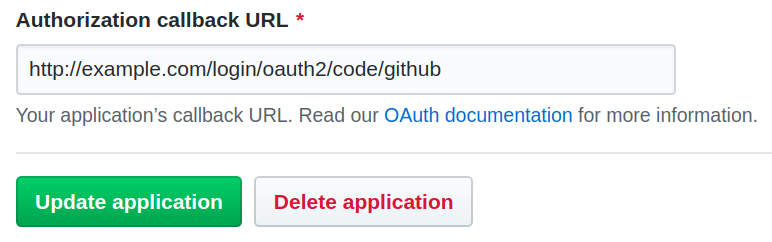
+
+O.k., that's done.
+
+But we haven't released yet and nothing can be found on the reals server, that hosts `example.com`...
+But still, we really would like to test that production-setup to be sure that we configured all bits and pieces correctly!
+
+_In order to tackle this chicken-egg-problem, we will fool our locally running browser to belive, that `example.com` is our local development system._
+
+## Setting Up The Alias for `example.com`
+
+On Linux/Unix this can be simply done by editing **`/etc/hosts`**.
+You just have to add the domain ( `example.com`) at the end of the line that starts with `127.0.0.1`:
+
+```hosts
+127.0.0.1 localhost example.com
+
+```
+
+Locally running programms - like your browser - will now resolve `example.com` as `127.0.0.1`
+
+## Create A Virtual Network With Docker
+
+Next, we have to create a virtual network, where we can put in both containers:
+
+```sh
+docker network create juplo
+
+```
+
+Yes, with Docker it is as simple as that.
+
+Docker networks also come with some extra goodies.
+Especially one, which is extremly handy for our use-case is: They are enabling automatic name-resolving for the connected containers.
+Because of that, we do not need to know the IP-addresses of the participating containers, if we give each connected container a name.
+
+## Docker vs. Kubernetes vs. Docker-Compose
+
+We are using Docker here on purpose.
+Using Kubernetes just to test / experiment on a DevOp-box would be overkill.
+Using Docker-Compose might be an option.
+But we want to keep it as simple as possible for now, hence we stick with Docker.
+Also, we are just experimenting here.
+
+_You might want to switch to Docker-Compose later._
+_Especially, if you plan to set up an environment, that you will frequently reuse for manual tests or such._
+
+## Move The App Into The Virtual Network
+
+To move our app into the virtual network, we have to start it again with the additional parameter **`--network`**.
+We also want to give it a name this time, by using **`--name`**, to be able to contact it by name.
+
+_You have to stop and remove the old container from part 1 of this HowTo-series with `CTRL-C` beforehand, if it is still running - Removing is done automatically, because we specified `--rm`_:
+
+```sh
+docker run \
+ -d \
+ --name app \
+ --rm \
+ --network juplo \
+ juplo/social-logout:0.0.1 \
+ --server.use-forward-headers=true \
+ --spring.security.oauth2.client.registration.github.client-id=YOUR_GITHUB_ID \
+ --spring.security.oauth2.client.registration.github.client-secret=YOUR_GITHUB_SECRET
+
+```
+
+Summary of the changes in comparison to [the statement used in part 1](/howto-redirect-to-spring-security-oauth2-behind-a-gateway-proxy-running-your-app-in-docker/#build-a-docker-image "Skip back to part 1, if you want to compare..."):
+
+- We added **`-d`** to run the container in the background - _See tips below..._
+- We added **`--server.use-forward-headers=true`**, which is needed, because our app is running behind a gateway now - _I will explain this in more detail later_
+- _And:_ Do not forget the **`--network juplo`**,
+ which is necessary to put the app in our virtual network `juplo`, and **`--name app`**, which is necessary to enable DNS-resolving.
+
+- You do not need the port-mapping this time, because we will only talk to our app through the gateway.
+
+ Remember: _We are **hiding** our app behind the gateway!_
+
+## Some quick tips to Docker-newbies
+
+- Since we are starting multiple containers, that shall run in parallel, you have to start each command in a separate terminal, because **`CTRL-C`** will stop (and in our case remove) the container again.
+
+- Alternatively, you can add the parameter **`-d`** (for daemonize) to start the container in the background.
+
+- Then, you can look at its output with **`docker logs -f NAME`** (safely disruptable with `CTRL-C`) and stop (and in our case remove) the container with **`docker stop NAME`**.
+
+- If you wonder, which containers are actually running, **`docker ps`** is your friend.
+
+## Starting the Reverse-Proxy Aka Gateway
+
+Next, we will start NGINX alongside our app and configure it as reverse-proxy:
+
+1. Create a file **`proxy.conf`** with the following content:
+
+ ```sh
+ upstream upstream_a {
+ server app:8080;
+ }
+
+ server {
+ listen 80;
+ server_name example.com;
+
+ proxy_set_header X-Real-IP $remote_addr;
+ proxy_set_header X-Forwarded-For $proxy_add_x_forwarded_for;
+ proxy_set_header X-Forwarded-Proto $scheme;
+ proxy_set_header Host $host;
+ proxy_set_header X-Forwarded-Host $host;
+ proxy_set_header X-Forwarded-Port $server_port;
+
+ location / {
+ proxy_pass http://upstream_a;
+ }
+ }
+
+ ```
+
+ - We define a server, that listens to requests for the host **`example.com`** ( `server_name`) on port **`80`**.
+ - With the `location`-directive we tell this server, that all requests shall be handled by the upstream-server **`upstream_a`**.
+ - This server was defined in the `upstream`-block at the beginning of the configuration-file to be a forward to **`app:8080`**
+ - **`app`** is simply the name of the container, that is running our oauth2-app - Rembember: the name is resolvable via DNS
+ - **`8080`** is the port, our app listens on in that container.
+ - The `proxy_set_header`-directives are needed by Spring-Boot Security, for dealing correctly with the circumstance, that it is running behind a reverse-proxy.
+
+_In part 3, we will survey the `proxy_set_header`-directives in more detail._
+1. Start nginx in the virtual network and connect port `80` to `localhost`:
+
+ ```sh
+ docker run \
+ --name proxy \
+ --rm \
+ --network juplo -p 80:80 \
+ --volume $(pwd)/proxy.conf:/etc/nginx/conf.d/proxy.conf:ro \
+ nginx:1.17
+
+ ```
+
+ _This command has to be executed in the direcotry, where you have created the file `proxy.conf`._
+
+ - I use NGINX here, because I want to demystify the work of a gateway
+_[traefik](https://docs.traefik.io/ "Read more about this great tool") would have been easier to configure in this setup, but it would have disguised, what is going on behind the scene: with NGINX we have to configure all manually, which is more explicitly and hence, more informative_
+ - We can use port `80` on localhost, since the docker-daemon runs with root-privileges and hence, can use this privileged port - _if you do not have another webserver running locally there_.
+ - `$(pwd)` resolves to your current working-directory - This is the most convenient way to produce the absolute path to `proxy.conf`, that is required by `--volume` to work correclty.
+
+If you have reproduced the receipt exacly, your app should be up and running now.
+That is:
+
+ - Because we set the alias `example.com` to point at `localhost` you should now be able to open your app as **`http://example.com` in a locally running browser**
+ - You then should be able to login/logount without errors
+ - If you have configured everything correctly, neither your app nor GitHub should mutter at you during the redirect to GitHub and back to your app
+
+## Whats next... is what can go wrong!
+
+In this simulated production-setup a lot of stuff can go wrong!
+You may face nearly any problem from configuration-mismatches considering the redirect-URIs to nasty and hidden redirect-issues due to forwarded requests.
+
+_Do not mutter at me..._
+_**Remember:** That was the reason, we set up this simulated production-setup in the first place!_
+
+In the next part of this series I will explain some of the most common problems in a production-setup with forwarded requests.
+I will also show, how you can debug the oauth2-flow in your simulated production-setup, to discover and solve these problems
--- /dev/null
+---
+_edit_last: "2"
+_wp_old_date: "2020-03-06"
+author: kai
+categories:
+ - howto
+ - java
+ - oauth2
+ - spring
+ - spring-boot
+classic-editor-remember: classic-editor
+date: "2020-03-06T22:02:44+00:00"
+guid: http://juplo.de/?p=1064
+parent_post_id: null
+post_id: "1064"
+title: 'How To Redirect To Spring Security OAuth2 Behind a Gateway/Proxy - Part 1: Running Your App In Docker'
+url: /howto-redirect-to-spring-security-oauth2-behind-a-gateway-proxy-running-your-app-in-docker/
+
+---
+## Switching From Tutorial-Mode (aka POC) To Production Is Hard
+
+Developing Your first OAuth2-App on [`localhost`](https://www.google.com/search?q=there+no+place+like+%22127.0.0.1%22&tbm=isch&ved=2ahUKEwjF-8XirIHoAhWzIMUKHWcZBJYQ2-cCegQIABAA&oq=there+no+place+like+%22127.0.0.1%22&gs_l=img.3..0i30l3j0i8i30l4.8396.18840..19156...0.0..0.114.2736.30j1......0....1..gws-wiz-img.......35i39j0j0i19j0i30i19j0i8i30i19.joOmqxpmfsw&ei=EeZfXoWvIrPBlAbnspCwCQ&bih=949&biw=1853) with [OAuth2 Boot](https://docs.spring.io/spring-security-oauth2-boot/docs/current/reference/htmlsingle/ "Learn more about OAuth2 Boot") may be easy, ...
+
+...but what about running it in **real life**?
+
+
+
+This is the first post of a series of Mini-Howtos, that gather some help, to get you started, when switching from localhost to production with SSL and a reverse-proxy (aka gateway) in front of your app, that forwards the requests to your app that listens on a different name/IP, port and protocol.
+
+## In This Series We Will...
+
+1. [Start with](#spring-boot-oauth2) the fantastic official [OAuth2-Tutorial](https://spring.io/guides/tutorials/spring-boot-oauth2/ "You definitely should work through this tutorial first!") from the Spring-Boot folks - _love it!_ \- and [run it as a container in docker](#build-a-docker-image)
+1. [Hide that behind a reverse-proxy, like in production - _nginx in our case, but could be any pice of software, that can act as a gateway_](/how-to-redirect-to-spring-security-oauth2-behind-a-gateway-proxy-hiding-the-app-behind-a-reverse-proxy-gateway/ "Jump to part 2 and learn how to set up a simulated production-installation")
+ [Show how to debug the oauth2-flow for the whole crap!\
+Enable SSL for our gateway - because oauth2-providers (like Facebook) are pressing us to do so\
+Show how to do the same with Facebook, instead of GitHub](/how-to-redirect-to-spring-security-oauth2-behind-a-gateway-proxy-hiding-the-app-behind-a-reverse-proxy-gateway/ "Jump to part 2 and learn how to set up a simulated production-installation")
+
+[I will also give some advice for those of you, who are new to Docker - _but just enough to enable you to follow_.\
+\
+This is **Part 1** of this series, that shows how to **package a Spring-Boot-App as Docker-Image and run it as a container**\
+**`tut-spring-boot-oauth2/logout`**](/how-to-redirect-to-spring-security-oauth2-behind-a-gateway-proxy-hiding-the-app-behind-a-reverse-proxy-gateway/ "Jump to part 2 and learn how to set up a simulated production-installation")
+
+[As an example for a simple app, that uses](/how-to-redirect-to-spring-security-oauth2-behind-a-gateway-proxy-hiding-the-app-behind-a-reverse-proxy-gateway/ "Jump to part 2 and learn how to set up a simulated production-installation") [OAuth2](https://tools.ietf.org/html/rfc6749 "Read all about OAuth2 in the RFC 6749") for authentication, we will use the third step of the [Spring-Boot OAuth2-Tutorial](https://spring.io/guides/tutorials/spring-boot-oauth2/ "You definitely should work through this tutorial first!").
+
+You should work through that tutorial up until that step - called **logout** -, if you have not done yet.
+This will guide you through programming and setting up a simple app, that uses the [GitHub-API](https://developer.github.com/v3/ "Learn more about the API provided by GitHub") to authenticate its users.
+
+Especially, it explains, how to **[create and set up a OAuth2-App on GitHub](https://spring.io/guides/tutorials/spring-boot-oauth2/#github-register-application "This links directly to the part of the tutorial, that explains the setup & configuration needed in GitHub Developers")** \- _Do not miss out on that part: You need your own app-ID and -secret and a correctly configured **redirect URI**_.
+
+You should be able to build the app as JAR and start that with the ID/secret of your GitHub-App without changing code or configuration-files as follows:
+
+```docker
+mvn package
+java -jar target/social-logout-0.0.1-SNAPSHOT.jar \
+ --spring.security.oauth2.client.registration.github.client-id=YOUR_GITHUB_APP_ID
+ --spring.security.oauth2.client.registration.github.client-secret=YOUR_GITHUB_APP_SECRET
+
+```
+
+_If the app is running corectly, you should be able to Login/Logout via **`http://localhost:8080/`**_
+
+The folks at Spring-Boot are keeping the guide and this repository up-to-date pretty well.
+At the date of the writing of this article it is up to date with version [2.2.2.RELEASE](https://github.com/spring-guides/tut-spring-boot-oauth2/commit/274b864a2bcab5326979bc2ba370e32180510362 "Check out the exact version of this example-project, that is used in this article, if you want") of Spring-Boot.
+
+_You may as well use any other OAuth2-application here. For example your own POC, if you already have build one that works while running on `localhost`_
+
+## Some Short Notes On OAuth2
+
+I will only explain the protocol in very short words here, so that you can understand what goes wrong in case you stumble across one of the many pitfalls, when setting up oauth2.
+You can [read more about oauth2 elswhere](https://www.oauth.com/oauth2-servers/getting-ready/ "And you most probably should: At least if you are planning to use it in production!")
+
+For authentication, [oauth2](https://tools.ietf.org/html/rfc6749 "OAuth2 is a standardized protocol, that was implemented by several authorities and organizations") redirects the browser of your user to a server of your oauth2-provider.
+This server authenticates the user and redirects the browser back to your server, providing additionally information and ressources, that lets your server know that the user was authenticated successfully and enables it to request more information in the name of the user.
+
+Hence, when configuring oath2 one have to:
+
+1. Provide the URI of the server of your oauth2-provider, the browser will be redirected to for authentication
+1. Tell the server of the oauth2-provider the URL, the browser will be redirected to back after authentication
+1. Also, your app has to provide some identification - a client-ID and -secret - when redirecting to the server of your oauth2-provider, which it has to know
+
+There are a lot more things, which can be configured in oauth2, because the protocol is designed to fit a wide range of use-cases.
+But in our case, it usually boils down to the parameters mentioned above.
+
+Considering our combination of **`spring-security-oauth2`** with **GitHub** this means:
+
+1. The redirect-URIs of well known oauth2-providers like GitHub are build into the library and do not have to be configured explicitly.
+1. The URI, the provider has to redirect the browser back to after authenticating the user, is predefined by the library as well.
+_But as an additional security measure, almost every oauth2-provider requires you, to also specify this redirect-URI in the configuration on the side of the oauth2-provider._
+
+ This is a good and necessary protection against fraud, but at the same time the primary source for missconfiguration:
+ **If the specified URI in the configuration of your app and on the server of your oauth2-provider does not match, ALL WILL FAIL!**
+1. The ID and secret of the client (your GitHub-app) always have to be specified explicitly by hand.
+
+Again, everything can be manually overriden, if needed.
+Configuration-keys starting with **`spring.security.oauth2.client.registration.github`** are choosing GitHub as the oauth2-provider and trigger a bunch of predifined default-configuration.
+If you have set up your own oauth2-provider, you have to configure everything manually.
+
+## Running The App Inside Docker
+
+To faciliate the debugging - and because this most probably will be the way you are deploying your app anyway - we will start by building a docker-image from the app
+
+For this, you do not have to change a single character in the example project - _all adjustments to the configuration will be done, when the image is started as a container_.
+Just change to the subdirectory [`logout`](https://github.com/spring-guides/tut-spring-boot-oauth2/tree/master/logout "This is the subdirectory of the GitHub-Porject, that contains that step of the guide") of the checked out project and create the following `Dockerfile` there:
+
+```docker
+FROM openjdk:8-jre-buster
+
+COPY target/social-logout-0.0.1-SNAPSHOT.jar /opt/app.jar
+EXPOSE 8080
+ENTRYPOINT [ "/usr/local/openjdk-8/bin/java", "-jar", "/opt/app.jar" ]
+CMD []
+
+```
+
+This defines a docker-image, that will run the app.
+
+- The image deduces from **`openjdk:8-jre-buster`**, which is an installation of the latest [OpenJDK-JDK8](https://openjdk.java.net/projects/jdk8/) on a [Debian-Buster](https://www.debian.org/releases/stable/index.de.html "Have a look at the Release notes of that Debian-Version")
+- The app will listen on port **`8080`**
+- By default, a container instanciated from this image will automatically start the Java-app
+- The **`CMD []`** overwrites the default from the parent-image with an empty list - _this enables us to pass command-line parameters to our spring-boot app which we will need to pass in our configuration_
+
+You can build and tag this image with the following commands:
+
+```sh
+mvn clean package
+docker build -t juplo/social-logout:0.0.1 .
+
+```
+
+This will tag your image as **`juplo/social-logout:0.0.1`** \- you obviously will/should use your own tag here, for example: `myfancytag`
+
+_Do not miss out on the flyspeck ( `.`) at the end of the last line!_
+
+You can run this new image with the follwing command - _and you should do that, to test that everything works as expected_:
+
+```sh
+docker run \
+ --rm \
+ -p 8080:8080 \
+ juplo/social-logout:0.0.1 \
+ --spring.security.oauth2.client.registration.github.client-id=YOUR_GITHUB_ID \
+ --spring.security.oauth2.client.registration.github.client-secret=YOUR_GITHUB_SECRET
+
+```
+
+- **`--rm`** removes this test-container automatically, once it is stopped again
+- **`-p 8080:8080`** redirects port `8080` on `localhost` to the app
+
+Everything _after_ the specification of the image (here: `juplo/social-logout:0.0.1`) is handed as a command-line parameter to the started Spring-Boot app - That is, why we needed to declare `CMD []` in our `Dockerfile`
+
+We utilize this here to pass the ID and secret of your GitHub-app into the docker container -- just like when we started the JAR directly
+
+The app should behave exactly the same now lik in the test above, where we started it directly by calling the JAR.
+
+That means, that you should still be able to login into and logout of your app, if you browse to `http://localhost:8080` --
+_At least, if you correctly configured `http://localhost:8080/login/oauth2/code/github` as authorization callback URL in the [settings of your OAuth App](https://github.com/settings/developers "If you have any problems here, you should check your settings: do not proceede, until this works!") on GitHub_.
+
+## Comming Next...
+
+In the [next part](/how-to-redirect-to-spring-security-oauth2-behind-a-gateway-proxy-hiding-the-app-behind-a-reverse-proxy-gateway/ "Jump to the next part and read on...") of this series, we will hide the app behind a proxy and simulate that the setup is running on our real server **`example.com`**.
--- /dev/null
+---
+_edit_last: "2"
+author: kai
+categories:
+ - uncategorized
+classic-editor-remember: classic-editor
+date: "2020-01-11T13:41:39+00:00"
+draft: "true"
+guid: http://juplo.de/?p=1009
+parent_post_id: null
+post_id: "1009"
+title: Implementing Narrow IntegrationTests By Combining MockServer With Testcontainers
+url: /
+
+---
+
--- /dev/null
+---
+_edit_last: "2"
+author: kai
+categories:
+ - demos
+ - explained
+ - java
+ - kafka
+ - spring
+ - spring-boot
+classic-editor-remember: classic-editor
+date: "2021-02-05T17:59:38+00:00"
+guid: http://juplo.de/?p=1201
+parent_post_id: null
+post_id: "1201"
+title: 'Implementing The Outbox-Pattern With Kafka - Part 0: The example'
+url: /implementing-the-outbox-pattern-with-kafka-part-0-the-example/
+
+---
+_This article is part of a Blog-Series_
+
+Based on a [very simple example-project](/implementing-the-outbox-pattern-with-kafka-part-0-the-example/)
+we will implemnt the [Outbox-Pattern](https://microservices.io/patterns/data/transactional-outbox.html) with [Kafka](https://kafka.apache.org/quickstart).
+
+- Part 0: The Example-Project
+- [Part 1: Writing In The Outbox-Table](/implementing-the-outbox-pattern-with-kafka-part-1-the-outbox-table/ "Jump to the explanation what has to be added, to enqueue messages in an outbox for successfully written transactions")
+
+## TL;DR
+
+In this part, a small example-project is introduced, that features a component, which has to inform another component upon every succsessfully completed operation.
+
+## The Plan
+
+In this mini-series I will implement the [Outbox-Pattern](https://microservices.io/patterns/data/transactional-outbox.html)
+as described on Chris Richardson's fabolous website [microservices.io](https://microservices.io/).
+
+The pattern enables you, to send a message as part of a database transaction in a reliable way, effectively turining the writing of the data
+to the database and the sending of the message into an **[atomic operation](https://en.wikipedia.org/wiki/Atomicity_(database_systems))**:
+either both operations are successful or neither.
+
+The pattern is well known and implementing it with [Kafka](https://kafka.apache.org/quickstart) looks like an easy straight forward job at first glance.
+However, there are many obstacles that easily lead to an incomplete or incorrect implementation.
+In this blog-series, we will circumnavigate these obstacles together step by step.
+
+## The Example Project
+
+To illustrate our implementation, we will use a simple example-project.
+It mimics a part of the registration process for an web application:
+a (very!) simplistic service takes registration orders for new users.
+
+- Successfull registration requests will return a 201 (Created), that carries the URI, under which the data of the newly registered user can be accessed in the `Location`-header:
+
+`echo peter | http :8080/users
+ HTTP/1.1 201
+ Content-Length: 0
+ Date: Fri, 05 Feb 2021 14:44:51 GMT
+ Location: http://localhost:8080/users/peter
+ `
+- Requests to registrate an already existing user will result in a 400 (Bad Request):
+
+`echo peter | http :8080/users
+ HTTP/1.1 400
+ Connection: close
+ Content-Length: 0
+ Date: Fri, 05 Feb 2021 14:44:53 GMT
+ `
+- Successfully registrated users can be listed:
+ `http :8080/users
+ HTTP/1.1 200
+ Content-Type: application/json;charset=UTF-8
+ Date: Fri, 05 Feb 2021 14:53:59 GMT
+ Transfer-Encoding: chunked
+ [
+ {
+ "created": "2021-02-05T10:38:32.301",
+ "loggedIn": false,
+ "username": "peter"
+ },
+ ...
+ ]
+ `
+
+## The Messaging Use-Case
+
+As our messaging use-case imagine, that there has to happen several processes after a successful registration of a new user.
+This may be the generation of an invoice, some business analytics or any other lengthy process that is best carried out asynchronously.
+Hence, we have to generate an event, that informs the responsible services about new registrations.
+
+Obviously, these events should only be generated, if the registration is completed successfully.
+The event must not be fired, if the registration is rejected, because a duplicate username.
+
+On the other hand, the publication of the event must happen reliably, because otherwise, the new might not be charged for the services, we offer...
+
+## The Transaction
+
+The users are stored in a database and the creation of a new user happens in a transaction.
+A "brilliant" colleague came up with the idea, to trigger an `IncorrectResultSizeDataAccessException` to detect duplicate usernames:
+
+`User user = new User(username);
+repository.save(user);
+// Triggers an Exception, if more than one entry is found
+repository.findByUsername(username);
+`
+
+The query for the user by its names triggers an `IncorrectResultSizeDataAccessException`, if more than one entry is found.
+The uncaught exception will mark the transaction for rollback, hence, canceling the requested registration.
+The 400-response is then generated by a corresponding `ExceptionHandler`:
+
+`@ExceptionHandler
+public ResponseEntity incorrectResultSizeDataAccessException(
+ IncorrectResultSizeDataAccessException e)
+{
+ LOG.info("User already exists!");
+ return ResponseEntity.badRequest().build();
+}
+`
+
+Please do not code this at home...
+
+But his weired implementation perfectly illustrates the requirements for our messaging use-case:
+The user is written into the database.
+But the registration is not successfully completed until the transaction is commited.
+If the transaction is rolled back, no message must be send, because no new user was registered.
+
+## Decoupling with Springs EventPublisher
+
+In the example implementation I am using an `EventPublisher` to decouple the business logic from the implementation of the messaging.
+The controller publishes an event, when a new user is registered:
+
+`publisher.publishEvent(new UserEvent(this, usernam));
+`
+
+A listener annotated with `@TransactionalEventListener` receives the events and handles the messaging:
+
+`@TransactionalEventListener
+public void onUserEvent(UserEvent event)
+{
+ // Sending the message happens here...
+}
+`
+
+In non-critical use-cases, it might be sufficient to actually send the message to Kafka right here.
+Spring ensures, that the message of the listener is only called, if the transaction completes successfully.
+But in the case of a failure this naive implementation can loose messages.
+If the application crashes, after the transaction has completed, but before the message could be send, the event would be lost.
+
+In the following blog posts, we will step by step implement a solution based on the Outbox-Pattern, that can guarantee Exactly-Once semantics for the send messages.
+
+## May The Source Be With You!
+
+The complete source code of the example-project can be cloned here:
+
+- `git clone /git/demos/spring/data-jdbc`
+- `git clone https://github.com/juplo/demos-spring-data-jdbc.git`
+
+It includes a [Setup for Docker Compose](https://github.com/juplo/demos-spring-data-jdbc/blob/master/docker-compose.yml), that can be run without compiling
+the project. And a runnable [README.sh](https://github.com/juplo/demos-spring-data-jdbc/blob/master/README.sh), that compiles and run the application and illustrates the example.
--- /dev/null
+---
+_edit_last: "2"
+author: kai
+categories:
+ - demos
+ - explained
+ - java
+ - kafka
+ - spring
+ - spring-boot
+classic-editor-remember: classic-editor
+date: "2021-02-14T18:10:38+00:00"
+guid: http://juplo.de/?p=1209
+parent_post_id: null
+post_id: "1209"
+title: 'Implementing The Outbox-Pattern With Kafka - Part 1: Writing In The Outbox-Table'
+linkTitle: 'Part 1: Writing In The Outbox-Table'
+url: /implementing-the-outbox-pattern-with-kafka-part-1-the-outbox-table/
+
+---
+_This article is part of a Blog-Series_
+
+Based on a [very simple example-project](/implementing-the-outbox-pattern-with-kafka-part-0-the-example/)
+we will implemnt the [Outbox-Pattern](https://microservices.io/patterns/data/transactional-outbox.html) with [Kafka](https://kafka.apache.org/quickstart).
+
+- [Part 0: The Example-Project](/implementing-the-outbox-pattern-with-kafka-part-0-the-example/ "Jump to the explanation of the example project")
+- Part 1: Writing In The Outbox-Table
+
+## TL;DR
+
+In this part, we will implement the outbox (aka: the queueing of the messages in a database-table).
+
+## The Outbox Table
+
+The outbox is represented by an additionall table in the database.
+This table acts as a queue for messages, that should be send as part of the transaction.
+Instead of sending the messages, the application stores them in the outbox-table.
+The actual sending of the messages occures outside of the transaction.
+
+Because the messages are read from the table outside of the transaction context, only entries related to sucessfully commited transactions are visible.
+Hence, the sending of the message effectively becomes a part of the transaction.
+It happens only, if the transaction was successfully completed.
+Messages associated to an aborted transaction will not be send.
+
+## The Implementation
+
+No special measures need to be taken when writing the messages to the table.
+The only thing to be sure of is that the writing takes part in the transaction.
+
+In our implementation, we simply store the **serialized message**, together with a **key**, that is needed for the partitioning of your data in Kafka, in case the order of the messages is important.
+We also store a timestamp, that we plan to record as [Event Time](https://kafka.apache.org/0110/documentation/streams/core-concepts) later.
+
+One more thing that is worth noting is that we utilize the database to create an unique record-ID.
+The generated **unique and monotonically increasing id** is required later, for the implementation of **Exactly-Once** semantics.
+
+[The SQL for the table](https://github.com/juplo/demos-spring-data-jdbc/blob/part-1/src/main/resources/db/migration/h2/V2__Table_outbox.sql) looks like this:
+
+ `CREATE TABLE outbox (
+ id BIGINT PRIMARY KEY AUTO_INCREMENT,
+ key VARCHAR(127),
+ value varchar(1023),
+ issued timestamp
+);
+`
+
+## Decoupling The Business Logic
+
+In order to decouple the business logic from the implementation of the messaging mechanism, I have implemented a thin layer, that uses [Spring Application Events](https://docs.spring.io/spring-integration/docs/current/reference/html/event.html) to publish the messages.
+
+Messages are send as a [subclass of `ApplicationEvent`](https://github.com/juplo/demos-spring-data-jdbc/blob/part-1/src/main/java/de/juplo/kafka/outbox/OutboxEvent.java):
+
+`publisher.publishEvent(
+ new UserEvent(
+ this,
+ username,
+ CREATED,
+ ZonedDateTime.now(clock)));
+`
+
+The event takes a key ( `username`) and an object as value (an instance of an enum in our case).
+An `EventListener` receives the events and writes them in the outbox table:
+
+`@TransactionalEventListener(phase = TransactionPhase.BEFORE_COMMIT)
+public void onUserEvent(OutboxEvent event)
+{
+ try
+ {
+ repository.save(
+ event.getKey(),
+ mapper.writeValueAsString(event.getValue()),
+ event.getTime());
+ }
+ catch (JsonProcessingException e)
+ {
+ throw new RuntimeException(e);
+ }
+}
+`
+
+The `@TransactionalEventListener` is not really needed here.
+A normal `EventListener` would also suffice, because spring immediately executes all registered normal event listeners.
+Therefore, the registered listeners would run in the same thread, that published the event, and participate in the existing transaction.
+
+But if a `@TransactionalEventListener` is used, like in our example project, it is crucial, that the phase is switched to `BEFORE_COMMIT` when the Outbox Pattern is introduced.
+This is, because the listener has to be executed in the same transaction context in which the event was published.
+Otherwise, the writing of the messages would not be coupled to the success or abortion of the transaction, thus violating the idea of the pattern.
+
+## May The Source Be With You!
+
+Since this part of the implementation only stores the messages in a normal database, it can be published as an independent component that does not require any dependencies on Kafka.
+To highlight this, the implementation of this step does not use Kafka at all.
+In a later step, we will separate the layer, that decouples the business code from our messaging logic in a separate package.
+
+The complete source code of the example-project can be cloned here:
+
+- `git clone -b part-1 /git/demos/spring/data-jdbc`
+- `git clone -b part-1 https://github.com/juplo/demos-spring-data-jdbc.git`
+
+This version only includes the logic, that is needed to fill the outbox-tabel.
+Reading the messages from this table and sending them through Kafka will be the topic of the next part of this blog-series.
+
+The sources include a [Setup for Docker Compose](https://github.com/juplo/demos-spring-data-jdbc/blob/master/docker-compose.yml), that can be run without compiling
+the project. And a runnable [README.sh](https://github.com/juplo/demos-spring-data-jdbc/blob/master/README.sh), that compiles and run the application and illustrates the example.
--- /dev/null
+---
+_edit_last: "2"
+author: kai
+categories:
+ - uncategorized
+classic-editor-remember: classic-editor
+date: "2021-05-16T14:56:45+00:00"
+draft: "true"
+guid: http://juplo.de/?p=1257
+parent_post_id: null
+post_id: "1257"
+title: 'Implementing The Outbox-Pattern With Kafka - Part 2: Sending Messages From The Outbox'
+url: /
+
+---
+_This article is part of a Blog-Series_
+
+Based on a [very simple example-project](/implementing-the-outbox-pattern-with-kafka-part-0-the-example/)
+we will implemnt the [Outbox-Pattern](https://microservices.io/patterns/data/transactional-outbox.html) with [Kafka](https://kafka.apache.org/quickstart).
+
+- [Part 0: The Example-Project](/implementing-the-outbox-pattern-with-kafka-part-0-the-example/ "Jump to the explanation of the example project")
+- [Part 1: Writing In The Outbox-Table](/implementing-the-outbox-pattern-with-kafka-part-1-the-outbox-table/ "Jump to the explanation what has to be added, to enqueue messages in an outbox for successfully written transactions")
+- Part 2: Sending Messages From The Outbox
+
+## TL;DR
+
+In this part, we will add a first simple version of the logic, that is needed to poll the outbox-table and send the found entries as messages into a Apache Kafka topic.
--- /dev/null
+---
+_edit_last: "2"
+author: kai
+categories:
+ - uncategorized
+classic-editor-remember: classic-editor
+date: "2020-01-11T13:45:04+00:00"
+draft: "true"
+guid: http://juplo.de/?p=1011
+parent_post_id: null
+post_id: "1011"
+title: In Need Of A MockWebClient? Mock WebClient With A Short-Circuit-ExchangeFunction
+url: /
+
+---
+
--- /dev/null
+---
+_edit_last: "2"
+author: kai
+categories:
+ - uncategorized
+date: "2014-02-17T01:25:20+00:00"
+draft: "true"
+guid: http://juplo.de/?p=203
+parent_post_id: null
+post_id: "203"
+title: Install Google Play on Hama...
+url: /
+
+---
+[Google Aps](http://goo-inside.me/gapps/gapps-ics-20120317-signed.zip "Download Google Apps for Android 4.0.x (Ice Cream Sandwich)")
+
+You need the Google Apps for Android 4.0.x (called Ice Cream Sandwich internally). These accord to Cyanogenmod 9 and download-links can be found on the [Cyanogenmod's "Google Apps"-page](http://wiki.cyanogenmod.org/w/Google_Apps "Google Apps download-page from cyanogenmod").
--- /dev/null
+---
+_edit_last: "2"
+author: kai
+categories:
+ - bootstrap
+ - css
+ - grunt
+ - java
+ - less
+ - maven
+ - nodejs
+ - spring
+ - thymeleaf
+date: "2015-08-26T11:57:43+00:00"
+guid: http://juplo.de/?p=509
+parent_post_id: null
+post_id: "509"
+title: Integrating A Maven-Backend- With A Nodjs/Grunt-Fronted-Project
+url: /integrating-a-maven-backend-with-a-nodjsgrunt-fronted-project/
+
+---
+## Frontend-Development With Nodjs and Grunt
+
+As I already wrote in [a previous article](/serve-static-html-with-nodjs-and-grunt/ "Serving Static HTML With Nodjs And Grunt For Template-Development"), frontend-development is mostly done with [Nodjs](https://nodejs.org/ "Read more about nodjs") and [Grunt](http://gruntjs.com/ "Read more about grunt") nowadays.
+As I am planing to base the frontend of my next Spring-Application on [Bootstrap](http://getbootstrap.com/ "Read more about Bootstrap"), I was looking for a way to integrate my backend, which is build using [Spring](http://projects.spring.io/spring-framework/ "Read more about the Springframework") and [Thymeleaf](http://www.thymeleaf.org/ "Read more about Thymeleaf") and managed with Maven, with a frontend, which is based on Bootstrap and, hence, build with Nodjs and Grunt.
+
+## Integrate The Frontend-Build Into The Maven-Build-Process
+
+As I found out, one can integrate a npm-based build into a maven project with the help of the [frontend-maven-plugin](https://github.com/eirslett/frontend-maven-plugin "Read more about the frontend-maven-plugin").
+This plugin automates the managment of Nodjs and its libraries and ensures that the version of Node and NPM being run is the same in every build environment.
+As a backend-developer, you do not have to install any of the frontend-tools manualy.
+Because of that, this plugin is ideal to integrate a separately developed frontend into a maven-build, without bothering the backend-developers with details of the frontend-build-process.
+
+## Seperate The Frontend-Project From The Maven-Based Backend-Project
+
+The drawback with this approach is, that the backend- and the frontend-project are tightly coupled.
+You can configure the frontend-maven-plugin to use a separate subdirectory as working-directory (for example `src/main/frontend`) and utilize this to separate the frontend-project in its own repository (for example by using [the submodule-functions of git](https://git-scm.com/book/en/v2/Git-Tools-Submodules "Read more about how to use git-submodules")).
+But the grunt-tasks, that you call in the frontend-project through the frontend-maven-plugin, must be defined in that project.
+
+Since I am planing to integrate a ‐ slightly modified ‐ version of Bootstrap as frontend into my project, that would mean that I have to mess around with the configuration of the Bootstrap-project a lot.
+But that is not a very good idea, because it hinders upgrades of the Bootstrap-base, because merge-conflicts became more and more likely.
+
+So, I decided to program a special `Gruntfile.js`, that resides in the base-folder of my Maven-project and lets me redefine and call tasks of a separated frontend-project in a subdirectory.
+
+## Redefine And Call Tasks Of An Included Gruntfile From A Sub-Project
+
+As it turned out, there are several npm-plugins for managing and building sub-projects (like [grunt-subgrunt](https://www.npmjs.com/package/grunt-subgrunt "Read more about the npm-plugin grunt-subgrunt") or [grunt-recurse](https://www.npmjs.com/package/grunt-recurse "Read more about the npm-plugin grunt-recurse")) or including existing Gruntfiles from sub-projects (like [grunt-load-gruntfile](https://www.npmjs.com/package/grunt-load-gruntfile "Read more about the npm-plugin grunt-load-gruntfile")), but none of them lets you redefine tasks of the subproject before calling them.
+
+I programmed a simple [Gruntfile](/gitweb/?p=examples/maven-grunt-integration;a=blob_plain;f=Gruntfile.js;hb=2.0.0 "Download the Gruntfile from juplo.de/gitweb"), that lets you do exactly this:
+
+```javascript
+
+module.exports = function(grunt) {
+
+ grunt.loadNpmTasks('grunt-newer');
+
+ grunt.registerTask('frontend','Build HTML & CSS for Frontend', function() {
+ var
+ done = this.async(),
+ path = './src/main/frontend';
+
+ grunt.util.spawn({
+ cmd: 'npm',
+ args: ['install'],
+ opts: { cwd: path, stdio: 'inherit' }
+ }, function (err, result, code) {
+ if (err || code > 0) {
+ grunt.fail.warn('Failed installing node modules in "' + path + '".');
+ }
+ else {
+ grunt.log.ok('Installed node modules in "' + path + '".');
+ }
+
+ process.chdir(path);
+ require(path + '/Gruntfile.js')(grunt);
+ grunt.task.run('newer:copy');
+ grunt.task.run('newer:less');
+ grunt.task.run('newer:svgstore');
+
+ done();
+ });
+ });
+
+ grunt.registerTask('default', [ 'frontend' ]);
+
+};
+
+```
+
+This Gruntfile loads the npm-taks [grunt-newer](https://www.npmjs.com/package/grunt-newer "Read more about the npm-plugin grunt-newer").
+Then, it registers a grunt-task called `frontend`, that loads the dependencies of the specified sub-project, read in its Gruntfile and runs redefined versions of the tasks `copy`, `less` and `svgstore`, which are defined in the sub-project.
+The sub-project itself does not register grunt-newer itself.
+This is done in this parent-project, to demonstrate how to register additional grunt-plugins and redefine tasks of the sub-project without touching it at all.
+
+The separated frontend-project can be used by the frontend-team to develop the temlates, needed by the backend-developers, without any knowledge of the maven-project.
+The frontend-project is then included into the backend, which is managed by maven, and can be used by the backend-developers without the need to know anything about the techniques that were used to develop the templates.
+
+The whole example can be browsed at [juplo.de/gitweb](/gitweb/?p=examples/maven-grunt-integration;a=tree;h=2.0.0 "Browse the example on juplo.de/gitweb") or cloned with:
+
+```bash
+
+git clone /git/examples/maven-grunt-integration
+
+```
+
+Be sure to checkout the tag `2.0.0` for the corresponding version after the cloning, in case i add more commits to demonstrate other stuff.
+Also, you have to init and clone the submodule after checkout:
+
+```bash
+
+git submodule init
+git submodule update
+
+```
+
+If you run `mvn jetty:run`, you will notice, that the frontend-maven-plugin will automatically download Nodejs into a the folder `node` of the parent-project.
+Afterwards, the dependencies of the parent-project are downloaded in the folder `node_modules` of the parent-project and the dpendencies of the sub-project are downloaded in the folder `src/main/frontend/node_modules` and the sub-project is build automatically in the folder `src/main/frontend/dist`, which is included into the directory-tree that is served by the [jetty-maven-plugin](http://www.eclipse.org/jetty/documentation/current/jetty-maven-plugin.html "Read more about the jetty-maven-plugin").
+
+The sub-project is fully usable standalone to drive the development of the frontend separately.
+You can [read more about it in this previous article](/serve-static-html-with-nodjs-and-grunt/ "Read more about the example development-environment").
+
+## Conclusion
+
+In this article, I showed how to integrate a separately developed frontend-project into a backend-project managed by Maven.
+This enables you to separate the development of the layout and the logic of a classic [ROCA](http://roca-style.org/ "Read more about the ROCA principles")-project nearly totally.
--- /dev/null
+---
+_edit_last: "3"
+author: kai
+categories:
+ - java
+ - jmockit
+ - junit
+ - maven
+date: "2016-10-09T10:29:40+00:00"
+guid: http://juplo.de/?p=535
+parent_post_id: null
+post_id: "535"
+title: 'java.lang.Exception: Method XZY should have no parameters'
+url: /java-lang-exception-method-xzy-should-have-no-parameters/
+
+---
+Did you ever stumbled across the following error during developing test-cases with [JUnit](http://junit.org/ "Visit the homepage of the JUnit-Project") and [JMockit](http://jmockit.org/ "Visit the homepage of the JMockit-Project")?
+
+```bash
+java.lang.Exception: Method XZY should have no parameters
+
+```
+
+Here is the quick and easy fix for it:
+**Fix the ordering of the dependencies in your pom.xml.**
+The dependency for JMockit has to come first!
--- /dev/null
+---
+_edit_last: "2"
+author: kai
+categories:
+ - uncategorized
+date: "2012-11-25T18:11:52+00:00"
+draft: "true"
+guid: http://juplo.de/?p=11
+parent_post_id: null
+post_id: "11"
+title: Lange Ladezeiten durch OpenX-Werbebanner verhindern
+url: /
+
+---
+Wer auf seiner Seite Banner mit Hilfe des freien Ad-Servers [OpenX](http://www.openx.com/community "Community-Seite des Ad-Servers OpenX besuchen...") Werbe-Banner einbindet, der kennt wahrscheinlich das Problem: **Die Seite lädt ewig lange und ist (insbesondere wenn JavaScript eingesetzt wird) erst dann wirklich bedienbar, wenn alle Werbebanner geladen sind.**
+
+## Single-Page-Call: Schmerzlinderung - aber keine Heilung
+
+Das Problem ist nicht unbekannt. Es gibt unzählige Anleitungen, wie man die Banner-Auslieferung mit Hilfe der [Single-Page-Call-Technik](http://www.openx.com/docs/tutorials/single+page+call "Single-Page-Call-Tutorial lesen") beschleunigen kann. Single-Page-Call fast die Anfragen, die für die einzelnen Banner an den Ad-Server gestellt werden müssen, in eine Anfrage zusammen und beschleunigt dadurch die Banner-Auslieferung, da unnötige HTTP-Anfragen vermieden werden. Doch das eigentliche Problem wird dadurch nur verringert - nicht behoben:
+
+## Das Laden der JavaScript-Skripte blockiert die Seite
+
+Der Browser muss ein `<scrpt>`-Tag in dem Moment laden und ausführen, in dem er es in dem HTML-Quellcode der Seite vorfindet. Denn es könnte z.B. einen `document.write()`-Aufruf enthalten, der die Seite an Ort und Stelle modifiziert. Verschärft wird dieser Umstand weiter dadruch, dass [der Browser keine anderen Ressourcen laden darf, während er das Skript herunterlädt](http://developer.yahoo.com/performance/rules.html#js_bottom "Yahoo-Tipps/Erklärungen zu JavaScript anzeigen").
+
+Dieser Umstand fällt besonders dann schnell unangenehm auf, wenn OpenX als "Banner" wiederum einen JavaScript-Code eines anderen Ad-Servers (z.B. Google-Ads) ausliefert, so dass sich die Wartezeiten, bis der Browser mit dem Rendern der Seite fortschreiten kann, aufaddieren. _Wenn nur einer der Ad-Server in so einer Kette gerade überlastet ist und langsam reagiert, muss der Browser warten!_
+
+## Die Lösung: JavaScript an das Ende der Seite...
+
+Die Lösung dieses Problems ist altbekannt. Die JavaScript-Tag's werden an das Ende der HTML-Seite verschoben. Möglichst direkt vor das schließende `</body>`-Tag. Ein einfacher Ansatz hierfür wäre, [einfach die Banner möglichst nah an das Seitenende zu schieben und dann via CSS zu platzieren](http://www.openxtips.com/2009/07/tip-20-protect-your-site-from-openx-hangs/ "Blog-Eintrag, der erklärt wie man die Banner-Codes möglichst weit an das Seitenende verschiebt"). Aber dieser Ansatz funktioniert nur mit Bannern vom Typ Superbanner oder Skyscraper. Sobald der Banner im Inhalt stehen soll, wird es schwer (bis unmöglich) dafür via CSS die richtige Menge Platz zu reservieren.
+
+Außerdem wäre es noch schöner, wenn man das Laden der Banner erst dann anstoßen könnte, wenn die Seite vollständig geladen ist (und/oder die eigenen Skripte angestoßen/abgearbeitet wurden), also z.B. über das JavaScript-Event `window.onload`, so daß die Seite bereits voll einsatzfähig ist, bevor die Banner fertig geladen sind.
+
+Das klingt alles einfach und schön - doch wie so oft gilt leider:
+
+## Der Teufel steckt im Detail
+
+```
+/** Optimierte Methoden für die Werbe-Einblendung via OpenX */
+
+/** see: http://enterprisejquery.com/2010/10/how-good-c-habits-can-encourage-bad-javascript-habits-part-1/ */
+
+(function( coolibri, $, undefined ) {
+
+ var
+
+ /** Muss angepasst werden, wenn die Zonen in OpenX geändert/erweitert werden! */
+ zones = {
+ 'oa-superbanner' : 15, // Superbanner
+ 'oa-skyscraper' : 16, // Skyscraper
+ 'oa-rectangle' : 14, // Medium Rectangle
+ 'oa-content' : 13, // content quer
+ 'oa-marginal' : 18, // Restplatz marginalspalte
+ 'oa-article' : 17, // Restplatz unter Artikel
+ 'oa-prime' : 19, // Prime Place
+ 'oa-gallery': 23 // Medium Rectangle Gallery
+ },
+
+ domain = document.location.protocol == 'https:' ? 'https://openx.coolibri.de:8443':'http://openx.coolibri.de',
+
+ id,
+ node,
+
+ count = 0,
+ slots = {},
+ queue = [],
+ ads = [],
+ output = [];
+
+ coolibri.show_ads = function() {
+
+ var name, src = domain;
+
+ /**
+ * Ohne diese Option, hängt jQuery an jede URL, die es per $.getScript()
+ * geholt wird einen Timestamp an. Dies kann mit bei Skripten von Dritt-
+ * Anbietern zu Problemen führen, wenn diese davon ausgehen, dass die
+ * Aufgerufene URL nicht verändert wird...
+ */
+ $.ajaxSetup({ cache: true });
+
+ src += "/www/delivery/spc.php?zones=";
+
+ /** Nur die Banner holen, die in dieser Seite wirklich benötigt werden */
+ for(name in zones) {
+ $('.oa').each(function() {
+ var
+ node = $(this),
+ id;
+ if (node.hasClass(name)) {
+ id = 'oa_' + ++count;
+ slots[id] = node;
+ queue.push(id);
+ src += escape(id + '=' + zones[name] + "|");
+ }
+ });
+ }
+
+ src += "&nz=1&source=" + escape(OA_source);
+ src += "&r=" + Math.floor(Math.random()*99999999);
+ src += "&block=1&charset=UTF-8";
+
+ if (window.location) src += "&loc=" + escape(window.location);
+ if (document.referrer) src += "&referer=" + escape(document.referrer);
+
+ $.getScript(src, init_ads);
+
+ src = domain + '/www/delivery/fl.js';
+ $.getScript(src);
+
+ }
+
+ function init_ads() {
+
+ var i, id;
+ for (i=0; i 0) {
+
+ var result, src, inline, i;
+
+ id = ads.shift();
+ node = slots[id];
+
+ node.slideDown();
+
+ // node.append(id + ": " + node.attr('class'));
+
+ /**
+ * Falls zwischenzeitlich Ausgaben über document.write() gemacht wurden,
+ * sollen diese als erstes (also bevor die restlichen von dem OpenX-Server
+ * gelieferten Statements verarbeitet werden) ausgegeben werden.
+ */
+ insert_output();
+
+ while ((result = /<script/i.exec(OA_output[id])) != null) {
+ node.append(OA_output[id].slice(0,result.index));
+ /** OA_output[id] auf den Text ab "]*)>([\s\S]*?)/i.exec(OA_output[id]);
+ if (result == null) {
+ /** Ungültige Syntax in der OpenX-Antwort. Rest der Antwort ignorieren! */
+ // alert(OA_output[id]);
+ OA_output[id] = "";
+ }
+ else {
+ /** Iinline-Code merken, falls vorhanden */
+ src = result[1]
+ inline = result[2];
+ /** OA_output[id] auf den Text nach dem schließenden -Tag kürzen */
+ OA_output[id] = OA_output[id].slice(result[0].length,OA_output[id].length);
+ result = /src\s*=\s*['"]([^'"]*)['"]/i.exec(src);
+ if (result == null) {
+ /** script-Tag mit Inline-Anweisungen: Inline-Anweisungen ausführen! */
+ result = /^\s* 0)
+ /** Der Banner-Code wurde noch nicht vollständig ausgegeben! */
+ ads.unshift(id);
+ /** So - jetzt erst mal das Skript laden und verarbeiten... */
+ $.getScript(result[1], render_ads); // << jQuery.getScript() erzeugt onload-Handler für _alle_ Browser ;)
+ return;
+ }
+ }
+ }
+
+ node.append(OA_output[id]);
+ OA_output[id] = "";
+ }
+
+ /** Alle Einträge aus OA_output wurden gerendert */
+
+ id = undefined;
+ node = undefined;
+
+ }
+
+ /** Mit dieser Funktion werden document.write und document.writeln überschrieben */
+ function document_write() {
+
+ if (id == undefined)
+ return;
+
+ for (var i=0; i 0) {
+ output.push(OA_output[id]);
+ OA_output[id] = "";
+ for (i=0; i<output.length; i++)
+ OA_output[id] += output[i];
+ output = [];
+ }
+
+ }
+
+} ( window.coolibri = window.coolibri || {}, jQuery ));
+
+/** Weil sich der IE sonst ggf. über die nicht definierte Variable lautstark aufregt, wenn irgendetwas schief geht... */
+var OA_output = {};
+
+```
+
+## Weiterlesen...
+
+- [How can we keep Openx from blocking page load](http://stackoverflow.com/questions/3770570/how-can-we-keep-openx-from-blocking-page-load)
+- [Protect your site from OpenX-hangs](http://www.openxtips.com/2009/07/tip-20-protect-your-site-from-openx-hangs/)
+- [Loading scripts without blocking](http://www.stevesouders.com/blog/2009/04/27/loading-scripts-without-blocking/)
--- /dev/null
+---
+_edit_last: "2"
+_wp_old_slug: logout-from-wrong-account-with-maven-appengine-plugin
+author: kai
+categories:
+ - appengine
+ - java
+ - maven
+ - oauth2
+date: "2016-01-12T12:50:07+00:00"
+guid: http://juplo.de/?p=97
+parent_post_id: null
+post_id: "97"
+title: Log out from wrong Account with maven-appengine-plugin
+url: /log-out-from-wrong-account-with-maven-appengine-plugin/
+
+---
+Do you work with the [maven-appengine-plugin](https://developers.google.com/appengine/docs/java/tools/maven "Open documentation") and several google-accounts? If you do, or if you ever were logged in to the wrong google-account while executing `mvn appengine:update`, like me yesterday, you surely wondering, **how to logout from maven-appengine-plugin**.
+
+maven-appengine-plugin somehow miracolously stores your credentials for you, when you attemp to upload an app for the first time. This comes in very handy, if you work with just one google-account. But it might get a "pain-in-the-ass", if you work with several accounts. Because, if you once logged in into an account, there is no way (I mean: no goal of the maven-appengine-plugin) to log out, in order to change the account!
+
+## The solution: clear the credentials, that the maven-appengine-plugin stored on your behalf
+
+Only after hard googling, i found a solution to this problem in a [blog-post](http://www.radomirml.com/blog/2009/09/20/delete-cached-google-app-engine-credentials/ "Open the blog-post"): maven-appengine-plugin stores its oauth2-credentials in the file `.appcfg_oauth2_tokens_java` in your home directory (on Linux - sorry Windows-folks, you have to figure out yourself, where the plugin stores the credentials on Windows).
+
+**Just delete the file `.appcfg_oauth2_tokens_java` and your logged out!** The next time you call `mvn appengine:upload` you will be asked again to accept the request and, hence, can switch accounts. _If you are not using oauth2, just look for `.appcfg*`-files in your home directory. I am sure, you will find another file with stored credentials, that you can delet to logout, like Radomir, who [deleted `.appcfg_cookiesy` to log out](http://www.radomirml.com/blog/2009/09/20/delete-cached-google-app-engine-credentials/ "Open Radomir's Blog-Post to read more...")_.
--- /dev/null
+---
+_edit_last: "2"
+author: kai
+categories:
+ - java
+ - spring
+date: "2015-02-09T10:52:15+00:00"
+guid: http://juplo.de/?p=326
+parent_post_id: null
+post_id: "326"
+title: Logging Request- and Response-Data From Requets Made Through RestTemplate
+url: /logging-request-and-response-data-from-requets-made-through-resttemplate/
+
+---
+Logging request- and response-data for requests made through Spring's `RestTemplate` is quite easy, if you know, what to do.
+But it is rather hard, if you have no clue where to start.
+Hence, I want to give you some hints in this post.
+
+In its default configuration, the `RestTemplate` uses the [HttpClient](https://hc.apache.org/httpcomponents-client-4.4.x/index.html "Visit the project homepage of httpcomponents-client") of the [Apache HttpComponents](https://hc.apache.org/index.html "Visit the project homepage of apache-httpcomonents") package.
+You can verify this and the used version with the mvn-command
+
+```bash
+
+mvn dependency:tree
+
+```
+
+To enable for example logging of the HTTP-Headers send and received, you then simply can add the following to your logging configuration:
+
+```xml
+
+<logger name="org.apache.http.headers">
+ <level value="debug"/>
+</logger>
+
+```
+
+## Possible Pitfalls
+
+If that does not work, you should check, which version of the Apache HttpComponents your project actually is using, because the name of the logger has changed between version `3.x` and `4.x`.
+Another common cause of problems is, that the Apache HttpComponets uses [Apache Commons Logging](http://commons.apache.org/proper/commons-logging/ "Visit the project homepage of commons-logging").
+If the jar for that library is missing, or if your project uses another logging library, the messages might get lost because of that.
--- /dev/null
+---
+_edit_last: "2"
+_oembed_db18ba6b34f5522f0ecb8abddbb529da: '{{unknown}}'
+_oembed_e1a31eec970f0e7dfe4452df3c5b94aa: '{{unknown}}'
+author: kai
+categories:
+ - howto
+date: "2016-06-07T09:40:39+00:00"
+draft: "true"
+guid: http://juplo.de/?p=550
+parent_post_id: null
+post_id: "550"
+tags:
+ - createmedia.nrw
+ - facebook
+ - graph-api
+ - jackson
+ - java
+title: Parsing JSON From Facebooks Graph-API Using Jackson 2.x And Java's New Time-API
+url: /
+
+---
+https://github.com/FasterXML/jackson-datatype-jsr310/issues/17
+
+Auch noch:
+https://en.wikibooks.org/wiki/Java\_Persistence/Identity\_and\_Sequencing#Strange\_behavior.2C\_unique\_constraint\_violation.
--- /dev/null
+---
+_edit_last: "2"
+author: kai
+categories:
+ - explained
+date: "2016-04-08T20:38:35+00:00"
+guid: http://juplo.de/?p=735
+parent_post_id: null
+post_id: "735"
+tags:
+ - createmedia.nrw
+ - debian
+ - java
+ - spring
+ - spring-boot
+title: Problems Deploying A Spring-Boot-App As WAR
+url: /problems-deploying-a-spring-boot-app-as-war/
+
+---
+## Spring-Boot-App Is Not Started, When Deployed As WAR
+
+Recently, I had a lot of trouble, deploying my spring-boot-app as war under Tomcat 8 on Debian Jessie.
+The WAR was found and deployed by tomcat, but it was never started.
+Browsing the URL of the app resulted in a 404.
+And instead of [the fancy Spring-Boot ASCII-art banner](https://docs.spring.io/spring-boot/docs/current/reference/html/boot-features-spring-application.html "See, what Spring-Boot usually shows, when starting..."), the only matching entry that showed up in my log-file was:
+
+```Bash
+INFO [localhost-startStop-1] org.apache.catalina.core.ApplicationContext.log Spring WebApplicationInitializers detected on classpath: [org.springframework.boot.autoconfigure.jersey.JerseyAutoConfiguration$JerseyWebApplicationInitializer@1fe086c]
+
+```
+
+[A blog-post from Stefan Isle](http://stefan-isele.logdown.com/posts/201646 "A short overview of Springs startup-mechanism and what can go wrong") lead me to the solution, what was going wrong.
+In my case, there was no wrong version of Spring on the classpath.
+But my `WebApplicationInitializer` was not found, because I had it compiled with a version of Java, that was not available on my production system.
+
+## `WebApplicationInitializer` Not Found Because Of Wrong Java Version
+
+On my development box, I had compiled and tested the WAR with Java 8.
+But on my production system, running Debian 8 (Jessie), only Java 7 was available.
+And because of that, my `WebApplicationInitializer`
+
+After installing Java 8 from [debian-backports](http://backports.debian.org/Instructions/ "Learn more on debian-backports") on my production system, like described in this [nice debian-upgrade note](https://github.com/OpenTreeOfLife/germinator/wiki/Debian-upgrade-notes:-jessie-and-openjdk-8 "Read, how to install Java 8 from debian-backports"), the `WebApplicationInitializer` of my App was found and everything worked like a charme, again.
--- /dev/null
+---
+_edit_last: "2"
+author: kai
+categories:
+ - explained
+date: "2016-03-08T00:29:46+00:00"
+guid: http://juplo.de/?p=711
+parent_post_id: null
+post_id: "711"
+tags:
+ - createmedia.nrw
+ - java
+ - maven
+title: 'Release Of A Maven-Plugin to Maven Central Fails With "error: unknown tag: goal"'
+url: /release-of-a-maven-plugin-to-maven-central-fails-with-error-unknown-tag-goal/
+
+---
+## error: unknown tag: goal
+
+Releasing a maven-plugin via Maven Central does not work, if you have switched to Java 8.
+This happens, because hidden in the `oss-parent`, that you have to configure as `parent` of your project to be able to release it via Sonatype, the `maven-javadoc-plugin` is configured for you.
+And the version of `javadoc`, that is shipped with Java 8, by default checks the syntax of the comments and fails, if anything unexpected is seen.
+
+**Unfortunatly, the special javadoc-tag's, like `@goal` or `@phase`, that are needed to configure the maven-plugin, are unexpected for javadoc.**
+
+## Solution 1: Turn Of The Linting Again
+
+As described elswehere, you can easily [turn of the linting](http://blog.joda.org/2014/02/turning-off-doclint-in-jdk-8-javadoc.html "Read, how to turn of the automatic linting of javadoc in Java 8") in the plugins-section of your `pom.xml`:
+
+```xml
+<plugin>
+ <groupId>org.apache.maven.plugins</groupId>
+ <artifactId>maven-javadoc-plugin</artifactId>
+ <version>2.7</version>
+ <configuration>
+ <additionalparam>-Xdoclint:none</additionalparam>
+ </configuration>
+</plugin>
+
+```
+
+## Solution 2: Tell javadoc About The Unknown Tags
+
+Another not so well known approach, that I found in a [fix](https://github.com/julianhyde/hydromatic-resource/commit/da5b2f203402324c68dd2eb2e5ce628f722fefbb "Read the fix with the additional configuration for the unknown tags") for [an issue of some project](https://github.com/julianhyde/hydromatic-resource/issues/1 "See the issue, that lead me to the fix"), is, to add the unknown tag's in the configuration of the `maven-javadoc-plugin`:
+
+```xml
+<plugin>
+ <groupId>org.apache.maven.plugins</groupId>
+ <artifactId>maven-javadoc-plugin</artifactId>
+ <version>2.7</version>
+ <configuration>
+ <tags>
+ <tag>
+ <name>goal</name>
+ <placement>a</placement>
+ <head>Goal:</head>
+ </tag>
+ <tag>
+ <name>phase</name>
+ <placement>a</placement>
+ <head>Phase:</head>
+ </tag>
+ <tag>
+ <name>threadSafe</name>
+ <placement>a</placement>
+ <head>Thread Safe:</head>
+ </tag>
+ <tag>
+ <name>requiresDependencyResolution</name>
+ <placement>a</placement>
+ <head>Requires Dependency Resolution:</head>
+ </tag>
+ <tag>
+ <name>requiresProject</name>
+ <placement>a</placement>
+ <head>Requires Project:</head>
+ </tag>
+ </tags>
+ </configuration>
+</plugin>
+
+```
--- /dev/null
+---
+_edit_last: "2"
+author: kai
+categories:
+ - css
+ - html(5)
+date: "2015-05-08T12:05:44+00:00"
+guid: http://juplo.de/?p=339
+parent_post_id: null
+post_id: "339"
+title: Replace text by graphic without extra markup
+url: /replace-text-by-graphic-without-extra-markup/
+
+---
+Here is a little trick for you, to replace text by a graphic through pure CSS without the need to add extra markup:
+
+```java
+
+SELECTOR
+{
+ text-indent: -99em;
+ line-height: 0;
+}
+SELECTOR:after
+{
+ display: block;
+ text-indent: 0;
+ content: REPLACEMENT;
+}
+
+```
+
+`SELECTOR` can be any valid CSS-selector.
+`REPLACEMENT` references the graphic, which should replace the text.
+This can be a SVG-graphic, a vector-graphics from a font, any bitmap graphic or (quiet useless, but a simple case to understand the source like in [the first of my two examples](/wp-uploads/2015/05/replace-1.html "This example replaces the h1-heading with another text")) other text.
+SVG- and bitmap-graphics are simply referred by an url in the `content`-directive, like I have done it with a data-url in [my second example](/wp-uploads/2015/05/replace-2.html "This example replaces the h1-heading with a svg-graphic referenced through a data-url").
+For the case of an icon embedded in a vector you simply put the character-code of the icon in the `content`-directive, like described in [the according ALA-article](http://alistapart.com/article/the-era-of-symbol-fonts "See the alistapart-article to icon fonts").
+
+## Examples
+
+1. [Example 1](/wp-uploads/2015/05/replace-1.html "Replaces the h1-heading with another text")
+1. [Example 2](/wp-uploads/2015/05/replace-2.html "Replaces the h1-heading with a svg-graphic referenced through a data-url")
+
+## What is it good for?
+
+If you need backward compatibility for Internet Explorer 8 and below or Android 2.3 and below, you have to use icon-fonts to support these old browsers.
+I use this often, if I have a brand logo, that should be inserted in a accessible way and do not want to bloat up the html-markup with useless tag's, to achieve this.
--- /dev/null
+---
+_edit_last: "3"
+author: kai
+categories:
+ - android
+ - hacking
+date: "2014-12-26T11:05:39+00:00"
+guid: http://juplo.de/?p=186
+parent_post_id: null
+post_id: "186"
+title: Rooting the hama 00054807 Internet TV Stick with the help of factory_update_param.aml
+url: /rooting-the-hama-00054807-internet-tv-stick-with-the-help-of-factory_update_param-aml/
+
+---
+## No Play Store - No Fun
+
+Recently, I bought myself the [Hama 00054807 Internet TV Stick](https://de.hama.com/00054807/hama-internet-tv-stick_eng "Visit the product page"). This stick is a low-budget option, to pimp your TV, if it has a HDMI-port, but no built in smart-tv functionality (or a crapy one). You just plug in the stick and connect its dc-port to a USB-port of the TV (or the included adapter) and there you go.
+
+But one big drawback of the `Hama 00054807` is, that there are nearly no usefull apps preinstalled and Google forbidds Hama to install the original [Google Play Store](https://play.google.com/store?hl=en "Visit Google Play") on the device. Hence, you are locked out of any easy access to all the apps, that constitute the usability of android.
+
+Because of that, I decided to [root](http://en.wikipedia.org/wiki/Rooting_%28Android_OS%29 "Learn mor about rooting android devices") my `Hama00054807` as a first step on the way to fully utilize this neat little toy of mine.
+
+I began with opening the device and found the device-ID `B.AML8726.6B 12122`. But there seems to be [no one else, who ever tried it](https://www.google.de/search?q=root+B.AML8726.6B "Google for it"). But as it turned out, it is fairly easy, because stock recovery is not locked and so you can just install everything you want.
+
+## Boot Into Recovery
+
+{{< figure align="left" width=300 src="/wp-uploads/2014/02/hama%5F00054807%5Fstock%5Frecovery-300x199.jpg" alt="stock recovery screenshot" caption="stock recovery screenshot" >}}
+
+I found out, that you can boot into recovery, by pressing the reset-button, while the stick is booting. You can reach the reset-button without the need to open the case through a little hole in the back of the device. Just hold the button pressed, until recovery shows up (see screenshot).
+
+Unfortunatly, the keyboard does not work, while you are in recovery-mode. So at first glance, you can do nothing, expect looking at the nice picture of the android-bot being repaired.
+
+## Installing Updates Without Keyboard-Interaction
+
+But I found out, that you can control stock recovery with the help of a file called `factory_update_param.aml`, which is read from the external sd-card and interpreted by stock recovery on startup. Just create a text-file with the following content (I think it should use [unix stle newlines, aka LF](http://en.wikipedia.org/wiki/Newline#Representations "Learn more about line endings")):
+
+```html
+
+--update_package=/sdcard/update.zip
+
+```
+
+Place this file on the sd-card and name it `factory_update_param.aml`. Now you can place any suitable correctly signed android-update on the sd-card and rename it to `update.zip` and stock recovery will install it upon boot, if you boot into recovery with the sd-card inserted.
+
+If you want to wipe all data as well and factory reset your device, you can extend `factory_update_param.aml` like this:
+
+```html
+
+--update_package=/sdcard/update.zip
+--wipe_data
+--wipe_cache
+--wipe_media
+
+```
+
+But be carefull to remove these extra-lines later, because they are executed _every time_ you boot into recovery with the sd-card inserted! You have been warned :)
+
+## Let's root
+
+So, actually rooting the device is fairly easy now. You just have to download any correclty signed [Superuser](http://androidsu.com/superuser/ "Visit superuser home")-Update. For example this one from the [superuser homepage](http://androidsu.com/superuser/ "Visit superuser home"): [Superuser-3.1.3-arm-signed.zip](http://downloads.noshufou.netdna-cdn.com/superuser/Superuser-3.1.3-arm-signed.zip "Download Superuser-3.1.3-arm-signed.zip"). Then, put it on the sd-card, rename it to `update.zip`, boot into recovery with the sd-card inserted and that's it, you'r root!
+
+If you reboot your device, you should now find the superuser-app among your apps. To verify, that everything went right, you could install any app that requires root-privileges. If the app requests root-privileges, you should see a dialog from the superuser-app, that asks you if the privileges should be granted, or not. For example, you can install a [terminal-app](https://play.google.com/store/apps/details?id=jackpal.androidterm&hl=en "For example this one") and type `su` and hit return to request root-privileges.
+
+## What's next...
+
+So now your device is rooted and you are prepared to install custom updates on it. But still the Google Play Store is missing. I hope I will find some time to accomplish that, too. Stay tuned!
--- /dev/null
+---
+_edit_last: "2"
+author: kai
+categories:
+ - java
+ - maven
+date: "2014-07-18T10:36:19+00:00"
+guid: http://juplo.de/?p=306
+parent_post_id: null
+post_id: "306"
+title: Running aspectj-maven-plugin with the current Version 1.8.1 of AspectJ
+url: /running-aspectj-maven-plugin-with-the-current-version-1-8-1-of-aspectj/
+
+---
+Lately, I stumbled over a syntactically valid class, that [can not be compiled by the aspectj-maven-plugin](/aspectj-maven-plugin-can-not-compile-valid-java-7-0-code/ "Read more about the code, that triggers the AspectJ compilation error"), even so it is a valid Java-7.0 class.
+
+Using the current version ( [Version 1.8.1](http://search.maven.org/#artifactdetails|org.aspectj|aspectjtools|1.8.1|jar "See informations about the current version 1.8.1 of AspectJ on Maven Central")) of [AspectJ](http://www.eclipse.org/aspectj/ "Visit the homepage of the AspectJ-project") solves this issue.
+But unfortunatly, there is no new version of the [aspectj-maven-plugin](http://mojo.codehaus.org/aspectj-maven-plugin/ "Learn more about the aspectj-maven-plugin") available, that uses this new version of AspectJ.
+[The last version of the aspectj-maven-plugin](http://search.maven.org/#artifactdetails|org.codehaus.mojo|aspectj-maven-plugin|1.6|maven-plugin "Read more informations about the latest version of the aspectj-maven-plugin on Maven Central") was released to Maven Central on December the 4th 2013 and this versions is bundeled with the version 1.7.2 of AspectJ.
+
+The simple solution is, to bring the aspectj-maven-plugin to use the current version of AspectJ.
+This can be done, by overwriting its dependency to the bundled aspectj.
+This definition of the plugin does the trick:
+
+```xml
+
+<plugin>
+ <groupId>org.codehaus.mojo</groupId>
+ <artifactId>aspectj-maven-plugin</artifactId>
+ <version>1.6</version>
+ <configuration>
+ <complianceLevel>1.7</complianceLevel>
+ <aspectLibraries>
+ <aspectLibrary>
+ <groupId>org.springframework</groupId>
+ <artifactId>spring-aspects</artifactId>
+ </aspectLibrary>
+ </aspectLibraries>
+ </configuration>
+ <executions>
+ <execution>
+ <goals>
+ <goal>compile</goal>
+ </goals>
+ </execution>
+ </executions>
+ <dependencies>
+ <dependency>
+ <groupId>org.aspectj</groupId>
+ <artifactId>aspectjtools</artifactId>
+ <version>1.8.1</version>
+ </dependency>
+ </dependencies>
+</plugin>
+
+```
+
+The crucial part is the explicit dependency, the rest depends on your project and might have to be adjusted accordingly:
+
+```xml
+
+ <dependencies>
+ <dependency>
+ <groupId>org.aspectj</groupId>
+ <artifactId>aspectjtools</artifactId>
+ <version>1.8.1</version>
+ </dependency>
+ </dependencies>
+
+```
+
+I hope, that helps, folks!
--- /dev/null
+---
+_edit_last: "2"
+author: kai
+categories:
+ - uncategorized
+classic-editor-remember: classic-editor
+date: "2019-12-28T14:06:47+00:00"
+draft: "true"
+guid: http://juplo.de/?p=1006
+parent_post_id: null
+post_id: "1006"
+title: Select Text-Content Of A Tag With Thymeleaf's Markup Selection
+url: /
+
+---
+
--- /dev/null
+---
+_edit_last: "2"
+author: kai
+categories:
+ - css
+ - grunt
+ - html(5)
+ - less
+ - nodejs
+date: "2015-08-25T20:25:28+00:00"
+guid: http://juplo.de/?p=500
+parent_post_id: null
+post_id: "500"
+title: Serving Static HTML With Nodjs And Grunt For Template-Development
+url: /serve-static-html-with-nodjs-and-grunt/
+
+---
+## A Simple Nodejs/Grunt-Development-Environment for static HTML-Templates
+
+Nowadays, [frontend-development](https://en.wikipedia.org/wiki/Front_end_development "Read more about frontend-development") is mostly done with [Nodjs](https://nodejs.org/ "Read more about Nodjs") and [Grunt](http://gruntjs.com/ "Read more about grunt").
+On [npm](https://www.npmjs.com/ "Read more about npm"), there are plenty of useful plugin's, that ease the development of HTML and CSS.
+For example [grunt-contrib-less](https://www.npmjs.com/package/grunt-contrib-less "Read the description of the plugin on npm") to automate the compilation of [LESS](http://lesscss.org/ "Read more about LESS")-sourcecode to CSS, or [grunt-svgstore](https://www.npmjs.com/package/grunt-svgstore "Read the description of the plugin on npm") to pack several SVG-graphics in a single SVG-sprite.
+
+Because of that, I decided to switch to Nodejs and Grunt to develop the HTML- and CSS-Markup for the templates, that I need for my [Spring](http://projects.spring.io/spring-framework/ "Read more about the spring-framework")/ [Thymeleaf](http://www.thymeleaf.org/ "Read more about the XML/XHTML/HTML5 template engine Thymeleaf")-Applications.
+But as with everything new, I had some hard work, to plug together what I needed.
+In this article I want to share, how I have set up a really minimalistic, but powerful development-environment for static HTML-templates, that suites all of my initial needs.
+
+This might not be the best solutions, but it is a good starting point for beginners like me and it is here to be improved through your feedback!
+
+You can browse the example-development-environment on [juplo.de/gitweb](/gitweb/?p=examples/template-development;a=tree;h=1.0.3;hb=1.0.3 "Browse the example development-environment on juplo.de/gitweb"), or clone it with:
+
+```bash
+
+git clone /git/examples/template-development
+
+```
+
+After [installing npm](https://docs.npmjs.com/getting-started/installing-node "Read how to install npm") you have to fetch the dependencies with:
+
+```bash
+
+npm install
+
+```
+
+Than you can fire up a build with:
+
+```bash
+
+grunt
+
+```
+
+...or start a webserver for development with:
+
+```bash
+
+git run-server
+
+```
+
+## Serving The HTML and CSS For Local Development
+
+The hardest part while putting together the development-environment was my need to automatically build the static HTML and CSS after file-changes and serve them via a local webserver.
+[As I wrote in an earlier article](/bypassing-the-same-origin-policiy-for-loal-files-during-development/ "Read the article 'Bypassing the Same-Origin-Policy For Local Files During Development'"), I often stumble over problems, that arise from the [Same-origin policy](https://en.wikipedia.org/wiki/Same-origin_policy "Read more about the Same-Origin Policy on wikipedia") when accessing the files locally through `file:///`-URI's).
+
+I was a bit surprised, that I could not find a simple explanation, how to set up a grunt-task to build the project automatically on file-changes and serve the generated HTML and CSS locally.
+That is the main reason, why I am writing this explanation now, in order to fill that gap ;)
+
+I realised that goal by implemnting a grunt-task, that spawn's a process that uses the [http-server](https://www.npmjs.com/package/http-server "Read the description of the plugin on npm") to serve up the files and combine that task with a common watch-task:
+
+```javascript
+
+grunt.registerTask('http-server', function() {
+
+ grunt.util.spawn({
+ cmd: 'node_modules/http-server/bin/http-server',
+ args: [ 'dist' ],
+ opts: { stdio: 'inherit' }
+ });
+
+});
+
+grunt.registerTask('run-server', [ 'default', 'http-server', 'watch' ]);
+
+```
+
+The rest of the configuration is really pretty self-explaining.
+I just put together the pieces I needed for my template development (copy some static HTML and generate CSS from the LESS-sources) and configured [grunt-contrib-watch](https://www.npmjs.com/package/grunt-contrib-watch "Read the description of the plugin on npm") to rebuild the project automatically, if anything changes.
+
+The result is put under `dist/` and is ready to be included in my Spring/Thymeleaf-Application as it is.
--- /dev/null
+---
+_edit_last: "2"
+author: kai
+categories:
+ - howto
+date: "2016-06-23T10:49:03+00:00"
+guid: http://juplo.de/?p=754
+parent_post_id: null
+post_id: "754"
+tags:
+ - java
+ - maven
+ - spring
+ - spring-boot
+title: Show Spring-Boot Auto-Configuration-Report When Running Via "mvn spring-boot:run"
+url: /show-spring-boot-auto-configuration-report-when-running-via-mvn-spring-boot-run/
+
+---
+There are a lot of explanations, how to turn on the Auto-Configuration-Report offered by Spring-Boot to debug the configuration of ones app.
+For an good example take a look at this little [Spring boot troubleshooting auto-configuration](http://www.leveluplunch.com/java/tutorials/009-spring-boot-what-autoconfigurations-turned-on/ "This guide shows nearly all options, to turn on the report") guide.
+But most often, when I want to see the Auto-Configuration-Report, I am running my app via `mvn:spring-boot:run`.
+And, unfortunatly, none of the guids you can find by google tells you, how to turn on the Auto-Configuration-Report in this case.
+Hence, I hope I can help out, with this little tip.
+
+## How To Turn On The Auto-Configuration-Report When Running `mvn spring-boot:run`
+
+The report is shown, if the logging for `org.springframework.boot.autoconfigure.logging` is set to `DEBUG`.
+The most simple way to do that, is to add the following line to your `src/main/resources/application.properties`:
+
+```shell
+logging.level.org.springframework.boot.autoconfigure.logging=DEBUG
+
+```
+
+I was not able, to enable the logging via a command-line-switch.
+The seemingly obvious way to add the property to the command line with a `-D` like this:
+
+```shell
+mvn spring-boot:run -Dlogging.level.org.springframework.boot.autoconfigure.logging=DEBUG
+
+```
+
+did not work for me.
+If anyone could point out, how to do that in a comment to this post, I would be realy grateful!
--- /dev/null
+---
+_edit_last: "2"
+author: kai
+categories:
+ - uncategorized
+date: "2014-02-26T23:29:24+00:00"
+draft: "true"
+guid: http://juplo.de/?p=266
+parent_post_id: null
+post_id: "266"
+title: Subscribe to Facebook's Real-Time Updates with Spring Security OAuth
+url: /
+
+---
+`invalid_request", error_description="{message=(#15) This method must be called with an app access_token., type=OAuthException, code=15}`
--- /dev/null
+---
+_edit_last: "2"
+author: kai
+categories:
+ - java
+ - spring
+ - spring-boot
+classic-editor-remember: classic-editor
+date: "2020-10-03T15:00:17+00:00"
+guid: http://juplo.de/?p=1133
+parent_post_id: null
+post_id: "1133"
+title: Testing Exception-Handling in Spring-MVC
+url: /testing-exception-handling-in-spring-mvc/
+
+---
+## Specifying Exception-Handlers for Controllers in Spring MVC
+
+Spring offers the annotation **`@ExceptionHandler`** to handle exceptions thrown by controllers.
+The annotation can be added to methods of a specific controller, or to methods of a **`@Component`**-class, that is itself annotated with **`@ControllerAdvice`**.
+The latter defines global exception-handling, that will be carried out by the `DispaterServlet` for all controllers.
+The former specifies exception-handlers for a single controller-class.
+
+This mechanism is documented in the [Springframework Documentation](https://docs.spring.io/spring-framework/docs/current/spring-framework-reference/web.html#mvc-exceptionhandlers) and it is neatly summarized in the blog-article
+[Exception Handling in Spring MVC](https://spring.io/blog/2013/11/01/exception-handling-in-spring-mvc).
+**In this article, we will focus on testing the sepcified exception-handlers.**
+
+## Testing Exception-Handlers with the `@WebMvcTest`-Slice
+
+Spring-Boot offers the annotation **`@WebMvcTest`** for tests of the controller-layer of your application.
+For a test annotated with `@WebMvcTest`, Spring-Boot will:
+
+- Auto-configure Spring MVC, Jackson, Gson, Message converters etc.
+- Load relevant components ( `@Controller`, `@RestController`, `@JsonComponent` etc.)
+- Configure `MockMVC`
+
+All other beans configured in the app will be ignored.
+Hence, a `@WebMvcTest` fits perfectly for testing exception-handlers, which are part of the controller-layer.
+It enables us, to mock away the other layers of the application and concentrate on the part, that we want to test.
+
+Consider the following controller, that defines a request-handling and an accompanying exception-handler, for an
+`IllegalArgumentException`, that may by thrown in the business-logic:
+
+`@Controller
+public class ExampleController
+{
+ @Autowired
+ ExampleService service;
+ @RequestMapping("/")
+ public String controller(
+ @RequestParam(required = false) Integer answer,
+ Model model)
+ {
+ Boolean outcome = answer == null ? null : service.checkAnswer(answer);
+ model.addAttribute("answer", answer);
+ model.addAttribute("outcome", outcome);
+ return "view";
+ }
+ @ResponseStatus(HttpStatus.BAD_REQUEST)
+ @ExceptionHandler(IllegalArgumentException.class)
+ public ModelAndView illegalArgumentException(IllegalArgumentException e)
+ {
+ LOG.error("{}: {}", HttpStatus.BAD_REQUEST, e.getMessage());
+ ModelAndView mav = new ModelAndView("400");
+ mav.addObject("exception", e);
+ return mav;
+ }
+}`
+
+The exception-handler resolves the exception as `400: Bad Request` and renders the specialized error-view `400`.
+
+With the help of `@WebMvcTest`, we can easily mock away the actual implementation of the business-logic and concentrate on the code under test:
+our specialized exception-handler.
+
+`@WebMvcTest(ExampleController.class)
+class ExceptionHandlingApplicationTests
+{
+ @MockBean ExampleService service;
+ @Autowired MockMvc mvc;
+ @Test
+ @Autowired
+ void test400ForExceptionInBusinessLogic() throws Exception {
+ when(service.checkAnswer(anyInt())).thenThrow(new IllegalArgumentException("FOO!"));
+ mvc
+ .perform(get(URI.create("http://FOO/?answer=1234")))
+ .andExpect(status().isBadRequest());
+ verify(service, times(1)).checkAnswer(anyInt());
+ }
+}`
+
+We preform a `GET` with the help of the provided `MockMvc` and check, that the status of the response fullfills our expectations, if we tell our mocked business-logic to throw the `IllegalArgumentException`, that is resolved by our exception-handler.
--- /dev/null
+---
+_edit_last: "2"
+author: kai
+categories:
+ - tips
+classic-editor-remember: classic-editor
+date: "2020-01-14T10:36:23+00:00"
+draft: "true"
+guid: http://juplo.de/?p=1034
+parent_post_id: null
+post_id: "1034"
+title: Testing Spring WebFlux with @SpringBootTest
+url: /
+
+---
+
--- /dev/null
+---
+_edit_last: "2"
+author: kai
+categories:
+ - explained
+classic-editor-remember: classic-editor
+date: "2021-02-12T08:57:51+00:00"
+draft: "true"
+guid: http://juplo.de/?p=1225
+parent_post_id: null
+post_id: "1225"
+title: The Outbox-Pattern - Pro / Contra / Alternatives
+url: /
+
+---
+## The Outbox
+
+The outbox is represented by an additionally table in the database, thate takes part in the transaction.
+All messages, that should be send if and only if the transaction is sucessfully completed, are stored in this table.
+The sending of this messages is thus postponed after the transaction is completed.
+
+If the table is read outside of the transaction context, only entries related to sucessfully commited transactions are visible.
+These entries can then be read and queued for sending.
+If the entries are only removed from the outbox-table after a successful transmission has been confirmed by the messaging middleware, no messages can be lost.
+
+## Drawback Of The Outbox-Pattern
+
+The biggest drawback of the Outbox-Pattern is the postponent of all messages, that are send as part of a transaction after the completion of the transaction.
+This changes the order in which the messages are sent.
+
+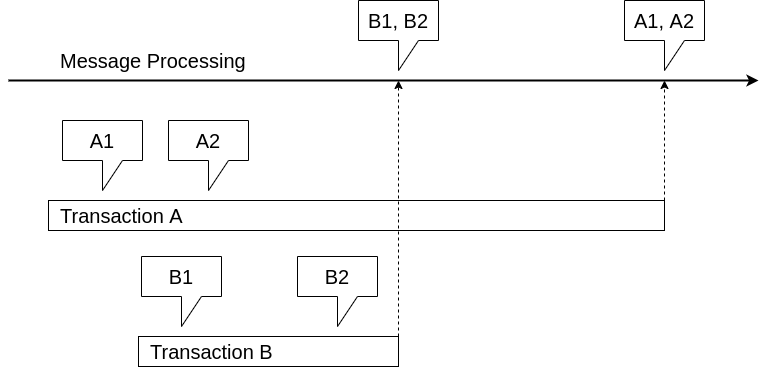
+
+Messages B1 and B2 of a transaction B, that started after a transation A will be sent before messages A1 and A2, that belong to transaction A, if transaction B completes before transaction A, even if the recording of messages A1 and A2 happend before the recording of messages B1 and B2.
+This happens, because all messages, that are written in transaction A will only become visible to the processing of the messages, after the completion of the transaction, because the processing of the messaging happens outside of the scope of the transaction.
+Therefore, the commit-order dictates the order, in which messages are sent.
--- /dev/null
+---
+_edit_last: "2"
+author: kai
+categories:
+ - uncategorized
+classic-editor-remember: classic-editor
+date: "2020-01-14T16:42:01+00:00"
+draft: "true"
+guid: http://juplo.de/?p=1013
+parent_post_id: null
+post_id: "1013"
+title: UnitTest or IntegrationTest? A Practical Guide
+url: /
+
+---
+_Idee:_ Zeigen, dass die Entscheidung nicht akademisch, sondern praktisch getroffen werden sollte / muss
+
+TODO
+
+- Am Beispiel von WebClient mit Mockito zeigen das Mocking schnell zu einem schlechten Unit-Test führt: Getestet werden Implementierungsdetails, wie genau wann die Fluid-API aufgerufen wird! Insbesondere gefährlich, wenn zusätzlich verifiziert wird
+- Außerdem: Häufig wird gar nicht mehr die Implementierung getestet, sondern irgendwelche Toos! Ein Beispiel: Commit-Schlechter-Unit-Tests. Z.B. zu sehen hier: https://stackoverflow.com/a/57196768/247276 und hier: https://www.baeldung.com/spring-mocking-webclient#mockito
+
+- Eigentlich will man: Das ggf. benötigte Verhalten möglichst unscharf aber passen erlauben. Eventuell: Aufrufe die als Seiteneffekte passieren müssen verifizieren
+- Als Konsequenz aus obigem auch:
+ - Wenn Mocking komplexer Klassen benötigt wird besser nicht mit UnitTest anfangen. Dann hätte man nämlich das Problem, das man ggf. noch gar nicht weiß, wie sich die ersetzte Klasse intern verhält.
+ - Besser hier mit einem _Narro_ Integration-Test anfangen. Der hat dann auch den schönen Nebeneffekt, dass man ihn wie den ersten Klienten des neu definierten Kontrakts betrachten kann! Erst wenn so klar geworden ist, wie der Kontrakt genau aussieht und welche einzelnen Methoden-Signaturen und -Kontrakte sich daraus ergeben diese in UnitTests überführen, die wesentlich schneller testbar sind.
+ - **Problem bei dieser Überlegung:** Abgrenzung / Kombination mit TDD!
+ - _Ggf. Antwort:_ Hier wird klar, wann die Unterscheidung zwischen Unit-Tests und Integration-Tests künstlich wird.
+ - Mit einem Unit-Test, der akademisch betrachtet schon ein Narrow Integration-Test ist, sollte sich TDD weiterhin problemlos durchhalten lassen
+- Mit einer Stub/Mock-Kombination ließe sich hier schon mehr ausrichten? Gemeint: Stub für alle aus Test-Sicht unwesenlichen Aufrufe und Unterklassen der Fluid-API des WebClient implementieren und das Verhalten von diesem an der für den Test wichtigen Stelle von außen konfigurierbar — `mockbar` — machen
+- Noch ein Schritt weiter (oder direkt überspringen): WebClient direkt benutzen und nur die Exchange-Function ersetzen: siehe https://dzone.com/articles/unit-tests-for-springs-webclient
--- /dev/null
+---
+_edit_last: "2"
+author: kai
+categories:
+ - jackson
+ - java
+ - tips
+classic-editor-remember: classic-editor
+date: "2020-08-15T17:02:52+00:00"
+guid: http://juplo.de/?p=1130
+parent_post_id: null
+post_id: "1130"
+title: Using Jackson Without Annotations To Quickly Add Logging Of Object-Graphs As JSON
+url: /using-jackson-without-annotations-to-quickly-add-logging-of-object-graphs-as-json/
+
+---
+Normally, you have to add Annotations to your classes, if you want to serialize them with Jackson.
+The following snippet shows, how you can configure Jackson in order to serialize vanilla classes without adding annotations.
+This is usefull, if you want to add logging-statements, that print out graphs of objects in JSON-notation for classes, that are not prepared for serialization.
+
+```sh
+
+ObjectMapper mapper = new ObjectMapper();
+mapper.setVisibility(PropertyAccessor.FIELD, JsonAutoDetect.Visibility.ANY);
+mapper.enable(SerializationFeature.INDENT_OUTPUT);
+String str = mapper.writeValueAsString(new Bar());
+
+```
+
+I have put together a tiny sample-project, that demonstrates the approach.
+URL for cloning with GIT:
+[/git/demos/noanno/](/git/demos/noanno/)
+
+It can be executed with `mvn spring-boot:run`
--- /dev/null
+---
+_edit_last: "2"
+author: kai
+categories:
+ - uncategorized
+date: "2019-06-03T19:50:08+00:00"
+draft: "true"
+guid: http://juplo.de/?p=856
+parent_post_id: null
+post_id: "856"
+title: 'Virtual Networking With Linux: Network Namespaces'
+url: /
+
+---
+
--- /dev/null
+---
+_edit_last: "2"
+author: kai
+categories:
+ - explained
+date: "2019-06-04T15:19:22+00:00"
+draft: "true"
+guid: http://juplo.de/?p=835
+parent_post_id: null
+post_id: "835"
+title: 'Virtual Networking With Linux: Veth-Pairs'
+url: /
+
+---
+A veth-pair acts as a virtual patch-cable.
+Like a real cable, it always has two ends and data that enters one end is copied to the other.
+Unlike a real cable, each end comes with an attached network interface card (nic).
+To stick with the metaphor: using a veth-pair is like taking a patch-cable with a nic hardwired to each end and installing these nics.
+
+## Typical Usages
+
+- [Connect Two Network Namespaces](#netns2netns)
+- [Connect A Network Namespace To A Bridge](#netns2br)
+- [Connect Two Bridges](#br2br)
+
+### Connect Two Network Namespaces
+
+In this usage scenario, two [network namespaces](/virtual-networking-with-linux-network-namespaces "Network Namespaces Explained") (i.e., two virtual hosts) are connected with a virtual patch cable (the veth-pair).
+One of the two network namespaces may be the default network namespace, but not both (see [Pitfall: Pointless Usage Of Veth-Pairs](#pointless "See Pitfall: Wrong (Or Better: Pointless) Usage Of Veth-Pairs")).
+
+Receipt:
+
+1. Create two network namespaces and connect them with a veth-pair:
+
+ ```bash
+ sudo ip netns add host_1
+ sudo ip netns add host_2
+ sudo ip link add dev if_1 type veth peer name if_2
+ sudo ip link set dev if_1 netns host_1
+ sudo ip link set dev if_2 netns host_2
+
+ ```
+
+1. Configure the network interfaces and bring them up:
+
+ ```bash
+ sudo ip netns exec host_1 ip addr add 192.168.111.1/24 dev if_1
+ sudo ip netns exec host_1 ip link set dev if_1 up
+ sudo ip netns exec host_2 ip addr add 192.168.111.2/24 dev if_2
+ sudo ip netns exec host_2 ip link set dev if_2 up
+
+ ```
+
+1. Check the created configuration (same for `host_2`):
+
+ ```bash
+ sudo ip netns exec host_1 ip -d addr show
+ 1: lo: mtu 65536 qdisc noop state DOWN group default qlen 1
+ link/loopback 00:00:00:00:00:00 brd 00:00:00:00:00:00 promiscuity 0
+ 904: if_1@if903: mtu 1500 qdisc noqueue state UP group default qlen 1000
+ link/ether 7e:02:d1:d3:36:7e brd ff:ff:ff:ff:ff:ff link-netnsid 1 promiscuity 0
+ veth
+ inet 192.168.111.1/32 scope global if_1
+ valid_lft forever preferred_lft forever
+ inet6 fe80::7c02:d1ff:fed3:367e/64 scope link
+ valid_lft forever preferred_lft forever
+
+ ```
+
+ ```bash
+ sudo ip netns exec host_1 ip route show
+ 192.168.111.0/24 dev if_1 proto kernel scope link src 192.168.111.1
+
+ ```
+
+ Note, that all interfaces are numbered and that each end of a veth-pair explicitly states the number of the other end of the pair:
+
+ ```bash
+ sudo ip netns exec host_2 ip addr show
+ 1: lo: mtu 65536 qdisc noop state DOWN group default qlen 1
+ link/loopback 00:00:00:00:00:00 brd 00:00:00:00:00:00
+ 903: if_2@if904: mtu 1500 qdisc noqueue state UP group default qlen 1000
+ link/ether 52:f4:5a:be:dc:9b brd ff:ff:ff:ff:ff:ff link-netnsid 0
+ inet 192.168.111.2/24 scope global if_2
+ valid_lft forever preferred_lft forever
+ inet6 fe80::50f4:5aff:febe:dc9b/64 scope link
+ valid_lft forever preferred_lft forever
+
+ ```
+
+ _Here:_ `if_2` with number 903 in the network namespace `host_2` states, that its other end has the number 904 — Compare this with the output for the network namespace `host_1` above!
+
+1. Validate the setup (same for `host_2`):
+
+ ```bash
+ sudo ip netns exec host_1 ping -c2 192.168.111.2
+ PING 192.168.111.2 (192.168.111.2) 56(84) bytes of data.
+ 64 bytes from 192.168.111.2: icmp_seq=1 ttl=64 time=0.066 ms
+ 64 bytes from 192.168.111.2: icmp_seq=2 ttl=64 time=0.059 ms
+
+ --- 192.168.111.2 ping statistics ---
+ 2 packets transmitted, 2 received, 0% packet loss, time 999ms
+ rtt min/avg/max/mdev = 0.059/0.062/0.066/0.008 ms
+
+ ```
+
+ ```bash
+ sudo ip netns exec host_1 ping -c2 192.168.111.2
+ # And at the same time in another terminal:
+ sudo ip netns exec host_1 tcpdump -n -i if_1
+ tcpdump: verbose output suppressed, use -v or -vv for full protocol decode
+ listening on if_1, link-type EN10MB (Ethernet), capture size 262144 bytes
+ ^C16:34:44.894396 IP 192.168.111.1 > 192.168.111.2: ICMP echo request, id 14277, seq 1, length 64
+ 16:34:44.894431 IP 192.168.111.2 > 192.168.111.1: ICMP echo reply, id 14277, seq 1, length 64
+ 16:34:45.893385 IP 192.168.111.1 > 192.168.111.2: ICMP echo request, id 14277, seq 2, length 64
+ 16:34:45.893418 IP 192.168.111.2 > 192.168.111.1: ICMP echo reply, id 14277, seq 2, length 64
+
+ 4 packets captured
+ 4 packets received by filter
+ 0 packets dropped by kernel
+
+ ```
+
+### Connect A Network Namespace To A Bridge
+
+In this usage scenario, a [network namespace](/virtual-networking-with-linux-network-namespaces "Network Namespaces Explained") (i.e., a virtual host) is connected to a [bridge](/virtual-networking-with-linux-virtual-bridges "Virtual Bridges Explained") (i.e. a virtual network/switch) with a virtual patch cable (the veth-pair).
+The network namespace may be the default network namespace (i.e., the local host).
+
+Receipt:
+
+1. Create a bridge and a network namespace.
+ Then connect the network namespace to the bridge with a veth-pair
+
+ ```bash
+ sudo ip link add dev switch type bridge
+ sudo ip netns add host_1
+ sudo ip link add dev veth0 type veth peer name link_1
+ sudo ip link set dev veth0 netns host_1
+
+ ```
+
+ You can think of the last step (the three last commands) as plugging the virtual host ( _the network namespace_) into the virtual switch ( _the bridge_) with the help of a patch-cable ( _the veth-pair_).
+
+1. Configure the network interfaces and bring all devices up:
+
+ ```bash
+ sudo ip link set dev switch up
+ sudo ip link set dev link_1 master switch
+ sudo ip link set dev link_1 up
+ sudo ip netns exec host_1 ip addr add 192.168.111.1/24 dev veth0
+ sudo ip netns exec host_1 ip link set dev veth0 up
+
+ ```
+
+_The bridge only needs its own IP, if the network has to be routable (see: [Virtual Bridges](/virtual-networking-with-linux-virtual-bridges "Read more about virtual bridges, if you want to learn why"))_
+
+1. Check the created configuration:
+
+ ```bash
+ sudo ip netns exec host_1 ip -d addr show
+ 1: lo: mtu 65536 qdisc noop state DOWN group default qlen 1
+ link/loopback 00:00:00:00:00:00 brd 00:00:00:00:00:00 promiscuity 0
+ 947: veth0@if946: mtu 1500 qdisc noqueue state UP group default qlen 1000
+ link/ether 3e:70:06:77:fa:67 brd ff:ff:ff:ff:ff:ff link-netnsid 0 promiscuity 0
+ veth
+ inet 192.168.111.1/24 scope global veth0
+ valid_lft forever preferred_lft forever
+ inet6 fe80::3c70:6ff:fe77:fa67/64 scope link
+ valid_lft forever preferred_lft forever
+
+ ```
+
+ ```bash
+ sudo ip netns exec host_1 ip route show
+ 192.168.111.0/24 dev veth0 proto kernel scope link src 192.168.111.1
+
+ ```
+
+1. In order to validate the setup, we need a second address in our virtual network for the `ping`-command.
+ There are three ways to achieve this.
+ _Choose only one!_
+
+ (There are even more possibilities — for example connecting the bridge to the real network interface of the host —, but these are the most straight forward approaches...)
+
+ - Give the virtual network its own address, so that it becomes routable:
+
+ ```bash
+ sudo ip addr add 192.168.111.254/24 dev switch
+ ping -c2 192.168.111.1
+ sudo ip netns exec host_1 ping -c2 192.168.111.254
+
+ ```
+
+ In this commonly used approach, the kernel sets up all needed routing entries automatically.
+
+ - Add a second virtual host to the network:
+
+ ```bash
+ sudo ip netns add host_2
+ sudo ip link add dev veth0 type veth peer name link_2
+ sudo ip link set dev veth0 netns host_2
+ sudo ip link set dev link_2 master switch
+ sudo ip link set dev link_2 up
+ sudo ip netns exec host_2 ip addr add 192.168.111.2/24 dev veth0
+ sudo ip netns exec host_2 ip link set dev veth0 up
+ sudo ip netns exec host_2 ping -c2 192.168.111.1
+ sudo ip netns exec host_1 ping -c2 192.168.111.2
+
+ ```
+
+ In this approach, the virtual network is kept separated from the host.
+ Only the virtual hosts, that are plugged into the virtual network can reach each other.
+
+ - Connect the local host to the virtual network
+
+ ```bash
+ sudo ip link add dev veth0 type veth peer name link_2
+ sudo ip link set dev link_2 master switch
+ sudo ip link set dev link_2 up
+ sudo ip addr add 192.168.111.2/24 dev veth0
+ sudo ip link set dev veth0 up
+ ping -c2 192.168.111.1
+ sudo ip netns exec host_1 ping -c2 192.168.111.2
+
+ ```
+
+ Strictly speaking, this is a special case of the former approach, where the default network namespace is used instead of a private one.
+
+
+ In general, it is advisable, to use the first approach, if you do need a connection to the local host, because it does not clutter your default network namespace with two more interfaces (here: `veth0` and `link_2`).
+
+### Connect Two Bridges
+
+Receipt:
+
+1. ```bash
+
+ ```
+
+1. ```bash
+
+ ```
+
+1. ```bash
+
+ ```
+
+## Pitfalls
+
+- [Do Not Forget To Specifiy The Prefix-Length For The Addresses](#prefix-length)
+- [Capturing Packages On Virtual Interfaces](#capturing)
+- [Wrong (Or Better: Pointless) Usage Of Veth-Pairs](#pointless)
+
+### Do Not Forget To Specifiy The Prefix-Length For The Addressses
+
+**If you forget to specifiy the prefix-length for one of the addresses, you will not be able to ping the host on the other end of the veth-pair.**
+
+`192.168.111.1/24` specifies the address `192.168.111.1` as part of the subnet with the network-mask `255.255.255.0`. If you forget the prefix, the address will be interpreted as `192.168.111.1/32` and the kernel will not add a network-route. Hence, you will not be able to ping the other end ( `192.168.111.2`), because the kernel would not know, that it is reachable via the interface that belongs to the address `192.168.111.1`.
+
+### Capturing Packages On Virtual Interfaces
+
+If you run `tcpdump` on an interface in the default-namespace, the captured packages show up immediatly.
+I.e.: You can watch the exchange of ICMP-packages live, as it happens.
+But: **If you run `tcpdump` in a named network-namespace, the captured packages will not show up, until you stop the command with `CRTL-C`!**
+
+_Do not ask me why — I just witnessed that odd behaviour on my linux-box and found it noteworthy, because I thought, that my setup was not working several times, before I realised, that I had to kill `tcpdump` to see the captured packages._
+
+### Wrong (Or Better: Pointless) Usage Of Veth-Pairs
+
+This is another reason, why packages might not show up on the virtual interfaces of the configured veth-pair.
+Often, veth-pairs are used as a simple example for virtual networking like in the following snippet:
+
+```bash
+sudo ip link add dev if_1 type veth peer name if_2
+sudo ip addr add 192.168.111.1 dev if_1
+sudo ip link set dev if_1 up
+sudo ip addr add 192.168.111.2 dev if_2
+sudo ip link set dev if_2 up
+
+```
+
+_Note, that additionally, the prefix was not specified with the given addresses ( [compare with above](#prefix-length "Compare with the remarkes considering the prefix length"))!_
+_This works here, because both interfaces are local, so that the kernel does know how to reach them without any routing information._
+
+The setup is then _"validated"_ with a ping from one address to the other:
+
+```bash
+ping -c 3 -I 192.168.111.1 192.168.111.2
+PING 192.168.111.2 (192.168.111.2) from 192.168.111.1 : 56(84) bytes of data.
+64 bytes from 192.168.111.2: icmp_seq=1 ttl=64 time=0.068 ms
+64 bytes from 192.168.111.2: icmp_seq=2 ttl=64 time=0.079 ms
+64 bytes from 192.168.111.2: icmp_seq=3 ttl=64 time=0.105 ms
+
+--- 192.168.111.2 ping statistics ---
+3 packets transmitted, 3 received, 0% packet loss, time 2052ms
+rtt min/avg/max/mdev = 0.068/0.084/0.105/0.015 ms
+
+```
+
+Though it looks like the setup is working as intended, this is not the case:
+_The packets are not routed through the virtual network interfaces `if_1` and `if_2`_
+
+```bash
+sudo tcpdump -i if_1 -n
+tcpdump: verbose output suppressed, use -v or -vv for full protocol decode
+listening on if_1, link-type EN10MB (Ethernet), capture size 262144 bytes
+^C
+0 packets captured
+0 packets received by filter
+0 packets dropped by kernel
+
+```
+
+Instead, they show up on the local interface:
+
+```bash
+sudo tcpdump -i lo -n
+tcpdump: verbose output suppressed, use -v or -vv for full protocol decode
+listening on lo, link-type EN10MB (Ethernet), capture size 262144 bytes
+12:20:09.899325 IP 192.168.111.1 > 192.168.111.2: ICMP echo request, id 28048, seq 1, length 64
+12:20:09.899353 IP 192.168.111.2 > 192.168.111.1: ICMP echo reply, id 28048, seq 1, length 64
+12:20:10.909627 IP 192.168.111.1 > 192.168.111.2: ICMP echo request, id 28048, seq 2, length 64
+12:20:10.909684 IP 192.168.111.2 > 192.168.111.1: ICMP echo reply, id 28048, seq 2, length 64
+12:20:11.933584 IP 192.168.111.1 > 192.168.111.2: ICMP echo request, id 28048, seq 3, length 64
+12:20:11.933630 IP 192.168.111.2 > 192.168.111.1: ICMP echo reply, id 28048, seq 3, length 64
+^C
+6 packets captured
+12 packets received by filter
+0 packets dropped by kernel
+
+```
+
+This happens, because the kernel adds entries for both interfaces in the local routing table, since both interfaces are connected to the default network namespace of the host:
+
+```bash
+ip route show table local
+broadcast 127.0.0.0 dev lo proto kernel scope link src 127.0.0.1
+local 127.0.0.0/8 dev lo proto kernel scope host src 127.0.0.1
+local 127.0.0.1 dev lo proto kernel scope host src 127.0.0.1
+broadcast 127.255.255.255 dev lo proto kernel scope link src 127.0.0.1
+local 192.168.111.1 dev if_1 proto kernel scope host src 192.168.111.1
+local 192.168.111.2 dev if_2 proto kernel scope host src 192.168.111.2
+
+```
+
+When routing the packages, the kernel looks up this entries and consequently routes the packages through the `lo`-interface, since both addresses are local addresses.
+
+There is nothing strange or even wrong with this behavior.
+**If there is something wrong in this setup, it is the idea to create two connected virtual local interfaces.**
+That is equally pointless, as installing two nics into one computer and connecting both cards with a cross-over patch cable...
+
+## References
+
+- [Linux Virtual Interfaces](https://gabhijit.github.io/linux-virtual-interfaces.html "Linux Virtual Interfaces")
+- [Guide to IP Layer Network Administration with Linux](http://linux-ip.net/html/routing-tables.html "Guide to IP Layer Network Administration with Linux, Chapter 4. IP Routing, Section 4.8 Routing Tables")
--- /dev/null
+---
+_edit_last: "2"
+author: kai
+categories:
+ - uncategorized
+date: "2019-06-04T09:27:40+00:00"
+draft: "true"
+guid: http://juplo.de/?p=858
+parent_post_id: null
+post_id: "858"
+title: 'Virtual Networking With Linux: Virtual Bridges'
+url: /
+
+---
+
--- /dev/null
+---
+_edit_last: "2"
+author: kai
+categories:
+ - explained
+date: "2018-09-28T08:38:10+00:00"
+guid: http://juplo.de/?p=762
+parent_post_id: null
+post_id: "762"
+title: XPath 2.0 deep-equal Does Not Match Like Expected - The Problem With Whitespace
+url: /xpath-2-0-deep-equal-does-not-match-like-expected-the-problem-with-whitespace/
+
+---
+I just stumbled accros a problem with the `deep-equal()`-method introduced by `XPath 2.0`.
+It costs me two hours at minimum to find out, what was going on.
+So I want to share this with you, in case your are wasting time on the same problem and try to find a solution via google ;)
+
+If you never heard of `deep-equal()` and just wonder how to compare XML-nodes in the right way, you should probably read this [exelent article about equality in XSLT](http://www.xml.com/lpt/a/1589 "Read more about the posibilities to compare nodes in XSLT") as a starter.
+
+## My Problem
+
+My problem was, that I wanted to parse/output a node only, if there exists no node on the `ancestor`-axis, that has a exact duplicate of that node as a direct child.
+
+## The Difference Between A Comparison With `=` And With `deep-equal()`
+
+If you just use simple equality (with `=` or `eq`), the two compared nodes are converted into strings implicitly.
+That is no problem, if you are comparing attributes, or nodes, that only contain text.
+But in all other cases, you will only compare the text-contents of the two nodes and their children.
+Hence, if they differ only in an attribute, your test will report that they are equal, which might not be what you are expecting.
+
+For example, the XPath-expression
+
+```XPath
+//child/ref[ancestor::parent/ref=.]
+```
+
+will match the `<ref>`-node with `@id='bar'`, that is nested insiede the `<child>`-node in this example-XML, what I was not expecting:
+
+```Java
+<root>
+ <parent>
+ <ref id="foo"><content>Same Text-Content</content></ref>
+ <child>
+ <ref id="bar"><content>Same Text-Content</content></ref>
+ </child>
+ <parent>
+<list>
+```
+
+So, what I tried, after I found out about `deep-equal()` was the following `Xpath`-expression, which solves the problem in the above example:
+
+```XPath
+//child/ref[deep-equal(ancestor::parent/ref,.)]
+```
+
+## The Unexpected Behaviour Of `deep-equal()`
+
+But, moving on I stumbled accross cases, where I was expecting a match, but `deep-equal()` does not match the nodes.
+For example:
+
+```Java
+<root>
+ <parent>
+ <ref id="same">
+ <content>Same Text-Content</content>
+ </ref>
+ <child>
+ <ref id="same">
+ <content>Same Text-Content</content>
+ </ref>
+ </child>
+ <parent>
+<list>
+```
+
+You probably catch the diffrenece at first glance, since I laid out the examples accordingly and gave you a hint in the heading of this post - but it really took me a long time to get that:
+
+## It is all about whitespace!
+
+`deep-equal()` compares _all_ child-nodes and only yields a match, if the compared nodes have exactly the same child-nodes.
+But in the second example, the compared `<ref>`-nodes contain whitespace befor and after their child-node `<content>`.
+And these whitespace are in fact implicite child-nodes of type text.
+Hence, the two nodes in the second example differe, because the indentation on the second one has two more spaces.
+
+## The solution...?
+
+Unfortunatly, I do not really know a good solution.
+(If you come up with one, feel free to note or link it in the comments!)
+
+The best solution would be an option additional argument for `deep-equal()`, that can be selected to tell the function to ignore such whitespace.
+In fact, some XSLT-parsers do provide such an argument.
+
+The only other solution, I can think of, is, to write another XSLT-script to remove all the whitespaces between tags to circumvent this at the first glance unexpected behaviour of `deep-equal()`
+++ /dev/null
----
-title: Blog
-url: /blog/
----
-Hallo Welt!
+++ /dev/null
----
-_edit_last: "2"
-author: kai
-categories:
- - html(5)
-date: "2020-04-10T11:53:39+00:00"
-guid: http://juplo.de/?p=357
-parent_post_id: null
-post_id: "357"
-title: A Perfect Outline
-url: /a-perfect-outline/
-
----
-## Point Out Your Content: Utilize the HTML5 Outline-Algorithm
-
-HTML5 introduces new semantic elements accompained by the definition of [a new algorithm to calculate the document-outline](https://developer.mozilla.org/de/docs/Web/Guide/HTML/Sections_and_Outlines_of_an_HTML5_document "Read all about the new possibilities to mark up the outline of your document") from the mark up.
-There are plenty of [good explanations](http://www.smashingmagazine.com/2011/08/16/html5-and-the-document-outlining-algorithm/ "This is a very good overview, because it also pointes out, what to watch out for") of these new possibilities, to point out your content in a more controlled way.
-But the most of these explanations fall short, if it comes to how to put these new markup into use, so that it results in a sensible outline of the document, that was marked up.
-
-In this article I will try to explain, how to use the new semantic markup, to produce an outline, that is usable as a real content table of the document - not just as an partially orderd overview of all headings.
-I will do so, by showing simple examples, that will illuminate the principles behind the new markup.
-
-## All Messed Up!
-
-Although, the ideas behind the new markup seems to be simple and clear, nearly nobody accomplishes to produce a sensible outline.
-Even the big players, who [guide us through the jungle of the new specifications](http://www.html5rocks.com/de/ "Great guidance - but bad outline") and are giving [great explanations about the subject](http://www.smashingmagazine.com/2013/01/18/the-importance-of-sections/ "Great explanation - but bad outline"), either fail on there sites (see by yourself with the help of the help of [the h5o HTML5 Outline Bookmarklet](https://h5o.github.io/ "Just drag and drop the bookmarklet to your favorites.")), or produce the outline in the old way by the usage of `h1`- `h6` only, like the fabulous HTML5-bible [Dive Into HTML5](http://diveintohtml5.info/semantics.html#footer-element "A wounderful introduction to the new possibilities of HTML5 - but the tid outline is produced the old way").
-
-This is, because there is a lot to mix up in a wrong way, when trying to adopt the new features.
-Here is, what I ended up with, on my first try to combine what I have learned about [semantic elements](http://www.w3schools.com/html/html5_semantic_elements.asp "Overview of the new semantic elements, available in HTML5") and the [document outline](http://html5doctor.com/outlines/ "An explanation, of what the specs told you about the document outline"):
-
-#### Example 01: Markup
-
-```html
-
-<!DOCTYPE html>
-<title>Example 01</title>
-<header>
- <h2>Header</h2>
- <nav>Navigation</nav>
-</header>
-<main>
- <h1>Main</h1>
- <section>
- <h2>Section I</h2>
- </section>
- <section>
- <h2>Section II</h2>
- <section>
- <h3>Subsection a</h3>
- </section>
- <section>
- <h3>Subsection b</h3>
- </section>
- </section>
- <section>
- <h2>Section III</h2>
- <section>
- <h3>Subsection a</h3>
- </section>
- </section>
-</main>
-<aside>
- <h1>Aside</h1>
-</aside>
-<footer>
- <h2>Footer</h2>
-</footer>
-
-```
-
-#### Example 01: Outline
-
-1. Header
-1. _Untitled section_
-1. Main
-1. Section I
-1. Section II
- 1. Subsection a
- 1. Subsection b
-1. Section III
- 1. Subsection a
-1. Aside
-1. Footer
-
-[View example 01](/wp-uploads/2015/06/example-01.html)
-
-That quiet was not the outline, that I had expected.
-I planed, that _Header_, _Main_, _Aside_ and _Footer_ are ending up at the same level.
-Instead of that, _Aside_ and _Footer_ had become sections of my _Main_-content.
-And where the hell comes that _Untitled section_ from?!?
-My first thought on that was: No problem, I just forgot the `header`-tags.
-But after adding them, the only thing that cleared out, was where the _Untitled section_ was coming from:
-
-#### Example 02: Markup
-
-```html
-
-<!DOCTYPE html>
-<title>Example 02</title>
-<header>
- <h2>Header</h2>
- <nav>
- <header><h3>Navigation</h3></header>
- </nav>
-</header>
-<main>
- <header><h1>Main</h1></header>
- <section>
- <header><h2>Section I</h2></header>
- </section>
- <section>
- <header><h2>Section II</h2></header>
- <section>
- <header><h3>Subsection a</h3></header>
- </section>
- <section>
- <header><h3>Subsection b</h3></header>
- </section>
- </section>
- <section>
- <header><h2>Section III</h2></header>
- <section>
- <header><h3>Subsection a</h3></header>
- </section>
- </section>
-</main>
-<footer>
- <header><h2>Footer</h2></header>
-
-```
-
-#### Example 02: Outline
-
-1. Header
-1. Navigation
-1. Main
-1. Section I
-1. Section II
- 1. Subsection a
- 1. Subsection b
-1. Section III
- 1. Subsection a
-1. Aside
-1. Footer
-
-[View example 02](/wp-uploads/2015/06/example-02.html)
-
-So I thought: Maybe the `main`-tag was the wrong choice.
-Perhaps it should be replaced by an `article`.
-But after that change, the outline even got worse.
-Now, _Navigation_, _Main_ and _Aside_ appeared on the same level, all as a subsection of _Header_.
-At least, _Footer_ suddenly was a sibling of _Header_ as planed:
-
-#### Example 03: Markup
-
-```html
-
-<!DOCTYPE html>
-<title>Example 03</title>
-<header>
- <h2>Header</h2>
- <nav>
- <header><h3>Navigation</h333></header>
- </nav>
-</header>
-<article>
- <header><h1>Article (Main)</h1></header>
- <section>
- <header><h2>Section I</h2></header>
- </section>
- <section>
- <header><h2>Section II</h2></header>
- <section>
- <header><h3>Subsection a</h3></header>
- </section>
- <section>
- <header><h3>Subsection b</h3></header>
- </section>
- </section>
- <section>
- <header><h2>Section III</h2></header>
- <section>
- <header><h3>Subsection a</h3></header>
- </section>
- </section>
-</article>
-<footer>
- <header><h2>Footer</h2></header>
-</footer>
-
-```
-
-#### Example 03: Outline
-
-1. Header
-1. Navigation
-1. Main
- 1. Section I
- 1. Section II
- 1. Subsection a
- 1. Subsection b
- 1. Section III
- 1. Subsection a
-1. Aside
-1. Footer
-
-[View example 03](/wp-uploads/2015/06/example-03.html)
-
-After that, I was totally confused and decided, to sort it out step by step.
-That procedure finally gave me the clue, I want to share with you now.
-
-## Step by Step (Uh Baby!)
-
-### Step I: Investigate the Structured Part
-
-Let us start with the strictly structured part of the document: **the article and it's subsections**.
-At first a minimal example with no markup except the `article`\- and the `section`-tags:
-
-#### Example 04: Markup
-
-```html
-
-<!DOCTYPE html>
-<title>Example 04</title>
-<article>
- Main
- <section>
- Section I
- </section>
- <section>
- Section II
- <section>
- Subsection a
- </section>
- <section>
- Subsection b
- </section>
- </section>
- <section>
- Section III
- <section>
- Subsection a
- </section>
- </section>
-</main>
-
-```
-
-#### Example 04: Outline
-
-1. _Untitled BODY_ 1. _Untitled ARTICLE_ 1. _Untitled SECTION_
- 1. _Untitled SECTION_ 1. _Untitled SECTION_
- 1. _Untitled SECTION_
- 1. _Untitled SECTION_ 1. _Untitled SECTION_
-
-[View Example 04](/wp-uploads/2015/06/example-04.html)
-
-Nothing really unexpected here.
-The `article`\- and `section`-tags are reflected in the outline according to their nesting.
-The only thing notably here is, that the `body` itself is also reflected in the outline.
-It appears on its own level as the root-element of all tags.
-We can think of it as the title of our document.
-
-We can add headings of any kind ( `h1`- `h6`) here and will always get an identically structured outline, that reflects the text of our headings.
-If we want to give the body a title, we have to place a heading outside and before any sectioning-elements:
-
-#### Example 05: Markup
-
-```html
-
-<!DOCTYPE html>
-<title>Example 05</title>
-<h1>Page</h1>
-<article>
- <h1>Article</h1>
- <section>
- <h1>Section I</h1>
- </section>
- <section>
- <h1>Section II</h1>
- <section>
- <h1>Subsection a</h1>
- </section>
- <section>
- <h1>Subsection b</h1>
- </section>
- </section>
- <section>
- <h1>Section III</h1>
- <section>
- <h1>Subsection a</h1>
- </section>
- </section>
-</article>
-
-```
-
-#### Example 05: Outline
-
-1. Page
-1. Article
- 1. Section I
- 1. Section II
- 1. Subsection a
- 1. Subsection b
- 1. Section III
- 1. Subsection a
-
-[View Example 05](/wp-uploads/2015/06/example-05.html)
-
-This is the new part of the outline algorithm introduced in HTML5: _The nesting of elements, that define sections, defines the outline of the document._
-The rank of the heading element is ignored by this algorithm!
-
-Among the elements, that define sections in HTML5 are the `article` and the `section` tags.
-But there are more.
-[I will discuss them later](#sectioning-elemnts "Jump to the explanation of all sectioning-elements now").
-For now, you only have to know, that in HTML5, sectioning elements define the structure of the outline.
-Also, you should memorize, that the outline always has a single root without any siblings: the `body`.
-
-### Step II: Investigate the Page-Elements
-
-So, let us do the same with the tags that represent the different logical sections of a web-page: **the page-elements**.
-We start with a minimal example again, that contains no markup except the `header`\- the `main` and the `footer`-tags:
-
-#### Example 06: Markup
-
-```html
-
-<!DOCTYPE html>
-<title>Example 06</title>
-<header>Page</header>
-<main>Main</main>
-<footer>Footer</footer>
-
-```
-
-#### Example 06: Outline
-
-1. _Untitled BODY_
-
-[View Example 06](/wp-uploads/2015/06/example-06.html)
-
-That is wired, ehh?
-There is only one untitled element in the outline.
-The explanation for this is, that neither the `header`\- nor the `main`\- nor the `footer`-tag belong to the elements, that define a section in HTML5!
-This is often confused, because these elements define _the logical sections_ (header – main-content – footer) of a website.
-But these logical sections do not have to do anything with the structural sectioning of the document, that defines the outline.
-
-### Step III: Investigate the Headings
-
-So, what happens, if we add the desired markup for our headings?
-We want a `h1`-heading for our main-content, because it is the important part of our page.
-The header should have a `h2`-heading and the footer a `h3`-heading, because it is rather unimportant.
-
-#### Example 07: Markup
-
-```html
-
-<!DOCTYPE html>
-<title>Example 07</title>
-<header><h2>Page</h2></header>
-<main><h1>Main</h1></main>
-<footer><h3>Footer</h3></footer>
-
-```
-
-#### Example 07: Outline
-
-1. Page
-1. Main
-1. Footer
-
-[View Example 07](/wp-uploads/2015/06/example-07.html)
-
-Now, there is an outline again.
-But why?
-And why is it looking this way?
-
-What happens here, is [implicit sectioning](https://developer.mozilla.org/de/docs/Web/Guide/HTML/Sections_and_Outlines_of_an_HTML5_document#Implicit_Sectioning "Read all about implicit sectioning").
-In short, implicit sectioning is the outline algorithm of HTML4.
-HTML5 needs implicit sectioning, to keep compatible with HTML4, which still dominates the web.
-In fact, we could have used plain HTML4, with `div` instead of `header`, `main` and `footer`, and it would have yield the exact same outline:
-
-#### Example 08: Markup
-
-```html
-
-<!DOCTYPE HTML PUBLIC "-//W3C//DTD HTML 4.01 Transitional//EN" "http://www.w3.org/TR/html4/loose.dtd">
-<html>
- <head><title>Example 08</title></head>
- <body>
- <div class="header"><h2>Page</h2></div>
- <div class="main"><h1>Main</h1></div>
- <div class="footer"><h3>Footer</h3></div>
- </body>
-</html>
-
-```
-
-#### Example 08: Outline
-
-1. Page
-1. Main
-1. Footer
-
-[View Example 08](/wp-uploads/2015/06/example-08.html)
-
-In HTML4, solely the headings ( `h1`- `h6`) define the outline of a document.
-The enclosing elements or any nesting of them are ignored altogether.
-The level, at which a heading appears in the outline, is defined by the rank of the heading alone.
-(Strictly speaking, HTML4 does not define anything like a document outline.
-But as a result of the common usage and interpretation, this is, how people outline their documents with HTML4.)
-
-The implicit sectioning of HTML5 works in a way, that is backward compatible with this way of outlining, but closes the gaps in the resulting hierarchy:
-_Each heading implicitly opens a section – hence the name –, but if there is a gap between its rank and the rank of its ancestor – that is the last preceding heading with a higher rank – it is placed in the level directly beneath its ancestor_:
-
-#### Example 09: Markup
-
-```html
-
-<!DOCTYPE html>
-<title>Example 09</title>
-<h4>h4</h4>
-<h2>h2</h2>
-<h4>h4</h4>
-<h3>h3</h3>
-<h2>h2</h2>
-<h1>h1</h1>
-<h2>h2</h2>
-<h3>h3</h3>
-
-```
-
-#### Example 09: Outline
-
-1. h4
-1. h2
-1. h4
-1. h3
-1. h2
-1. h1
-1. h2
- 1. h3
-
-[View Example 09](/wp-uploads/2015/06/example-09.html)
-
-See, how the first heading `h4` ends up on the same level as the second, which is a `h2`.
-Or, how the third and fourth headings are both on the same level under the `h2`, although they are of different rank.
-And note, how the `h2` and `h3` end up on different sectioning-levels as their earlier appearances, if they follow a `h1` in the natural order.
-
-### Step IV: Mixing it all together
-
-With the gathered clues in mind, we can now retry to layout our document with the desired outline.
-If we want, that _Header_, _Main_ and _Footer_ end up as top level citizens in our planed outline, we simply have to achieve, that they are all recognized as sections under the top level by the HTML5 outline algorithm.
-We can do that, by explicitly stating, that the `header` and the `footer` are section:
-
-#### Example 10: Markup
-
-```html
-
-<!DOCTYPE html>
-<title>Example 10</title>
-<header>
- <section>
- <h2>Main</h2>
- </section>
-</header>
-<main>
- <article>
- <h1>Article</h1>
- <section>
- <h2>Section I</h2>
- </section>
- <section>
- <h2>Section II</h2>
- <section>
- <h3>Subsection a</h3>
- </section>
- <section>
- <h3>Subsection b</h3>
- </section>
- </section>
- <section>
- <h2>Section III</h2>
- <section>
- <h3>Subsection a</h3>
- </section>
- </section>
- </article>
-</main>
-<footer>
- <section>
- <h3>Footer</h3>
- </section>
-</footer>
-
-```
-
-#### Example 10: Outline
-
-1. _Untitled BODY_ 1. Main
-1. Article
- 1. Section I
- 1. Section II
- 1. Subsection a
- 1. Subsection b
- 1. Section III
- 1. Subsection a
-1. Footer
-
-[View Example 10](/wp-uploads/2015/06/example-10.html)
-
-So far, so good.
-But what about the untitled body?
-We forgot about the single root of any outline, that is defined by the body, how we learned back in [step 1](#step-01 "Jump back to step 1, if you do not remember..."). As shown in [example 05](#example-05 "Revisit example 5"), we can simply name that by putting a heading outside and before any element, that defines a section:
-
-#### Example 11: Markup
-
-```html
-
-<!DOCTYPE html>
-<title>Example 11</title>
-<header>
- <h2>Page</h2>
- <section>
- <h3>Header</h3>
- </section>
-</header>
-<main>
- <article>
- <h1>Article</h1>
- <section>
- <h2>Section I</h2>
- </section>
- <section>
- <h2>Section II</h2>
- <section>
- <h3>Subsection a</h3>
- </section>
- <section>
- <h3>Subsection b</h3>
- </section>
- </section>
- <section>
- <h2>Section III</h2>
- <section>
- <h3>Subsection a</h3>
- </section>
- </section>
- </article>
-</main>
-<footer>
- <section>
- <h3>Footer</h3>
- </section>
-</footer>
-
-```
-
-#### Example 11: Outline
-
-1. _Page_ 1. Header
-1. Main
- 1. Section I
- 1. Section II
- 1. Subsection a
- 1. Subsection b
- 1. Section III
- 1. Subsection a
-1. Footer
-
-[View Example 11](/wp-uploads/2015/06/example-11.html)
-
-### Step V: Be Aware, Which Elements Define Sections
-
-The eagle-eyed among you might have noticed, that I had "forgotten" the two element-types `nav` and `aside`, when we were investigating the elements, that define the logical structure of the page in [step 2](#step-2 "Revisit step 2").
-I did not forgot about these – I left them out intentionally.
-Because otherwise, the results of [example 07](#example-07 "Revisit example 07") would have been too confusing, to made my point about implicit sectioning.
-Let us look, what would have happend:
-
-#### Example 12: Markup
-
-```html
-
-<!DOCTYPE html>
-<title>Example 12</title>
-<header>
- <h1>Page</h1>
- <nav><h1>Navigation</h1></nav>
-</header>
-<main><h1>Main</h1></main>
-<aside><h1>Aside</h1></aside>
-<footer><h1>Footer</h1></footer>
-
-```
-
-#### Example 07: Outline
-
-1. Page
-1. Navigation
-1. Main
-1. Aside
-1. Footer
-
-[View Example 12](/wp-uploads/2015/06/example-12.html)
-
-What is wrong there?
-Why are _Navigation_ and _Aside_ showing up as children, albeit we marked up every element with headings of the same rank?
-The reason for this is, that `nav` and `aside` are sectioning elements:
-
-#### Example 12: Markup
-
-```html
-
-<!DOCTYPE html>
-<title>Example 13</title>
-<header>
- Page
- <nav>Navigation</nav>
-</header>
-<main>Main</main>
-<aside>Aside</aside>
-<footer>Footer</footer>
-
-```
-
-#### Example 07: Outline
-
-1. _Untitled BODY_ 1. _Untitled NAV_
-1. _Untitled ASIDE_
-
-[View Example 13](/wp-uploads/2015/06/example-13.html)
-
-The HTML5 spec defines four [sectioning elements](http://www.w3.org/WAI/GL/wiki/Using_HTML5_section_elements "Read about the intended use of these sectioning elements"): `article`, `section`, `nav` and `aside`!
-Some explain the confusion about this fact with the constantly evolving standard, that leads to [structurally unclear specifications](http://www.smashingmagazine.com/2013/01/18/the-importance-of-sections/#cad-middle "Jump to this rather lame excuse in an otherwise great article").
-I will be frank:
-_I cannot imagine any good reason for this decision!_
-In my opinion, the concept would be much clearer, if `article` and `section` would be the only two sectioning elements and `nav` and `aside` would only define the logical structure of the page, like `header` and `footer`.
-
-## Putting It All Together
-
-Knowing, that `nav` and `aside` will define sections, we now can complete our outline skillfully avoiding the appearance of untitled sections:
-
-#### Example 14: Markup
-
-```html
-
-<!DOCTYPE html>
-<title>Example 14</title>
-<header>
- <h2>Page</h2>
- <section>
- <h3>Header</h3>
- <nav><h4>Navigation</h4></nav>
- </section>
-</header>
-<main>
- <article>
- <h1>Main</h1>
- <section>
- <h2>Section I</h2>
- </section>
- <section>
- <h2>Section II</h2>
- <section>
- <h3>Subsection a</h3>
- </section>
- <section>
- <h3>Subsection b</h3>
- </section>
- </section>
- <section>
- <h2>Section III</h2>
- <section>
- <h3>Subsection a</h3>
- </section>
- </section>
- </article>
-</main>
-<aside><h3>Aside</h3></aside>
-<footer>
- <section>
- <h3>Footer</h3>
- </section>
-</footer>
-
-```
-
-#### Example 14: Outline
-
-1. _Page_ 1. Header
- 1. Navigation
-1. Main
- 1. Section I
- 1. Section II
- 1. Subsection a
- 1. Subsection b
- 1. Section III
- 1. Subsection a
-1. Aside
-1. Footer
-
-[View Example 14](/wp-uploads/2015/06/example-14.html)
-
-_Et voilà: Our Perfect Outline!_
-
-If you memorize the concepts, that you have learned in this little tutorial, you should now be able to mark up your documents to generate _your perfect outline_...
-
-...but: one last word about headings:
-
-## A Word On The Ranks Of The Headings
-
-It is crucial to note, that [the new outline-algorithm still is a fiction](http://www.paciellogroup.com/blog/2013/10/html5-document-outline/ "Read, why it may be dangerous, to miss that it is not yet real"): most user agents do not implement the algorithm yet.
-Hence, you still should stick to the old [hints for keeping your content accessible](https://dequeuniversity.com/assets/html/jquery-summit/html5/slides/headings.html "Tipps, how to create a logical outline of your document the old way") and point out the most important heading to the search engines.
-
-But there is no reason, not to apply the new possibilities shown in this article to your markup: it will only make it more feature-proof.
-It is very likely, that [search engines will start to adopt the HTML5 outline algorithm](http://html5doctor.com/html5-seo-search-engine-optimisation/ "Read more about, what search engines already pick up from the new fruits, that HTML5 has to offer"), to make more sense out of your content in near feature - or are already doing so...
-So, why not be one of the first, to gain from that new technique.
-
-_I would advise you, to adopt the new possibilities to section your content and generate a sensible outline, while still keeping the old heading ranks to be backward compatible._
+++ /dev/null
----
-_edit_last: "2"
-_oembed_0a2776cf844d7b8b543bf000729407fe: '{{unknown}}'
-_oembed_8a143b8145082a48cc586f0fdb19f9b5: '{{unknown}}'
-_oembed_4484ca19961800dfe51ad98d0b1fcfef: '{{unknown}}'
-_oembed_b0575eccf8471857f8e25e8d0f179f68: '{{unknown}}'
-author: kai
-categories:
- - explained
- - java
- - spring-boot
-classic-editor-remember: classic-editor
-date: "2020-07-02T13:24:07+00:00"
-guid: http://juplo.de/?p=970
-parent_post_id: null
-post_id: "970"
-title: Actuator HTTP Trace Does Not Work With Spring Boot 2.2.x
-linkTitle: Fixing Actuator HTTP Trace
-url: /actuator-httptrace-does-not-work-with-spring-boot-2-2/
-
----
-## TL;DR
-
-In Spring Boot 2.2.x, you have to instanciate a **`@Bean`** of type **`InMemoryHttpTraceRepository`** to enable the HTTP Trace Actuator.
-
-Jump to the [explanation](#explanation) of and [example code for the fix](#fix)
-
-## `Enabling HTTP Trace — Before 2.2.x...`
-
-Spring Boot comes with a very handy feature called [Actuator](https://docs.spring.io/spring-boot/docs/current/reference/htmlsingle/#production-ready "Show the Spring Boot Documentation for the Actuator Feature").
-Actuator provides a build-in production-ready REST-API, that can be used to monitor / menage / debug your bootified App.
-To enable it — _prior to 2.2.x_ —, one only had to:
-
-1. Specifiy the dependency for Spring Boot Actuator:
-
- ```
- <dependency>
- <groupId>org.springframework.boot
- <artifactId>spring-boot-starter-actuator
- </dependency>
-
- ```
-
-1. Expose the needed endpoints via HTTP:
-
- ```properties
- management.endpoints.web.exposure.include=*
-
- ```
-
- - This exposes **all available endpoints** via HTTP.
- - _**Advise:** Do not copy this into a production config_
-
- (Without thinking about it twice and — at least — [enable some security measures](https://docs.spring.io/spring-boot/docs/current/reference/htmlsingle/#production-ready-endpoints-security "Read, how to secure HTTP-endpoints in the documentation of Spring Boot") to protect the exposed endpoints!)
-
-## The problem: _It simply does not work any more in 2.2 :(_
-
-_But..._
-
-- If you upgrade your existing app with a working `httptrace`-actuator to Spring Boot 2.2.x, or
-- If you start with a fresh app in Spring Boot 2.2.x and try to enable the `httptrace`-actuator [as described in the documentation](https://docs.spring.io/spring-boot/docs/current/reference/htmlsingle/#production-ready-endpoints-exposing-endpoints "Read, how to expose HTTP-endpoints in the documentation of Spring Boot")
-
-**...it simply does not work at all!**
-
-## The Fix
-
-The simple fix for this problem is, to add a `@Bean` of type `InMemoryHttpTraceRepository` to your **`@Configuration`**-class:
-
-```
-@Bean
-public HttpTraceRepository htttpTraceRepository()
-{
- return new InMemoryHttpTraceRepository();
-}
-
-```
-
-## The Explanation
-
-The cause of this problem is not a bug, but a legitimate change in the default configuration.
-Unfortunately, this change is not noted in the according section of the documentation.
-Instead it is burried in the [Upgrade Notes for Spring Boot 2.2](https://github.com/spring-projects/spring-boot/wiki/Spring-Boot-2.2.0-M3-Release-Notes#actuator-http-trace-and-auditing-are-disabled-by-default)
-
-The default-implementation stores the captured data in memory.
-Hence, it consumes much memory, without the user knowing, or even worse: needing it.
-This is especially undesirable in cluster environments, where memory is a precious good.
-_And remember:_ Spring Boot was invented to simplify cluster deployments!
-
-**That is, why this feature is now turned of by default and has to be turned on by the user explicitly, if needed.**
+++ /dev/null
----
-_edit_last: "2"
-author: kai
-categories:
- - facebook
-date: "2015-10-01T11:57:11+00:00"
-draft: "true"
-guid: http://juplo.de/?p=532
-parent_post_id: null
-post_id: "532"
-title: 'Arbeitspaket 1a: Entwicklung eines Facebook-Crawlers'
-linkTitle: 'Entwicklung eines Facebook-Crawlers'
-url: /
-
----
-
+++ /dev/null
----
-_edit_last: "2"
-author: kai
-categories:
- - java
- - maven
-date: "2014-07-18T10:32:21+00:00"
-guid: http://juplo.de/?p=302
-parent_post_id: null
-post_id: "302"
-title: aspectj-maven-plugin can not compile valid Java-7.0-Code
-linkTitle: aspectj-maven-plugin & Java 7.0
-url: /aspectj-maven-plugin-can-not-compile-valid-java-7-0-code/
-
----
-I stumbled over a valid construction, that can not be compiled by the [aspectj-maven-plugin](http://mojo.codehaus.org/aspectj-maven-plugin/ "Jump to the homepage of the aspectj-maven-plugin"):
-
-```java
-
-class Outer
-{
- void outer(Inner inner)
- {
- }
-
- class Inner
- {
- Outer outer;
-
- void inner()
- {
- outer.outer(this);
- }
- }
-}
-
-```
-
-This code might look very useless.
-Originally, it `Inner` was a Thread, that wants to signal its enclosing class, that it has finished some work.
-I just striped down all other code, that was not needed, to trigger the error.
-
-If you put the class `Outer` in a maven-project and configure the aspectj-maven-plugin to weave this class with compliance-level 1.6, you will get the following error:
-
-```
-
-[ERROR] Failed to execute goal org.codehaus.mojo:aspectj-maven-plugin:1.6:compile (default-cli) on project shouter: Compiler errors:
-[ERROR] error at outer.inner(this);
-[ERROR]
-[ERROR] /home/kai/juplo/shouter/src/main/java/Outer.java:16:0::0 The method inner(Outer.Inner) is undefined for the type Outer
-[ERROR] error at queue.done(this, System.currentTimeMillis() - start);
-[ERROR]
-
-```
-
-The normal compilation works, because the class is syntactically correct Java-7.0-Code.
-But the AspectJ-Compiler (Version 1.7.4) bundeled with the aspectj-maven-pluign will fail!
-
-Fortunately, I found out, [how to use the aspectj-maven-plugin with AspectJ 1.8.3](/running-aspectj-maven-plugin-with-the-current-version-1-8-1-of-aspectj/ "Read, how to run the aspectj-maven-plugin with a current version of AspectJ").
-
-So, if you have a similar problem, [read on...](/running-aspectj-maven-plugin-with-the-current-version-1-8-1-of-aspectj/ "Read, how you can solve this ajc compilation error")
+++ /dev/null
----
-_edit_last: "2"
-author: kai
-categories:
- - hibernate
- - java
- - jpa
-date: "2013-10-03T09:11:36+00:00"
-guid: http://juplo.de/?p=90
-parent_post_id: null
-post_id: "90"
-title: Bidirectional Association with @ElementCollection
-url: /bidirectional-association-with-elementcollection/
-
----
-Have you ever wondered, how to map a bidirectional association from an entity to the instances of its element-collection? Actually, it is very easy, if you are using hibernate. It is just somehow hard to find in the documentation, if you are searching for it (look for chapter 2.4.3.4 in the [Hibernate-Annotationss-Documentation](http://docs.jboss.org/hibernate/annotations/3.5/reference/en/html_single/#entity-hibspec-property "Chapter 2.4.3 of the Hibernate-Annotation-Documentation")).
-
-## Hibernate
-
-So, here we go:
-Just add the `@Parent`-annotation to the attribute of your associated `@Embeddable`-class, that points back to its _parent_.
-
-```
-@Entity
-class Cat
-{
- @Id
- Long id;
-
- @ElementCollection
- Set kittens;
-
- ...
-}
-
-@Embeddable
-class Kitten
-{
- // Embeddable's have no ID-property!
-
- @Parent
- private Cat mother;
-
- ...
-}
-
-```
-
-## Drawback
-
-But this clean approach has a drawback: it only works with hibernate. If you work with other JPA-implementations or plain old JPA itself, it will not work. Hence, it will not work in googles appengine, for example!
-
-Unfortunatly, there are no clean workarounds, to get bidirectional associations to `@ElementCollections`'s working with JPA. The only workarounds I found, only work for directly embedded instances - not for collections of embedded instances:
-
-- Applying `@Embedded` to a getter/setter pair rather than to the member itself (found on [stackoverflow.com](http://stackoverflow.com/a/5061089/247276 "Open the Answer in stackoverflow.com")).
-- Set the parent in the property set method (found in the [Java-Persistence WikiBook](http://en.wikibooks.org/wiki/Java_Persistence/Embeddables#Example_of_setting_a_relationship_in_an_embeddable_to_its_parent "Open the Java-Persistence WikiBook")).
-
-**If you want bidirectiona associations to the elements of your embedded collection, it works only with hibernate!**
+++ /dev/null
----
-_edit_last: "2"
-author: kai
-categories:
- - css
- - grunt
- - html(5)
- - less
- - nodejs
-date: "2015-08-25T15:16:32+00:00"
-guid: http://juplo.de/?p=481
-parent_post_id: null
-post_id: "481"
-title: Bypassing the Same-Origin-Policy For Local Files During Development
-linkTitle: Bypassing SOP For Local Development
-url: /bypassing-the-same-origin-policiy-for-loal-files-during-development/
-
----
-## downloadable font: download failed ...: status=2147500037
-
-Are you ever stumbled accross weired errors with font-files, that could not be loaded, or SVG-graphics, that are not shown during local development on your machine using `file:///`-URI's, though everything works as expected, if you push the content to a webserver and access it via HTTP?
-Furthermore, the browsers behave very differently here.
-Firefox, for example, just states, that the download of the font failed:
-
-```bash
-
-downloadable font: download failed (font-family: "XYZ" style:normal weight:normal stretch:normal src index:0): status=2147500037 source: file:///home/you/path/to/font/xyz.woff
-
-```
-
-Meanwhile, Chrome just happily uses the same font.
-Considering the SVG-graphics, that are not shown, Firefox just does not show them, like it would not be able to at all.
-Chrome logs an error:
-
-```bash
-
-Unsafe attempt to load URL file:///home/you/path/to/project/img/sprite.svg#logo from frame with URL file:///home/you/path/to/project/templates/layout.html. Domains, protocols and ports must match
-
-```
-
-...though, no protocol, domain or port is involved.
-
-## The Same-Origin Policy
-
-The reason for this strange behavior is the [Same-origin policy](https://en.wikipedia.org/wiki/Same-origin_policy "Read more about the Same-origin policy on wikipedia").
-Chrome gives you a hint in this direction with the remark that something does not match.
-I found the trail, that lead me to this explanation, while [googling for the strange error message](https://bugzilla.mozilla.org/show_bug.cgi?id=760436 "Read the bug-entry, that explains the meaning of the error-message"), that Firefox gives for the fonts, that can not be loaded.
-
-_The Same-origin policy forbids, that locally stored files can access any data, that is stored in a parent-directory._
-_They only have access to files, that reside in the same directory or in a directory beneath it._
-
-You can read more about that rule on [MDN](https://developer.mozilla.org/en-US/docs/Same-origin_policy_for_file%3A_URIs "Same-origin policy for file: URIs").
-
-I often violate that rule, when developing templates for dynamically rendered pages with [Thymeleaf](http://www.thymeleaf.org/ "Read more about the XML/XHTML/HTML5 template engine Thymeleaf"), or similar techniques.
-That is, because I like to place the template-files on a subdirectory of the directory, that contains my webapp ( `src/main/webapp` with Maven):
-
-```
-
-+ src/main/webapp/
- + css/
- + img/
- + fonts/
- + thymeleaf/templates/
-
-```
-
-I packed a simple example-project for developing static templates with [LESS](http://lesscss.org/ "Read more about less"), [nodejs](https://nodejs.org/ "Read more about nodejs") and [grunt](http://gruntjs.com/ "Read more about grunt"), that shows the problem and the [quick solution for Firefox](#quick-solution "Jump to the quick solution for Firefox") presented later.
-You can browse it on my [juplo.de/gitweb](/gitweb/?p=examples/template-development;a=tree;h=1.0.3;hb=1.0.3 "Browse the example-project on juplo.de/gitweb"), or clone it with:
-
-```bash
-
-git clone /git/examples/template-development
-
-```
-
-## Cross-Browser Solution
-
-Unfortunately, there is no simple cross-browser solution, if you want to access your files through `file:///`-URI's during development.
-The only real solution is, to access your files through the HTTP-protocol, like in production.
-If you do not want to do that, the only two cross-browser solutions are, to
-
-1. turn of the Same-origin policy for local files in all browsers, or
-
-1. rearrange your files in such a way, that they do not violate the Same-origin policy (as a rule, all resources linked in a HTML-file must reside in the same directory as the file, or beneath it).
-
-The only real cross-browser solution is to circumvent the problem altogether and serve the content with a local webserver, so that you can access it through HTTP, like in production.
-You can [read how to extend the example-project mentioned above to achieve that goal](/serve-static-html-with-nodjs-and-grunt/ "Read the article 'Serving Static HTML With Nodjs And Grunt For Template-Development'") in a follow up article.
-
-## Turn Of Security
-
-Turning of the Same-origin policy is not recommended.
-I would only do that, if you only use your browser, to access the HTML-files under development ‐ which I doubt, that it is the case.
-Anyway, this is a good quick test to validate, that the Same-origin policy is the source of your problems ‐ if you quickly re-enable it after the validation.
-
-Firefox:
- Set `security.fileuri.strict_origin_policy` to `false` on the [about:config](about:config)-page.
- Chrome:
- Restart Chrome with `--disable-web-security` or `--allow-file-access-from-files` (for more, see this [question on Stackoverflow)](http://stackoverflow.com/questions/3102819/disable-same-origin-policy-in-chrome "Read more on how to turn of the Same-origin policy in chrome").
-
-## Quick Fix For Firefox
-
-If you develop with Firefox, there is a quick fix, to bypass the Same-origin policy for local files.
-
-As the [explanation on MDM](https://developer.mozilla.org/en-US/docs/Same-origin_policy_for_file%3A_URIs "Read the explanation on MDM") stats, a file loaded in a frame shares the same origin as the file, that contains the frameset.
-This can be used to bypass the policy, if you place a file with a frameset in the topmost directory of your development-folder and load the template under development through that file.
-
-In [my case](#my-case "See the directory-tree I use this frameset with"), the frameset-file looks like this:
-
-```html
-
-<!DOCTYPE HTML PUBLIC "-//W3C//DTD HTML 4.01 Frameset//EN" "http://www.w3.org/TR/html4/frameset.dtd">
-<html>
- <head>
- <meta http-equiv="content-type" content="text/html; charset=utf-8">
- <title>Frameset to Bypass Same-Origin-Policy
- </head>
- <frameset>
- <frame src="thymeleaf/templates/layout.html">
- </frameset>
-</html>
-
-```
+++ /dev/null
----
-_edit_last: "2"
-author: kai
-categories:
- - tips
-classic-editor-remember: classic-editor
-date: "2020-01-13T16:13:13+00:00"
-guid: http://juplo.de/?p=1025
-parent_post_id: null
-post_id: "1025"
-tags:
- - bash
- - git
-title: Cat Any File in Any Commit With Git
-url: /cat-any-file-in-any-commit-with-git/
-
----
-Ever wanted to do take a quick look at the version of some file in a different commit without checking out that commit first? Then read on, here's how you can do it...
-
-## Goal
-
-- **Take a quick look at a special version of a file with _git_ withou checking out the commit first**
-- Commit may be anything denominatable by git (commit, branch, HEAD, remote-branch)
-- Branch may differ
-- Pipe into another command in the shell
-- Overwrite a file with an older version of itself
-
-## Tip
-
-### Syntax
-
-```bash
-git show BRANCH:PATH
-
-```
-
-### Examples
-
-- Show the content of file `file.txt` in commit `a09127`:
-
- ```bash
- git show a09127a:file.txt
-
- ```
-
- _The commit can be specified with any valid denominator and may belong to any local- or remote-branch..._
- - Same as above, but specify the commit relativ to the checked-out commit (handy syntax):
-
- ```bash
- git show HEAD^^^^:file.txt
-
- ```
-
- - Same as above, but specify the commit relativ to the checked-out commit (readable syntax):
-
- ```bash
- git show HEAD~4:file.txt
-
- ```
-
- - Same as above for a remote-branch:
-
- ```bash
- git show remotes/origin/master~4:file.txt
-
- ```
-
- - Same as above for the branch `foo` in repository `bar`:
-
- ```bash
- git show remotes/bar/foo~4:file.txt
-
- ```
-- Pipe the file into another command:
-
- ```bash
- git show a09127a:file.txt | wc -l
-
- ```
-
-- Overwrite the file with its version four commits ago:
-
- ```bash
- git show HEAD~4:file.txt > file.txt
-
- ```
-
-## Explanation
-
-If the path (aka _object name_) contains a colon ( **`:`**), git interprets the part before the colon as a commit and the part after it as the path in the tree, denominated by the commit.
-
-- The **commit** can be specified by its reference, or the name of a local or remote branch
-- The **path** is interpreted as absolut to the origin of the tree, denominated by the commit
-- If you want to use a relative path (i.e, current directory), prepend the path accordingly — for example **`./file`**.
-_But in this case, be aware that the path is expanded against the checked-out version and not the version, that is specified before the colon!_
+++ /dev/null
----
-_edit_last: "2"
-author: kai
-categories:
- - java
- - jetty
-date: "2014-06-03T09:55:28+00:00"
-guid: http://juplo.de/?p=291
-parent_post_id: null
-post_id: "291"
-title: Changes in log4j.properties are ignored, when running sl4fj under Tomcat
-url: /changes-in-log4j-properties-are-ignored-when-running-sl4fj-under-tomcat/
-
----
-Lately, I run into this very subtle bug:
-my logs were all visible, like intended and configured in `log4j.properties` (or `log4j.xml`), when I fired up my web-application in development-mode under [Jetty](http://www.eclipse.org/jetty/ "Lern more about Jetty") with `mvn jetty:run`.
-But if I installed the application on the production-server, which uses a [Tomcat 7](http://tomcat.apache.org/ "Lern more about Tomcat") servlet-container, no special logger-configuration where picked up from my configuration-file.
-_But - very strange - my configuration-file was not ignored completely._
-The appender-configuration and the log-level from the root-logger where picked up from my configuration-file.
-**Only all special logger-configuration were ignored**.
-
-## Erroneous logging-configuration
-
-Here is my configuration, as it was when I run into the problem:
-
-- Logging was done with [slf4j](http://www.slf4j.org "Learn more about slf4j")
-- Logs were written by [log4j](http://logging.apache.org/log4j/2.x/ "Learn more about log4j") with the help of **slf4j-log4j12**
-- Because I was using some legacy libraries, that were using other logging-frameworks, I had to include some [bridges](http://www.slf4j.org/legacy.html "Lern more about slf4j-bridges") to be able to include the log-messages, that were logged through this frameworks in my log-files.
- I used: **jcl-over-slf4j** and **log4j-over-slf4j**.
-
-## Do not use sl4fj-log4j and log4j-over-slf4j together!
-
-As said before:
-_All worked as expected while developing under Jetty and in production under Tomcat, only special logger-confiugrations where ignored._
-
-Because of that, it took me quiet a while and a lot of reading, to figure out, that **this was not a configuration-issue, but a clash of libraries**.
-The cause of this strange behaviour were the fact, that **one must not use the log4j-binding _slf4j-log4j12_ and the log4j-bridge _log4j-over-slf4j_ together**.
-
-This fact is quiet logically, because it _should_ push all your logging-statements into an endless loop, where they are handed back and forth between sl4fj and log4j as stated in the sl4fj-documentation [here](http://www.slf4j.org/legacy.html#log4j-over-slf4j "Here you can read the warning in the documentation").
-But if you see all your log-messages in development and in production only the configuration behaves strangley, this mistake is realy hard to figure out!
-So, I hope I can save you some time by dragging your attention to this.
-
-## The solution
-
-Only the cause is hard to find.
-The solution is very simple:
-**Just switch from log4j to [logback](http://logback.qos.ch/index.html "Learn more about logback")**.
-
-There are some more good reasons, why you should do this anyway, over which you can [learn more here](http://logback.qos.ch/reasonsToSwitch.html "Learn why you should switch from log4j to logback anyway").
+++ /dev/null
----
-_edit_last: "3"
-author: kai
-categories:
- - jetty
- - less
- - maven
- - wro4j
-date: "2013-12-06T10:58:17+00:00"
-guid: http://juplo.de/?p=140
-parent_post_id: null
-post_id: "140"
-title: Combining jetty-maven-plugin and wro4j-maven-plugin for Dynamic Reloading of LESS-Resources
-url: /combining-jetty-maven-plugin-and-wro4j-maven-plugin-for-dynamic-reloading-of-less-resources/
-
----
-Ever searched for a simple configuration, that lets you use your [jetty-maven-plugin](http://wiki.eclipse.org/Jetty/Feature/Jetty_Maven_Plugin "See the documentation for mor information") as you are used to, while working with [LESS](http://www.lesscss.org/ "See LESS CSS documentation for mor informations") to simplify your stylesheets?
-
-You cannot do both, use the [Client-side mode](http://www.lesscss.org/#usage "More about the client-side usage of LESS") of LESS to ease development and use the [lesscss-maven-plugin](https://github.com/marceloverdijk/lesscss-maven-plugin "Homepage of the official LESS CSS maven plugin") to automatically compile the LESS-sources into CSS for production. That does not work, because your stylesheets must be linked in different ways if you are switching between the client-side mode - which is best for development - and the pre-compiled mode - which is best for production. For the client-side mode you need something like:
-
-```html
-
-<link rel="stylesheet/less" type="text/css" href="styles.less" />
-<script src="less.js" type="text/javascript"></script>
-
-```
-
-While, for the pre-compiled mode, you want to link to your stylesheets as usual, with:
-
-```html
-
-<link rel="stylesheet" type="text/css" href="styles.css" />
-
-```
-
-While looking for a solution to this dilemma, I stumbled accross [wro4j](https://code.google.com/p/wro4j/ "See the documentation of ths wounderfull tool"). Originally intended, to speed up page-delivery by combining and minimizing multiple resources into one through the use of a servlet-filter, this tool also comes with a maven-plugin, that let you do the same offline, while compiling your webapp.
-
-The idea is, to use the [wro4j-maven-plugin](http://code.google.com/p/wro4j/wiki/MavenPlugin "See the documentation of hte wro4j-maven-plugin") to compile and combine your LESS-sources into CSS for production and to use the [wro4j filter](http://code.google.com/p/wro4j/wiki/Installation "See how to configure the filter"), to dynamically deliver the compiled CSS while developing. This way, you do not have to alter your HTML-code, when switching between development and production, because you always link to the CSS-files.
-
-So, lets get dirty!
-
-## Step 1: Configure wro4j
-
-First, we configure **wro4j**, like as we want to use it to speed up our page. The details are explained and linked on wro4j's [Getting-Started-Page](http://code.google.com/p/wro4j/wiki/GettingStarted "Visit the Getting-Started-Page"). In short, we just need two files: **wro.xml** and **wro.properties**.
-
-### wro.xml
-
-wro.xml tells wro4j, which resources should be combined and how the result should be named. I am using the following configuration to generate all LESS-Sources beneath `base/` into one CSS-file called `base.css`:
-
-```xml
-
-<groups xmlns="http://www.isdc.ro/wro">
- <group name="base">
- <css>/less/base/*.less</css>
- </group>
-
-```
-
-wro4j looks for `/less/base/*.less` inside the root of the web-context, which is equal to `src/main/webapp` in a normal maven-project. There are [other ways to specifie the resources](http://code.google.com/p/wro4j/wiki/ResourceTypes "See the resource locator documentation of wro4j for more details"), which enable you to store them elswhere. But this approach works best for our goal, because the path is understandable for both: the wro4j servlet-filter, we are configuring now for our development-environment, and the wro4j-maven-plugin, that we will configure later for build-time compilation.
-
-### wro.properties
-
-wro.properties in short tells wro4j, how or if it should convert the combined sources and how it should behave. I am using the following configuration to tell wro4j, that it should convert `*.less`-sources into CSS and do that on _every request_:
-
-```properties
-
-managerFactoryClassName=ro.isdc.wro.manager.factory.ConfigurableWroManagerFactory
-preProcessors=cssUrlRewriting,lessCssImport
-postProcessors=less4j
-disableCache=true
-
-```
-
-First of all we specify the `ConfigurableWroManagerFactory`, because otherwise, wro4j would not pick up our pre- and post-processor-configuration. This is a little bit confusing, because wro4j is already reading the `wro.properties`-file - otherwise wro4j would never detect the `managerFactoryClassName`-directive - and you might think: "Why? He is already interpreting our configuration!" But belive me, he is not! You can [read more about that in wro4j's documentation](http://code.google.com/p/wro4j/wiki/ConfigurableWroManagerFactory "Read the full story in wro4j's documentation"). The `disableCache=true` is also crucial, because otherwise, we would not see the changes take effect when developing with **jetty-maven-plugin** later on. The pre-processors `lessCssImport` and `cssUrlRewriting` merge together all our LESS-resources under `/less/base/*.less` and do some URL-rewriting, in case you have specified paths to images, fonts or other resources inside your LESS-code, to reflect that the resulting CSS is found under `/css/base.css` and not `/css/base/YOURFILE.css` like the LESS-resources.
-
-You can do much more with your resources here, for example [minimizing](https://code.google.com/p/wro4j/wiki/AvailableProcessors "See all available processors"). Also, there are countless [configuration options](http://code.google.com/p/wro4j/wiki/ConfigurationOptions "See all configuration options") to fine-tune the behaviour of wro4j. But for our goal, we are now only intrested in the compilation of our LESS-sources.
-
-## Step 2: Configure the wro4j servlet-filter
-
-Configuring the filter in the **web.xml** is easy. It is explained in wro4j's [installation-insctuctions](https://code.google.com/p/wro4j/wiki/Installation "See the installation instructions for the wro4j servlet-filter"). But the trick is, that we do not want to configure that filter for the production-version of our webapp, because we want to compile the resources offline, when the webapp is build. To acchieve this, we can use the `<overrideDescriptor>`-Parameter of the [jetty-maven-plugin](http://wiki.eclipse.org/Jetty/Feature/Jetty_Maven_Plugin#Configuring_Your_WebApp "Read more about the configuration of the jetty-maven-plugin").
-
-## <overrideDescriptor>
-
-This parameter lets you specify additional configuration options for the web.xml of your webapp. I am using the following configuration for my jetty-maven-plugin:
-
-```xml
-
-<plugin>
- <groupId>org.eclipse.jetty</groupId>
- <artifactId>jetty-maven-plugin</artifactId>
- <configuration>
- <webApp>
- <overrideDescriptor>${project.basedir}/src/test/resources/jetty-web.xml</overrideDescriptor>
- </webApp>
- </configuration>
- <dependencies>
- <dependency>
- <groupId>ro.isdc.wro4j</groupId>
- <artifactId>wro4j-core</artifactId>
- <version>${wro4j.version}</version>
- </dependency>
- <dependency>
- <groupId>ro.isdc.wro4j</groupId>
- <artifactId>wro4j-extensions</artifactId>
- <version>${wro4j.version}</version>
- <exclusions>
- <exclusion>
- <groupId>javax.servlet</groupId>
- <artifactId>servlet-api</artifactId>
- </exclusion>
- <exclusion>
- <groupId>org.apache.commons</groupId>
- <artifactId>commons-lang3</artifactId>
- </exclusion>
- <exclusion>
- <groupId>commons-io</groupId>
- <artifactId>commons-io</artifactId>
- </exclusion>
- <exclusion>
- <groupId>org.springframework</groupId>
- <artifactId>spring-web</artifactId>
- </exclusion>
- <exclusion>
- <groupId>com.google.code.gson</groupId>
- <artifactId>gson</artifactId>
- </exclusion>
- <exclusion>
- <groupId>com.google.javascript</groupId>
- <artifactId>closure-compiler</artifactId>
- </exclusion>
- <exclusion>
- <groupId>com.github.lltyk</groupId>
- <artifactId>dojo-shrinksafe</artifactId>
- </exclusion>
- <exclusion>
- <groupId>org.jruby</groupId>
- <artifactId>jruby-core</artifactId>
- </exclusion>
- <exclusion>
- <groupId>org.jruby</groupId>
- <artifactId>jruby-stdlib</artifactId>
- </exclusion>
- <exclusion>
- <groupId>me.n4u.sass</groupId>
- <artifactId>sass-gems</artifactId>
- </exclusion>
- <exclusion>
- <groupId>nz.co.edmi</groupId>
- <artifactId>bourbon-gem-jar</artifactId>
- </exclusion>
- <exclusion>
- <groupId>org.codehaus.gmaven.runtime</groupId>
- <artifactId>gmaven-runtime-1.7</artifactId>
- </exclusion>
- <exclusion>
- <groupId>org.webjars</groupId>
- <artifactId>jshint</artifactId>
- </exclusion>
- <exclusion>
- <groupId>org.webjars</groupId>
- <artifactId>emberjs</artifactId>
- </exclusion>
- <exclusion>
- <groupId>org.webjars</groupId>
- <artifactId>handlebars</artifactId>
- </exclusion>
- <exclusion>
- <groupId>org.webjars</groupId>
- <artifactId>coffee-script</artifactId>
- </exclusion>
- <exclusion>
- <groupId>org.webjars</groupId>
- <artifactId>jslint</artifactId>
- </exclusion>
- <exclusion>
- <groupId>org.webjars</groupId>
- <artifactId>json2</artifactId>
- </exclusion>
- <exclusion>
- <groupId>org.webjars</groupId>
- <artifactId>jquery</artifactId>
- </exclusion>
- </exclusions>
- </dependency>
- </dependencies>
-</plugin>
-
-```
-
-The dependencies to **wro4j-core** and **wro4j-extensions** are needed by jetty, to be able to enable the filter defined below. Unfortunatly, one of the transitive dependencies of `wro4j-extensions` triggers an uggly error when running the jetty-maven-plugin. Therefore, all unneeded dependencies of `wro4j-extensions` are excluded, as a workaround for this error/bug.
-
-## jetty-web.xml
-
-And my jetty-web.xml looks like this:
-
-```xml
-
-<?xml version="1.0" encoding="UTF-8"?>
-<web-app xmlns="http://java.sun.com/xml/ns/javaee"
- xmlns:xsi="http://www.w3.org/2001/XMLSchema-instance"
- xsi:schemaLocation="http://java.sun.com/xml/ns/javaee http://java.sun.com/xml/ns/javaee/web-app_2_5.xsd"
- version="2.5">
- <filter>
- <filter-name>wro</filter-name>
- <filter-class>ro.isdc.wro.http.WroFilter</filter-class>
- </filter>
- <filter-mapping>
- <filter-name>wro</filter-name>
- <url-pattern>*.css</url-pattern>
- </filter-mapping>
-</web-app>
-
-```
-
-The filter processes any URI's that end with `.css`. This way, the wro4j servlet-filter makes `base.css` available under any path, because for exampl `/base.css`, `/css/base.css` and `/foo/bar/base.css` all end with `.css`.
-
-This is all, that is needed to develop with dynamically reloadable compiled LESS-resources. Just fire up your browser and browse to `/what/you/like/base.css`. (But do not forget to put some LESS-files in `src/main/webapp/less/base/` first!)
-
-## Step 3: Install wro4j-maven-plugin
-
-All that is left over to configure now, is the build-process. If you would build and deploy your webapp now, the CSS-file `base.css` would not be generated and the link to your stylesheet, that already works in our jetty-maven-plugin environment would point to a 404. Hence, we need to set up the **wro4j-maven-plugin**. I am using this configuration:
-
-```xml
-
-<plugin>
- <groupId>ro.isdc.wro4j</groupId>
- <artifactId>wro4j-maven-plugin</artifactId>
- <version>${wro4j.version}</version>
- <configuration>
- <wroManagerFactory>ro.isdc.wro.maven.plugin.manager.factory.ConfigurableWroManagerFactory</wroManagerFactory>
- <cssDestinationFolder>${project.build.directory}/${project.build.finalName}/css/</cssDestinationFolder>
- </configuration>
- <executions>
- <execution>
- <phase>prepare-package</phase>
- <goals>
- <goal>run</goal>
- </goals>
- </execution>
- </executions>
-</plugin>
-
-```
-
-I connected the `run`-goal with the `package`-phase, because the statically compiled CSS-file is needed only in the final war. The `ConfigurableWroManagerFactory` tells wro4j, that it should look up further configuration options in our `wro.properties`-file, where we tell wro4j, that it should compile our LESS-resources. The `<cssDestinationFolder>`-tag tells wro4j, where it should put the generated CSS-file. You can adjust that to suite your needs.
-
-That's it: now the same CSS-file, which is created on the fly by the wro4j servlet-filter when using `mvn jetty:run` and, thus, enables dynamic reloading of our LESS-resources, is generated during the build-process by the wro4j-maven-plugin.
-
-## Cleanup and further considerations
-
-### lesscss-maven-plugin
-
-If you already compile your LESS-resources with the lesscss-maven-plugin, you can stick with it and skip step 3. But I strongly recommend giving wro4j-maven-plugin a try, because it is a much more powerfull tool, that can speed up your final webapp even more.
-
-### Clean up your mess
-
-With a configuration like the above one, your LESS-resources and wro4j-configuration-files will be packed into your production-war. That might be confusing later, because neither wro4j nor LESS is used in the final war. You can add the following to your `pom.xml` to exclude these files from your war for the sake of clarity:
-
-```xml
-
-<plugin>
- <artifactId>maven-war-plugin</artifactId>
- <configuration>
- <warSourceExcludes>
- WEB-INF/wro.*,
- less/**
- </warSourceExcludes>
- </configuration>
-</plugin>
-
-```
-
-### What's next?
-
-We only scrached the surface, of what can be done with wro4j. Based on this configuration, you can easily enable additional features to fine-tune your final build for maximum speed. You really should take a look at the [list of available Processors](https://code.google.com/p/wro4j/wiki/AvailableProcessors "Available Processors")!
+++ /dev/null
----
-_edit_last: "2"
-author: kai
-categories:
- - tips
-classic-editor-remember: classic-editor
-date: "2020-01-13T16:20:34+00:00"
-guid: http://juplo.de/?p=1019
-parent_post_id: null
-post_id: "1019"
-tags:
- - bash
- - git
-title: Compare Two Files In Different Branches With Git
-url: /compare-two-files-in-different-branches-with-git/
-
----
-Ever wanted to do a quick diff between two different files in two different commits with git? Then read on, here's how you can do it...
-
-## Goal
-
-- **Compare two files in two commits with _git_**
-- Commit may be anything denominatable by git (commit, branch, HEAD, remote-branch)
-- Name / Path may differ
-- Branch may differ
-
-## Tip
-
-### Syntax
-
-```bash
-git diff BRANCH:PATH OTHER_BRANCH:OTHER_PATH
-
-```
-
-### Examples
-
-- Compare two different files in two different branches:
-
- ```bash
- git diff branch_a:file_a.txt branch_b:file_b.txt
-
- ```
-
-- Compare a file with another version of itself in another commit
-
- ```bash
- git diff HEAD:file.txt a09127a:file.txt
-
- ```
-
-- Same as above, but the commit is denominated by its branch:
-
- ```bash
- git diff HEAD:file.txt branchname:file.txt
-
- ```
-
-- Same as above, but with shortcut-syntax for the currently checked-out commit:
-
- ```bash
- git diff :file.txt branchname:file.txt
-
- ```
-
-- Compare a file with itself four commits ago (readable syntax):
-
- ```bash
- git diff :file.txt HEAD~4:file.txt
-
- ```
-
-- Compare a file with itself four commits ago (handy syntax):
-
- ```bash
- git diff :file.txt HEAD~4:file.txt
-
- ```
-
-- Compare a file with its latest version in the origin-repository:
-
- ```bash
- git diff :file.txt remotes/origin/master:file.txt
-
- ```
-
-- Compare a file with its fourth-latest version in the `foo`-branch of the `bar`-repository:
-
- ```bash
- git diff :file.txt remotes/bar/foo~4:file.txt
-
- ```
-
-## Explanation
-
-If the path (aka _object name_) contains a colon ( **`:`**), git interprets the part before the colon as a commit and the part after it as the path in the tree, denominated by the commit. (For more details refere to this post with [tips for `git show`](/cat-any-file-in-any-commit-with-git/ "Read more on how to cat any file in any commit with git, without checking it out first"))
+++ /dev/null
----
-_edit_last: "2"
-author: kai
-categories:
- - java
- - jetty
-date: "2018-08-17T10:29:23+00:00"
-guid: http://juplo.de/?p=209
-parent_post_id: null
-post_id: "209"
-title: Configure HTTPS for jetty-maven-plugin 9.0.x
-url: /configure-https-for-jetty-maven-plugin-9-0-x/
-
----
-## For the impatient
-
-If you do not want to know why it does not work and how I fixed it, just [jump to the quick fix](#quick-fix)!
-
-## jetty-maven-plugin 9.0.x breaks the HTTPS-Connector
-
-With Jetty 9.0.x the configuration of the `jetty-maven-plugin` (formaly known as `maven-jetty-plugin`) has changed dramatically. Since then, it is no more possible to configure a HTTPS-Connector in the plugin easily. Normally, connecting your development-container via HTTPS was not often necessary. But since [Snowden](http://en.wikipedia.org/wiki/Edward_Snowden "Read more about Edward Snowden"), encryption is on everybodys mind. And so, testing the encrypted part of your webapp becomes more and more important.
-
-## Why it is "broken" in `jetty-maven-plugin` 9.0.x
-
-[A bug-report](https://bugs.eclipse.org/bugs/show_bug.cgi?id=408962 "Read the bug-report") stats, that
-
-Since the constructor signature changed for Connectors in jetty-9 to require the Server instance to be passed into it, it is no longer possible to configure Connectors directly with the plugin (because maven requires no-arg constructor for any <configuration> elements).
-
-[The documentation](http://www.eclipse.org/jetty/documentation/current/jetty-maven-plugin.html "Jump to the documentation of the jetty-maven-plugin") includes an example, [how to configure a HTTPS Connector with the help of a `jetty.xml`-file](http://www.eclipse.org/jetty/documentation/current/jetty-maven-plugin.html#maven-config-https "Jump to the example in the documentation of the jetty-maven-plugin"). But unfortunatly, this example is broken. Jetty refuses to start with the following error: `[ERROR] Failed to execute goal org.eclipse.jetty:jetty-maven-plugin:9.0.5.v20130815:run (default-cli) on project FOOBAR: Failure: Unknown configuration type: New in org.eclipse.jetty.xml.XmlConfiguration@4809f93a -> [Help 1]`.
-
-## Get HTTPS running again
-
-So, here is, what you have to do to fix this [broken example](http://www.eclipse.org/jetty/documentation/current/jetty-maven-plugin.html#maven-config-https "Jump to the example in the documentation of the jetty-maven-plugin"): the content shown for the file `jetty.xml` in the example is wrong. It has to look like the other example-files. That is, ith has to start with a `<Configure>`-tag. The corrected content of the file looks like this:
-
-```html
-
-<?xml version="1.0"?>
-<!DOCTYPE Configure PUBLIC "-//Jetty//Configure//EN" "http://www.eclipse.org/jetty/configure_9_0.dtd">
-
-<!-- ============================================================= -->
-<!-- Configure the Http Configuration -->
-<!-- ============================================================= -->
-<Configure id="httpConfig" class="org.eclipse.jetty.server.HttpConfiguration">
- <Set name="secureScheme">https</Set>
- <Set name="securePort"><Property name="jetty.secure.port" default="8443" /></Set>
- <Set name="outputBufferSize">32768</Set>
- <Set name="requestHeaderSize">8192</Set>
- <Set name="responseHeaderSize">8192</Set>
- <Set name="sendServerVersion">true</Set>
- <Set name="sendDateHeader">false</Set>
- <Set name="headerCacheSize">512</Set>
-
- <!-- Uncomment to enable handling of X-Forwarded- style headers
- <Call name="addCustomizer">
- <Arg><New class="org.eclipse.jetty.server.ForwardedRequestCustomizer"/></Arg>
- </Call>
- -->
-</Configure>
-
-```
-
-## But it's not running!
-
-If you are getting the error `[ERROR] Failed to execute goal org.eclipse.jetty:jetty-maven-plugin:9.0.5.v20130815:run (default-cli) on project FOOBAR: Failure: etc/jetty.keystore (file or directory not found) -> [Help 1]` now, this is because you have to create/get a certificate for your HTTPS-Connector. For development, a selfsigned certificate is sufficient. You can easily create one like back in the [good old `maven-jetty-plugin`-times](http://mrhaki.blogspot.de/2009/05/configure-maven-jetty-plugin-for-ssl.html "Example for configuring the HTTPS-Connector of the old maven-jetty-plugin"), with this command: `keytool -genkey -alias jetty -keyalg RSA -keystore src/test/resources/jetty.keystore -storepass secret -keypass secret -dname "CN=localhost"`. Just be sure, to change the example file `jetty-ssl.xml`, to reflect the path to your new keystore file and password. Your `jetty-ssl.xml` should look like:
-
-```html
-
-<?xml version="1.0"?>
-<!DOCTYPE Configure PUBLIC "-//Jetty//Configure//EN" "http://www.eclipse.org/jetty/configure_9_0.dtd">
-
-<!-- ============================================================= -->
-<!-- Configure a TLS (SSL) Context Factory -->
-<!-- This configuration must be used in conjunction with jetty.xml -->
-<!-- and either jetty-https.xml or jetty-spdy.xml (but not both) -->
-<!-- ============================================================= -->
-<Configure id="sslContextFactory" class="org.eclipse.jetty.util.ssl.SslContextFactory">
- <Set name="KeyStorePath"><Property name="jetty.base" default="." />/<Property name="jetty.keystore" default="src/test/resources/jetty.keystore"/></Set>
- <Set name="KeyStorePassword"><Property name="jetty.keystore.password" default="secret"/></Set>
- <Set name="KeyManagerPassword"><Property name="jetty.keymanager.password" default="secret"/></Set>
- <Set name="TrustStorePath"><Property name="jetty.base" default="." />/<Property name="jetty.truststore" default="src/test/resources/jetty.keystore"/></Set>
- <Set name="TrustStorePassword"><Property name="jetty.truststore.password" default="secret"/></Set>
- <Set name="EndpointIdentificationAlgorithm"></Set>
- <Set name="ExcludeCipherSuites">
- <Array type="String">
- <Item>SSL_RSA_WITH_DES_CBC_SHA</Item>
- <Item>SSL_DHE_RSA_WITH_DES_CBC_SHA</Item>
- <Item>SSL_DHE_DSS_WITH_DES_CBC_SHA</Item>
- <Item>SSL_RSA_EXPORT_WITH_RC4_40_MD5</Item>
- <Item>SSL_RSA_EXPORT_WITH_DES40_CBC_SHA</Item>
- <Item>SSL_DHE_RSA_EXPORT_WITH_DES40_CBC_SHA</Item>
- <Item>SSL_DHE_DSS_EXPORT_WITH_DES40_CBC_SHA</Item>
- </Array>
- </Set>
-
- <!-- =========================================================== -->
- <!-- Create a TLS specific HttpConfiguration based on the -->
- <!-- common HttpConfiguration defined in jetty.xml -->
- <!-- Add a SecureRequestCustomizer to extract certificate and -->
- <!-- session information -->
- <!-- =========================================================== -->
- <New id="sslHttpConfig" class="org.eclipse.jetty.server.HttpConfiguration">
- <Arg><Ref refid="httpConfig"/></Arg>
- <Call name="addCustomizer">
- <Arg><New class="org.eclipse.jetty.server.SecureRequestCustomizer"/></Arg>
- </Call>
- </New>
-
-</Configure>
-
-```
-
-## But it's still not running!
-
-Unless you are running `mvn jetty:run` as `root`, you should see another error now: `[ERROR] Failed to execute goal org.eclipse.jetty:jetty-maven-plugin:9.0.5.v20130815:run (default-cli) on project FOOBAR: Failure: Permission denied -> [Help 1]`. This is, because the ports are set to the numbers `80` and `443` of the privileged port-range.
-
-You have to change `jetty-http.xml` like this:
-
-```html
-
-<?xml version="1.0"?>
-<!DOCTYPE Configure PUBLIC "-//Jetty//Configure//EN" "http://www.eclipse.org/jetty/configure_9_0.dtd">
-
-<!-- ============================================================= -->
-<!-- Configure the Jetty Server instance with an ID "Server" -->
-<!-- by adding a HTTP connector. -->
-<!-- This configuration must be used in conjunction with jetty.xml -->
-<!-- ============================================================= -->
-<Configure id="Server" class="org.eclipse.jetty.server.Server">
-
- <!-- =========================================================== -->
- <!-- Add a HTTP Connector. -->
- <!-- Configure an o.e.j.server.ServerConnector with a single -->
- <!-- HttpConnectionFactory instance using the common httpConfig -->
- <!-- instance defined in jetty.xml -->
- <!-- -->
- <!-- Consult the javadoc of o.e.j.server.ServerConnector and -->
- <!-- o.e.j.server.HttpConnectionFactory for all configuration -->
- <!-- that may be set here. -->
- <!-- =========================================================== -->
- <Call name="addConnector">
- <Arg>
- <New class="org.eclipse.jetty.server.ServerConnector">
- <Arg name="server"><Ref refid="Server" /></Arg>
- <Arg name="factories">
- <Array type="org.eclipse.jetty.server.ConnectionFactory">
- <Item>
- <New class="org.eclipse.jetty.server.HttpConnectionFactory">
- <Arg name="config"><Ref refid="httpConfig" /></Arg>
- </New>
- </Item>
- </Array>
- </Arg>
- <Set name="host"><Property name="jetty.host" /></Set>
- <Set name="port"><Property name="jetty.port" default="8080" /></Set>
- <Set name="idleTimeout"><Property name="http.timeout" default="30000"/></Set>
- </New>
- </Arg>
- </Call>
-
-</Configure>
-
-```
-
-... and `jetty-https.xml` like this:
-
-```html
-
-<?xml version="1.0"?>
-<!DOCTYPE Configure PUBLIC "-//Jetty//Configure//EN" "http://www.eclipse.org/jetty/configure_9_0.dtd">
-
-<!-- ============================================================= -->
-<!-- Configure a HTTPS connector. -->
-<!-- This configuration must be used in conjunction with jetty.xml -->
-<!-- and jetty-ssl.xml. -->
-<!-- ============================================================= -->
-<Configure id="Server" class="org.eclipse.jetty.server.Server">
-
- <!-- =========================================================== -->
- <!-- Add a HTTPS Connector. -->
- <!-- Configure an o.e.j.server.ServerConnector with connection -->
- <!-- factories for TLS (aka SSL) and HTTP to provide HTTPS. -->
- <!-- All accepted TLS connections are wired to a HTTP connection.-->
- <!-- -->
- <!-- Consult the javadoc of o.e.j.server.ServerConnector, -->
- <!-- o.e.j.server.SslConnectionFactory and -->
- <!-- o.e.j.server.HttpConnectionFactory for all configuration -->
- <!-- that may be set here. -->
- <!-- =========================================================== -->
- <Call id="httpsConnector" name="addConnector">
- <Arg>
- <New class="org.eclipse.jetty.server.ServerConnector">
- <Arg name="server"><Ref refid="Server" /></Arg>
- <Arg name="factories">
- <Array type="org.eclipse.jetty.server.ConnectionFactory">
- <Item>
- <New class="org.eclipse.jetty.server.SslConnectionFactory">
- <Arg name="next">http/1.1</Arg>
- <Arg name="sslContextFactory"><Ref refid="sslContextFactory"/></Arg>
- </New>
- </Item>
- <Item>
- <New class="org.eclipse.jetty.server.HttpConnectionFactory">
- <Arg name="config"><Ref refid="sslHttpConfig"/></Arg>
- </New>
- </Item>
- </Array>
- </Arg>
- <Set name="host"><Property name="jetty.host" /></Set>
- <Set name="port"><Property name="https.port" default="8443" /></Set>
- <Set name="idleTimeout"><Property name="https.timeout" default="30000"/></Set>
- </New>
- </Arg>
- </Call>
-</Configure>
-
-```
-
-Now, it should be running, _but..._
-
-## That is all much to complex. I just want a quick fix to get it running!
-
-So, now it is working. But you still have to clutter your project with several files and avoid some pitfalls (belive me or not: if you put the filenames in the `<jettyXml>`-tag of your `pom.xml` on separate lines, jetty won't start!). Last but not least, the HTTP-Connector will stop working, if you forget to add the `jetty-http.xml`, that is mentioned at the end of the example.
-
-Because of that, I've created a simple 6-step quick-fix-guide to get the HTTPS-Connector of the `jetty-maven-plugin` running.
-
-## Quick Fix
-
-1. Download [jetty.xml](/wp-uploads/2014/02/jetty.xml) or copy it [from above](#jetty-xml) and place it in `src/test/resources/jetty.xml`
-1. Download [jetty-http.xml](/wp-uploads/2014/02/jetty-http.xml) or copy it [from above](#jetty-http-xml) and place it in `src/test/resources/jetty-http.xml`
-1. Download [jetty-ssl.xml](/wp-uploads/2014/02/jetty-ssl.xml) or copy it [from above](#jetty-ssl-xml) and place it in `src/test/resources/jetty-ssl.xml`
-1. Download [jetty-https.xml](/wp-uploads/2014/02/jetty-https.xml) or copy it [from above](#jetty-https-xml) and place it in `src/test/resources/jetty-https.xml`
-1. Download [jetty.keystore](/wp-uploads/2014/02/jetty.keystore) or generate it with the command [keytool-command from above](#keytool) and place it in `src/test/resources/jetty.keystore`
-1. Update the configuration of the `jetty-maven-plugin` in your `pom.xml` to include the XML-configurationfiles. But be aware, the ordering of the files is important and there should be no newlines inbetween. You have been warned! It should look like:
-
- ```html
-
- <plugin>
- <groupId>org.eclipse.jetty</groupId>
- <artifactId>jetty-maven-plugin</artifactId>
- <configuration>
- <jettyXml>
- ${project.basedir}/src/test/resources/jetty.xml,${project.basedir}/src/test/resources/jetty-http.xml,${project.basedir}/src/test/resources/jetty-ssl.xml,${project.basedir}/src/test/resources/jetty-https.xml
- </jettyXml>
- </configuration>
- </plugin>
-
- ```
-
-That's it. You should be done!
+++ /dev/null
----
-_edit_last: "2"
-author: kai
-categories:
- - facebook
- - java
- - oauth2
- - spring
-date: "2016-06-26T10:40:45+00:00"
-guid: http://juplo.de/?p=462
-parent_post_id: null
-post_id: "462"
-title: Configure pac4j for a Social-Login along with a Spring-Security based Form-Login
-url: /configure-pac4j-for-a-social-login-along-with-a-spring-security-based-form-login/
-
----
-## The Problem – What will be explained
-
-If you just want to enable your spring-based webapplication to let users log in with their social accounts, without changing anything else, [pac4j](http://www.pac4j.org/#1 "The authentication solution for java") should be your first choice.
-But the [provided example](https://github.com/pac4j/spring-security-pac4j-demo "Clone the examples on GitHub") only shows, how to define all authentication mechanisms via pac4j.
-If you already have set up your log-in via spring-security, you have to reconfigure it with the appropriate pac4j-mechanism.
-That is a lot of unnecessary work, if you just want to supplement the already configured log in with the additionally possibility, to log in via a social provider.
-
-In this short article, I will show you, how to set that up along with the normal [form-based login of Spring-Security](http://docs.spring.io/spring-security/site/docs/4.0.1.RELEASE/reference/htmlsingle/#ns-form-and-basic "Read, how to set up the form-based login of Spring-Security").
-I will show this for a Login via Facabook along the Form-Login of Spring-Security.
-The method should work as well for [other social logins, that are supported by spring-security-pac4j](https://github.com/pac4j/spring-security-pac4j#providers-supported "See a list of all login-mechanisms, supported by spring-security-pac4j"), along other login-mechanisms provided by spring-security out-of-the-box.
-
-In this article I will not explain, how to store the user-profile-data, that was retrieved during the social login.
-Also, if you need more social interaction, than just a login and access to the default data in the user-profile you probably need [spring-social](http://projects.spring.io/spring-social/ "Homepage of the spring-social project"). How to combine spring-social with spring-security for that purpose, is explained in this nice article about how to [add social sign in to a spring-mvc weba-pplication](http://www.petrikainulainen.net/programming/spring-framework/adding-social-sign-in-to-a-spring-mvc-web-application-configuration/ "Read this article about how to integrate spring-security with spring-social").
-
-## Adding the Required Maven-Artifacts
-
-In order to use spring-security-pac4j to login to facebook, you need the following maven-artifacts:
-
-```xml
-
-<dependency>
- <groupId>org.pac4j</groupId>
- <artifactId>spring-security-pac4j</artifactId>
- <version>1.2.5</version>
-</dependency>
-<dependency>
- <groupId>org.pac4j</groupId>
- <artifactId>pac4j-http</artifactId>
- <version>1.7.1</version>
-</dependency>
-<dependency>
- <groupId>org.pac4j</groupId>
- <artifactId>pac4j-oauth</artifactId>
- <version>1.7.1</version>
-</dependency>
-
-```
-
-## Configuration of Spring-Security (Without Social Login via pac4j)
-
-This is a bare minimal configuration to get the form-login via Spring-Security working:
-
-```xml
-
-<?xml version="1.0" encoding="UTF-8"?>
-<beans
- xmlns="http://www.springframework.org/schema/beans"
- xmlns:security="http://www.springframework.org/schema/security"
- xmlns:xsi="http://www.w3.org/2001/XMLSchema-instance"
- xsi:schemaLocation="
- http://www.springframework.org/schema/beans http://www.springframework.org/schema/beans/spring-beans-3.0.xsd
- http://www.springframework.org/schema/security http://www.springframework.org/schema/security/spring-security-3.2.xsd
- ">
-
- <security:http use-expressions="true">
- <security:intercept-url pattern="/**" access="permitAll"/>
- <security:intercept-url pattern="/home.html" access="isAuthenticated()"/>
- <security:form-login login-page="/login.html" authentication-failure-url="/login.html?failure"/>
- <security:logout/>
- <security:remember-me/>
- </security:http>
-
- <security:authentication-manager>
- <security:authentication-provider>
- <security:user-service>
- <security:user name="user" password="user" authorities="ROLE_USER" />
- </security:user-service>
- </security:authentication-provider>
- </security:authentication-manager>
-
-</beans>
-
-```
-
-The `http` defines, that the access to the url `/home.html` is restriced and must be authenticated via a form-login on url `/login.html`.
-The `authentication-manager` defines an in-memory authentication-provider for testing purposes with just one user (username: `user`, password: `user`).
-For more details, see the [documentation of spring-security](http://docs.spring.io/spring-security/site/docs/4.0.1.RELEASE/reference/htmlsingle/#ns-form-and-basic "Read more about the available configuration-parameters in the spring-security documentation").
-
-## Enabling pac4j via spring-security-pac4j alongside
-
-To enable pac4j alongside, you have to add/change the following:
-
-```xml
-
-<?xml version="1.0" encoding="UTF-8"?>
-<beans
- xmlns="http://www.springframework.org/schema/beans"
- xmlns:security="http://www.springframework.org/schema/security"
- xmlns:xsi="http://www.w3.org/2001/XMLSchema-instance"
- xsi:schemaLocation="
- http://www.springframework.org/schema/beans http://www.springframework.org/schema/beans/spring-beans-3.0.xsd
- http://www.springframework.org/schema/security http://www.springframework.org/schema/security/spring-security-3.2.xsd
- ">
-
- <security:http use-expressions="true">
- <security:custom-filter position="OPENID_FILTER" ref="clientFilter"/>
- <security:intercept-url pattern="/**" access="permitAll()"/>
- <security:intercept-url pattern="/home.html" access="isAuthenticated()"/>
- <security:form-login login-page="/login.html" authentication-failure-url="/login.html?failure"/>
- <security:logout/>
- </security:http>
-
- <security:authentication-manager alias="authenticationManager">
- <security:authentication-provider>
- <security:user-service>
- <security:user name="user" password="user" authorities="ROLE_USER" />
- </security:user-service>
- </security:authentication-provider>
- <security:authentication-provider ref="clientProvider"/>
- </security:authentication-manager>
-
- <!-- entry points -->
- <bean id="facebookEntryPoint" class="org.pac4j.springframework.security.web.ClientAuthenticationEntryPoint">
- <property name="client" ref="facebookClient"/>
- </bean>
-
- <!-- client definitions -->
- <bean id="facebookClient" class="org.pac4j.oauth.client.FacebookClient">
- <property name="key" value="145278422258960"/>
- <property name="secret" value="be21409ba8f39b5dae2a7de525484da8"/>
- </bean>
- <bean id="clients" class="org.pac4j.core.client.Clients">
- <property name="callbackUrl" value="http://localhost:8080/callback"/>
- <property name="clients">
- <list>
- <ref bean="facebookClient"/>
- </list>
- </property>
- </bean>
-
- <!-- common to all clients -->
- <bean id="clientFilter" class="org.pac4j.springframework.security.web.ClientAuthenticationFilter">
- <constructor-arg value="/callback"/>
- <property name="clients" ref="clients"/>
- <property name="sessionAuthenticationStrategy" ref="sas"/>
- <property name="authenticationManager" ref="authenticationManager"/>
- </bean>
- <bean id="clientProvider" class="org.pac4j.springframework.security.authentication.ClientAuthenticationProvider">
- <property name="clients" ref="clients"/>
- </bean>
- <bean id="httpSessionRequestCache" class="org.springframework.security.web.savedrequest.HttpSessionRequestCache"/>
- <bean id="sas" class="org.springframework.security.web.authentication.session.SessionFixationProtectionStrategy"/>
-
-</beans>
-
-```
-
-In short:
-
-1. You have to add an additional filter in `http`.
- I added this filter on position `OPENID_FILTER`, because pac4j introduces a unified way to handle OpenID and OAuth and so on.
- If you are using the OpenID-mechanism of spring-security, you have to use another position in the filter-chain (for example `CAS_FILTER`) or reconfigure OpenID to use the pac4j-mechanism, which should be fairly straight-forward.
-
-
- The new Filter has the ID `clientFilter` and needs a reference to the `authenticationManager`.
- Also, the callback-URL (here: `/callback`) must be mapped to your web-application!
-
-1. You have to add an additional `authentication-provider` to the `authentication-manager`, that references your newly defined pac4j-ClientProvider ( `clientProvider`).
-
-1. You have to configure your entry-points as pac4j-clients.
- In the example above, only one pac4j-client, that authenticats the user via Facebook, is configured.
- You easily can add more clients: just copy the definitions from the [spring-security-pac4j example](https://github.com/pac4j/spring-security-pac4j-demo "Browse the source of that example on GitHub").
-
-That should be all, that is necessary, to enable a Facebook-Login in your Spring-Security web-application.
-
-## Do Not Forget To Use Your Own APP-ID!
-
-The App-ID `145278422258960` and the accompanying secret `be21409ba8f39b5dae2a7de525484da8` were taken from the [spring-security-pac4j example](https://github.com/pac4j/spring-security-pac4j-demo "Browse the source of that example on GitHub") for simplicity.
-That works for a first test-run on `localhost`.
-_But you have to replace that with your own App-ID and -scecret, that you have to generate using [your App Dashboard on Facebook](https://developers.facebook.com/apps "You can generate your own apps on your App Dashboard")!_
-
-## More to come...
-
-This short article does not show, how to save the retrieved user-profiles in your user-database, if you need that.
-I hope, I will write a follow-up on that soon.
-In short:
-pac4j creates a Spring-Security `UserDetails`-Instance for every user, that was authenticated against it.
-You can use this, to access the data in the retrieved user-profile (for example to write out the name of the user in a greeting or contact him via e-mail).
+++ /dev/null
----
-_edit_last: "2"
-author: kai
-categories:
- - howto
-date: "2019-06-03T16:05:21+00:00"
-draft: "true"
-guid: http://juplo.de/?p=831
-parent_post_id: null
-post_id: "831"
-title: Create A Simulated Network As Docker Does It
-url: /
-
----
-## Why
-
-In this mini-HOWTO, we will configure a simulated network in exact the same way, as Docker does it.
-
-Our goal is, to understand how Docker handles virtual networks.
-Later (in another post), we will use the gained understanding to simulate segmented multihop networks using Docker-Compose.
-
-## Step 1: Create The Bridge
-
-First, we have to create a bridge, that will act as the switch in our virtual network and bring it up.
-
-```bash
-sudo ip link add dev switch type bridge
-sudo ip link set dev switch up
-
-```
-
-_It is crucial, to activate each created device, since new devices are not activated by default._
-
-## Step 2: Create A Virtual Host
-
-Now we can create a virtual host.
-This is done by creating a new **network namespace**, that will act as the host:
-
-```bash
-sudo ip netns add host_1
-```
-
-This "virtual host" is not of much use at the moment, because it is not connected to any network, which we will do next...
-
-## Step 3: Connect The Virtual Host To The Network
-
-Connecting the host to the network is done with the help of a **[veth pair](/virtual-networking-with-linux-veth-pairs/ "Virtual Networking With Linux: Veth-Pairs")**:
-
-```bash
-sudo ip link add dev host_1 type veth peer name host_if
-
-```
-
-A veth-pair acts as a virtual patch-cable.
-As a real cable, it always has two ends and data that enters one end is copied to the other.
-Unlike a real cable, each end comes with a network interface card (nic).
-To stick with the metaphor: using a veth-pair is like taking a patch-cable with a nic hardwired to each end and installing these nics.
-
-## Pitfalls
-
-Some common pitfalls, when
-
-```bash
-# Create a bridge in the standard-networknamespace, that represents the switch
-sudo ip link add dev switch type bridge
-# Bring the bridge up
-sudo ip link set dev switch up
-
-# Create a veth-pair for the virtual peer host_1
-sudo ip link add dev host_1 type veth peer name host_if
-# Create a private namespace for host_1 and move the interface host_if into it
-sudo ip netns add host_1
-sudo ip link set dev host_if netns host_1
-# Rename the private interface to eth0
-sudo ip netns exec host_1 ip link set dev host_if name eth0
-# Set the IP for the interface eth0 and bring it up
-sudo ip netns exec host_1 ip addr add 192.168.10.1/24 dev eth0
-sudo ip netns exec host_1 ip link set dev eth0 up
-# Plug the other end into the virtual switch and bring it up
-sudo ip link set dev host_1 master switch
-sudo ip link set dev host_1 up
-
-# Create a veth-pair for the virtual peer host_2
-sudo ip link add dev host_2 type veth peer name host_if
-# Create a private namespace for host_2 and move the interface host_if into it
-sudo ip netns add host_2
-sudo ip link set dev host_if netns host_2
-# Rename the private interface to eth0
-sudo ip netns exec host_2 ip link set dev host_if name eth0
-# Set the IP for the interface eth0 and bring it up
-sudo ip netns exec host_2 ip addr add 192.168.10.2/24 dev eth0
-sudo ip netns exec host_2 ip link set dev eth0 up
-# Plug the other end into the virtual switch and bring it up
-sudo ip link set dev host_2 master switch
-sudo ip link set dev host_2 up
-
-# Create a veth-pair for the virtual peer host_3
-sudo ip link add dev host_3 type veth peer name host_if
-# Create a private namespace for host_3 and move the interface host_if into it
-sudo ip netns add host_3
-sudo ip link set dev host_if netns host_3
-# Rename the private interface to eth0
-sudo ip netns exec host_3 ip link set dev host_if name eth0
-# Set the IP for the interface eth0 and bring it up
-sudo ip netns exec host_3 ip addr add 192.168.10.3/24 dev eth0
-sudo ip netns exec host_3 ip link set dev eth0 up
-# Plug the other end into the virtual switch and bring it up
-sudo ip link set dev host_3 master switch
-sudo ip link set dev host_3 up
-
-# Create a veth-pair for the virtual peer host_4
-sudo ip link add dev host_4 type veth peer name host_if
-# Create a private namespace for host_4 and move the interface host_if into it
-sudo ip netns add host_4
-sudo ip link set dev host_if netns host_4
-# Rename the private interface to eth0
-sudo ip netns exec host_4 ip link set dev host_if name eth0
-# Set the IP for the interface eth0 and bring it up
-sudo ip netns exec host_4 ip addr add 192.168.10.4/24 dev eth0
-sudo ip netns exec host_4 ip link set dev eth0 up
-# Plug the other end into the virtual switch and bring it up
-sudo ip link set dev host_4 master switch
-sudo ip link set dev host_4 up
-
-# Create a veth-pair for the virtual peer host_5
-sudo ip link add dev host_5 type veth peer name host_if
-# Create a private namespace for host_5 and move the interface host_if into it
-sudo ip netns add host_5
-sudo ip link set dev host_if netns host_5
-# Rename the private interface to eth0
-sudo ip netns exec host_5 ip link set dev host_if name eth0
-# Set the IP for the interface eth0 and bring it up
-sudo ip netns exec host_5 ip addr add 192.168.10.5/24 dev eth0
-sudo ip netns exec host_5 ip link set dev eth0 up
-# Plug the other end into the virtual switch and bring it up
-sudo ip link set dev host_5 master switch
-sudo ip link set dev host_5 up
-
-```
+++ /dev/null
----
-_edit_last: "2"
-author: kai
-categories:
- - howto
-classic-editor-remember: classic-editor
-date: "2019-12-09T17:55:30+00:00"
-guid: http://juplo.de/?p=887
-parent_post_id: null
-post_id: "887"
-title: Create Self-Signed Multi-Domain (SAN) Certificates
-url: /create-self-signed-multi-domain-san-certificates/
-
----
-## TL;DR
-
-The SAN-extension is removed during signing, if not respecified explicitly.
-To create a private CA with self-signed multi-domain certificats for your development setup, you simply have to:
-
-1. Run [create-ca.sh](/wp-uploads/selfsigned+san/create-ca.sh) to generate the root-certificate for your private CA.
-1. Run [gencert.sh NAME](/wp-uploads/selfsigned+san/gencert.sh) to generate selfsigned certificates for the CN NAME with an exemplary SAN-extension.
-
-## Subject Alternative Name (SAN) And Self-Signed Certificates
-
-Multi-Domain certificates are implemented as a certificate-extension called **Subject Alternative Name (SAN)**.
-One can simply specify the additional domains (or IP's) when creating a certificate.
-
-The following example shows the syntax for the **`keytool`**-command, that comes with the JDK and is frequently used by Java-programmers to create certificates:
-
-```bash
-keytool \
- -keystore test.jks -storepass confidential -keypass confidential \
- -genkey -alias test -validity 365 \
- -dname "CN=test,OU=security,O=juplo,L=Juist,ST=Niedersachsen,C=DE" \
- -ext "SAN=DNS:test,DNS:localhost,IP:127.0.0.1"
-
-```
-
-If you list the content of the newly created keystore with...
-
-```bash
-keytool -list -v -keystore test.jks
-
-```
-
-...you should see a section like the following one:
-
-```bash
-#1: ObjectId: 2.5.29.17 Criticality=false
-SubjectAlternativeName [
- DNSName: test
- DNSName: localhost
- IPAddress: 127.0.0.1
-]
-
-```
-
-The certificate is also valid for this additionally specified domains and IP's.
-
-The problem is, that it is not signed and will not be trusted, unless you publicize it explicitly through a truststore.
-This is feasible, if you just want to authenticate and encrypt one point-2-point communication.
-But if more clients and/or servers have to be authenticated to each other, updating and distributing the truststore will soon become hell.
-
-The common solution in this situation is, to create a private CA, that can sign newly created certificates.
-This way, only the root-certificate of that private CA has to be distributed.
-Clients, that know the root-certificate of the private CA will automatically trust all certificates, that are signed by that CA.
-
-But unfortunatly, **if you sign your certificate, the SAN-extension vanishes**: the signed certificate is only valid for the CN.
-_(One may think, that you just have to specify the export of the SAN-extension into the certificate-signing-request - which is not exported by default - but the SAN will still be lost after signing the extended request...)_
-
-This removal of the SAN-extension is not a bug, but a feature.
-A CA has to be in control, which domains and IP's it signes certificates for.
-If a client could write arbitrary additional domains in the SAN-extension of his certificate-signing-request, he could fool the CA into signing a certificate for any domain.
-Hence, all entries in a SAN-extension are removed by default during signing.
-
-This default behavior is very annoying, if you just want to run your own private CA, to authenticate all your services to each other.
-
-In the following sections, I will walk you through a solution to circumvent this pitfall.
-If you just need a working solution for your development setup, you may skip the explanation and just [download the scripts](#scripts "Jump to the downloads"), that combine the presented steps.
-
-## Recipe To Create A Private CA With Self-Signed Multi-Domain Certificates
-
-### Create And Distribute The Root-Certificate Of The CA
-
-We are using **`openssl`** to create the root-certificate of our private CA:
-
-```bash
-openssl req \
- -new -x509 -subj "/C=DE/ST=Niedersachsen/L=Juist/O=juplo/OU=security/CN=Root-CA" \
- -keyout ca-key -out ca-cert -days 365 -passout pass:extraconfidential
-
-```
-
-This should create two files:
-
-- **`ca-cert`**, the root-certificate of your CA
-- **`ca-key`**, the private key of your CA with the password **`extraconfidential`**
-
-_Be sure to protect `ca-key` and its password, because anyone who has access to both of them, can sign certificates in the name of your CA!_
-
-To distribute the root-certificate, so that your Java-clients can trust all certificates, that are signed by your CA, you have to import the root-certificate into a truststore and make that truststore available to your Java-clients:
-
-```bash
-keytool \
- -keystore truststore.jks -storepass confidential \
- -import -alias ca-root -file ca-cert -noprompt
-
-```
-
-### Create A Certificate-Signing-Request For Your Certificat
-
-We are reusing the already created certificate here.
-If you create a new one, there is no need to specify the SAN-extension, since it will not be exported into the request and this version of the certificate will be overwritten, when the signed certificate is reimported:
-
-```bash
-keytool \
- -keystore test.jks -storepass confidential \
- -certreq -alias test -file cert-file
-
-```
-
-This will create the file **`cert-file`**, which contains the certificate-signing-request.
-This file can be deleted, after the certificate is signed (which is done in the next step).
-
-### Sign The Request, Adding The Additional Domains In A SAN-Extension
-
-We use **`openssl x509`** to sign the request:
-
-```bash
-openssl x509 \
- -req -CA ca-cert -CAkey ca-key -in cert-file -out test.pem \
- -days 365 -CAcreateserial -passin pass:extraconfidential \
- -extensions SAN -extfile <(printf "\n[SAN]\nsubjectAltName=DNS:test,DNS:localhost,IP:127.0.0.1")
-
-```
-
-This can also be done with `openssl ca`, which has a slightly different and little bit more complicated API.
-`openssl ca` is ment to manage a real full-blown CA.
-But we do not need the extra options and complexity for our simple private CA.
-
-The important part here is all that comes after **`-extensions SAN`**.
-It specifies the _Subject-Alternative-Name_-section, that we want to include additionally into the signed certificate.
-Because we are in full control of our private CA, we can specify any domains and/or IP's here, that we want.
-The other options are ordinary certificate-signing-stuff, that is [already better explained elswhere](https://stackoverflow.com/a/21340898 "For example, you can read more in this answer on stackoverflow.com").
-
-We use a special syntax with the option `-extfile`, that allows us to specify the contents of a virtual file as part of the command.
-You can as well write your SAN-extension into a file and hand over the name of that file here, as it is done usually.
-If you want to specify the same SAN-extension in a file, that file would have to contain:
-
-```bash
-[SAN]
-subjectAltName=DNS:test,DNS:localhost,IP:127.0.0.1
-
-```
-
-Note, that the name that you give the extension on the command-line with `-extension SAN` has to match the header in the (virtual) file ( `[SAN]`).
-
-As a result of the command, the file **`test.pem`** will be created, which contains the signed x509-certificate.
-You can disply the contents of that certificate in a human readable form with:
-
-```bash
-openssl x509 -in test.pem -text
-
-```
-
-_It should display something similar to this [example-output](/wp-uploads/selfsigned+san/pem.txt "Display the example-output for a x509-certificate in PEM-format")_
-
-### Import The Root-Certificate Of The CA And The Signed Certificate Into The Keystore
-
-If you want your clients, that do only know the root-certificate of your CA, to trust your Java-service, you have to build up a _Chain-of-Trust_, that leads from the known root-certificate to the signed certificate, that your service uses to authenticate itself.
-_(Note: SSL-encryption always includes the authentication of the service a clients connects to through its certificate!)_
-In our case, that chain only has two entries, because our certificate was directly signed by the root-certificate.
-Therefore, you have to import the root-certificate ( `ca-cert`) and your signed certificate ( `test.pem`) into a keystore and make that keystore available to the Java-service, in order to enable it to authentificate itself using the signed certificate, when a client connects.
-
-Import the root-certificate of the CA:
-
-```bash
-keytool \
- -keystore test.jks -storepass confidential \
- -import -alias ca-root -file ca-cert -noprompt
-
-```
-
-Import the signed certificate (this will overwrite the unsigned version):
-
-```bash
-keytool \
- -keystore test.jks -storepass confidential \
- -import -alias test -file test.pem
-
-```
-
-**That's it: we are done!**
-
-You can validate the contents of the created keystore with:
-
-```bash
-keytool \
- -keystore test.jks -storepass confidential \
- -list -v
-
-```
-
-_It should display something similar to this [example-output](/wp-uploads/selfsigned+san/jks.txt "Display the example-output for a JKS-keystore")_
-
-To authenticate service A against client B you will have to:
-
-- make the keystore **`test.jks`** available to the service **A**
-- make the truststore **`truststore.jks`** available to the client **B**
-
-_If you want, that your clients also authentificate themselfs to your services, so that only clients with a trusted certificate can connect (2-Way-Authentication), client B also needs its own signed certificate to authenticate against service A and service A also needs access to the truststore, to be able to trust that certificate._
-
-## Simple Example-Scripts To Create A Private CA And Self-Signed Certificates With SAN-Extension
-
-The following two scripts automate the presented steps and may be useful, when setting up a private CA for Java-development:
-
-- Run [create-ca.sh](/wp-uploads/selfsigned+san/create-ca.sh "Read the source of create-ca.sh") to create the root-certificate for the CA and import it into a truststore (creates **`ca-cert`** and **`ca-key`** and the truststore **`truststore.p12`**)
-- Run [gencert.sh CN](/wp-uploads/selfsigned+san/gencert.sh "Read the source of gencert.sh") to create a certificate for the common name CN, sign it using the private CA (also exemplarily adding alternative names) and building up a valid Chain-of-Trust in a keystore (creates **`CN.pem`** and the keystore **`CN.p12`**)
-- Global options can be set in the configuration file [settings.conf](/wp-uploads/selfsigned+san/settings.conf "Read the source of setings.conf")
-
-_Read the source for more options..._
-
-Differing from the steps shown above, these scripts use the keystore-format PKCS12.
-This is, because otherwise, `keytool` is nagging about the non-standard default-format JKS in each and every step.
-
-**Note:** PKCS12 does not distinguish between a store-password and a key-password. Hence, only a store-passwort is specified in the scripts.
+++ /dev/null
----
-_edit_last: "2"
-_oembed_0a2776cf844d7b8b543bf000729407fe: '{{unknown}}'
-_oembed_4484ca19961800dfe51ad98d0b1fcfef: '{{unknown}}'
-_oembed_b0575eccf8471857f8e25e8d0f179f68: '{{unknown}}'
-author: kai
-categories:
- - hacking
- - java
- - oauth2
- - spring-boot
-classic-editor-remember: classic-editor
-date: "2019-12-28T00:34:36+00:00"
-draft: "true"
-guid: http://juplo.de/?p=971
-parent_post_id: null
-post_id: "971"
-title: Debugging The OAuth2-Flow in Spring Security
-url: /
-
----
-## TL;DR
-
-Use **`CommonsRequestLoggingFilter`** and place it befor the filter, that represents Spring Security.
-
-Jump to the [configuration details](details)
-
-## The problem: Logging the Request/Response-Flow
-
-If you want to understand the OAuth2-Flow or have to debug any issues involving it, the crucial part about it is the request/response-flow between your application and the provider.
-**Unfortunately, this**
-
-**```properties**
-**spring.security.filter.order=-100**
-
-**```**
-
-**https://docs.spring.io/spring-boot/docs/current/reference/htmlsingle/#security-properties**
-
-**https://mtyurt.net/post/spring-how-to-insert-a-filter-before-springsecurityfilterchain.html**
-
-**https://spring.io/guides/topicals/spring-security-architecture#\_web\_security**
-
-**```properties**
-**logging.level.org.springframework.web.filter.CommonsRequestLoggingFilter=DEBUG**
-
-**```**
-
-**```java**
-**@Bean**
-**public FilterRegistrationBean requestLoggingFilter()**
-**{**
-**CommonsRequestLoggingFilter loggingFilter = new CommonsRequestLoggingFilter();**
-
-**loggingFilter.setIncludeClientInfo(true);**
-**loggingFilter.setIncludeQueryString(true);**
-**loggingFilter.setIncludeHeaders(true);**
-**loggingFilter.setIncludePayload(true);**
-**loggingFilter.setMaxPayloadLength(64000);**
-
-**FilterRegistrationBean reg = new FilterRegistrationBean(loggingFilter);**
-**reg.setOrder(-101); // Default for spring.security.filter.order is -100**
-**return reg;**
-**}**
-
-**```**
+++ /dev/null
----
-_edit_last: "2"
-author: kai
-categories:
- - demos
- - java
- - kafka
- - spring-boot
-classic-editor-remember: classic-editor
-date: "2020-10-10T20:02:49+00:00"
-guid: http://juplo.de/?p=1147
-parent_post_id: null
-post_id: "1147"
-title: Deduplicating Partitioned Data With a Kafka Streams ValueTransformer
-url: /deduplicating-partitioned-data-with-kafka-streams/
-
----
-Inspired by a current customer project and this article about
-[deduplicating events with Kafka Streams](https://blog.softwaremill.com/de-de-de-de-duplicating-events-with-kafka-streams-ed10cfc59fbe)
-I want to share a simple but powerful implementation of a deduplication mechanism, that works well for partitioned data and does not suffer of memory leaks, because a countless number of message-keys has to be stored.
-
-Yet, the presented approach does not work for all use-cases, because it presumes, that a strictly monotonically increasing sequence numbering can be established across all messages - at least concerning all messages, that are routed to the same partition.
-
-## The Problem
-
-A source produces messages, with reliably unique ID's.
-From time to time, sending these messages to Kafka may fail.
-The order, in which these messages are send, is crucial with respect to the incedent, they belong to.
-Resending the messages in correct order after a failure (or downtime) is no problem.
-But some of the messages may be send twice (or more often), because the producer does not know exactly, which messages were send successful.
-
-`Incident A - { id: 1, data: "ab583cc8f8" }
-Incident B - { id: 2, data: "83ccc8f8f8" }
-Incident C - { id: 3, data: "115tab5b58" }
-Incident C - { id: 4, data: "83caac564b" }
-Incident B - { id: 5, data: "a583ccc8f8" }
-Incident A - { id: 6, data: "8f8bc8f890" }
-Incident A - { id: 7, data: "07583ab583" }
-<< DOWNTIME OR FAILURE >>
-Incident C - { id: 4, data: "83caac564b" }
-Incident B - { id: 5, data: "a583ccc8f8" }
-Incident A - { id: 6, data: "8f8bc8f890" }
-Incident A - { id: 7, data: "07583ab583" }
-Incident A - { id: 8, data: "930fce58f3" }
-Incident B - { id: 9, data: "7583ab93ab" }
-Incident C - { id: 10, data: "7583aab583" }
-Incident B - { id: 11, data: "b583075830" }
-`
-
-Since eache message has a unique ID, all messages are inherently idempotent:
-**Deduplication is no problem, if the receiver keeps track of the messages, he has already seen.**
-
-_Where is the problem?_, you may ask. _That's trivial, I just code the deduplication into my consumer!_
-
-But this approach has several drawbacks, including:
-
-- Implementing the trivial algorithm described above is not efficent, since the algorithm in general has to remember the IDs of all messages for an indefinit period of time.
-- Implementing the algorithm over and over again for every consumer is cumbersome and errorprone.
-
-_Wouldn't it be much nicer, if we had an efficient and bulletproof algorithm, that we can simply plug into our Kafka-pipelines?_
-
-## The Idea
-
-In his [blog-article](https://blog.softwaremill.com/de-de-de-de-duplicating-events-with-kafka-streams-ed10cfc59fbe)
-Jaroslaw Kijanowski describes three deduplication algorithms.
-The first does not scale well, because it does only work for single-partition topics.
-The third aims at a slightly different problem and might fail deduplicating some messages, if the timing is not tuned correctly.
-The looks like a robust solution.
-But it also looks a bit hacky and is unnecessary complex in my opinion.
-
-Playing around with his ideas, i have come up with the following algorithm, that combines elements of all three solutions:
-
-- All messages are keyed by an ID that represents the incident - not the message.
- _This guarantees, that all messages concerning a specific incident will be stored in the same partition, so that their ordering is retained._
-- We generate unique strictly monotonically increasing sequence numbers, that are assigned to each message.
- _If the IDs of the messages fullfill these requirements and are stored in the value (like above), they can be reused as sequence numbers_
-- We keep track of the sequence number last seen for each partition.
-- We drop all messages with sequnce numbers, that are not greater than the last sequence number, that we saw on that partition.
-
-The algorithm uses the well known approach, that TCP/IP uses to detect and drop duplicate packages.
-It is efficient, since we never have to store more sequence numbers, than partitions, that we are handling.
-The algorithm can be implemented easily based on a `ValueTransformer`, because Kafka Streams provides the ability to store state locally.
-
-## A simplified example-implementation
-
-To clearify the idea, I further simplified the problem for the example implementation:
-
-- Key and value of the messages are of type `String`, for easy scripting.
-
-- In the example implementation, person-names take the part of the ID of the incident, that acts out as message-key.
-
-- The value of the message solely consists of the sequence number.
- _In a real-world use-case, the sequence number would be stored in the message-value and would have to be extracted from there._
- _Or it would be stored as a message-header._
-
-That is, our message stream is simply a mapping from names to unique sequence numbers and we want to be able to separate out the contained sequence for a single person, without duplicate entries and without jeopardizing the order of that sequence.
-
-In this simplified setup, the implementation effectively boils down to the following method-override:
-
-`@Override
-public Iterable<String> transform(String value)
-{
- Integer partition = context.partition();
- long sequenceNumber = Long.parseLong(value);
- Long seen = store.get(partition);
- if (seen == null || seen < sequenceNumber)
- {
- store.put(partition, sequenceNumber);
- return Arrays.asList(value);
- }
- return Collections.emptyList();
-}
-`
-
-- We can get the active partition from the `ProcessorContext`, that is handed to our Instance in the constructor, which is not shown here for brevity.
-- Parsing the `String`-value of the message as `long` corresponds to the extraction of the sequence number from the value of the message in our simplified setup.
-- We then check the local state, if a sequence-number was already seen for the active partition.
- _Kafka Streams takes care of the initialization and resurection of the local state._
- _Take a look at the [full source-code](https://github.com/juplo/demos-kafka-deduplication "Browse the source on github.com") see, how we instruct Kafka Streams to do so._
-- If this is the first sequence-number, that we see for this partition, or if the sequence-number is greater (that is: newer) than the stored one, we store it in our local state and return the value of the message, because it was seen for the first time.
-
-- Otherwise, we instruct Kafka Streams to drop the current (duplicate!) value, by returning an empty array.
-
-We can use our `ValueTransformer` with **`flatTransformValues()`**,
-to let Kafka Streams drop the detected duplicate values:
-
-`streamsBuilder
- .stream("input")
- .flatTransformValues(
- new ValueTransformerSupplier()
- {
- @Override
- public ValueTransformer get()
- {
- return new DeduplicationTransformer();
- }
- },
- "SequenceNumbers")
- .to("output");
-`
-
-One has to register an appropriate store to the `StreamsBuilder` under the referenced name.
-
-[The full source is available on github.com](https://github.com/juplo/demos-kafka-deduplication "Browse the source on github.com")
-
-## Recapping Our Assumptions...
-
-The presented deduplication algorithm presumes some assumptions, that may not fit your use-case.
-It is crucial, that these prerequisites are not violated.
-Therefor, I will spell them out once more:
-
-1. We can generate **unique strictly monotonically increasing sequence numbers** for all messages (of a partition).
-
-1. We have a **strict ordering of all messages** (per partition).
-
-1. And hence, since we want to handle more than one partition:
- **The data is partitioned by key**.
- That is, all messages for a specific key must always be routed to the same partition.
-
-As a conclusion of this assumptions, we have to note:
-**We can only deduplicate messages, that are routed to the same partition.**
-This follows, because we can only guarantee message-order per partition. But it should not be a problem for the same reason:
-**We assume a use-case, where all messages concerning a specific incident are captured in the same partition.**
-
-## What is _not_ needed - _but also does not hurt_
-
-Since we are only deduplicating messages, that are routed to the same partition, we do not need globally unique sequence numbers.
-Our sequence numbers only have to be unique per partition, to enable us to detect, that we have seen a specific message before on that partition.
-Golbally unique sequence numbers clearly are a stronger condition:
-**It does not hurt, if the sequence numbers are globally unique, because they are always unique per partition, if they are also globally unique.**
-
-We detect unseen messages, by the fact that their sequence number is greater than the last stored hight watermark for the partition, they are routed to.
-Hence, we do not rely on a seamless numbering without gaps.
-**It does not hurt, if the series of sequence numbers does not have any gaps, as long as two different messages on the same partition never are assigned to the same sequence number.**
-
-That said, it should be clear, that a globally unique seamless numbering of all messages across all partitions - as in our simple example-implementation - does fit well with our approach, because the numbering is still unique, if one only considers the messages in one partition, and the gaps in the numbering, that are introduced by focusing only on the messages of a single partition, are not violating our assumptions.
-
-## Pointless / Contradictorily Usage Of The Presented Approach
-
-Last but not least, I want to point out, that this approach silently assumes, that the sequence number of the message is not identically to the key of the message.
-On the contrary: **The sequence number is expected to be different from the key of the message!**
-
-If one would use the key of the message as its sequence number (provided that it is unique and represents a strictly increasing sequence of numbers), one would indeed assure, that all duplicates can be detected, but he would at once force the implementation to be indifferent, concerning the order of the messages.
-
-That is, because subsequent messages are forced to have different keys, because all messages are required to have unique sequence numbers.
-But messages with different keys may be routed to different partitions - and Kafka can only guarantee message ordering for messages, that live on the same partition.
-Hence, one has to assume, that the order in which the messages are send is not retained, if he uses the message-keys as sequence numbers - _unless,_ only one partition is utilized, which is contradictory to our primary goal here: enabling scalability through data-sharding.
-
-This is also true, if the key of a message contains an invariant ID and only embeds the changing sequence number.
-Because, the default partitioning algorithm always considers the key as a whole, and if any part of it changes, the outcome of the algorithm might change.
-
-In a production-ready implementation of the presented approach, I would advice, to store the sequence number in a message header, or provide a configurable extractor, that can derive the sequence number from the contents of the value of the message.
-It would be perfectly o.k., if the IDs of the messages are used as sequence numbers, as long as they are unique and monotonically increasing and are stored in the value of the message - not in / as the key!
+++ /dev/null
----
-_edit_last: "2"
-author: kai
-categories:
- - uncategorized
-classic-editor-remember: classic-editor
-date: "2020-04-22T17:45:06+00:00"
-guid: http://juplo.de/?p=275
-parent_post_id: null
-post_id: "275"
-title: Der Benutzer ist nicht dazu berechtigt, diese Anwendung zu sehen
-url: /der-benutzer-ist-nicht-dazu-berechtigt-diese-anwendung-zu-sehen/
-
----
-Du bist gerade bei Facebook über die folgende Fehlermeldung gestolpert:
-
-**Fehler**
-
-Der Nutzer ist nicht dazu berechtigt, diese Anwendung zu sehen.:
-
-Der Benutzer ist nicht berrechtigt diese Applikation an zusehen. Der Entwickler hat dies so eingestellt.
-
-[](/wp-uploads/2014/03/der-nutzer-ist-nicht-dazu-berechtigt.png)
-
-Da dazu nichts bei Googel zu finden war, hier die einfache Erklärung, was da schief läuft:
-
-**Du hast die bei Facebook als Testbenutzer einer deiner Apps eingeloggt und das beim Zugriff auf eine andere App vergessen!**
-
-Die Testbenutzer einer App dürfen offensichtlich nur auf diese App und sonst auf keine Seiten/Apps in Facebook zugreifen - macht ja auch Sinn.
-Verwirrend nur, dass Facebook behauptet, man hättte da etwas selber von Hand eingestellt...
+++ /dev/null
----
-_edit_last: "2"
-_wp_old_slug: develop-a-facebook-app-with-spring-social-part-0
-author: kai
-categories:
- - howto
-date: "2016-02-01T18:33:47+00:00"
-guid: http://juplo.de/?p=558
-parent_post_id: null
-post_id: "558"
-tags:
- - createmedia.nrw
- - facebook
- - graph-api
- - java
- - oauth2
- - spring
- - spring-boot
- - spring-social
-title: 'Develop a Facebook-App with Spring-Social - Part 0: Prepare'
-url: /develop-a-facebook-app-with-spring-social-part-00/
-
----
-In this series of Mini-How-Tow's I will describe how to develop a facebook app with the help of [Spring-Social](http://projects.spring.io/spring-social/ "Learn more about Spring-Social").
-
-The goal of this series is not, to show how simple it is to set up your first social app with Spring Social.
-Even though the usual getting-started guides, like [the one this series is based on](http://spring.io/guides/gs/accessing-facebook/ "Read the official guide, that was the starting point of this series"), are really simple at first glance, they IMHO tend to be confusing, if you try to move on.
-I started with [the example from the original Getting-Started guide "Accessing Facebook Data"](https://github.com/spring-guides/gs-accessing-facebook.git "Browse the source of the original example") and planed to extend it to handle a sign-in via the canvas-page of facebook, like in the [Spring Social Canvas-Example](https://github.com/spring-projects/spring-social-samples/tree/master/spring-social-canvas "Browse the source of the Spring Social Canvas-Example").
-But I was not able to achieve that simple refinement and ran into multiple obstacles.
-
-Because of that, I wanted to show the refinement-process from a simple example up to a full-fledged facebook-app.
-My goal is, that you should be able to reuse the final result of the last part of this series as blueprint and starting-point for your own project.
-At the same time, you should be able to jump back to earlier posts and read all about the design-decisions, that lead up to that result.
-
-This part of my series will handle the preconditions of our first real development-steps.
-
-## The Source is With You
-
-The source-code can be found on [/git/examples/facebook-app/](/git/examples/facebook-app/ "Link for cloning")
-and [browsed via gitweb](/gitweb/?p=examples/facebook-app;a=summary "Browse the source-code now").
-For every part I will add a corresponding tag, that denotes the differences between the earlier and the later development steps.
-
-## Keep it Simple
-
-We will start with the most simple app possible, that just displays the public profile data of the logged in user.
-This app is based on the code of [the original Getting-Started guide "Accessing Facebook Data" from Spring-Social](http://spring.io/guides/gs/accessing-facebook/ "Jump to the original guide").
-
-But it is simplified and cleand a little.
-And I fixed some small bugs: the original code from
-[https://github.com/spring-guides/gs-accessing-facebook.git](https://github.com/spring-guides/gs-accessing-facebook.git "Link to clone the original code")
-produces a
-[NullPointerException](https://github.com/spring-guides/gs-accessing-facebook/issues/15 "Read more about this bug") and won't work with the current version 2.0.3.RELEASE of spring-social-facebook, because it uses the [depreceated](https://developers.facebook.com/docs/facebook-login/permissions#reference-read_stream) scope `read_stream`.
-
-The code for this.logging.level.de.juplo.yourshouter= part is tagged with `part-00`.
-Appart from the HTML-templates, the attic for spring-boot and the build-definitions in the `pom.xml` it mainly consists of one file:
-
-```Java
-@Controller
-@RequestMapping("/")
-public class HomeController
-{
- private final static Logger LOG = LoggerFactory.getLogger(HomeController.class);
-
- private final Facebook facebook;
-
- @Inject.logging.level.de.juplo.yourshouter=
- public HomeController(Facebook facebook)
- {
- this.facebook = facebook;
- }
-
- @RequestMapping(method = RequestMethod.GET)
- public String helloFacebook(Model model)
- {
- boolean authorized = true;
- try
- {
- authorized = facebook.isAuthorized();
- }
- catch (NullPointerException e)
- {
- LOG.debug("NPE while acessing Facebook: {}", e);
- authorized = false;
- }
- if (!authorized)
- {
- LOG.info("no authorized user, redirecting to /connect/facebook");
- return "redirect:/connect/facebook";
- }
-
- User user = facebook.userOperations().getUserProfile();
- LOG.info("authorized user {}, id: {}", user.getName(), user.getId());
- model.addAttribute("user", user);
- return "home";
- }
-}
-
-```
-
-I removed every unnecessary bit, to clear the view for the relevant part.
-You can add your styling and stuff by yourself later...
-
-## Automagic
-
-The magic of Spring-Social is hidden in the autoconfiguration of [Spring-Boot](http://projects.spring.io/spring-boot/ "Learn more about Spring Boot"), which will be revealed and refined/replaced in the next parts of this series.
-
-## Run it!
-
-You can clone the repository, checkout the right version and run it with the following commands:
-
-```bash
-git clone /git/examples/facebook-app/
-cd facebook-app
-checkout part-00
-mvn spring-boot:run \
- -Dfacebook.app.id=YOUR_ID \
- -Dfacebook.app.secret=YOUR_SECRET
-
-```
-
-Of course, you have to replace `YOUR_ID` and `YOUR_SECRET` with the ID and secret of your Facebook-App.
-What you have to do to register as a facebook-developer and start your first facebook-app is described in this ["Getting Started"-guide from Spring-Social](http://spring.io/guides/gs/register-facebook-app/ "Read, how to register your first facebook-app").
-
-In addition to what is described there, you have to **configure the URL of your website**.
-To do so, you have to navigate to the _Settings_-panel of your newly registered facebook-app.
-Click on _Add Platform_ and choose _Website_.
-Then, enter `http://localhost:8080/` as the URL of your website.
-
-After maven has downloaded all dependencies and started the Spring-Boot application in the embedded tomcat, you can point your browser to [http://localhost:8080](http://localhost:8080 "Jump to your first Facebook-App"), connect, go back to the welcome-page and view the public data of the account you connected with your app.
-
-## Coming next...
-
-Now, you are prepared to learn Spring-Social and develop your first app step by step.
-I will guide you through the process in the upcoming parts of this series.
-
-In [the next part](develop-a-facebook-app-with-spring-social-part-01-behind-the-scenes "Jump to the next part of this series and read on...") of this series I will explain, why this example from the "Getting Started"-guide would not work as a real application and what has to be done, to fix that.
+++ /dev/null
----
-_edit_last: "2"
-author: kai
-categories:
- - howto
-date: "2016-01-22T16:19:12+00:00"
-guid: http://juplo.de/?p=579
-parent_post_id: null
-post_id: "579"
-tags:
- - createmedia.nrw
- - facebook
- - graph-api
- - java
- - oauth2
- - spring
- - spring-boot
- - spring-social
-title: 'Develop a Facebook-App with Spring-Social - Part I: Behind the Scenes'
-url: /develop-a-facebook-app-with-spring-social-part-01-behind-the-scenes/
-
----
-In this series of Mini-How-Tow's I will describe how to develop a facebook app with the help of [Spring-Social](http://projects.spring.io/spring-social/ "Learn more about Spring-Social").
-
-In [the last and first part of this series](/develop-a-facebook-app-with-spring-social-part-00/ "Read part 0 of this series, to get prepared!"), I prepared you for our little course.
-
-In this part we will take a look behind the scenes and learn more about the autoconfiguration performed by Spring-Boot, which made our first small example so automagically.
-
-## The Source is With You
-
-You can find the source-code on [/git/examples/facebook-app/](/git/examples/facebook-app/ "Link for cloning")
-and [browse it via gitweb](/gitweb/?p=examples/facebook-app;a=summary "Browse the source-code now").
-Check out `part-01` to get the source for this part of the series.
-
-## Our Silent Servant Behind the Scenes: Spring-Boot
-
-While looking at our simple example from the last part of this series, you may have wondered, how all this is wired up.
-You can log in a user from facebook, access his public profile and all this without one line of configuration.
-
-**This is achieved via [Spring-Boot autoconfiguration](http://docs.spring.io/spring-boot/docs/current/reference/htmlsingle/#using-boot-auto-configuration "Learn more about Spring-Boot's autoconfiguration-mechanism").**
-
-What comes in very handy in the beginning, sometimes get's in your way, when your project grows.
-This may happen, because these parts of the code are not under your control and you do not know what the autoconfiguration is doing on your behalf.
-Because of that, in this part of our series, we will rebuild the most relevant parts of the configuration by hand.
-As you will see later, this is not only an exercise, but will lead us to the first improvement of our little example.
-
-## What Is Going On Here?
-
-In our case, two Spring-Boot configuration-classes are defining the configuration.
-These two classes are [SocialWebAutoConfiguration](https://github.com/spring-projects/spring-boot/blob/v1.3.1.RELEASE/spring-boot-autoconfigure/src/main/java/org/springframework/boot/autoconfigure/social/SocialWebAutoConfiguration.java "View the class on github") and [FacebookAutoConfiguration](https://github.com/spring-projects/spring-boot/blob/v1.3.1.RELEASE/spring-boot-autoconfigure/src/main/java/org/springframework/boot/autoconfigure/social/FacebookAutoConfiguration.java "View the class on github").
-Both classes are located in the package [spring-boot-autoconfigure](https://github.com/spring-projects/spring-boot/tree/v1.3.1.RELEASE/spring-boot-autoconfigure/src/main/java/org/springframework/boot/autoconfigure/social "View the package on github").
-
-The first one configures the `ConnectController`, sets up an instance of `InMemoryUsersConnectionRepository` as persitent store for user/connection-mappings and sets up a `UserIdService` on our behalf, that always returns the user-id `anonymous`.
-
-The second one adds an instance of `FacebookConnectionFactory` to the list of available connection-factories, if the required properties ( `spring.social.facebook.appId` and `spring.social.facebook.appSecret`) are available.
-It also configures, that a request-scoped bean of the type `Connection<Facebook>` is created for each request, that has a known user, who is connected to the Graph-API.
-
-## Rebuild This Configuration By Hand
-
-The following class rebuilds the same configuration explicitly:
-
-```Java
-@Configuration
-@EnableSocial
-public class SocialConfig extends SocialConfigurerAdapter
-{
- /**
- * Add a {@link FacebookConnectionFactory} to the configuration.
- * The factory is configured through the keys <code>facebook.app.id</code>
- * and <,code>facebook.app.secret</code>.
- *
- * @param config
- * @param env
- */
- @Override
- public void addConnectionFactories(
- ConnectionFactoryConfigurer config,
- Environment env
- )
- {
- config.addConnectionFactory(
- new FacebookConnectionFactory(
- env.getProperty("facebook.app.id"),
- env.getProperty("facebook.app.secret")
- )
- );
- }
-
- /**
- * Configure an instance of {@link InMemoryUsersConnection} as persistent
- * store of user/connection-mappings.
- *
- * At the moment, no special configuration is needed.
- *
- * @param connectionFactoryLocator
- * The {@link ConnectionFactoryLocator} will be injected by Spring.
- * @return
- * The configured {@link UsersConnectionRepository}.
- */
- @Override
- public UsersConnectionRepository getUsersConnectionRepository(
- ConnectionFactoryLocator connectionFactoryLocator
- )
- {
- InMemoryUsersConnectionRepository repository =
- new InMemoryUsersConnectionRepository(connectionFactoryLocator);
- return repository;
- }
-
- /**
- * Configure a {@link UserIdSource}, that is equivalent to the one, that is
- * created by Spring-Boot.
- *
- * @return
- * An instance of {@link AnonymousUserIdSource}.
- *
- * @see {@link AnonymousUserIdSource}
- */
- @Override
- public UserIdSource getUserIdSource()
- {
- return new AnonymousUserIdSource();
- }
-
- /**
- * Configuration of the controller, that handles the authorization against
- * the Facebook-API, to connect a user to Facebook.
- *
- * At the moment, no special configuration is needed.
- *
- * @param factoryLocator
- * The {@link ConnectionFactoryLocator} will be injected by Spring.
- * @param repository
- * The {@link ConnectionRepository} will be injected by Spring.
- * @return
- * The configured controller.
- */
- @Bean
- public ConnectController connectController(
- ConnectionFactoryLocator factoryLocator,
- ConnectionRepository repository
- )
- {
- ConnectController controller =
- new ConnectController(factoryLocator, repository);
- return controller;
- }
-
- /**
- * Configure a scoped bean named <code>facebook</code>, that enables
- * access to the Graph-API in the name of the current user.
- *
- * @param repository
- * The {@link ConnectionRepository} will be injected by Spring.
- * @return
- * A {@Connection}, that represents the authorization of the
- * current user against the Graph-API, or null, if the
- * current user is not connected to the API.
- */
- @Bean
- @Scope(value = "request", proxyMode = ScopedProxyMode.INTERFACES)
- public Facebook facebook(ConnectionRepository repository)
- {
- Connection connection =
- repository.findPrimaryConnection(Facebook.class);
- return connection != null ? connection.getApi() : null;
- }
-}
-
-```
-
-If you run this refined version of our app, you will see, that it behaves in exact the same way, as the initial version.
-
-## Coming next
-
-You may ask, why we should rebuild the configuration by hand, if it does the same thing.
-This is, because the example, so far, would not work as a real app.
-The first step, to refine it, is to take control of the configuration.
-
-In [the next part](develop-a-facebook-app-with-spring-social-part-02-how-spring-social-works "Jump to the third part of this series and read on...") of this series, I will show you, why this is necessary.
-But, first, we have to take a short look into Spring Social.
+++ /dev/null
----
-_edit_last: "2"
-author: kai
-categories:
- - howto
-date: "2016-01-22T23:10:04+00:00"
-guid: http://juplo.de/?p=592
-parent_post_id: null
-post_id: "592"
-tags:
- - createmedia.nrw
- - facebook
- - graph-api
- - java
- - oauth2
- - spring
- - spring-boot
- - spring-social
-title: 'Develop a Facebook-App with Spring-Social - Part II: How Spring Social Works'
-url: /develop-a-facebook-app-with-spring-social-part-02-how-spring-social-works/
-
----
-In this series of Mini-How-Tow's I will describe how to develop a facebook app with the help of [Spring-Social](http://projects.spring.io/spring-social/ "Learn more about Spring-Social").
-
-In [the last part of this series](/develop-a-facebook-app-with-spring-social-part-01-behind-the-scenes/ "Read part 1 of this series, to take a look behind the scenes!"), we took control of the autoconfiguration, that Spring Boot had put in place for us.
-But there is still a lot of magic in our little example, that was borrowed from [the offical "Getting Started"-guides](http://spring.io/guides/gs/accessing-facebook/ "Read the official guide") or at least, it looks so.
-
-## First Time In The Electric-Wonder-Land
-
-When I first run the example, I wondered like _"Wow, how does this little piece of code figures out which data to fetch? How is Spring Social told, which data to fetch? That must be stored in the session, or so! But where is that configured?"_ and so on and so on.
-
-When we connect to Facebook, Facebook tells Spring Social, which user is logged in and if this user authorizes the requested access.
-We get an access-token from facebook, that can be used to retrieve user-related data from the Graph-API.
-Our application has to manage this data.
-
-Spring Social assists us on that task.
-But in the end, we have to make the decisions, how to deal with it.
-
-## Whom Are You Intrested In?
-
-Spring Social provides the concept of a `ConnectionRepository`, which is used to persist the connections of specific user.
-Spring Social also provides the concept of a `UsersConnectionRepository`, which stores, whether a user is connected to a specific social service or not.
-As described in [the official documentation](http://docs.spring.io/spring-social/docs/1.1.4.RELEASE/reference/htmlsingle/#configuring-connectcontroller "For further details, please read the official implementations"), Spring Social uses the `UsersConnectionRepository` to create a request-scoped `ConnectionRepository` bean (the bean named `facebook` in [our little example](/develop-a-facebook-app-with-spring-social-part-00/#HomeController "Go back to part 00, to reread the code-example, that uses this bean to access the facebook-data")), that is used by us to access the Graph-API.
-
-**But to be able to do so, it must know _which user_ we are interested in!**
-
-Hence, Spring Social requires us to configure a `UserIdSource`.
-Every time, when it prepares a request for us, Spring Social will ask this source, which user we are interested in.
-
-Attentive readers might have noticed, that we have configured such a source, when we were [explicitly rebuilding](/develop-a-facebook-app-with-spring-social-part-01-behind-the-scenes/ "Jump back to re-read our explicitly rebuild configuration") the automatic default-configuration of Spring Boot:
-
-```Java
-public class AnonymousUserIdSource implements UserIdSource
-{
- @Override
- public String getUserId()
- {
- return "anonymous";
- }
-}
-
-```
-
-## No One Special...
-
-But what is that?!?
-All the time we are only interested in one and the same user, whose connections should be stored under the key `anonymous`?
-
-**And what will happen, if a second user connects to our app?**
-
-## Let's Test That!
-
-To see what happens, if more than one user connects to your app, you have to create a [test user](https://developers.facebook.com/docs/apps/test-users "Read more about test users").
-This is very simple.
-Just go to the dashboard of your app, select the menu-item _"Roles"_ and click on the tab _"Test Users"_.
-Select a test user (or create a new one) and click on the _"Edit"_-button.
-There you can select _"Log in as this test user"_.
-
-**If you first connect to the app as yourself and afterwards as test user, you will see, that your data is presented to the test user.**
-
-That is, because we are telling Spring Social that every user is called `anonymous`.
-Hence, every user is the same for Spring Social!
-When the test user fetches the page, after you have connected to Facebook as yourself, Spring-Social is thinking, that the same user is returning and serves your data.
-
-## Coming next...
-
-In [the next part](develop-a-facebook-app-with-spring-social-part-03-implementing-a-user-id-source "Jump to the next part of this series and read on...") of this series, we will try to teach Spring Social to distinguish between several users.
+++ /dev/null
----
-_edit_last: "2"
-author: kai
-categories:
- - howto
-date: "2016-01-25T13:43:26+00:00"
-guid: http://juplo.de/?p=613
-parent_post_id: null
-post_id: "613"
-tags:
- - createmedia.nrw
- - facebook
- - graph-api
- - java
- - oauth2
- - spring
- - spring-boot
- - spring-social
-title: 'Develop a Facebook-App with Spring-Social – Part III: Implementing a UserIdSource'
-url: /develop-a-facebook-app-with-spring-social-part-03-implementing-a-user-id-source/
-
----
-In this series of Mini-How-Tow's I will describe how to develop a facebook app with the help of [Spring-Social](http://projects.spring.io/spring-social/ "Learn more about Spring-Social")
-
-In [the last part of this series](/develop-a-facebook-app-with-spring-social-part-02-how-spring-social-works/ "Read part 2 of this series, to understand, why the first example cannot work as a real app!"), I explained, why the nice little example from the Getting-Started-Guide " [Accessing Facebook Data](http://spring.io/guides/gs/accessing-facebook/ "Read the official Getting-Started-Guide")" cannot function as a real facebook-app.
-
-In this part, we will try to solve that problem, by implementing a `UserIdSource`, that tells Spring Social, which user it should connect to the API.
-
-## The Source is With You
-
-You can find the source-code on [/git/examples/facebook-app/](/git/examples/facebook-app/ "Link for cloning")
-and [browse it via gitweb](/gitweb/?p=examples/facebook-app;a=summary "Browse the source-code now").
-Check out `part-03` to get the source for this part of the series.
-
-## Introducing `UserIdSource`
-
-The `UserIdSource` is used by Spring Social to ask us, which user it should connect with the social net.
-Clearly, to answer that question, we must remeber, which user we are currently interested in!
-
-## Remember Your Visitors
-
-In order to remember the current user, we implement a simple mechanism, that stores the ID of the current user in a cookie and retrieves it from there for subsequent calls.
-This concept was borrowed — again — from [the official code examples](https://github.com/spring-projects/spring-social-samples "Clone the official code examples from GitHub").
-You can find it for example in the [quickstart-example](https://github.com/spring-projects/spring-social-samples/tree/master/spring-social-quickstart "Clone the quickstart-example from GitHub").
-
-**It is crucial to stress, that this concept is inherently insecure and should never be used in a production-environment.**
-As the ID of the user is stored in a cookie, an attacker could simply take over control by sending the ID of any currently connected user, he is interested in.
-
-The concept is implemented here only for educational purposes.
-It will be replaced by Spring Security later on.
-But for the beginning, it is easier to understand, how Spring Social works, if we implement a simple version of the mechanism ourself.
-
-## Pluging in Our New Memory
-
-The internals of our implementation are not of interest.
-You may explore them by yourself.
-In short, it stores the ID of each new user in a cookie.
-By inspecting that cookie, it can restore the ID of the user on subsequent calls.
-
-What is from interest here is, how we can plug in this simple example-mechanism in Spring Social.
-
-Mainly, there are two hooks to do that, that means: two interfaces, we have to implement:
-
-1. **UserIdSource**:
- Spring Social uses an instance of this interface to ask us, which users authorizations it should load from its persistent store of user/connection-mappings.
- We already have seen an implementation of that one in [the last part of our series](develop-a-facebook-app-with-spring-social-part-02-how-spring-social-works/#AnonymousUserIdSource "Jump back to the last part of our series").
-
-1. **ConnectionSignUp**:
- Spring Social uses an instance of this interface, to ask us about the name it should use for a new user during sign-up.
-
-## Implementation
-
-The implementation of `ConnectionSignUp` simply uses the ID, that is provided by the social network.
-Since we are only signing in users from Facebook, these ID's are guaranteed to be unique.
-
-```Java
-public class ProviderUserIdConnectionSignUp implements ConnectionSignUp
-{
- @Override
- public String execute(Connection connection)
- {
- return connection.getKey().getProviderUserId();
- }
-}
-
-```
-
-The implementation of `UserIdSource` retrieves the ID, that was stored in the `SecurityContext` (our simple implementation — not to be confused with the class from Spring Security).
-If no user is stored in the `SecurityContext`, it falls back to the old behavior and returns the fix id `anonymous`.
-
-```Java
-public class SecurityContextUserIdSource implements UserIdSource
-{
- private final static Logger LOG =
- LoggerFactory.getLogger(SecurityContextUserIdSource.class);
-
- @Override
- public String getUserId()
- {
- String user = SecurityContext.getCurrentUser();
- if (user != null)
- {
- LOG.debug("found user \"{}\" in the security-context", user);
- }
- else
- {
- LOG.info("found no user in the security-context, using \"anonymous\"");
- user = "anonymous";
- }
- return user;
- }
-}
-
-```
-
-## Actual Plumbing
-
-To replace the `AnonymousUserIdSource` by our new implementation, we simply instantiate that instead of the old one in our configuration-class `SocialConfig`:
-
-```Java
-@Override
-public UserIdSource getUserIdSource()
-{
- return new SecurityContextUserIdSource();
-}
-
-```
-
-There are several ways to plug in the `ConnectionSignUp`.
-I decided, to plug it into the instance of `InMemoryUsersConnectionRepository`, that our configuration uses, because this way, the user will be signed up automatically on sign in, if it is not known to the application:
-
-```Java
-@Override
-public UsersConnectionRepository getUsersConnectionRepository(
- ConnectionFactoryLocator connectionFactoryLocator
- )
-{
- InMemoryUsersConnectionRepository repository =
- new InMemoryUsersConnectionRepository(connectionFactoryLocator);
- repository.setConnectionSignUp(new ProviderUserIdConnectionSignUp());
- return repository;
-}
-
-```
-
-This makes sense, because our facebook-app uses Facebook, to sign in its users, and, because of that, does not have its own user-model.
-It can just reuse the user-data provided by facebook.
-
-The other approach would be, to officially sign up users, that are not known to the app.
-This is achieved, by redirecting to a special URL, if a sign-in fails, because the user is unknown.
-These URL then presents a formular for sign-up, which can be prepopulated with the user-data provided by the social network.
-You can read more about this approach in the [official documentation](http://docs.spring.io/spring-social/docs/1.1.4.RELEASE/reference/htmlsingle/#signing-up-after-a-failed-sign-in "Read more on signing up after a faild sign-in in the official documentation").
-
-## Run It!
-
-So, let us see, if our refinement works. Run the following command and log into your app with at least two different users:
-
-```bash
-git clone /git/examples/facebook-app/
-cd facebook-app
-checkout part-00
-mvn spring-boot:run \
- -Dfacebook.app.id=YOUR_ID \
- -Dfacebook.app.secret=YOUR_SECRET \
- -Dlogging.level.de.juplo.yourshouter=debug
-
-```
-
-(The last part of the command turns on the `DEBUG` logging-level, to see in detail, what is going on.
-
-## But What The \*\#! Is Going On There?!?
-
-**Unfortunately, our application shows exactly the same behavior as, before our last refinement.**
-Why that?
-
-If you run the application in a debugger and put a breakpoint in our implementation of `ConnectionSignUp`, you will see, that this code is never called.
-But it is plugged in in the right place and should be called, if _a new user signs in_!
-
-The solution is, that we are using the wrong mechanism.
-We are still using the `ConnectController` which was configured in the simple example, we extended.
-But this controller is meant to connect a _known user_ to one or more _new social services_.
-This controller assumes, that the user is already signed in to the application and can be retrieved via the configured `UserIdSource`.
-
-**To sign in a user to our application, we have to use the `ProviderSignInController` instead!**
-
-## Coming next...
-
-In [the next part](/develop-a-facebook-app-with-spring-social-part-04-signing-in-users "Jump to the next part of this series and read on...") of this series, I will show you, how to change the configuration, so that the `ProviderSignInController` is used to sign in (and automatically sign up) users, that were authenticated through the Graph-API from Facebook.
+++ /dev/null
----
-_edit_last: "2"
-author: kai
-categories:
- - howto
-date: "2016-01-25T17:59:59+00:00"
-guid: http://juplo.de/?p=626
-parent_post_id: null
-post_id: "626"
-tags:
- - createmedia.nrw
- - facebook
- - graph-api
- - java
- - oauth2
- - spring
- - spring-boot
- - spring-social
-title: 'Develop a Facebook-App with Spring-Social – Part IV: Signing In Users'
-url: /develop-a-facebook-app-with-spring-social-part-04-signing-in-users/
-
----
-In this series of Mini-How-Tow's I will describe how to develop a facebook app with the help of [Spring-Social](http://projects.spring.io/spring-social/ "Learn more about Spring-Social")
-
-In [the last part of this series](/develop-a-facebook-app-with-spring-social-part-03-implementing-a-user-id-source "Go back to part 3 of this series, to learn how you plug in user-recognition into Spring Social"), we tried to teach Spring Social how to remember our signed in users and learned, that we have to sign in a user first.
-
-In this part, I will show you, how you sign (and automatically sign up) users, that are authenticated via the Graph-API.
-
-## The Source is With You
-
-You can find the source-code on [/git/examples/facebook-app/](/git/examples/facebook-app/ "Link for cloning")
-and [browse it via gitweb](/gitweb/?p=examples/facebook-app;a=summary "Browse the source-code now").
-Check out `part-04` to get the source for this part of the series.
-
-## In Or Up? Up And In!
-
-In the last part of our series we ran in the problem, that we wanted to connect several (new) users to our application.
-We tried to achieve that, by extending our initial configuration.
-But the mistake was, that we tried to _connect_ new users.
-In the world of Spring Social we can only connect a _known user_ to a _new social service_.
-
-To know a user, Spring Social requires us to _sign in_ that user.
-But again, if you try to _sign in_ a _new user_, Spring Social requires us to _sign up_ that user first.
-Because of that, we had already implemented a [`ConnectionSignUp`](/develop-a-facebook-app-with-spring-social-part-03-implementing-a-user-id-source/#ProviderUserIdConnectionSignUp "Jump back to the last part and view the source of our implementation") and [configured Spring Social to call it](/develop-a-facebook-app-with-spring-social-part-03-implementing-a-user-id-source/#plumbing-ConnectionSignUp "Jump back to the last part to view how we pluged in our ConnectionSignUp"), whenever it does not know a user, that was authenticated by Facebook.
-If you forget that (or if you remove the according configuration, that tells Spring Social to use our `ConnectionSignUp`), Spring Social will redirect you to the URL `/signup` — a Sign-Up page you have to implement — after a successfull authentication of a user, that Spring Social does not know yet.
-
-The confusion — or, to be honest, _my_ confusion — about _sign in_ and _sign up_ arises from the fact, that we are developing a Facebook-Application.
-We do not care about signing up users.
-Each user, that is known to Facebook — that is, who has signed up to Facebook — should be able to use our application.
-An explicit sign-up to our application is not needed and not wanted.
-So, in our use-case, we have to implement the automatically sign-up of new users.
-But Spring Social is designed for a much wider range of use cases.
-Hence, it has to distinguish between sign-in and sign-up.
-
-## Implementation Of The Sign-In
-
-Spring Social provides the interface `SignInAdapter`, that it calls every time, it has authenticated a user against a social service.
-This enables us, to be aware of that event and remember the user for subsequent calls.
-Our implementation stores the user in our `SecurityContext` to sign him in and creates a cookie to remember him for subsequent calls:
-
-```Java
-public class UserCookieSignInAdapter implements SignInAdapter
-{
- private final static Logger LOG =
- LoggerFactory.getLogger(UserCookieSignInAdapter.class);
-
- @Override
- public String signIn(
- String user,
- Connection connection,
- NativeWebRequest request
- )
- {
- LOG.info(
- "signing in user {} (connected via {})",
- user,
- connection.getKey().getProviderId()
- );
- SecurityContext.setCurrentUser(user);
- UserCookieGenerator
- .INSTANCE
- .addCookie(usSigning In Userser, request.getNativeResponse(HttpServletResponse.class));
-
- return null;
- }
-}
-
-```
-
-It returns `null`, to indicate, that the user should be redirected to the default-URL after an successful sign-in.
-This URL can be configured in the `ProviderSignInController` and defaults to `/`, which matches our use-case.
-If you return a string here, for example `/welcome.html`, the controller would ignore the configured URL and redirect to that URL after a successful sign-in.
-
-## Configuration Of The Sign-In
-
-To enable the Sign-In, we have to plug our `SignInAdapter` into the `ProviderSignInController`:
-
-```Java
-@Bean
-public ProviderSignInController signInController(
- ConnectionFactoryLocator factoryLocator,
- UsersConnectionRepository repository
- )
-{
- ProviderSignInController controller = new ProviderSignInController(
- factoryLocator,
- repository,
- new UserCookieSignInAdapter()
- );
- return controller;
-}
-
-```
-
-Since we are using Spring Boot, an alternative configuration would have been to just create a bean-instance of our implementation named `signInAdapter`.
-Then, the auto-configuration of Spring Boot would discover that bean, create an instance of `ProviderSignInController` and plug in our implementation for us.
-If you want to learn, how that works, take a look at the implementation of the auto-configuration in the class [SocialWebAutoConfiguration](https://github.com/spring-projects/spring-boot/blob/v1.3.1.RELEASE/spring-boot-autoconfigure/src/main/java/org/springframework/boot/autoconfigure/social/SocialWebAutoConfiguration.java#L112 "Jump to GitHub to study the implementation of the SocialWebAutoConfiguration"), lines 112ff.
-
-## Run it!
-
-If you run our refined example and visit it after impersonating different facebook-users, you will see that everything works as expected now.
-If you visit the app for the first time (after a restart) with a new user, the user is signed up and in automatically and a cookie is generated, that stores the Facebook-ID of the user in the browser.
-On subsequent calls, his ID is read from this cookie and the corresponding connection is restored from the persistent store by Spring Social.
-
-## Coming Next...
-
-In [the next part](/develop-a-facebook-app-with-spring-social-part-05-refactor-the-redirect-logic "Jump to the next part of this series and read on...") of this little series, we will move the redirect-if-unknown logic from our `HomeController` into our `UserCookieInterceptor`, so that the behavior of our so-called "security"-concept more closely resembles the behavior of Spring Security.
-That will ease the migration to that solution in a later step.
-
-Perhaps you want to skip that, rather short and boring step and jump to the part after the next, that explains, how to sign in users by the `signed_request`, that Facebook sends, if you integrate your app as a canvas-page.
+++ /dev/null
----
-_edit_last: "2"
-author: kai
-categories:
- - howto
-date: "2016-01-26T14:34:23+00:00"
-guid: http://juplo.de/?p=644
-parent_post_id: null
-post_id: "644"
-tags:
- - createmedia.nrw
- - facebook
- - graph-api
- - java
- - oauth2
- - spring
- - spring-boot
- - spring-social
-title: 'Develop a Facebook-App with Spring-Social – Part V: Refactor The Redirect-Logic'
-url: /develop-a-facebook-app-with-spring-social-part-05-refactor-the-redirect-logic/
-
----
-In this series of Mini-How-Tow's I will describe how to develop a facebook app with the help of [Spring-Social](http://projects.spring.io/spring-social/ "Learn more about Spring-Social")
-
-In [the last part of this series](/develop-a-facebook-app-with-spring-social-part-04-signing-in-users "Go back to part 4 of this series, to learn how to sign in users"), we reconfigured our app, so that users are signed in after an authentication against Facebook and new users are signed up automatically on the first visit.
-
-In this part, we will refactor our redirect-logic for unauthenticated users, so that it more closely resembles the behavior of Spring Social, hence, easing the planed switch to that technology in a feature step.
-
-## The Source is With You
-
-You can find the source-code on [/git/examples/facebook-app/](/git/examples/facebook-app/ "Link for cloning")
-and [browse it via gitweb](/gitweb/?p=examples/facebook-app;a=summary "Browse the source-code now").
-Check out `part-05` to get the source for this part of the series.
-
-## Mimic Spring Security
-
-**To stress that again: our simple authentication-concept is only meant for educational purposes. [It is inherently insecure!](/develop-a-facebook-app-with-spring-social-part-03-implementing-a-user-id-source#remember "Jump back to part 3 to learn, why our authentication-concept is insecure")**
-We are not refining it here, to make it better or more secure.
-We are refining it, so that it can be replaced with Spring Security later on, without a hassle!
-
-In our current implementation, a user, who is not yet authenticated, would be redirected to our sign-in-page only, if he visits the root of our webapp ( `/`).
-To move all redirect-logic out of `HomeController` and redirect unauthenicated users from all pages to our sign-in-page, we can simply modify our interceptor `UserCookieInterceptor`, which already intercepts each and every request.
-
-We refine the method `preHandle`, so that it redirects every request to our sign-in-page, that is not authenticated:
-
-```Java
-@Override
-public boolean preHandle(
- HttpServletRequest request,
- HttpServletResponse response,
- Object handler
- )
- throws
- Exception
-{
- if (request.getServletPath().startsWith("/signin"))
- return true;
-
- String user = UserCookieGenerator.INSTANCE.readCookieValue(request);
- if (user != null)
- {
- if (!repository
- .findUserIdsConnectedTo("facebook", Collections.singleton(user))
- .isEmpty()
- )
- {
- LOG.info("loading user {} from cookie", user);
- SecurityContext.setCurrentUser(user);
- return true;
- }
- else
- {
- LOG.warn("user {} is not known!", user);
- UserCookieGenerator.INSTANCE.removeCookie(response);
- }
- }
-
- response.sendRedirect("/signin.html");
- return false;
-}
-
-```
-
-If the user, that is identified by the cookie, is not known to Spring Security, we send a redirect to our sign-in-page and flag the request as already handled, by returning `false`.
-To prevent an endless loop of redirections, we must not redirect request, that were already redirected to our sign-in-page.
-Since these requests hit our webapp as a new request for the different location, we can filter out and wave through at the beginning of this method.
-
-## Run It!
-
-That is all there is to do.
-Run the app and call the page `http://localhost:8080/profile.html` as first request.
-You will see, that you will be redirected to our sigin-in-page.
-
-## Cleaning Up Behind Us...
-
-As it is now not possible, to call any page except the sigin-up-page, without beeing redirected to our sign-in-page, if you are not authenticated, it is impossible to call any page without being authenticated.
-Hence, we can (and should!) refine our `UserIdSource`, to throw an exception, if that happens anyway, because it has to be a sign for a bug:
-
-```Java
-public class SecurityContextUserIdSource implements UserIdSource
-{
-
- @Override
- public String getUserId()
- {
- Assert.state(SecurityContext.userSignedIn(), "No user signed in!");
- return SecurityContext.getCurrentUser();
- }
-}
-
-```
-
-## Coming Next...
-
-In the next part of this series, we will enable users to sign in through the canvas-page of our app.
-The canvas-page is the page that Facebook embeds into its webpage, if we render our app inside of Facebook.
+++ /dev/null
----
-_edit_last: "2"
-author: kai
-categories:
- - howto
-date: "2016-01-26T16:05:28+00:00"
-guid: http://juplo.de/?p=671
-parent_post_id: null
-post_id: "671"
-tags:
- - createmedia.nrw
- - facebook
- - graph-api
- - java
- - oauth2
- - spring
- - spring-boot
- - spring-social
-title: 'Develop a Facebook-App with Spring-Social – Part VI: Sign In Users Through The Canvas-Page'
-url: /develop-a-facebook-app-with-spring-social-part-06-sign-in-users-through-the-canvas-page/
-
----
-In this series of Mini-How-Tow's I will describe how to develop a facebook app with the help of [Spring-Social](http://projects.spring.io/spring-social/ "Learn more about Spring-Social")
-
-In [the last part of this series](/develop-a-facebook-app-with-spring-social-part-05-refactor-the-redirect-logic/ "Read part 5 of this series"), we refactored our authentication-concept, so that it can be replaced by Spring Security later on more easy.
-
-In this part, we will turn our app into a real Facebook-App, that is rendered inside Facebook and signs in users through the `signed_request`.
-
-## The Source is With You
-
-You can find the source-code on [/git/examples/facebook-app/](/git/examples/facebook-app/ "Link for cloning")
-and [browse it via gitweb](/gitweb/?p=examples/facebook-app;a=summary "Browse the source-code now").
-Check out `part-06` to get the source for this part of the series.
-
-## What The \*\#&! Is a `signed_request`
-
-If you add the platform **Facebook Canvas** to your app, you can present your app inside of Facebook.
-It will be accessible on a URL like **`https://apps.facebook.com/YOUR_NAMESPACE`** then and if a (known!) user accesses this URL, facebook will send a [`signed_request`](https://developers.facebook.com/docs/reference/login/signed-request "Read more about the fields, that are contained in the signed_request"), that already contains some data of this user an an authorization to retrieve more.
-
-## Sign In Users With `signed_request` In 5 Simple Steps
-
-As I first tried to extend the [simple example](http://spring.io/guides/gs/accessing-facebook/ "Read the original guide, this article-series is based on"), this article-series is based on, I stumbled across multiple misunderstandings.
-But now, as I guided you around all that obstacles, it is fairly easy to refine our app, so that is can sign in users through the signed\_request, send to a Canvas-Page.
-
-You just have to:
-
-1. Add the platform "Facebook Canvas" in the settings of your app and choose a canvas-URL.
-1. Reconfigure your app to support HTTPS, because Facebook requires the canvas-URL to be secured by SSL.
-1. Configure the `CanvasSignInController`.
-1. Allow the URL of the canvas-page to be accessed unauthenticated.
-1. Enable Sign-Up throw your canvas-page.
-
-That is all, there is to do.
-But now, step by step...
-
-## Step 1: Turn Your App Into A Canvas-Page
-
-Go to the settings-panel of your app on [https://developers.facebook.com/apps](https://developers.facebook.com/apps "Log in to your developer-account on Facebook now") and click on _Add Platform_.
-Choose _Facebook Canvas_.
-Pick a secure URL, where your app will serve the canvas-page.
-
-For example: `https://localhost:8443`.
-
-Be aware, that the URL has to be publicly available, if you want to enable other users to access your app.
-But that also counts for the Website-URL `http://localhost:8080`, that we are using already.
-
-Just remember, if other people should be able to access your app later, you have to change these URL's to something, they can access, because all the content of your app is served by you, not by Facebook.
-A Canvas-App just embedds your content in an iFrame inside of Facebook.
-
-## Step 2: Reconfigure Your App To Support HTTPS
-
-Add the following lines to your `src/main/resources/application.properties`:
-
-```properties
-server.port: 8443
-server.ssl.key-store: keystore
-server.ssl.key-store-password: secret
-
-```
-
-I have included a self-signed `keystore` with the password `secret` in the source, that you can use for development and testing.
-But of course, later, you have to create your own keystore with a certificate that is signed by an official certificate authority, that is known by the browsers of your users.
-
-Since your app now listens on `8443` an uses `HTTPS`, you have to change the URL, that is used for the platform "Website", if you want your sign-in-page to continue to work in parallel to the sign-in through the canvas-page.
-
-For now, you can simply change it to `https://locahost:8443/` in the settings-panel of your app.
-
-## Step 3: Configure the `CanvasSignInController`
-
-To actually enable the [automatic handling](https://developers.facebook.com/docs/games/gamesonfacebook/login#usingsignedrequest "Read about all the cumbersome steps, that would be necesarry, if you had to handle a signed_requst by yourself") of the `signed_request`, that is, decoding the `signed_request` and sign in the user with the data provided in the `signed_request`, you just have to add the `CanvasSignInController` as a bean in your `SocialConfig`:
-
-```Java
-@Bean
-public CanvasSignInController canvasSignInController(
- ConnectionFactoryLocator connectionFactoryLocator,
- UsersConnectionRepository usersConnectionRepository,
- Environment env
- )
-{
- return
- new CanvasSignInController(
- connectionFactoryLocator,
- usersConnectionRepository,
- new UserCookieSignInAdapter(),
- env.getProperty("facebook.app.id"),
- env.getProperty("facebook.app.secret"),
- env.getProperty("facebook.app.canvas")
- );
-}
-
-```
-
-## Step 4: Allow the URL Of Your Canvas-Page To Be Accessed Unauthenticated
-
-Since [we have "secured" all of our pages](/develop-a-facebook-app-with-spring-social-part-05-refactor-the-redirect-logic "Read more about the refactoring, that ensures, that every request, that is made to our app, is authenticated") except of our sign-in-page `/signin*`, so that they can only be accessed by an authenticated user, we have to explicitly allow unauthenticated access to our new special sign-in-page.
-
-To achieve that, we have to refine our [`UserCookieInterceptor`](/develop-a-facebook-app-with-spring-social-part-05-refactor-the-redirect-logic#redirect "Compare the changes to the unchanged method of our UserCookieInterceptor") as follows.
-First add a pattern for all pages, that are allowed to be accessed unauthenticated:
-
-```Java
-private final static Pattern PATTERN = Pattern.compile("^/signin|canvas");
-
-```
-
-Then match the requests against this pattern, instead of the fixed string `/signin`:
-
-```Java
-if (PATTERN.matcher(request.getServletPath()).find())
- return true;
-
-```
-
-## Step 5: Enable Sign-Up Through Your Canvas-Page
-
-Facebook always sends a `signed_request` to your app, if a user visits your app through the canvas-page.
-But on the first visit of a user, the `signed_request` does not authenticate the user.
-In this case, the only data that is presented to your page is the language and locale of the user and his or her age.
-
-Because the data, that is needed to sign in the user, is missing, the `CanvasSignInController` will issue an explicit authentication-request to the Graph-API via a so called [Server-Side Log-In](https://developers.facebook.com/docs/games/gamesonfacebook/login#serversidelogin "Read more details about the process of a Server-Side Log-In on Facebook").
-This process includes a redirect to the Login-Dialog of Facebook and then a second redirect back to your app.
-It requires the specification of a full absolute URL to redirect back to.
-
-Since we are configuring the canvas-login-in, we want, that new users are redirected to the canvas-page of our app.
-Hence, you should use the Facebook-URL of your app: `https://apps.facebook.com/YOUR_NAMESPACE`.
-This will result in a call to your canvas-page with a `signed_request`, that authenticates the new user, if the user accepts to share the requested data with your app.
-
-Any other page of your app would work as well, but the result would be a call to the stand-alone version of your app (the version of your app that is called the "Website"-platform of your app by Facebook), meaning, that your app is not rendered inside of Facebook.
-Also it requires one more call of your app to the Graph-API to actually sign-in the new user, because Facebook sends the `signed_request` only the canvas-page of your app.
-
-To specify the URL I have introduced a new attribute `facebook.app.canvas` that is handed to the `CanvasSignInController`.
-You can specifiy it, when starting your app:
-
-```bash
-mvn spring-boot:run \
- -Dfacebook.app.id=YOUR_ID \
- -Dfacebook.app.secret=YOUR_SECRET \
- -Dfacebook.app.canvas=https://apps.facebook.com/YOUR_NAMESPACE
-
-```
-
-Be aware, that this process requires the automatic sign-up of new users, that we enabled in [part 3](/develop-a-facebook-app-with-spring-social-part-03-implementing-a-user-id-source#plumbing-UserIdSource "Jump back to part 3 of this series to reread, how we enabled the automatic sign-up") of this series.
-Otherwise, the user would be redirected to the sign-up-page of your application, after he allowed your app to access the requested data.
-Obviously, that would be very confusing for the user, so we really nead automati sign-up in this use-case!
-
-## Coming Next...
-
-In [the next part](/develop-a-facebook-app-with-spring-social-part-07-what-is-going-on-on-the-wire/ "Jump to the next part of this series and learn how to turn on debugging for the HTTP-communication between your app and the Graph-API") of this series, I will show you, how you can debug the calls, that Spring Social makes to the Graph-API, by turning on the debugging of the classes, that process the HTTP-requests and -responses, that your app is making.
+++ /dev/null
----
-_edit_last: "2"
-_wp_old_slug: develop-a-facebook-app-with-spring-social-part-07-whats-on-the-wire
-author: kai
-categories:
- - howto
-date: "2016-01-29T09:18:33+00:00"
-guid: http://juplo.de/?p=694
-parent_post_id: null
-post_id: "694"
-tags:
- - createmedia.nrw
- - facebook
- - graph-api
- - java
- - oauth2
- - spring
- - spring-boot
- - spring-social
-title: 'Develop a Facebook-App with Spring-Social – Part VII: What is Going On On The Wire'
-url: /develop-a-facebook-app-with-spring-social-part-07-what-is-going-on-on-the-wire/
-
----
-In this series of Mini-How-Tow's I will describe how to develop a facebook app with the help of [Spring-Social](http://projects.spring.io/spring-social/ "Learn more about Spring-Social")
-
-In [the last part of this series](/develop-a-facebook-app-with-spring-social-part-06-sign-in-users-through-the-canvas-page "Read part 6 of this series to learn, how you turn your spring-social-app into a real facebook-app"), I showed you, how you can sign-in your users through the `signed_request`, that is send to your canvas-page.
-
-In this part, I will show you, how to turn on logging of the HTTP-requests, that your app sends to, and the -responses it recieves from the Facebook Graph-API.
-
-## The Source is With You
-
-You can find the source-code on [/git/examples/facebook-app/](/git/examples/facebook-app/ "Link for cloning")
-and [browse it via gitweb](/gitweb/?p=examples/facebook-app;a=summary "Browse the source-code now").
-Check out `part-07` to get the source for this part of the series.
-
-## Why You Want To Listen On The Wire
-
-If you are developing your app, you will often wonder, why something does not work as expected.
-In this case, it is often very usefull to be able to debug the communitation between your app and the Graph-API.
-But since all requests to the Graph-API are secured by SSL you can not simply listen in with tcpdump or wireshark.
-
-Fortunately, you can turn on the debugging of the underling classes, that process theses requests, to sidestep this problem.
-
-## Introducing HttpClient
-
-In its default-configuration, the Spring Framework will use the `HttpURLConnection`, which comes with the JDK, as http-client.
-As described in the [documentation](http://docs.spring.io/spring/docs/current/spring-framework-reference/htmlsingle/#rest-client-access "Read more about that in the Spring-documentation"), some advanced methods are not available, when using `HttpURLConnection`
-Besides, the package [`HttpClient`](https://hc.apache.org/httpcomponents-client-4.5.x/index.html "Visit the project home of Apache HttpClient"), which is part of Apaches `HttpComponents` is a much more mature, powerful and configurable alternative.
-For example, you easily can plug in connection pooling, to speed up the connection handling, or caching to reduce the amount of requests that go through the wire.
-In production, you should always use this implementation, instead of the default-one, that comes with the JDK.
-
-Hence, we will switch our configuration to use the `HttpClient` from Apache, before turning on the debug-logging.
-
-## Switching From Apaches `HttpCompnents` To `HttpClient`
-
-To siwtch from the default client, that comes with the JDK to Apaches `HttpClient`, you have to configure an instance of `HttpComponentsClientHttpRequestFactory` as `HttpRequestFactory` in your `SocialConfig`:
-
-```Java
-@Bean
-public HttpComponentsClientHttpRequestFactory requestFactory(Environment env)
-{
- HttpComponentsClientHttpRequestFactory factory =
- new HttpComponentsClientHttpRequestFactory();
- factory.setConnectTimeout(
- Integer.parseInt(env.getProperty("httpclient.timeout.connection"))
- );
- factory.setReadTimeout(
- Integer.parseInt(env.getProperty("httpclient.timeout.read"))
- );
- return factory;
-}
-
-```
-
-To use this configuration, you also have to add the dependency `org.apache.httpcomonents:httpclient` in your `pom.xml`.
-
-As you can see, this would also be the right place to enable other specialized configuration-options.
-
-## Logging The Headers From HTTP-Requests And Responses
-
-I configured a short-cut to enable the logging of the HTTP-headers of the communication between the app and the Graph-API.
-Simply run the app with the additionally switch `-Dhttpclient.logging.level=DEBUG`
-
-## Take Full Control
-
-If the headers are not enough to answer your questions, you can enable a lot more debugging messages.
-You just have to overwrite the default logging-levels.
-Read [the original documentation of `HttpClient`](https://hc.apache.org/httpcomponents-client-4.5.x/logging.html "Jump to the logging-guide form HttpClient now."), for more details.
-
-For example, to enable logging of the headers and the content of all requests, you have to start your app like this:
-
-```bash
-mvn spring-boot:run \
- -Dfacebook.app.id=YOUR_ID \
- -Dfacebook.app.secret=YOUR_SECRET \
- -Dfacebook.app.canvas=https://apps.facebook.com/YOUR_NAMESPACE
- -Dlogging.level.org.apache.http=DEBUG \
- -Dlogging.level.org.apache.http.wire=DEBUG
-
-```
-
-The second switch is necessary, because I defined the default-level `ERROR` for that logger in our `src/main/application.properties`, to enable the short-cut for logging only the headers.
+++ /dev/null
----
-_edit_last: "2"
-author: kai
-categories:
- - html(5)
- - wordpress
-date: "2018-07-20T11:23:50+00:00"
-guid: http://juplo.de/?p=255
-parent_post_id: null
-post_id: "255"
-title: Disable automatic p and br tags in the wordpress editor - and do it as early, as you can!
-url: /disable-automatic-p-and-br-tags-in-the-wordpress-editor-and-do-it-as-early-as-you-can/
-
----
-## Why you should disable them as early, as you can
-
-I don't like visual HTML-editors, because they always mess up your HTML. So the first thing, that I've done in my wordpress-profile, was checking the check-box `Disable the visual editor when writing`.
-But today I found out, that this is worth nothing.
-Even when in text-mode, wordpress is adding some `<p>-` and `<br>`-tags automagically and, hence, is automagically messing up my neatly hand-crafted HTML-code.
-
-**Fuck wordpress!** _(Ehem - sorry for that outburst)_...
-
-But what is even worse: after [really turning off wordpress's automagically-messup-functionality](#disable "Jump to the tech-section, if you only want to find out, how to disable wordpress's auto-messup functionality"), nearly all my handwritten `<p>`-tags were gone, too.
-So, if you want to turn of automatic `<p>-` and `<br>`-tags, you should really do it as early, as you can. Otherwise, you will have to clean up all your old posts afterwards like me. TI've lost some hours with usless HTML-editing today, because of that sh#%&\*!
-
-## How to disable them
-
-The [wordpress-documentation of the build-in HTML-editor](https://codex.wordpress.org/TinyMCE#Automatic_use_of_Paragraph_Tags) links to [this post](http://redrokk.com/2010/08/16/removing-p-tags-in-wordpress/), which describs how to disable autmatic use of paragraph tags.
-Simple open the file `wp-includes/default-filters.php` of you wordpress-installation and comment out the following line:
-
-```html
-
-addfilter('the_content', 'wpautop');
-
-```
-
-If you are building your own wordpress-theme - like me - you alternatively can add the following to the `functions.php`-file of your theme:
-
-```html
-
-remove_filter('the_content', 'wpautop');
-
-```
-
-## Why you should disable automatic paragraph tags
-
-For example, I was wondering a while, where all that whitespace in my posts were coming from.
-Being used to handcraft my HTML, I often wrote one sentence per line, or put some empty lines inbetween to clearly arange my code.
-There comes wordpress, messing everything up by automagically putting every sentence in its own paragraph, because it was written on its own line and putting `<br>` inbetween, to reflect my empty lines.
-
-But even worse, wordpress also puts these unwanted `<p>`-tags [arround HTML-code, that breaks because of it](http://wordpress.org/support/topic/disable-automatic-p-and-br-tags-in-html-editor "Another example is described in this forum-request. One guy puts a plugin in his post, but it does not work, because wordpress automagically messed up his HTML...").
-For example, I eventually found out about this auto-messup functionallity, because I was checking my blog-post with a [html-validator](http://validator.w3.org/) and was wondering, why the validator was grumping about a `<quote>`-tag inside [flow content](http://dev.w3.org/html5/html-author/#flow-content), which I've never put there. It turned out, that wordpress had put it there for me...
+++ /dev/null
----
-_edit_last: "2"
-author: kai
-categories:
- - uncategorized
-date: "2014-04-01T08:46:44+00:00"
-draft: "true"
-guid: http://juplo.de/?p=283
-parent_post_id: null
-post_id: "283"
-title: Disable Spring-Autowireing for Junit-Tests
-url: /
-
----
-```java
-
-import java.beans.PropertyDescriptor;
-import org.slf4j.Logger;
-import org.slf4j.LoggerFactory;
-import org.springframework.beans.BeansException;
-import org.springframework.beans.PropertyValues;
-import org.springframework.beans.factory.BeanCreationException;
-import org.springframework.beans.factory.BeanFactory;
-import org.springframework.beans.factory.NoSuchBeanDefinitionException;
-import org.springframework.beans.factory.support.RootBeanDefinition;
-import org.springframework.context.annotation.CommonAnnotationBeanPostProcessor;
-
-/**
- * Swallows all {@link NoSuchBeanDefinitionException}s, and
- * {@link BeanCreationException}s, that might be thrown
- * during autowireing.
- *
- * @author kai@juplo.de
- */
-public class ForgivableCommonAnnotationBeanPostProcessor
- extends
- CommonAnnotationBeanPostProcessor
-{
- private static final Logger log =
- LoggerFactory.getLogger(ForgivableCommonAnnotationBeanPostProcessor.class);
-
- @Override
- protected Object autowireResource(BeanFactory factory, LookupElement element, String requestingBeanName) throws BeansException
- {
- try
- {
- return super.autowireResource(factory, element, requestingBeanName);
- }
- catch (NoSuchBeanDefinitionException e)
- {
- log.warn(e.getMessage());
- return null;
- }
- }
-
- @Override
- public Object postProcessBeforeInitialization(Object bean, String beanName)
- {
- try
- {
- return super.postProcessBeforeInitialization(bean, beanName);
- }
- catch (BeanCreationException e)
- {
- log.warn(e.getMessage());
- return bean;
- }
- }
-}
-
-```
+++ /dev/null
----
-_edit_last: "2"
-author: kai
-categories:
- - uncategorized
-classic-editor-remember: classic-editor
-date: "2019-12-28T00:36:30+00:00"
-draft: "true"
-guid: http://juplo.de/?p=1004
-parent_post_id: null
-post_id: "1004"
-title: Enabling Decoupled Template Logic For Thymeleaf In A Spring-Boot App
-url: /
-
----
-
+++ /dev/null
----
-_edit_last: "2"
-author: kai
-categories:
- - howto
-classic-editor-remember: classic-editor
-date: "2020-09-25T23:23:17+00:00"
-guid: http://juplo.de/?p=881
-parent_post_id: null
-post_id: "881"
-tags:
- - encryption
- - java
- - kafka
- - security
- - tls
- - zookeeper
-title: Encrypt Communication Between Kafka And ZooKeeper With TLS
-url: /encrypt-communication-between-kafka-and-zookeeper-with-tls/
-
----
-## TL;DR
-
-1. Download and unpack [zookeeper+tls.tgz](/wp-uploads/zookeeper+tls.tgz).
-1. Run [README.sh](/wp-uploads/zookeeper+tls/README.sh) for a fully automated example of the presented setup.
-
-Copy and paste to execute the two steps on Linux:
-
-```bash
-curl -sc - /wp-uploads/zookeeper+tls.tgz | tar -xzv && cd zookeeper+tls && ./README.sh
-
-```
-
-A [german translation](https://www.trion.de/news/2019/06/28/kafka-zookeeper-tls.html "Hier findest du eine deutsche Übersetzung dieses Artikels") of this article can be found on [http://trion.de](https://www.trion.de/news/ "A lot of intresting posts about Java, Docker, Kubernetes, Spring Boot and so on can be found @trion").
-
-## Current Kafka Cannot Encrypt ZooKeeper-Communication
-
-Up until now ( [Version 2.3.0 of Apache Kafka](https://kafka.apache.org/documentation/#security_overview "Read more about the supported options in the original documentation of version 2.3.0")) it is not possible, to encrypt the communication between the Kafka-Brokers and their ZooKeeper-ensemble.
-This is not possiible, because ZooKeeper 3.4.13, which is shipped with Apache Kafka 2.3.0, lacks support for TLS-encryption.
-
-The documentation deemphasizes this, with the observation, that usually only non-sensitive data (configuration-data and status information) is stored in ZooKeeper and that it would not matter, if this data is world-readable, as long as it can be protected against manipulation, which can be done through proper authentication and ACL's for zNodes:
-
-> _The rationale behind this decision is that the data stored in ZooKeeper is not sensitive, but inappropriate manipulation of znodes can cause cluster disruption._ ( [Kafka-Documentation](https://kafka.apache.org/documentation/#zk_authz "Read the documentation about how to secure ZooKeeper"))
-
-This quote obfuscates the [elsewhere mentioned fact](https://kafka.apache.org/documentation/#security_sasl_scram_security "The security considerations for SASL/SCRAM are clearly stating, that ZooKeeper must be protected, because it stores sensitive authentication data in this case"), that there are use-cases that store sensible data in ZooKeeper.
-For example, if authentication via [SASL/SCRAM](https://kafka.apache.org/documentation/#security_sasl_scram_clientconfig "Read more about authentication via SASL/SCRAM") or [Delegation Tokens](https://kafka.apache.org/documentation/#security_delegation_token) is used.
-Accordingly, the documentation often stresses, that usually there is no need to make ZooKeeper accessible to normal clients.
-Nowadays, only admin-tools need direct access to the ZooKeeper-ensemble.
-Hence, it is stated as a best practice, to make the ensemble only available on a local network, hidden behind a firewall or such.
-
-**In cleartext: One must not run a Kafka-Cluster, that spans more than one data-center — or at least make sure, that all communication is tunneled through a virtual private network.**
-
-## ZooKeeper 3.5.5 To The Rescue
-
-On may the 20th 2019, [version 3.5.5 of ZooKeeper](http://zookeeper.apache.org/releases.html#releasenotes "Read the release notes") has been released.
-Version 3.5.5 is the first stable release of the 3.5.x branch, that introduces the support for TLS-encryption, the community has yearned for so long.
-It supports the encryption of all communication between the nodes of a ZooKeeper-ensemble and between ZooKeeper-Servers and -Clients.
-
-Part of ZooKeeper is a sophisticated client-API, that provide a convenient abstraction for the communication between clients and servers over the _Atomic Broadcast Protocol_.
-The TLS-encryption is applied by this API transparently.
-Because of that, all client-implementations can profit from this new feature through a simple library-upgrade from 3.4.13 to 3.5.5.
-**This article will walk you through an example, that shows how to carry out such a library-upgrade for Apache Kafka 2.3.0 and configure a cluster to use TLS-encryption, when communicating with a standalone ZooKeeper.**
-
-## Disclaimer
-
-**The presented setup is ment for evaluation only!**
-
-It fiddles with the libraries, used by Kafka, which might cause unforseen issues.
-Furthermore, using TLS-encryption in ZooKeeper requires one to switch from the battle-tested `NIOServerCnxnFactory`, which uses the [NIO-API](https://en.wikipedia.org/wiki/Non-blocking_I/O_(Java) "Learn more about non-blocking I/O in Java") directly, to the newly introduced `NettyServerCnxnFactory`, which is build on top of [Netty](https://netty.io/ "Learn more about Netty").
-
-## Recipe To Enable TLS Between Broker And ZooKeeper
-
-The article will walk you step by step through the setup now.
-If you just want to evaluate the example, you can [jump to the download-links](#scripts "I am so inpatient, just get me to the fully automated example").
-
-All commands must be executed in the same directory.
-We recommend, to create a new directory for that purpose.
-
-### Download Kafka and ZooKeeper
-
-First of all: Download version 2.3.0 of Apache Kafka and version 3.5.5 of Apache ZooKeeper:
-
-```bash
-curl -sc - http://ftp.fau.de/apache/zookeeper/zookeeper-3.5.5/apache-zookeeper-3.5.5-bin.tar.gz | tar -xzv
-curl -sc - http://ftp.fau.de/apache/kafka/2.3.0/kafka_2.12-2.3.0.tgz | tar -xzv
-
-```
-
-### Switch Kafka 2.3.0 from ZooKeeper 3.4.13 to ZooKeeper 3.5.5
-
-Remove the 3.4.13-version from the `libs`-directory of Apache Kafka:
-
-```bash
-rm -v kafka_2.12-2.3.0/libs/zookeeper-3.4.14.jar
-
-```
-
-Then copy the JAR's of the new version of Apache ZooKeeper into that directory. (The last JAR is only needed for CLI-clients, like for example `zookeeper-shell.sh`.)
-
-```bash
-cp -av apache-zookeeper-3.5.5-bin/lib/zookeeper-3.5.5.jar kafka_2.12-2.3.0/libs/
-cp -av apache-zookeeper-3.5.5-bin/lib/zookeeper-jute-3.5.5.jar kafka_2.12-2.3.0/libs/
-cp -av apache-zookeeper-3.5.5-bin/lib/netty-all-4.1.29.Final.jar kafka_2.12-2.3.0/libs/
-cp -av apache-zookeeper-3.5.5-bin/lib/commons-cli-1.2.jar kafka_2.12-2.3.0/libs/
-
-```
-
-That is all there is to do to upgrade ZooKeeper.
-If you run one of the Kafka-commands, it will use ZooKeeper 3.5.5. from now on.
-
-### Create A Private CA And The Needed Certificates
-
-_You can [read more about setting up a private CA in this post](/create-self-signed-multi-domain-san-certificates/ "Lern how to set up a private CA and create self-signed certificates")..._
-
-Create the root-certificate for the CA and store it in a Java-truststore:
-
-```bash
-openssl req -new -x509 -days 365 -keyout ca-key -out ca-cert -subj "/C=DE/ST=NRW/L=MS/O=juplo/OU=kafka/CN=Root-CA" -passout pass:superconfidential
-keytool -keystore truststore.jks -storepass confidential -import -alias ca-root -file ca-cert -noprompt
-
-```
-
-The following commands will create a self-signed certificate in **`zookeeper.jks`**.
-What happens is:
-
-1. Create a new key-pair and certificate for `zookeeper`
-1. Generate a certificate-signing-request for that certificate
-1. Sign the request with the key of private CA and also add a SAN-extension, so that the signed certificate is also valid for `localhost`
-1. Import the root-certificate of the private CA into the keystore `zookeeper.jks`
-1. Import the signed certificate for `zookeeper` into the keystore `zookeeper.jks`
-
-_You can [read more about creating self-signed certificates with multiple domains and building a Chain-of-Trust here](/create-self-signed-multi-domain-san-certificates/#sign-with-san "Lern how to sign certificates with SAN-extension")..._
-
-```bash
-NAME=zookeeper
-keytool -keystore $NAME.jks -storepass confidential -alias $NAME -validity 365 -genkey -keypass confidential -dname "CN=$NAME,OU=kafka,O=juplo,L=MS,ST=NRW,C=DE"
-keytool -keystore $NAME.jks -storepass confidential -alias $NAME -certreq -file cert-file
-openssl x509 -req -CA ca-cert -CAkey ca-key -in cert-file -out $NAME.pem -days 365 -CAcreateserial -passin pass:superconfidential -extensions SAN -extfile <(printf "\n[SAN]\nsubjectAltName=DNS:$NAME,DNS:localhost")
-keytool -keystore $NAME.jks -storepass confidential -import -alias ca-root -file ca-cert -noprompt
-keytool -keystore $NAME.jks -storepass confidential -import -alias $NAME -file $NAME.pem
-
-```
-
-Repeat this with:
-
-- **`NAME=kafka-1`**
-- **`NAME=kafka-2`**
-- **`NAME=client`**
-
-Now we have signed certificates for all participants in our small example, that are stored in separate keystores, each with a Chain-of-Trust set up, that is rooting in our private CA.
-We also have a truststore, that will validate all these certificates, because it contains the root-certificate of the Chain-of-Trust: the certificate of our private CA.
-
-### Configure And Start ZooKeeper
-
-_We hightlight/explain only the configuration-options here, that are needed for TLS-encryption!_
-
-In our setup, the standalone ZooKeeper essentially needs two specially tweaked configuration files, to use encryption.
-
-Create the file **`java.env`**:
-
-```bash
-SERVER_JVMFLAGS="-Xms512m -Xmx512m -Dzookeeper.serverCnxnFactory=org.apache.zookeeper.server.NettyServerCnxnFactory"
-ZOO_LOG_DIR=.
-
-```
-
-- The Java-Environmentvariable **`zookeeper.serverCnxnFactory`** switches the connection-factory to use the Netty-Framework.
-**Without this, TLS is not possible!**
-
-Create the file **`zoo.cfg`**:
-
-```bash
-dataDir=/tmp/zookeeper
-secureClientPort=2182
-maxClientCnxns=0
-authProvider.1=org.apache.zookeeper.server.auth.X509AuthenticationProvider
-ssl.keyStore.location=zookeeper.jks
-ssl.keyStore.password=confidential
-ssl.trustStore.location=truststore.jks
-ssl.trustStore.password=confidential
-
-```
-
-- **`secureClientPort`**: We only allow encrypted connections!
-(If we want to allow unencrypted connections too, we can just specify `clientPort` additionally.)
-- **`authProvider.1`**: Selects authentification through client certificates
-- **`ssl.keyStore.*`**: Specifies the path to and password of the keystore, with the `zookeeper`-certificate
-- **`ssl.trustStore.*`**: Specifies the path to and password of the common truststore with the root-certificate of our private CA
-
-Copy the file **`log4j.properties`** into the current working directory, to enable logging for ZooKeeper (see also `java.env`):
-
-```bash
-cp -av apache-zookeeper-3.5.5-bin/conf/log4j.properties .
-
-```
-
-Start the ZooKeeper-Server:
-
-```bash
-apache-zookeeper-3.5.5-bin/bin/zkServer.sh --config . start
-
-```
-
-- **`--config .`**: The script should search in the current directory for the configration data and certificates.
-
-### Konfigure And Start The Brokers
-
-_We hightlight/explain only the configuration-options and start-parameters here, that are needed to encrypt the communication between the Kafka-Brokers and the ZooKeeper-Server!_
-
-The other parameters shown here, that are concerned with SSL are only needed for securing the communication between the Brokers itself and between Brokers and Clients.
-You can read all about them in the [standard documentation](https://kafka.apache.org/documentation/#security).
-In short: This example is set up, to use SSL for authentication between the brokers and SASL/PLAIN for client-authentification — both channels are encrypted with TLS.
-
-TLS for the ZooKeeper Client-API is configured through Java-Environmentvariables.
-Hence, most of the SSL-configuration for connecting to ZooKeeper has to be specified, when starting the broker.
-Only the address and port for the connction itself is specified in the configuration-file.
-
-Create the file **`kafka-1.properties`**:
-
-```bash
-broker.id=1
-zookeeper.connect=zookeeper:2182
-listeners=SSL://kafka-1:9193,SASL_SSL://kafka-1:9194
-security.inter.broker.protocol=SSL
-ssl.client.auth=required
-ssl.keystore.location=kafka-1.jks
-ssl.keystore.password=confidential
-ssl.key.password=confidential
-ssl.truststore.location=truststore.jks
-ssl.truststore.password=confidential
-listener.name.sasl_ssl.plain.sasl.jaas.config=org.apache.kafka.common.security.plain.PlainLoginModule required user_consumer="pw4consumer" user_producer="pw4producer";
-sasl.enabled.mechanisms=PLAIN
-log.dirs=/tmp/kafka-1-logs
-offsets.topic.replication.factor=2
-transaction.state.log.replication.factor=2
-transaction.state.log.min.isr=2
-
-```
-
-- **`zookeeper.connect`**: If you allow unsecure connections too, be sure to specify the right port here!
-- _All other options are not relevant for encrypting the connections to ZooKeeper_
-
-Start the broker in the background and remember its PID in the file **`KAFKA-1`**:
-
-```bash
-(
- export KAFKA_OPTS="
- -Dzookeeper.clientCnxnSocket=org.apache.zookeeper.ClientCnxnSocketNetty
- -Dzookeeper.client.secure=true
- -Dzookeeper.ssl.keyStore.location=kafka-1.jks
- -Dzookeeper.ssl.keyStore.password=confidential
- -Dzookeeper.ssl.trustStore.location=truststore.jks
- -Dzookeeper.ssl.trustStore.password=confidential
- "
- kafka_2.12-2.3.0/bin/kafka-server-start.sh kafka-1.properties & echo $! > KAFKA-1
-) > kafka-1.log &
-
-```
-
-Check the logfile **`kafka-1.log`** to confirm that the broker starts without errors!
-
-- **`zookeeper.clientCnxnSocket`**: Switches from NIO to the Netty-Framework.
-**Without this, the ZooKeeper Client-API (just like the ZooKeeper-Server) cannot use TLS!**
-- **`zookeeper.client.secure=true`**: Switches on TLS-encryption, for all connections to any ZooKeeper-Server
-- **`zookeeper.ssl.keyStore.*`**: Specifies the path to and password of the keystore, with the `kafka-1`-certificate
-- **`zookeeper.ssl.trustStore.*`**: Specifies the path to and password of the common truststore with the root-certificate of our private CA
-
-_Do the same for **`kafka-2`**!_
-_And do not forget, to adapt the config-file accordingly — or better: just [download a copy](/wp-uploads/zookeeper+tls/kafka-2.properties)..._
-
-### Configure And Execute The CLI-Clients
-
-All scripts from the Apache-Kafka-Distribution that connect to ZooKeeper are configured in the same way as seen for `kafka-server-start.sh`.
-For example, to create a topic, you will run:
-
-```bash
-export KAFKA_OPTS="
- -Dzookeeper.clientCnxnSocket=org.apache.zookeeper.ClientCnxnSocketNetty
- -Dzookeeper.client.secure=true
- -Dzookeeper.ssl.keyStore.location=client.jks
- -Dzookeeper.ssl.keyStore.password=confidential
- -Dzookeeper.ssl.trustStore.location=truststore.jks
- -Dzookeeper.ssl.trustStore.password=confidential
-"
-kafka_2.12-2.3.0/bin/kafka-topics.sh \
- --zookeeper zookeeper:2182 \
- --create --topic test \
- --partitions 1 --replication-factor 2
-
-```
-
-_Note:_ A different keystore is used here ( `client.jks`)!
-
-CLI-clients, that connect to the brokers, can be called as usual.
-
-In this example, they use an encrypted listener on port 9194 (for `kafka-1`) and are authenticated using SASL/PLAIN.
-The client-configuration is kept in the files `consumer.config` and `producer.config`.
-Take a look at that files and compare them with the broker-configuration above.
-If you want to lern more about securing broker/client-communication, we refere you to the [official documentation](https://kafka.apache.org/documentation/#security "The official documentation does a good job on this topic!").
-
-_If you have trouble to start these clients, download the scripts and take a look at the examples in [README.sh](/wp-uploads/zookeeper+tls/README.sh)_
-
-### TBD: Further Steps To Take...
-
-This recipe only activates TLS-encryption between Kafka-Brokers and a Standalone ZooKeeper.
-It does not show, how to enable TLS between ZooKeeper-Nodes (which should be easy) or if it is possible to authenticate Kafka-Brokers via TLS-certificates. These topics will be covered in future articles...
-
-## Fully Automated Example Of The Presented Setup
-
-Download and unpack [zookeeper+tls.tgz](/wp-uploads/zookeeper+tls.tgz) for an evaluation of the presented setup:
-
-```bash
-curl -sc - /wp-uploads/zookeeper+tls.tgz | tar -xzv
-
-```
-
-The archive contains a fully automated example.
-Just run [README.sh](/wp-uploads/zookeeper+tls/README.sh) in the unpacked directory.
-
-It downloads the required software, carries out the library-upgrade, creates the required certificates and starts a standalone ZooKeeper and two Kafka-Brokers, that use TLS to encrypt all communication.
-It also executes a console-consumer and a console-producer, that read and write to a topic, and a zookeeper-shell, that communicates directly with the ZooKeeper-node, to proof, that the setup is working.
-The ZooKeeper and the Brokers-instances are left running, to enable the evaluation of the fully encrypted cluster.
-
-### Usage
-
-- Run **`README.sh`**, to execute the automated example
-- After running `README.sh`, the Kafka-Cluster will be still running, so that one can experiment with commands from `README.sh` by hand
-- `README.sh` can be executed repeatedly: it will skip all setup-steps, that are already done automatically
-- Run **`README.sh stop`**, to stop the Kafka-Cluster (it can be restarted by re-running `README.sh`)
-- Run **`README.sh cleanup`**, to stop the Cluster and remove all created files and data (only the downloaded packages will be left untouched)
-
-### Separate Downloads For The Packaged Files
-
-- [README.sh](/wp-uploads/zookeeper+tls/README.sh)
-- [create-certs.sh](/wp-uploads/zookeeper+tls/create-certs.sh)
-- [gencert.sh](/wp-uploads/zookeeper+tls/gencert.sh)
-- [zoo.cfg](/wp-uploads/zookeeper+tls/zoo.cfg)
-- [java.env](/wp-uploads/zookeeper+tls/java.env)
-- [kafka-1.properties](/wp-uploads/zookeeper+tls/kafka-1.properties)
-- [kafka-2.properties](/wp-uploads/zookeeper+tls/kafka-2.properties)
-- [consumer.config](/wp-uploads/zookeeper+tls/consumer.config)
-- [producer.config](/wp-uploads/zookeeper+tls/producer.config)
+++ /dev/null
----
-_edit_last: "2"
-author: kai
-categories:
- - uncategorized
-date: "2015-10-01T11:55:54+00:00"
-draft: "true"
-guid: http://juplo.de/?p=530
-parent_post_id: null
-post_id: "530"
-title: Entwicklung einer crowdgestützten vertikalen Suchmaschine für Veranstaltungen und Locations
-url: /
-
----
-
+++ /dev/null
----
-_edit_last: "3"
-author: kai
-categories:
- - java
- - spring
- - spring-boot
- - thymeleaf
-date: "2020-05-01T14:06:13+00:00"
-guid: http://juplo.de/?p=543
-parent_post_id: null
-post_id: "543"
-title: Fix Hot Reload of Thymeleaf-Templates In spring-boot:run
-url: /fix-hot-reload-of-thymeleaf-templates-in-spring-bootrun/
-
----
-## The Problem: Hot-Reload Of Thymeleaf-Templates Does Not Work, When The Application Is Run With `spring-boot:run`
-
-A lot of people seem to have problems with hot reloading of static HTML-ressources when developing a [Spring-Boot](http://projects.spring.io/spring-boot/#quick-start "Learn more about Spring-Boot") application that uses [Thymeleaf](http://www.thymeleaf.org/ "Learn more about Thymeleaf") as templateing engine with [`spring-boot:run`](http://docs.spring.io/spring-boot/docs/current/reference/html/build-tool-plugins-maven-plugin.html "Learn more about the spring-boot-maven-plugin").
-There are a lot of tips out there, how to fix that problem:
-
-- [The official Hot-Swapping-Guide](http://docs.spring.io/spring-boot/docs/current/reference/html/howto-hotswapping.html "Read the official guide") says, that you just have to add `spring.thymeleaf.cache=false` in your application-configuration in `src/main/resources/application.properties`.
-- [Some say](http://stackoverflow.com/a/26562302/247276 "Read the whole suggestion"), that you have to disable caching by setting `spring.template.cache=false` **and** `spring.thymeleaf.cache=false` and/or run the application in debugging mode.
-- [Others say](http://stackoverflow.com/a/31641587/247276 "Read the suggestion"), that you have to add a dependency to `org.springframework:springloaded` to the configuration of the `spring-boot-maven-plugin`.
-- There is even a [bug-report on GitHub](https://github.com/spring-projects/spring-boot/issues/34 "Read the whole bug-report on GitHub"), that says, that you have to run the application from your favored IDE.
-
-But none of that fixes worked for me.
-Some may work, if I would switch my IDE (I am using Netbeans), but I have not tested that, because I am not willing to switch my beloved IDE because of that issue.
-
-## The Solution: Move Your Thymeleaf-Templates Back To `src/main/webapp`
-
-Fortunatly, I found a simple solution, to fix the issue without all the above stuff.
-**You simply have to move your Thymeleaf-Templates back to where they belong (IMHO): `src/main/webapp` and turn of the caching.**
-It is not necessary to run the application in debugging mode and/or from your IDE, nor is it necessary to add the dependency to `springloaded` or more configuration-switches.
-
-To move the templates and disable caching, just add the following to your application configuration in `src/main/application.properties`:
-
-```properties
-spring.thymeleaf.prefix=/thymeleaf/
-spring.thymeleaf.cache=false
-
-```
-
-Of course, you also have to move your Thymeaf-Templates from `src/main/resources/templates/` to `src/main/webapp/thymeleaf/`.
-In my opinion, the templates belong there anyway, in order to have them accessible as normal static HTML(5)-files.
-If they are locked away in the classpath you cannot access them, which foils the approach of Thymeleaf, that you can view your templates in a browser as thy are.
+++ /dev/null
----
-_edit_last: "2"
-author: kai
-categories:
- - projects
-date: "2020-06-24T11:32:38+00:00"
-guid: http://juplo.de/?p=721
-parent_post_id: null
-post_id: "721"
-tags:
- - createmedia.nrw
- - hibernate
- - java
- - jpa
- - maven
-title: hibernate-maven-plugin 2.0.0 released!
-url: /hibernate-maven-plugin-2-0-0-released/
-
----
-Today we released the version 2.0.0 of [hibernate-maven-plugin](/hibernate-maven-plugin "hibernate-maven-plugin") to [Central](http://search.maven.org/#search|gav|1|g%3A%22de.juplo%22%20AND%20a%3A%22hibernate-maven-plugin%22 "Central")!
-
-## Why Now?
-
-During one of our other projects ‐ the development of [a vertical search-engine for events and locations](http://yourshouter.com/projekte/crowdgest%C3%BCtzte-veranstaltungs-suchmaschine.html "Read more about our project"), which is [funded by the mistery of economy of NRW](http://yourshouter.com/partner/mweimh-nrw.html "Read more about the support by the ministery") ‐, we realized, that we were in the need of Hibernate 5 and some of the more sophisticated JPA-configuration-options.
-
-Unfortunatly ‐ _for us_ ‐ the old releases of this plugin neither support Hibernate 5 nor all configuration options, that are available for use in the `META-INF/persistence.xml`.
-
-Fortunatly ‐ _for you_ ‐ we decided, that we really need all that and have to integrate it in our little plugin.
-
-## Nearly Complete Rewrite
-
-Due to [changes in the way Hibernate has to be configured internally](http://docs.jboss.org/hibernate/orm/5.0/integrationsGuide/en-US/html_single/ "Read more about this changes in the official Integrations Guide for Hibernate 5"), this release is a nearly complete rewrite.
-It was no longer possible, to just use the [SchemaExport](https://docs.jboss.org/hibernate/orm/3.5/reference/en/html/toolsetguide.html#toolsetguide-s1-3)-Tool to build up the configuration and support all possible configuration-approaches.
-Hence, the plugin now builds up the configuration using [Services and Registries](http://docs.jboss.org/hibernate/orm/5.0/integrationsGuide/en-US/html_single/#services "Read more about services and registries"), like described in the Integration Guide.
-
-## Simplified Configuration: No Drop-In-Replacement!
-
-We also took the opportunity, to simplify the configuration.
-Beforehand, the plugin had just used the configuration, that was set up in the class [SchemaExport](https://docs.jboss.org/hibernate/orm/4.3/javadocs/org/hibernate/tool/hbm2ddl/SchemaExport.html).
-This reliefed us from the burden, to understand the configuration internals, but brought up some oddities of the internal implementation of the tool.
-It also turned out to be a bad decision in the long run, because some configuration options are hard coded in that class and cannot be changed.
-
-By building up the whole configuration by hand, it is now possible to implement separate goals for creating and dropping the schema.
-Also, it enables us to add a goal `update` in one of the next releases.
-Because of all this improvements, you have to revise your configuration, if you want to switch from 1.x to 2.x.
-
-**Be warned: this release is _no drop-in replacement_ of the previous releases!**
-
-## Not Only For 4, But For Any Version
-
-While rewirting the plugin, we focused on Hibernate 5, which was not supported by the older releases, because of some of the oddities of the internal implementation of the SchemaExport-tool.
-We tried to maintain backward compatibility.
-
-You should be able to use the new plugin with Hibernate 5 and also with older versions of Hibernate (we only tested that for Hibernate 4).
-Because of that, we dropped the 4 in the name of the plugin!
-
-## Extended Support For JPA-Configurations
-
-We tried to support all possible configuration-approaches, that Hibernate 5 understands.
-Including hard coded XML-mapping-files in the `META-INF/persistence.xml`, that do not seem to be used very often, but which we needed in one of our own projects.
-
-Therefore, the plugin now understands all (or most of?) the relevant configuration options, that one can specify through a standard JPA-configuration.
-The plugin now should work with any configuration, that you drop in from your existing JPA- or Hibernate-projects.
-All recognized configuration from the different possible configuration-sources are merged together, considering the [configuration-method-precedence](/hibernate-maven-plugin/configuration.html#precedence "Jump to the documentation to read more about the configuration-method-precedence"), described in the documentation.
-
-We hope, we did not make any unhandy assumptions, while designing the merge-process.
-_Please let us know, if something wents wrong in your projects and you think it is, because we messed it up!_
-
-## Release notes:
-
-```
-commit 64b7446c958efc15daf520c1ca929c6b8d3b8af5
-Author: Kai Moritz
-Date: Tue Mar 8 00:25:50 2016 +0100
-
- javadoc hat to be configured multiple times for release:prepare
-
-commit 1730d92a6da63bdcc81f7a1c9020e73cdc0adc13
-Author: Kai Moritz
-Date: Tue Mar 8 00:13:10 2016 +0100
-
- Added the special javadoc-tags for maven-plugins to the configuration
-
-commit 0611db682bc69b80d8567bf9316668a1b6161725
-Author: Kai Moritz
-Date: Mon Mar 7 16:01:59 2016 +0100
-
- Updated documentation
-
-commit a275df25c52fdb7b5b4275fcf9a359194f7b9116
-Author: Kai Moritz
-Date: Mon Mar 7 17:56:16 2016 +0100
-
- Fixed missing menu on generated site: moved template from skin to project
-
-commit e8263ad80b1651b812618c964fb02f7e5ddf3d7e
-Author: Kai Moritz
-Date: Mon Mar 7 14:44:53 2016 +0100
-
- Turned of doclint, that was introduced in Java 8
-
- See: http://blog.joda.org/2014/02/turning-off-doclint-in-jdk-8-javadoc.html
-
-commit 62ec2b1b98d5ce144f1ac41815b94293a52e91e6
-Author: Kai Moritz
-Date: Tue Dec 22 19:56:41 2015 +0100
-
- Fixed ConcurrentModificationException
-
-commit 9d6e06c972ddda45bf0cd2e6a5e11d8fa319c290
-Author: Kai Moritz
-Date: Mon Dec 21 17:01:42 2015 +0100
-
- Fixed bug regarding the skipping of unmodified builds
-
- If a property or class was removed, its value or md5sum stayed in the set
- of md5sums, so that each following build (without a clean) was juged as
- modified.
-
-commit dc652540d007799fb23fc11d06186aa5325058db
-Author: Kai Moritz
-Date: Sun Dec 20 21:06:37 2015 +0100
-
- All packages up to the root are checked for annotations
-
-commit 851ced4e14fefba16b690155b698e7a39670e196
-Author: Kai Moritz
-Date: Sun Dec 20 13:32:48 2015 +0100
-
- Fixed bug: the execution is no more skipped after a failed build
-
- After a failed build, further executions of the plugin were skipped, because
- the MD5-summs suggested, that nothing is to do because nothing has changed.
- Because of that, the MD5-summs are now removed in case of a failure.
-
-commit 08649780d2cd70f2861298d683aa6b1945d43cda
-Author: Kai Moritz
-Date: Sat Dec 19 18:02:02 2015 +0100
-
- Mappings from JPA-mapping-files are considered
-
-commit bb8b638714db7fc02acdc1a9032cc43210fe5c0e
-Author: Kai Moritz
-Date: Sat Dec 19 03:46:49 2015 +0100
-
- Fixed minor misconfiguration in integration-test dependency test
-
- Error because of multiple persistence-units by repeated execution
-
-commit 3a7590b8862c3be691b05110f423865f6674f6f6
-Author: Kai Moritz
-Date: Thu Dec 17 03:10:33 2015 +0100
-
- Considering mapping-configuration from persistence.xml and hibernate.cfg.xml
-
-commit 23668ccaa93bfbc583c1697214bae116bd9f4ef6
-Author: Kai Moritz
-Date: Thu Dec 17 02:53:38 2015 +0100
-
- Sidestepped bug in Hibernate 5
-
-commit 8e5921c9e76b4540f1d4b75e05e338001145ff6d
-Author: Kai Moritz
-Date: Wed Dec 16 22:09:00 2015 +0100
-
- Introduced the goal "drop"
-
- * Fixed integration-test hibernate4-maven-plugin-envers-sample by adapting
- it to the new drop-goal
- * Adapted the other integration-tests to the new naming schema for the
- create-script
-
-commit 6dff3bfb0f9ea7a1d0cc56398aaad29e31a17b91
-Author: Kai Moritz
-Date: Wed Dec 16 18:08:56 2015 +0100
-
- Reworked configuration and the tracking thereof
-
- * Moved common parameters from CreateMojo to AbstractSchemaMojo
- * Reordered parameters into sensible groups
- * Renamed the maven-property-names of the parameters
- * All configuration-parameters are tracked, not only hibernate-parameters
- * Introduced special treatment for some of the plugin-parameters (export
- and show)
-
-commit b316a5b4122c3490047b68e1e4a6df205645aad5
-Author: Kai Moritz
-Date: Wed Oct 21 11:49:56 2015 +0200
-
- Reworked plugin-configuration: worshipped the DRY-principle
-
-commit 4940080670944a15916c68fb294e18a6bfef12d5
-Author: Kai Moritz
-Date: Fri Oct 16 12:16:30 2015 +0200
-
- Refined reimplementation of the plugin for Hibernate 5.x
-
- Renamed the plugin from hibernate4-maven-plugin to hibernate-maven-plugin,
- because the goal is, to support all recent older versions with the new
- plugin.
-
-commit fdda82a6f76deefd10f83da89d7e82054e3c3ecd
-Author: Kai Moritz
-Date: Wed Oct 21 12:18:29 2015 +0200
-
- Integration-Tests are skiped, if "maven.test.skip" is set to true
-
-commit b971570e28cbdc3b27eca15a7395586bee787446
-Author: Kai Moritz
-Date: Tue Sep 8 13:55:43 2015 +0200
-
- Updated version of juplo-skin for generation of documentation
-
-commit 3541cf3742dd066b94365d351a3ca39a35e3d3c8
-Author: Kai Moritz
-Date: Tue May 19 21:41:50 2015 +0200
-
- Added new configuration sources in documentation about precedence
-
-```
+++ /dev/null
----
-_edit_last: "2"
-author: kai
-categories:
- - hibernate
- - java
- - maven
-date: "2013-01-15T23:10:59+00:00"
-guid: http://juplo.de/?p=64
-parent_post_id: null
-post_id: "64"
-title: hibernate4-maven-plugin 1.0.1 released!
-url: /hibernate4-maven-plugin-1-0-1-released/
-
----
-Today we released the bugfix-version 1.0.1 of [hibernate4-maven-plugin](/hibernate4-maven-plugin "hibernate4-maven-plugin") to [Central](http://search.maven.org/ "Central").
-
-Appart from two bugfixes, this version includes some minor improvements, which might come in handy for you.
-
-**[hibernate4-maven-plugin 1.0.1](/hibernate4-maven-plugin/ "hibernate4-maven-plugin")** should be available in the [Central Maven Repository](http://search.maven.org/#artifactdetails|de.juplo|hibernate4-maven-plugin|1.0.1|maven-plugin "Central Maven Repository") in a few hours.
-
-- [hibernate4-maven-plugin?](/hibernate4-maven-plugin/ "hibernate4-maven-plugin") What's that for?!?
-- [Read more about the hibernate4-maven-plugin...](/hibernate4-maven-plugin-a-simple-plugin-for-generating-a-database-schema-from-hibernate-4-mapping-annotations/ "About the hibernate4-maven-plugin")
-- [Jump to the quickstart-guide!](/hibernate4-maven-plugin/configuration.html "Quickstart")
-
-## Release notes:
-
- `
-commit 4b507b15b0122ac180e44b8418db8d9143ae9c3a
-Author: Kai Moritz
-Date: Tue Jan 15 23:09:01 2013 +0100
- Reworked documentation: splited and reorderd pages and menu
-commit 65bbbdbaa7df1edcc92a3869122ff06a3895fe57
-Author: Kai Moritz
-Date: Tue Jan 15 22:39:39 2013 +0100
- Added breadcrumb to site
-commit a8c4f4178a570da392c94e384511f9e671b0d040
-Author: Kai Moritz
-Date: Tue Jan 15 22:33:48 2013 +0100
- Added Google-Analytics tracking-code to site
-commit 1feb1053532279981a464cef954072cfefbe01a5
-Author: Kai Moritz
-Date: Tue Jan 15 22:21:54 2013 +0100
- Added release information to site
-commit bf5e8c39287713b9eb236ca441473f723059357a
-Author: Kai Moritz
-Date: Tue Dec 18 00:14:08 2012 +0100
- Reworked documentation: added documentation for new features etc.
-commit 36af74be42d47438284677134037ce399ea0b58e
-Author: Kai Moritz
-Date: Tue Jan 15 10:40:09 2013 +0100
- Test-Classes can now be included into the scanning for Hibernate-Annotations
-commit bcf07578452d7c31dc97410bc495c73bd0f87748
-Author: Kai Moritz
-Date: Tue Jan 15 09:09:05 2013 +0100
- Bugfix: database-parameters for connection were not taken from properties
-
- The hibernate-propertiesfile was read and used for the configuration of
- the SchemaExport-class, but the database-parameters from these source were
- ignored, when the database-connection was opened.
-commit 54b22b88de40795a73397ac8b3725716bc80b6c4
-Author: Kai Moritz
-Date: Wed Jan 9 20:57:22 2013 +0100
- Bugfix: connection was closed, even when it was never created
-
- Bugreport from: Adriano Machado
-
- When only the script is generated and no export is executed, no database-
- connection is opend. Nevertheless, the code tried to close it in the
- finally-block, which lead to a NPE.
-commit b9ab24b21d3eb65e2a2208be658ff447c1846894
-Author: Kai Moritz
-Date: Tue Dec 18 00:31:22 2012 +0100
- Implemented new parameter "force"
-
- If -Dhibernate.export.force is specified, the schema-export will be forced.
-commit 19740023bb37770ad8e08c8e50687cb507e2fbfd
-Author: Kai Moritz
-Date: Fri Dec 14 02:16:44 2012 +0100
- Plugin ignores upper- or lower-case mismatches for "type" and "target"
-commit 8a2e08b6409034fd692c4bea72058f785e6802ad
-Author: Kai Moritz
-Date: Fri Dec 14 02:13:05 2012 +0100
- The Targets EXPORT and NONE force excecution
-
- Otherwise, an explicitly requestes SQL-export or mapping-test-run would be
- skipped, if no annotated class was modified.
-
- If the export is skipped, this is signaled via the maven-property
- hibernate.export.skipped.
-
- Refactored name of the skip-property to an public final static String
-commit 55a33e35422b904b974a19d3d6368ded60ea1811
-Author: Kai Moritz
-Date: Fri Dec 14 01:43:45 2012 +0100
- Configuration via properties reworked
-
- * export-type and -target are now also configurable via properties
- * schema-filename, -delemiter and -format are now also configurable via
- porperties
-commit 5002604d2f9024dd7119190915b6c62c75fbe1d6
-Author: Kai Moritz
-Date: Thu Dec 13 16:19:55 2012 +0100
- schema is now rebuild, when SQL-dialect changes
-commit a2859d3177a64880ca429d4dfd9437a7fb78dede
-Author: Kai Moritz
-Date: Tue Dec 11 17:30:19 2012 +0100
- Skipping of unchanged scenarios is now based on MD5-sums of all classes
-
- When working with Netbeans, the schema was often rebuild without need.
- The cause of this behaviour was, that Netbeans (or Maven itself) sometimes
- touches unchanged classes. To avoid this, hibernat4-maven-plugin now
- calculates MD5-sums for all annotated classes and compares these instead of
- the last-modified value.
-commit a4de03f352b21ce6abad570d2753467e3a972a10
-Author: Kai Moritz
-Date: Tue Dec 11 17:02:14 2012 +0100
- hibernate4:export is skipped, when annotated classes are unchanged
-
- Hbm2DdlMojo now checks the last-modified-timestamp of all found annotated
- classes and aborts the schema-generation, when no class has changed and no
- new class was added since the last execution.
-
- It then sets a maven-property, to indicate to other plugins, that the
- generation was skipped.
-commit 2f3807b9fbde5c1230e3a22010932ddec722871b
-Author: Kai Moritz
-Date: Thu Nov 29 18:23:59 2012 +0100
- Found annotated classes get logged now
-`
+++ /dev/null
----
-_edit_last: "2"
-author: kai
-categories:
- - hibernate
- - java
- - maven
-date: "2013-09-08T00:51:18+00:00"
-guid: http://juplo.de/?p=75
-parent_post_id: null
-post_id: "75"
-title: hibernate4-maven-plugin 1.0.2 released!
-url: /hibernate4-maven-plugin-1-0-2-release/
-
----
-Today we released the version 1.0.2 of [hibernate4-maven-plugin](/hibernate4-maven-plugin "hibernate4-maven-plugin") to [Central](http://search.maven.org/ "Central").
-
-This release includes:
-
-- Improved documentation (thanks to Adriano Machado)
-- Support for the `hibernateNamingStrategy`-configuration-option (thanks to Lorenzo Nicora)
-- Mapping via `*.hbm.xml`-files (old approach without annotations)
-
-**[hibernate4-maven-plugin 1.0.2](/hibernate4-maven-plugin/ "hibernate4-maven-plugin")** is available in the [Central Maven Repository](http://search.maven.org/#artifactdetails|de.juplo|hibernate4-maven-plugin|1.0.2|maven-plugin "Central Maven Repository").
-
-- [hibernate4-maven-plugin?](/hibernate4-maven-plugin/ "hibernate4-maven-plugin") What's that for?!?
-- [Read more about the hibernate4-maven-plugin...](/hibernate4-maven-plugin-a-simple-plugin-for-generating-a-database-schema-from-hibernate-4-mapping-annotations/ "About the hibernate4-maven-plugin")
-- [Jump to the quickstart-guide!](/hibernate4-maven-plugin/configuration.html "Quickstart")
-
-## Release notes:
-
- `
-commit 4edef457d2b747d939a141de24bec5e32abbc0c7
-Author: Kai Moritz
-Date: Fri Aug 2 00:37:40 2013 +0200
- Last preparations for release
-commit 82eada1297cdc295dcec9f43660763a04c1b1deb
-Author: Kai Moritz
-Date: Fri Aug 2 00:37:22 2013 +0200
- Upgrade to Hibernate 4.2.3.Final
-commit 3d355800b5a5d2a536270b714f37a84d50b12168
-Author: Kai Moritz
-Date: Thu Aug 1 12:41:06 2013 +0200
- Mapping-configurations are opend as given before searched in resources
-commit 1ba817af3ae5ab23232fca001061f8050cecd6a7
-Author: Kai Moritz
-Date: Thu Aug 1 01:45:22 2013 +0200
- Improved documentaion (new FAQ-entries)
-commit 02312592d27d628cc7e0d8e28cc40bf74a80de21
-Author: Kai Moritz
-Date: Wed Jul 31 23:07:26 2013 +0200
- Added support for mapping-configuration through mapping-files (*.hbm.xml)
-commit b6ac188a40136102edc51b6824875dfb07c89955
-Author: nicus
-Date: Fri Apr 19 15:27:21 2013 +0200
- Fixed problem with NamingStrategy (contribution from Lorenzo Nicora)
-
- * NamingStrategy is set explicitly on Hibernate Configuration (not
- passed by properties)
- * Added 'hibernateNamingStrategy' configuration property
-commit c2135b5dedc55fc9e3f4dd9fe53f8c7b4141204c
-Author: Kai Moritz
-Date: Mon Feb 25 22:35:33 2013 +0100
- Integration of the maven-plugin-plugin for automated helpmojo-generation
-
- Thanks to Adriano Machado, who contributed this patch!
-`
+++ /dev/null
----
-_edit_last: "2"
-author: kai
-categories:
- - hibernate
- - java
- - maven
-date: "2014-01-15T20:12:55+00:00"
-guid: http://juplo.de/?p=114
-parent_post_id: null
-post_id: "114"
-title: hibernate4-maven-plugin 1.0.3 released!
-url: /hibernate4-maven-plugin-1-0-3-released/
-
----
-Today we released the version 1.0.3 of [hibernate4-maven-plugin](/hibernate4-maven-plugin "hibernate4-maven-plugin") to [Central](http://search.maven.org/ "Central").
-
-## Scanning dependencies
-
-This release of the plugin now supports scanning of dependencies. By default all dependencies in the scope `compile` are scanned for annotated classes. Thanks to Guido Wimmel, who pointed out, that this was really missing and supported the implementation with a little test-project for this use-case. [Learn more...](/hibernate4-maven-plugin/export-mojo.html#scanDependencies "Configuring dependency-scanning")
-
-## Support for Hibernate Envers
-
-Another new feature of this release is support for [Hibernate Envers - Easy Entity Auditing](http://docs.jboss.org/envers/docs/ "Open documentation"). Thanks a lot to Victor Tatai, how implemented this, and Erik-Berndt Scheper, who helped integrating it and who supported the testin with a little test-project, that demonstrates the new feature. You can [visit it at bitbucket](https://bitbucket.org/fbascheper/hibernate4-maven-plugin-envers-sample "Open the example project") as a starting point for your own experiments with this technique.
-
-## Less bugs!
-
-Many thanks also to Stephen Johnson and Eduard Szente, who pointed out bugs and helped eleminating them...
-
-## Get your hands on - on central!
-
-**[hibernate4-maven-plugin 1.0.3](/hibernate4-maven-plugin/ "hibernate4-maven-plugin")** is available in the [Central Maven Repository](http://search.maven.org/#artifactdetails|de.juplo|hibernate4-maven-plugin|1.0.3|maven-plugin "Central Maven Repository").
-
-- hibernate4-maven-plugin? [What's that for?!?](/hibernate4-maven-plugin/ "hibernate4-maven-plugin")
-- [Read more about the hibernate4-maven-plugin...](/hibernate4-maven-plugin-a-simple-plugin-for-generating-a-database-schema-from-hibernate-4-mapping-annotations/ "About the hibernate4-maven-plugin")
-- [Jump to the quickstart-guide!](/hibernate4-maven-plugin/configuration.html "Quickstart")
-
-## Release notes:
-
- `
-commit adb20bc4da63d4cec663ca68648db0f808e3d181
-Author: Kai Moritz
-Date: Fri Oct 18 01:52:27 2013 +0200
- Added missing documentation for skip-configuration
-commit 99a7eaddd1301df0d151f01791e3d177297670aa
-Author: Kai Moritz
-Date: Fri Oct 18 00:38:29 2013 +0200
- Added @since-Annotation to configuration-parameters
-commit 221d977368ee1897377f80bfcdd50dcbcd1d4b83
-Author: Kai Moritz
-Date: Wed Oct 16 01:18:53 2013 +0200
- The plugin now scans for annotated classes in dependencies too
-commit ef1233a6095a475d9cdded754381267c5d1e336f
-Author: Kai Moritz
-Date: Wed Oct 9 21:37:58 2013 +0200
- Project-Documentation now uses the own skin juplo-skin
-commit 84e8517be79d88d7e2bec2688a8f965f591394bf
-Author: Kai Moritz
-Date: Wed Oct 9 21:30:28 2013 +0200
- Reworked APT-Documentation: page-titles were missing
-commit f27134cdec6c38b4c8300efb0bb34fc8ed381033
-Author: Kai Moritz
-Date: Wed Oct 9 21:29:30 2013 +0200
- maven-site-plugin auf Version 3.3 aktualisiert
-commit d38b2386641c7ca00f54d69cb3f576c20b0cdccc
-Author: Kai Moritz
-Date: Wed Sep 18 23:59:13 2013 +0200
- Reverted to old behaviour: export is skipped, when maven.test.skip=true
-commit 7d935b61a3d80260b9cacf959984e14708c3a96b
-Author: Kai Moritz
-Date: Wed Sep 18 18:15:38 2013 +0200
- No configuration for hibernate.dialect might be a valid configuration too
-commit caa492b70dc1daeaef436748db38df1c19554943
-Author: Kai Moritz
-Date: Wed Sep 18 18:14:54 2013 +0200
- Improved log-messages
-commit 2b1147d5e99c764c1f6816f4d4f000abe260097c
-Author: Kai Moritz
-Date: Wed Sep 18 18:10:32 2013 +0200
- Variable "envers" should not be put into hibernate.properties
-
- "hibernate.exoprt.envers" is no Hibernate-Configuration-Parameter.
- Hence, it should not be put into the hibernate.properties-file.
-commit 0a52dca3dd6729b8b6a43cc3ef3b69eb22755b0a
-Author: Erik-Berndt Scheper
-Date: Tue Sep 10 16:18:47 2013 +0200
- Rename envers property to hibernate.export.envers
-commit 0fb85d6754939b2f30ca4fc18823c5f7da1add31
-Author: Erik-Berndt Scheper
-Date: Tue Sep 10 08:20:23 2013 +0200
- Ignore IntelliJ project files
-commit e88830c968c1aabc5c32df8a061a8b446c26505c
-Author: Victor Tatai
-Date: Mon Feb 25 16:23:29 2013 -0300
- Adding envers support (contribution from Victor Tatai)
-commit e59ac1191dda44d69dfb8f3afd0770a0253a785c
-Author: Kai Moritz
-Date: Tue Sep 10 20:46:55 2013 +0200
- Added Link to old Version 1.0.2 in documentation
-commit 97a45d03e1144d30b90f2f566517be22aca39358
-Author: Kai Moritz
-Date: Tue Sep 10 20:29:15 2013 +0200
- Execution is only skipped, if explicitly told so
-commit 8022611f93ad6f86534ddf3568766f88acf863f3
-Author: Kai Moritz
-Date: Sun Sep 8 00:25:51 2013 +0200
- Upgrade to Scannotation 1.0.3
-commit 9ab53380a87c4a1624654f654158a701cfeb0cae
-Author: Kai Moritz
-Date: Sun Sep 8 00:25:02 2013 +0200
- Upgrade to Hibernate 4.2.5.Final
-commit 5715c7e29252ed230389cfce9c1a0376fec82813
-Author: Kai Moritz
-Date: Sat Aug 31 09:01:43 2013 +0200
- Fixed failure when target/classes does not exist when runnin mvn test phase
-
- Thanks to Stephen Johnson
-
- Details from the original email:
- ---------
- The following patch stops builds failing when target/classes (or no main java exists), and target/test-classes and src/tests exist.
-
- So for example calling
-
- mvn test -> invokes compiler:compile and if you have export bound to process-classes phase in executions it will fail. Maybe better to give info and carry on. Say for example they want to leave the executions in place that deal with process-classes and also process-test-classes but they do not want it to fail if there is no java to annotate in src/classes. The other way would be to comment out the executions bound to process-classes. What about export being bound to process-class by default? Could this also cause issues?
-
- In either case I think the plugin code did checks for src/classes directory existing, in which case even call "mvn test" would fail as src/classes would not exist as no java existed in src/main only in src/test. Have a look through the patch and see if its of any use.
-commit 9414e11c9ffb27e195193f5fa53c203c6297c7a4
-Author: Kai Moritz
-Date: Sat Aug 31 11:28:51 2013 +0200
- Improved log-messages
-commit da0b3041b8fbcba6175d05a2561b38c365111ed8
-Author: Kai Moritz
-Date: Sat Aug 31 08:51:03 2013 +0200
- Fixed NPE when using nested classes in entities with @EmbeddedId/@Embeddable
-
- Patch supplied by Eduard Szente
-
- Details:
- ----------------
- Hi,
-
- when using your plugin for schema export the presence of nested classes
- in entities (e.g. when using @EmbeddedId/@Embeddable and defining the Id
- within the target entity class)
- yields to NPEs.
-
- public class Entity {
-
- @EmbeddedId
- private Id id;
-
- @Embeddable
- public static class Id implements Serializable {
- ....
- }
-
- }
-
- Entity.Id.class.getSimplename == "Id", while the compiled class is named
- "Entity$Id.class"
-
- Patch appended.
-
- Best regards,
- Eduard
-`
+++ /dev/null
----
-_edit_last: "2"
-author: kai
-categories:
- - hibernate
- - java
- - maven
-date: "2014-06-17T10:32:30+00:00"
-guid: http://juplo.de/?p=288
-parent_post_id: null
-post_id: "288"
-title: hibernate4-maven-plugin 1.0.4 released!
-url: /hibernate4-maven-plugin-1-0-4-released/
-
----
-We finally did it.
-Today we released the version 1.0.4 of [hibernate4-maven-plugin](/hibernate4-maven-plugin "hibernate4-maven-plugin") to [Central](http://search.maven.org/#search|gav|1|g%3A%22de.juplo%22%20AND%20a%3A%22hibernate4-maven-plugin%22 "Central")!
-
-This release mainly is a library-upgrade to version 4.3.1.Final of hibernate.
-It also includes some bug-fixes provided by the community.
-Please see the release notes for details.
-
-It took us quiet some time, to release this version and we are sorry for that.
-But with a growing number of users, we are becoming more anxious to break some special use-cases.
-Because of that, we started to add some integration-tests, to avoid that hassle, and that took us some time...
-
-If you have some special small-sized (example) use-cases for the plugin, we would appreciate it, if you would provide them to us, so we can add them es additional integration-tests.
-
-## Release notes:
-
- `
-commit f3dabc0e6e3676244986b5bbffdb67d427c8383c
-Author: Kai Moritz
-Date: Mon Jun 2 10:31:12 2014 +0200
- [maven-release-plugin] prepare release hibernate4-maven-plugin-1.0.4
-commit 856dd31c9b90708e841163c91261a865f9efd224
-Author: Kai Moritz
-Date: Mon Jun 2 10:12:24 2014 +0200
- Updated documentation
-commit 64900890db2575b7a28790c5e4d5f45083ee94b3
-Author: Kai Moritz
-Date: Tue Apr 29 20:43:15 2014 +0200
- Switched documentation to xhtml, to be able to integrate google-pretty-print
-commit bd78c276663790bf7a3f121db85a0d62c64ce38c
-Author: Kai Moritz
-Date: Tue Apr 29 19:42:41 2014 +0200
- Fixed bug in site-configuration
-commit 1628bcf6c9290a729352215ee22e5b48fa628c4c
-Author: Kai Moritz
-Date: Tue Apr 29 18:07:44 2014 +0200
- Verifying generated SQL in integration-test hibernate4-maven-plugin-envers-sample
-commit 25079f13c0eda6807d5aee67086a21ddde313213
-Author: Kai Moritz
-Date: Tue Apr 29 18:01:10 2014 +0200
- Added integration-test provided by Erik-Berndt Scheper
-commit 69458703cddc2aea1f67e06db43bce6950c6f3cb
-Author: Kai Moritz
-Date: Tue Apr 29 17:52:17 2014 +0200
- Verifying generated SQL in integration-test schemaexport-example
-commit a53a2ad438038084200a8449c557a41159e409dc
-Author: Kai Moritz
-Date: Tue Apr 29 17:46:05 2014 +0200
- Added integration-test provided by Guido Wimmel
-commit f18f820198878cddcea8b98c2a5e0c9843b923d2
-Author: Kai Moritz
-Date: Tue Apr 29 09:43:06 2014 +0200
- Verifying generated SQL in integration-test hib-test
-commit 4bb462610138332087d808a62c84a0c9776b24cc
-Author: Kai Moritz
-Date: Tue Apr 29 08:58:33 2014 +0200
- Added integration-test provided by Joel Johnson
-commit c5c4c7a4007bc2bd58b850150adb78f8518788da
-Author: Kai Moritz
-Date: Tue Apr 29 08:43:28 2014 +0200
- Prepared POM for integration-tests via invoker-maven-plugin
-commit d8647fedfe936f49476a5c1f095d51a9f5703d3d
-Author: Kai Moritz
-Date: Tue Apr 29 08:41:50 2014 +0200
- Upgraded Version of maven from 3.0.4 to 3.2.1
-commit 1979c6349fc2a9e0fe3f028fa1cc76557b32031c
-Author: Frank Schimmel
-Date: Wed Feb 12 15:16:18 2014 +0100
- Properly support constraints expressed by bean validation (jsr303) annotations.
-
- * Access public method of package-visible TypeSafeActivator class without reflection.
- * Fix arguments to call of TypeSafeActivator.applyRelationalConstraints().
- * Use hibernate version 4.3.1.Final for all components.
- * Minor refactorings in exception handling.
-commit c3a16dc3704517d53501914bb8a0f95f856585f4
-Author: Kai Moritz
-Date: Fri Jan 17 09:05:05 2014 +0100
- Added last contributors to the POM
-commit 5fba40e135677130cbe0ff3c59f6055228293d92
-Author: Mark Robinson
-Date: Fri Jan 17 08:53:47 2014 +0100
- Generated schema now corresponds to hibernate validators set on the beans
-commit aedcc19cfb89a8b387399a978afab1166be816e3
-Author: Kai Moritz
-Date: Thu Jan 16 18:33:32 2014 +0100
- Upgrade to Hibernate 4.3.0.Final
-commit 734356ab74d2896ec8d7530af0d2fa60ff58001f
-Author: Kai Moritz
-Date: Thu Jan 16 18:23:12 2014 +0100
- Improved documentation of the dependency-scanning on the pitfalls-page
-commit f2955fc974239cbb266922c04e8e11101d7e9dd9
-Author: Joel Johnson
-Date: Thu Dec 26 14:33:51 2013 -0700
- Text cleanup, spelling, etc.
-commit 727d1a35bb213589270b097d04d5a1f480bffef6
-Author: Joel Johnson
-Date: Thu Dec 26 14:02:29 2013 -0700
- Make output file handling more robust
-
- * Ensure output file directory path exists
- * Anchor relative paths in build directory
-commit eeb182205a51c4507e61e1862af184341e65dbd3
-Author: Joel Johnson
-Date: Thu Dec 26 13:53:37 2013 -0700
- Check that md5 path is file and has content
-commit 64c0a52bdd82142a4c8caef18ab0671a74fdc6c1
-Author: Joel Johnson
-Date: Thu Dec 26 11:25:34 2013 -0700
- Use more descriptive filename for schema md5
-commit ba2e48a347a839be63cbce4b7ca2469a600748c6
-Author: Joel Johnson
-Date: Thu Dec 26 11:20:24 2013 -0700
- Offer explicit disable option
-
- Use an explicit disable property, but still default it to test state
-commit e44434257040745e66e0596b262dd0227b085729
-Author: Kai Moritz
-Date: Fri Oct 18 01:55:11 2013 +0200
- [maven-release-plugin] prepare for next development iteration
-`
+++ /dev/null
----
-_edit_last: "2"
-author: kai
-categories:
- - hibernate
- - java
- - maven
-date: "2015-05-03T13:52:31+00:00"
-guid: http://juplo.de/?p=319
-parent_post_id: null
-post_id: "319"
-title: hibernate4-maven-plugin 1.0.5 released!
-url: /hibernate4-maven-plugin-1-0-5-released/
-
----
-Today we released the version 1.0.5 of [hibernate4-maven-plugin](/hibernate4-maven-plugin "hibernate4-maven-plugin") to [Central](http://search.maven.org/#search|gav|1|g%3A%22de.juplo%22%20AND%20a%3A%22hibernate4-maven-plugin%22 "Central")!
-
-This release mainly fixes a NullPointerException-bug, that was introduced in 1.0.4.
-The NPE was triggered, if a `hibernate.properties`-file is present and the dialect is specified in that file and not in the plugin configuration.
-Thanks to Paulo Pires and and everflux, for pointing me at that bug.
-
-But there are also some minor improvements to talk about:
-
-- Package level annotations are now supported (Thanks to Joachim Van der Auwera for that)
-- `Hibernate Core` was upgraded to 4.3.7.Final
-- `Hibernate Envers` was upgraded to 4.3.7.Final
-- `Hibernate Validator` was upgrades to 5.1.3.Final
-
-The upgrade of `Hibernate Validator` is a big step, because 5.x supports Bean Validation 1.1 ( [JSR 349](https://jcp.org/en/jsr/detail?id=349 "Read the specification at jpc.org")).
-See [the FAQ of hibernate-validator](http://hibernate.org/validator/faq/ "Read the first entry for more details on the supported version of Bean Validation") for more details on this.
-
-Because `Hibernate Validator 5` requires the Unified Expression Language (EL) in version 2.2 or later, a dependency to `javax.el-api:3.0.0` was added.
-That does the trick for the integration-tests included in the source code of the plugin.
-But, because I am not using `Hibernate Validator` in any of my own projects, at the moment, the upgrade may rise some backward compatibility errors, that I am not aware of.
-_If you stumble across any problems, please let me know!_
-
-## Release notes:
-
- `
-commit ec30af2068f2d12a9acf65474ca1a4cdc1aa7122
-Author: Kai Moritz
-Date: Tue Nov 11 15:28:12 2014 +0100
- [maven-release-plugin] prepare for next development iteration
-commit 18840e3c775584744199d8323eb681b73b98e9c4
-Author: Kai Moritz
-Date: Tue Nov 11 15:27:57 2014 +0100
- [maven-release-plugin] prepare release hibernate4-maven-plugin-1.0.5
-commit b95416ef16bbaafecb3d40888fe97e70cdd75c77
-Author: Kai Moritz
-Date: Tue Nov 11 15:10:32 2014 +0100
- Upgraded hibernate-validator from 4.3.2.Final to 5.1.3.Final
-
- Hibernate Validator 5 requires the Unified Expression Language (EL) in
- version 2.2 or later. Therefore, a dependency to javax.el-api:3.0.0 was
- added. (Without that, the compilation of some integration-tests fails!)
-commit ad979a8a82a7701a891a59a183ea4be66672145b
-Author: Kai Moritz
-Date: Tue Nov 11 14:32:42 2014 +0100
- Upgraded hibernate-core, hibernate-envers, hibernate-validator and maven-core
-
- * Upgraded hibernate-core from 4.3.1.Final to 4.3.7.Final
- * Upgraded hibernate-envers from 4.3.1.Final to 4.3.7.Final
- * Upgraded hibernate-validator from 4.3.1.Final to 4.3.2.Final
- * Upgraded maven-core from 3.2.1 to 3.2.3
-commit 347236c3cea0f204cefd860c605d9f086e674e8b
-Author: Kai Moritz
-Date: Tue Nov 11 14:29:23 2014 +0100
- Added FAQ-entry for problem with whitespaces in the path under Windows
-commit 473c3ef285c19e0f0b85643b67bbd77e06c0b926
-Author: Kai Moritz
-Date: Tue Oct 28 23:37:45 2014 +0100
- Explained how to suppress dependency-scanning in documentation
-
- Also added a test-case to be sure, that dependency-scanning is skipped, if
- the parameter "dependencyScanning" is set to "none".
-commit 74c0dd783b84c90e116f3e7f1c8d6109845ba71f
-Author: Kai Moritz
-Date: Mon Oct 27 09:04:48 2014 +0100
- Fixed NullPointerException, when dialect is specified in properties-file
-
- Also added an integration test-case, that proofed, that the error was
- solved.
-commit d27f7af23c82167e873ce143e50ce9d9a65f5e61
-Author: Kai Moritz
-Date: Sun Oct 26 11:16:00 2014 +0100
- Renamed an integration-test to test for whitespaces in the filename
-commit 426d18e689b89f33bf71601becfa465a00067b10
-Author: Kai Moritz
-Date: Sat Oct 25 17:29:41 2014 +0200
- Added patch by Joachim Van der Auwera to support package level annotations
-commit 3a3aeaabdb1841faf5e1bf8d220230597fb22931
-Author: Kai Moritz
-Date: Sat Oct 25 16:52:34 2014 +0200
- Integrated integration test provided by Claus Graf (clausgraf@gmail.com)
-commit 3dd832edbd50b1499ea6d53e4bcd0ad4c79640ed
-Author: Kai Moritz
-Date: Mon Jun 2 10:31:13 2014 +0200
- [maven-release-plugin] prepare for next development iteration
-`
+++ /dev/null
----
-_edit_last: "2"
-_wp_old_slug: hibernat4-maven-plugin-1-0-released
-author: kai
-categories:
- - hibernate
- - java
- - maven
-date: "2012-11-29T20:04:25+00:00"
-guid: http://juplo.de/?p=55
-parent_post_id: null
-post_id: "55"
-title: hibernate4-maven-plugin 1.0 released!
-url: /hibernate4-maven-plugin-1-0-released/
-
----
-**Yeah!** We successfully released our first artifact to [Central](http://search.maven.org/ "Central").
-
-**[hibernate4-maven-plugin](/hibernate4-maven-plugin/ "hibernate4-maven-plugin")** is now available in the [Central Maven Repository](http://search.maven.org/#artifactdetails|de.juplo|hibernate4-maven-plugin|1.0|maven-plugin "Central Maven Repository")
-
-That means, that you now can use it without manually downloading and adding it to your local repository.
-
-Simply define it in your `plugins`-section...
-
-```
-
- de.juplo
- hibernate4-maven-plugin
- 1.0
-
-```
-
-...and there you go!
-
-- [hibernate4-maven-plugin?](/hibernate4-maven-plugin/ "hibernate4-maven-plugin") What's that for?!?
-- [Read more about the hibernate4-maven-plugin...](/hibernate4-maven-plugin-a-simple-plugin-for-generating-a-database-schema-from-hibernate-4-mapping-annotations/ "About the hibernate4-maven-plugin")
-- [Jump to the quickstart-guide!](/hibernate4-maven-plugin-1.0/examples.html "Quickstart")
+++ /dev/null
----
-_edit_last: "2"
-author: kai
-categories:
- - hibernate
- - java
- - jpa
- - maven
- - uncategorized
-date: "2015-05-16T14:52:37+00:00"
-guid: http://juplo.de/?p=348
-parent_post_id: null
-post_id: "348"
-title: hibernate4-maven-plugin 1.1.0 released!
-url: /hibernate4-maven-plugin-1-1-0-released/
-
----
-Today we released the version 1.1.0 of [hibernate4-maven-plugin](/hibernate4-maven-plugin "hibernate4-maven-plugin") to [Central](http://search.maven.org/#search|gav|1|g%3A%22de.juplo%22%20AND%20a%3A%22hibernate4-maven-plugin%22 "Central")!
-
-The main work in this release were modification to the process of configuration-gathering.
-The plugin now also is looking for a `hibernate.cfg.xml` on the classpath or a persistence-unit specified in a `META-INF/persistence.xml`.
-
-With this enhancement, the plugin is now able to deal with all examples from the official
-[Hibernate Getting Started Guide](https://docs.jboss.org/hibernate/orm/3.6/quickstart/en-US/html/index.html "Read the Tutorial").
-
-All configuration infos found are merged together with the same default precedences applied by hibernate.
-So, the overall order, in which possible configuration-sources are checked is now (each later source might overwrite settings of a previous source):
-
-1. `hibernate.properties`
-1. `hibernate.cfg.xml`
-1. `persistence.xml`
-1. maven properties
-1. plugin configuration
-
-Because the possible new configuration-sources might change the expected behavior of the plugin, we lifted the version to 1.1.
-
-This release also fixes a bug, that occured on some platforms, if the path to the project includes one or more space characters.
-
-## Release notes:
-
- `
-commit 94e6b2e93fe107e75c9d20aa1eb3126e78a5ed0a
-Author: Kai Moritz
-Date: Sat May 16 14:14:44 2015 +0200
- Added script to check outcome of the hibernate-tutorials
-commit b3f8db2fdd9eddbaac002f94068dd1b4e6aef9a8
-Author: Kai Moritz
-Date: Tue May 5 12:43:15 2015 +0200
- Configured hibernate-tutorials to use the plugin
-commit 4b6fc12d443b0594310e5922e6ad763891d5d8fe
-Author: Kai Moritz
-Date: Tue May 5 12:21:39 2015 +0200
- Fixed the settings in the pom's of the tutorials
-commit 70bd20689badc18bed866b3847565e1278433503
-Author: Kai Moritz
-Date: Tue May 5 11:49:30 2015 +0200
- Added tutorials of the hibernate-release 4.3.9.Final as integration-tests
-commit 7e3e9b90d61b077e48b59fc0eb63059886c68cf5
-Author: Kai Moritz
-Date: Sat May 16 11:04:36 2015 +0200
- JPA-jdbc-properties are used, if appropriate hibernate-properties are missing
-commit c573877a186bec734915fdb3658db312e66a9083
-Author: Kai Moritz
-Date: Thu May 14 23:43:13 2015 +0200
- Hibernate configuration is gathered from class-path by default
-commit 2a85cb05542795f9cd2eed448f212f92842a85e8
-Author: Kai Moritz
-Date: Wed May 13 09:44:18 2015 +0200
- Found no way to check, that mapped classes were found
-commit 038ccf9c60be6c77e2ba9c2d2a2a0d261ce02ccb
-Author: Kai Moritz
-Date: Tue May 12 22:13:23 2015 +0200
- Upgraded scannotation from 1.0.3 to 1.0.4
-
- This fixes the bug that occures on some platforms, if the path contains a
- space. Created a fork of scannotation to bring the latest bug-fixes from SVN
- to maven central...
-commit c43094689043d7da04df6ca55529d0f0c089d820
-Author: Kai Moritz
-Date: Sun May 10 19:06:27 2015 +0200
- Added javadoc-jar to deployed artifact
-commit 524cb8c971de87c21d0d9f0e04edf6bd30f77acc
-Author: Kai Moritz
-Date: Sat May 9 23:48:39 2015 +0200
- Be sure to relase all resources (closing db-connections!)
-commit 1e5cca792c49d60e20d7355eb97b13d591d80af6
-Author: Kai Moritz
-Date: Sat May 9 22:07:31 2015 +0200
- Settings in a hibernate.cfg.xml are read
-commit 9156c5f6414b676d34eb0c934e70604ba822d09a
-Author: Kai Moritz
-Date: Tue May 5 23:42:40 2015 +0200
- Catched NPE, if hibernate-dialect is not set
-commit 62859b260a47e70870e795304756bba2750392e3
-Author: Kai Moritz
-Date: Sun May 3 18:53:24 2015 +0200
- Upgraded oss-type, maven-plugin-api and build/report-plugins
-commit c1b3b60be4ad2c5c78cb1e3706019dfceb390f89
-Author: Kai Moritz
-Date: Sun May 3 18:53:04 2015 +0200
- Upgraded hibernate to 4.3.9.Final
-commit 038ccf9c60be6c77e2ba9c2d2a2a0d261ce02ccb
-Author: Kai Moritz
-Date: Tue May 12 22:13:23 2015 +0200
- Upgraded scannotation from 1.0.3 to 1.0.4
-
- This fixes the bug that occures on some platforms, if the path contains a
- space. Created a fork of scannotation to bring the latest bug-fixes from SVN
- to maven central...
-commit c43094689043d7da04df6ca55529d0f0c089d820
-Author: Kai Moritz
-Date: Sun May 10 19:06:27 2015 +0200
- Added javadoc-jar to deployed artifact
-commit 524cb8c971de87c21d0d9f0e04edf6bd30f77acc
-Author: Kai Moritz
-Date: Sat May 9 23:48:39 2015 +0200
- Be sure to relase all resources (closing db-connections!)
-commit 1e5cca792c49d60e20d7355eb97b13d591d80af6
-Author: Kai Moritz
-Date: Sat May 9 22:07:31 2015 +0200
- Settings in a hibernate.cfg.xml are read
-commit 9156c5f6414b676d34eb0c934e70604ba822d09a
-Author: Kai Moritz
-Date: Tue May 5 23:42:40 2015 +0200
- Catched NPE, if hibernate-dialect is not set
-commit 62859b260a47e70870e795304756bba2750392e3
-Author: Kai Moritz
-Date: Sun May 3 18:53:24 2015 +0200
- Upgraded oss-type, maven-plugin-api and build/report-plugins
-commit c1b3b60be4ad2c5c78cb1e3706019dfceb390f89
-Author: Kai Moritz
-Date: Sun May 3 18:53:04 2015 +0200
- Upgraded hibernate to 4.3.9.Final
-commit 038ccf9c60be6c77e2ba9c2d2a2a0d261ce02ccb
-Author: Kai Moritz
-Date: Tue May 12 22:13:23 2015 +0200
- Upgraded scannotation from 1.0.3 to 1.0.4
-
- This fixes the bug that occures on some platforms, if the path contains a
- space. Created a fork of scannotation to bring the latest bug-fixes from SVN
- to maven central...
-commit c43094689043d7da04df6ca55529d0f0c089d820
-Author: Kai Moritz
-Date: Sun May 10 19:06:27 2015 +0200
- Added javadoc-jar to deployed artifact
-commit 524cb8c971de87c21d0d9f0e04edf6bd30f77acc
-Author: Kai Moritz
-Date: Sat May 9 23:48:39 2015 +0200
- Be sure to relase all resources (closing db-connections!)
-commit 1e5cca792c49d60e20d7355eb97b13d591d80af6
-Author: Kai Moritz
-Date: Sat May 9 22:07:31 2015 +0200
- Settings in a hibernate.cfg.xml are read
-commit 9156c5f6414b676d34eb0c934e70604ba822d09a
-Author: Kai Moritz
-Date: Tue May 5 23:42:40 2015 +0200
- Catched NPE, if hibernate-dialect is not set
-commit 62859b260a47e70870e795304756bba2750392e3
-Author: Kai Moritz
-Date: Sun May 3 18:53:24 2015 +0200
- Upgraded oss-type, maven-plugin-api and build/report-plugins
-commit c1b3b60be4ad2c5c78cb1e3706019dfceb390f89
-Author: Kai Moritz
-Date: Sun May 3 18:53:04 2015 +0200
- Upgraded hibernate to 4.3.9.Final
-commit 248ff3220acc8a2c11281959a1496adc024dd4df
-Author: Kai Moritz
-Date: Sun May 3 18:09:12 2015 +0200
- Renamed nex release to 1.1.0
-commit 2031d4cfdb8b2d16e4f2c7bbb5c03a15b4f64b21
-Author: Kai Moritz
-Date: Sun May 3 16:48:43 2015 +0200
- Generation of tables and rows for auditing is now default
-commit 42465d2a5e4a5adc44fbaf79104ce8cc25ecd8fd
-Author: Kai Moritz
-Date: Sun May 3 16:20:58 2015 +0200
- Fixed mojo to scan for properties in persistence.xml
-commit d5a4326bf1fe2045a7b2183cfd3d8fdb30fcb406
-Author: Kai Moritz
-Date: Sun May 3 14:51:12 2015 +0200
- Added an integration-test, that depends on properties from a persistence.xml
-commit 5da1114d419ae10f94a83ad56cea9856a39f00b6
-Author: Kai Moritz
-Date: Sun May 3 14:51:46 2015 +0200
- Switched to usage of a ServiceRegistry
-commit fed9fc9e4e053c8b61895e78d1fbe045fadf7348
-Author: Kai Moritz
-Date: Sun May 3 11:42:54 2015 +0200
- Integration-Test for envers really generates the SQL
-commit fee05864d61145a06ee870fbffd3bff1e95af08c
-Author: Kai Moritz
-Date: Sun Mar 15 16:56:22 2015 +0100
- Extended integration-test "hib-test" to check for package-level annotations
-commit 7518f2a7e8a3d900c194dbe61609efa34ef047bd
-Author: Kai Moritz
-Date: Sun Mar 15 15:42:01 2015 +0100
- Added support for m2e
-
- Thanks to Andreas Khutz
-`
+++ /dev/null
----
-_edit_last: "1"
-author: kai
-categories:
- - hibernate
- - java
- - maven
-date: "2020-06-15T19:15:58+00:00"
-guid: http://juplo.de/?p=34
-parent_post_id: null
-post_id: "34"
-title: hibernate4-maven-plugin
-url: /hibernate4-maven-plugin-a-simple-plugin-for-generating-a-database-schema-from-hibernate-4-mapping-annotations/
-
----
-## A simple Plugin for generating a Database-Schema from Hibernate 4 Mapping-Annotations
-
-Hibernate comes with the buildin functionality, to automatically create or update the database schema. This functionality is configured in the session-configuraton via the parameter `hbm2ddl.auto` (see [Hibernate Reference Documentation - Chapter 3.4. Optional configuration properties](http://docs.jboss.org/hibernate/orm/4.1/manual/en-US/html_single/#configuration-optional)). But doing so [is not very wise](http://stackoverflow.com/questions/221379/hibernate-hbm2ddl-auto-update-in-production), because you can easily corrupt or erase your production database, if this configuration parameter slips through to your production environment.
-
-Alternatively, you can [run the tools **SchemaExport** or **SchemaUpdate** by hand](http://stackoverflow.com/questions/835961/how-to-creata-database-schema-using-hibernate). But that is not very comfortable and being used to maven you will quickly long for a plugin, that does that job automatically for you, when you fire up your test cases.
-
-In the good old times, there was the [Maven Hibernate3 Plugin](http://mojo.codehaus.org/maven-hibernate3/hibernate3-maven-plugin/), that does this for you. But unfortunatly, this plugin is not compatible with Hibernate 4.x. Since there does not seem to be any successor for the Maven Hibernate3 Plugin and [googeling](http://www.google.de/search?q=hibernate4+maven+plugin) does not help, I decided to write up this simple plugin (inspired by these two articles I found: [Schema Export with Hibernate 4 and Maven](http://www.tikalk.com/alm/blog/schema-export-hibernate-4-and-maven) and [Schema generation with Hibernate 4, JPA and Maven](http://doingenterprise.blogspot.de/2012/05/schema-generation-with-hibernate-4-jpa.html)).
-
-I hope, the resulting simple to use buletproof [hibernate4-maven-plugin](/hibernate4-maven-plugin/) is usefull!
-
-**[Try it out now!](/hibernate4-maven-plugin/)**
+++ /dev/null
----
-_edit_last: "2"
-author: kai
-categories:
- - demos
- - explained
- - howto
- - java
- - spring
- - spring-boot
-classic-editor-remember: classic-editor
-date: "2020-11-21T10:12:57+00:00"
-guid: http://juplo.de/?p=1185
-parent_post_id: null
-post_id: "1185"
-title: How To Instantiatiate Multiple Beans Dinamically in Spring-Boot Depending on Configuration-Properties
-url: /how-to-instantiatiate-multiple-beans-dinamically-in-spring-boot-based-on-configuration-properties/
-
----
-## TL;DR
-
-In this mini-HowTo I will show a way, how to instantiate multiple beans dinamically in Spring-Boot, depending on configuration-properties.
-We will:
-
-- write a **`ApplicationContextInitializer`** to add the beans to the context, before it is refreshed
-- write a **`EnvironmentPostProcessor`** to access the configured configuration sources
-- register the `EnvironmentPostProcessor` with Spring-Boot
-
-## Write an ApplicationContextInitializer
-
-Additionally Beans can be added programatically very easy with the help of an `ApplicationContextInitializer`:
-
-`@AllArgsConstructor
-public class MultipleBeansApplicationContextInitializer
- implements
- ApplicationContextInitializer
-{
- private final String[] sites;
- @Override
- public void initialize(ConfigurableApplicationContext context)
- {
- ConfigurableListableBeanFactory factory =
- context.getBeanFactory();
- for (String site : sites)
- {
- SiteController controller =
- new SiteController(site, "Descrition of site " + site);
- factory.registerSingleton("/" + site, controller);
- }
- }
-}
-`
-
-This simplified example is configured with a list of strings that should be registered as controllers with the `DispatcherServlet`.
-All "sites" are insances of the same controller `SiteController`, which are instanciated and registered dynamically.
-
-The instances are registered as beans with the method **`registerSingleton(String name, Object bean)`**
-of a `ConfigurableListableBeanFactory` that can be accessed through the provided `ConfigurableApplicationContext`
-
-The array of strings represents the accessed configuration properties in the simplified example.
-The array will most probably hold more complex data-structures in a real-world application.
-
-_But how do we get access to the configuration-parameters, that are injected in this array here...?_
-
-## Accessing the Configured Property-Sources
-
-Instantiating and registering the additionally beans is easy.
-The real problem is to access the configuration properties in the early plumbing-stage of the application-context, in that our `ApplicationContextInitializer` runs in:
-
-_The initializer cannot be instantiated and autowired by Spring!_
-
-**The Bad News:** In the early stage we are running in, we cannot use autowiring or access any of the other beans that will be instantiated by spring - especially not any of the beans, that are instantiated via `@ConfigurationProperties`, we are intrested in.
-
-**The Good News:** We will present a way, how to access initialized instances of all property sources, that will be presented to your app
-
-## Write an EnvironmentPostProcessor
-
-If you write an **`EnvironmentPostProcessor`**, you will get access to an instance of `ConfigurableEnvironment`, that contains a complete list of all `PropertySource`'s, that are configured for your Spring-Boot-App.
-
-`public class MultipleBeansEnvironmentPostProcessor
- implements
- EnvironmentPostProcessor
-{
- @Override
- public void postProcessEnvironment(
- ConfigurableEnvironment environment,
- SpringApplication application)
- {
- String sites =
- environment.getRequiredProperty("juplo.sites", String.class);
- application.addInitializers(
- new MultipleBeansApplicationContextInitializer(
- Arrays
- .stream(sites.split(","))
- .map(site -> site.trim())
- .toArray(size -> new String[size])));
- }
-}
-`
-
-**The Bad News:**
-Unfortunately, you have to scan all property-sources for the parameters, that you are interested in.
-Also, all values are represented as stings in this early startup-phase of the application-context, because Spring's convenient conversion mechanisms are not available yet.
-So, you have to convert any values by yourself and stuff them in more complex data-structures as needed.
-
-**The Good News:**
-The property names are consistently represented in standard Java-Properties-Notation, regardless of the actual type ( `.properties` / `.yml`) of the property source.
-
-## Register the EnvironmentPostProcessor
-
-Finally, you have to [register](https://docs.spring.io/spring-boot/docs/current/reference/html/howto.html#howto-customize-the-environment-or-application-context "Read more on details and/or alternatives of the mechanism") the `EnvironmentPostProcessor` with your Spring-Boot-App.
-This is done in the **`META-INF/spring.factories`**:
-
-`org.springframework.boot.env.EnvironmentPostProcessor=\
- de.juplo.demos.multiplebeans.MultipleBeansEnvironmentPostProcessor
-`
-
-**That's it, your done!**
-
-## Source Code
-
-You can find the whole source code in a working mini-application on juplo.de and GitHub:
-
-- [/git/demos/multiple-beans/](/git/demos/multiple-beans/)
-- [https://github.com/juplo/demos-multiple-beans](https://github.com/juplo/demos-multiple-beans)
-
-## Other Blog-Posts On The Topic
-
-- The blog-post [Dynamic Beans in Spring](https://blog.pchudzik.com/201705/dynamic-beans/) shows a way to register beans dynamically, but does not show how to access the configuration. Also, meanwhile another interface was added to spring, that facilitates this approach: `BeanDefinitionRegistryPostProcessor `
-- Benjamin shows in [How To Create Your Own Dynamic Bean Definitions In Spring](https://comsystoreply.de/blog-post/how-to-create-your-own-dynamic-bean-definitions-in-spring), how this interface can be applied and how one can access the configuration. But his example only works with plain Spring in a Servlet Container
+++ /dev/null
----
-_edit_last: "3"
-author: kai
-categories:
- - jackson
- - java
- - leitmarkt-wettbewerb-createmedia.nrw
-date: "2015-11-12T15:12:05+00:00"
-guid: http://juplo.de/?p=554
-parent_post_id: null
-post_id: "554"
-title: How To Keep The Time-Zone When Deserializing A ZonedDateTime With Jackson
-url: /how-to-keep-the-time-zone-when-deserializing-a-zoneddatetime-with-jackson/
-
----
-## The Problem: Jackson Loses The Time-Zone During Dezerialization Of A ZonedDateTime
-
-In its default configuration [Jackson](http://wiki.fasterxml.com/JacksonHome "Visit the homepage of the Jackson-project") adjusts the time-zone of a `ZonedDateTime` to the time-zone of the local context.
-As, by default, the time-zone of the local context is not set and has to be configured manually, Jackson adjusts the time-zone to GMT.
-
-This behavior is very unintuitive and not well documented.
-[It looks like Jackson just loses the time-zone during deserialization](http://stackoverflow.com/questions/19460004/jackson-loses-time-offset-from-dates-when-deserializing-to-jodatime/33674296 "Read this question on Stackoverflow for example") and, [if you serialize and deserialize a `ZonedDateTime`, the result will not equal the original instance](https://github.com/FasterXML/jackson-datatype-jsr310/issues/22 "See this issue on the jackson-datatype-jsr310 on GitHub"), because it has a different time-zone.
-
-## The Solution: Tell Jackson, Not To Adjust the Time-Zone
-
-Fortunately, there is a quick and simple fix for this odd default-behavior: you just have to tell Jackson, not to adjust the time-zone.
-Tis can be done with this line of code:
-
-```java
-mapper.disable(DeserializationFeature.ADJUST_DATES_TO_CONTEXT_TIME_ZONE);
-```
+++ /dev/null
----
-_edit_last: "2"
-author: kai
-categories:
- - uncategorized
-classic-editor-remember: classic-editor
-date: "2020-03-07T15:58:36+00:00"
-draft: "true"
-guid: http://juplo.de/?p=1116
-parent_post_id: null
-post_id: "1116"
-title: 'How To Redirect To Spring Security OAuth2 Behind a Gateway/Proxy -- Part 3: Debugging The OAuth2-Flow'
-url: /
-
----
-If you only see something like the following, after starting NGINX, you have forgotten, to start your app before (in the network `juplo`):
-
-```sh
-2020/03/06 14:31:20 [emerg] 1#1: host not found in upstream "app:8080" in /etc/nginx/conf.d/proxy.conf:2
-nginx: [emerg] host not found in upstream "app:8080" in /etc/nginx/conf.d/proxy.conf:2
-
-```
-
-```sh
-
-```
-
-```sh
-
-```
+++ /dev/null
----
-_edit_last: "2"
-author: kai
-categories:
- - howto
- - java
- - oauth2
- - spring
- - spring-boot
-classic-editor-remember: classic-editor
-date: "2020-11-10T07:20:07+00:00"
-guid: http://juplo.de/?p=1037
-parent_post_id: null
-post_id: "1037"
-title: 'How To Redirect To Spring Security OAuth2 Behind a Gateway/Proxy -- Part 2: Hiding The App Behind A Reverse-Proxy (Aka Gateway)'
-url: /how-to-redirect-to-spring-security-oauth2-behind-a-gateway-proxy-hiding-the-app-behind-a-reverse-proxy-gateway/
-
----
-This post is part of a series of Mini-Howtos, that gather some help, to get you started, when switching from localhost to production with SSL and a reverse-proxy (aka gateway) in front of your app, that forwards the requests to your app that listens on a different name/IP, port and protocol.
-
-## In This Series We...
-
-1. [Run the official Spring-Boot-OAuth2-Tutorial as a container in docker](/howto-redirect-to-spring-security-oauth2-behind-a-gateway-proxy-running-your-app-in-docker/)
-1. Simulate production by hiding the app behind a gateway (this part)
-1. Show how to debug the oauth2-flow for the whole crap!
-1. Enable SSL on our gateway
-1. Show how to do the same with Facebook, instead of GitHub
-
-I will also give some advice for those of you, who are new to Docker - _but just enough to enable you to follow_.
-
-This is **part 2** of this series, that shows how to **run a Spring-Boot OAuth2 App behind a gateway**
-\- Part 1 is linked above.
-
-## Our Plan: Simulating A Production-Setup
-
-We will simulate a production-setup by adding the domain, that will be used in production - `example.com` in our case -, as an alias for `localhost`.
-
-Additionally, we will start an [NGINX](https://nginx.com) as reverse-proxy alongside our app and put both containers into a virtual network.
-This simulates a real-world secenario, where your app will be running behinde a gateway together with a bunch of other apps and will have to deal with forwarded requests.
-
-Together, this enables you to test the production-setup of your oauth2-provider against a locally running development environment, including the configuration of the finally used URIs and nasty forwarding-errors.
-
-To reach this goal we will have to:
-
-1. [Reconfigure our oauth-provider for the new domain](#provider-production-setup)
-1. [Add the domain as an alias for localhost](#set-alias-for-domain)
-1. [Create a virtual network](#create-virtual-network)
-1. [Move the app into the created virtual network](#move-app-into-virtual-network)
-1. [Configure and start nginx as gateway in the virtual network](#start-gateway-in-virtual-network)
-
-_By the way:_
-Any other server, that can act as reverse proxy, or some real gateway,like [Zuul](https://github.com/Netflix/zuul "In real real-world you should consider something like Zuul of similar") would work as well, but we stick with good old NGINX, to keep it simple.
-
-## Switching The Setup Of Your OAuth2-Provider To Production
-
-In our example we are using GitHub as oauth2-provider and `example.com` as the domain, where the app should be found after the release.
-So, we will have to change the **Authorization callback URL** to
-**`http://example.de/login/oauth2/code/github`**
-
-
-
-O.k., that's done.
-
-But we haven't released yet and nothing can be found on the reals server, that hosts `example.com`...
-But still, we really would like to test that production-setup to be sure that we configured all bits and pieces correctly!
-
-_In order to tackle this chicken-egg-problem, we will fool our locally running browser to belive, that `example.com` is our local development system._
-
-## Setting Up The Alias for `example.com`
-
-On Linux/Unix this can be simply done by editing **`/etc/hosts`**.
-You just have to add the domain ( `example.com`) at the end of the line that starts with `127.0.0.1`:
-
-```hosts
-127.0.0.1 localhost example.com
-
-```
-
-Locally running programms - like your browser - will now resolve `example.com` as `127.0.0.1`
-
-## Create A Virtual Network With Docker
-
-Next, we have to create a virtual network, where we can put in both containers:
-
-```sh
-docker network create juplo
-
-```
-
-Yes, with Docker it is as simple as that.
-
-Docker networks also come with some extra goodies.
-Especially one, which is extremly handy for our use-case is: They are enabling automatic name-resolving for the connected containers.
-Because of that, we do not need to know the IP-addresses of the participating containers, if we give each connected container a name.
-
-## Docker vs. Kubernetes vs. Docker-Compose
-
-We are using Docker here on purpose.
-Using Kubernetes just to test / experiment on a DevOp-box would be overkill.
-Using Docker-Compose might be an option.
-But we want to keep it as simple as possible for now, hence we stick with Docker.
-Also, we are just experimenting here.
-
-_You might want to switch to Docker-Compose later._
-_Especially, if you plan to set up an environment, that you will frequently reuse for manual tests or such._
-
-## Move The App Into The Virtual Network
-
-To move our app into the virtual network, we have to start it again with the additional parameter **`--network`**.
-We also want to give it a name this time, by using **`--name`**, to be able to contact it by name.
-
-_You have to stop and remove the old container from part 1 of this HowTo-series with `CTRL-C` beforehand, if it is still running - Removing is done automatically, because we specified `--rm`_:
-
-```sh
-docker run \
- -d \
- --name app \
- --rm \
- --network juplo \
- juplo/social-logout:0.0.1 \
- --server.use-forward-headers=true \
- --spring.security.oauth2.client.registration.github.client-id=YOUR_GITHUB_ID \
- --spring.security.oauth2.client.registration.github.client-secret=YOUR_GITHUB_SECRET
-
-```
-
-Summary of the changes in comparison to [the statement used in part 1](/howto-redirect-to-spring-security-oauth2-behind-a-gateway-proxy-running-your-app-in-docker/#build-a-docker-image "Skip back to part 1, if you want to compare..."):
-
-- We added **`-d`** to run the container in the background - _See tips below..._
-- We added **`--server.use-forward-headers=true`**, which is needed, because our app is running behind a gateway now - _I will explain this in more detail later_
-- _And:_ Do not forget the **`--network juplo`**,
- which is necessary to put the app in our virtual network `juplo`, and **`--name app`**, which is necessary to enable DNS-resolving.
-
-- You do not need the port-mapping this time, because we will only talk to our app through the gateway.
-
- Remember: _We are **hiding** our app behind the gateway!_
-
-## Some quick tips to Docker-newbies
-
-- Since we are starting multiple containers, that shall run in parallel, you have to start each command in a separate terminal, because **`CTRL-C`** will stop (and in our case remove) the container again.
-
-- Alternatively, you can add the parameter **`-d`** (for daemonize) to start the container in the background.
-
-- Then, you can look at its output with **`docker logs -f NAME`** (safely disruptable with `CTRL-C`) and stop (and in our case remove) the container with **`docker stop NAME`**.
-
-- If you wonder, which containers are actually running, **`docker ps`** is your friend.
-
-## Starting the Reverse-Proxy Aka Gateway
-
-Next, we will start NGINX alongside our app and configure it as reverse-proxy:
-
-1. Create a file **`proxy.conf`** with the following content:
-
- ```sh
- upstream upstream_a {
- server app:8080;
- }
-
- server {
- listen 80;
- server_name example.com;
-
- proxy_set_header X-Real-IP $remote_addr;
- proxy_set_header X-Forwarded-For $proxy_add_x_forwarded_for;
- proxy_set_header X-Forwarded-Proto $scheme;
- proxy_set_header Host $host;
- proxy_set_header X-Forwarded-Host $host;
- proxy_set_header X-Forwarded-Port $server_port;
-
- location / {
- proxy_pass http://upstream_a;
- }
- }
-
- ```
-
- - We define a server, that listens to requests for the host **`example.com`** ( `server_name`) on port **`80`**.
- - With the `location`-directive we tell this server, that all requests shall be handled by the upstream-server **`upstream_a`**.
- - This server was defined in the `upstream`-block at the beginning of the configuration-file to be a forward to **`app:8080`**
- - **`app`** is simply the name of the container, that is running our oauth2-app - Rembember: the name is resolvable via DNS
- - **`8080`** is the port, our app listens on in that container.
- - The `proxy_set_header`-directives are needed by Spring-Boot Security, for dealing correctly with the circumstance, that it is running behind a reverse-proxy.
-
-_In part 3, we will survey the `proxy_set_header`-directives in more detail._
-1. Start nginx in the virtual network and connect port `80` to `localhost`:
-
- ```sh
- docker run \
- --name proxy \
- --rm \
- --network juplo -p 80:80 \
- --volume $(pwd)/proxy.conf:/etc/nginx/conf.d/proxy.conf:ro \
- nginx:1.17
-
- ```
-
- _This command has to be executed in the direcotry, where you have created the file `proxy.conf`._
-
- - I use NGINX here, because I want to demystify the work of a gateway
-_[traefik](https://docs.traefik.io/ "Read more about this great tool") would have been easier to configure in this setup, but it would have disguised, what is going on behind the scene: with NGINX we have to configure all manually, which is more explicitly and hence, more informative_
- - We can use port `80` on localhost, since the docker-daemon runs with root-privileges and hence, can use this privileged port - _if you do not have another webserver running locally there_.
- - `$(pwd)` resolves to your current working-directory - This is the most convenient way to produce the absolute path to `proxy.conf`, that is required by `--volume` to work correclty.
-
-If you have reproduced the receipt exacly, your app should be up and running now.
-That is:
-
- - Because we set the alias `example.com` to point at `localhost` you should now be able to open your app as **`http://example.com` in a locally running browser**
- - You then should be able to login/logount without errors
- - If you have configured everything correctly, neither your app nor GitHub should mutter at you during the redirect to GitHub and back to your app
-
-## Whats next... is what can go wrong!
-
-In this simulated production-setup a lot of stuff can go wrong!
-You may face nearly any problem from configuration-mismatches considering the redirect-URIs to nasty and hidden redirect-issues due to forwarded requests.
-
-_Do not mutter at me..._
-_**Remember:** That was the reason, we set up this simulated production-setup in the first place!_
-
-In the next part of this series I will explain some of the most common problems in a production-setup with forwarded requests.
-I will also show, how you can debug the oauth2-flow in your simulated production-setup, to discover and solve these problems
+++ /dev/null
----
-_edit_last: "2"
-_wp_old_date: "2020-03-06"
-author: kai
-categories:
- - howto
- - java
- - oauth2
- - spring
- - spring-boot
-classic-editor-remember: classic-editor
-date: "2020-03-06T22:02:44+00:00"
-guid: http://juplo.de/?p=1064
-parent_post_id: null
-post_id: "1064"
-title: 'How To Redirect To Spring Security OAuth2 Behind a Gateway/Proxy - Part 1: Running Your App In Docker'
-url: /howto-redirect-to-spring-security-oauth2-behind-a-gateway-proxy-running-your-app-in-docker/
-
----
-## Switching From Tutorial-Mode (aka POC) To Production Is Hard
-
-Developing Your first OAuth2-App on [`localhost`](https://www.google.com/search?q=there+no+place+like+%22127.0.0.1%22&tbm=isch&ved=2ahUKEwjF-8XirIHoAhWzIMUKHWcZBJYQ2-cCegQIABAA&oq=there+no+place+like+%22127.0.0.1%22&gs_l=img.3..0i30l3j0i8i30l4.8396.18840..19156...0.0..0.114.2736.30j1......0....1..gws-wiz-img.......35i39j0j0i19j0i30i19j0i8i30i19.joOmqxpmfsw&ei=EeZfXoWvIrPBlAbnspCwCQ&bih=949&biw=1853) with [OAuth2 Boot](https://docs.spring.io/spring-security-oauth2-boot/docs/current/reference/htmlsingle/ "Learn more about OAuth2 Boot") may be easy, ...
-
-...but what about running it in **real life**?
-
-
-
-This is the first post of a series of Mini-Howtos, that gather some help, to get you started, when switching from localhost to production with SSL and a reverse-proxy (aka gateway) in front of your app, that forwards the requests to your app that listens on a different name/IP, port and protocol.
-
-## In This Series We Will...
-
-1. [Start with](#spring-boot-oauth2) the fantastic official [OAuth2-Tutorial](https://spring.io/guides/tutorials/spring-boot-oauth2/ "You definitely should work through this tutorial first!") from the Spring-Boot folks - _love it!_ \- and [run it as a container in docker](#build-a-docker-image)
-1. [Hide that behind a reverse-proxy, like in production - _nginx in our case, but could be any pice of software, that can act as a gateway_](/how-to-redirect-to-spring-security-oauth2-behind-a-gateway-proxy-hiding-the-app-behind-a-reverse-proxy-gateway/ "Jump to part 2 and learn how to set up a simulated production-installation")
- [Show how to debug the oauth2-flow for the whole crap!\
-Enable SSL for our gateway - because oauth2-providers (like Facebook) are pressing us to do so\
-Show how to do the same with Facebook, instead of GitHub](/how-to-redirect-to-spring-security-oauth2-behind-a-gateway-proxy-hiding-the-app-behind-a-reverse-proxy-gateway/ "Jump to part 2 and learn how to set up a simulated production-installation")
-
-[I will also give some advice for those of you, who are new to Docker - _but just enough to enable you to follow_.\
-\
-This is **Part 1** of this series, that shows how to **package a Spring-Boot-App as Docker-Image and run it as a container**\
-**`tut-spring-boot-oauth2/logout`**](/how-to-redirect-to-spring-security-oauth2-behind-a-gateway-proxy-hiding-the-app-behind-a-reverse-proxy-gateway/ "Jump to part 2 and learn how to set up a simulated production-installation")
-
-[As an example for a simple app, that uses](/how-to-redirect-to-spring-security-oauth2-behind-a-gateway-proxy-hiding-the-app-behind-a-reverse-proxy-gateway/ "Jump to part 2 and learn how to set up a simulated production-installation") [OAuth2](https://tools.ietf.org/html/rfc6749 "Read all about OAuth2 in the RFC 6749") for authentication, we will use the third step of the [Spring-Boot OAuth2-Tutorial](https://spring.io/guides/tutorials/spring-boot-oauth2/ "You definitely should work through this tutorial first!").
-
-You should work through that tutorial up until that step - called **logout** -, if you have not done yet.
-This will guide you through programming and setting up a simple app, that uses the [GitHub-API](https://developer.github.com/v3/ "Learn more about the API provided by GitHub") to authenticate its users.
-
-Especially, it explains, how to **[create and set up a OAuth2-App on GitHub](https://spring.io/guides/tutorials/spring-boot-oauth2/#github-register-application "This links directly to the part of the tutorial, that explains the setup & configuration needed in GitHub Developers")** \- _Do not miss out on that part: You need your own app-ID and -secret and a correctly configured **redirect URI**_.
-
-You should be able to build the app as JAR and start that with the ID/secret of your GitHub-App without changing code or configuration-files as follows:
-
-```docker
-mvn package
-java -jar target/social-logout-0.0.1-SNAPSHOT.jar \
- --spring.security.oauth2.client.registration.github.client-id=YOUR_GITHUB_APP_ID
- --spring.security.oauth2.client.registration.github.client-secret=YOUR_GITHUB_APP_SECRET
-
-```
-
-_If the app is running corectly, you should be able to Login/Logout via **`http://localhost:8080/`**_
-
-The folks at Spring-Boot are keeping the guide and this repository up-to-date pretty well.
-At the date of the writing of this article it is up to date with version [2.2.2.RELEASE](https://github.com/spring-guides/tut-spring-boot-oauth2/commit/274b864a2bcab5326979bc2ba370e32180510362 "Check out the exact version of this example-project, that is used in this article, if you want") of Spring-Boot.
-
-_You may as well use any other OAuth2-application here. For example your own POC, if you already have build one that works while running on `localhost`_
-
-## Some Short Notes On OAuth2
-
-I will only explain the protocol in very short words here, so that you can understand what goes wrong in case you stumble across one of the many pitfalls, when setting up oauth2.
-You can [read more about oauth2 elswhere](https://www.oauth.com/oauth2-servers/getting-ready/ "And you most probably should: At least if you are planning to use it in production!")
-
-For authentication, [oauth2](https://tools.ietf.org/html/rfc6749 "OAuth2 is a standardized protocol, that was implemented by several authorities and organizations") redirects the browser of your user to a server of your oauth2-provider.
-This server authenticates the user and redirects the browser back to your server, providing additionally information and ressources, that lets your server know that the user was authenticated successfully and enables it to request more information in the name of the user.
-
-Hence, when configuring oath2 one have to:
-
-1. Provide the URI of the server of your oauth2-provider, the browser will be redirected to for authentication
-1. Tell the server of the oauth2-provider the URL, the browser will be redirected to back after authentication
-1. Also, your app has to provide some identification - a client-ID and -secret - when redirecting to the server of your oauth2-provider, which it has to know
-
-There are a lot more things, which can be configured in oauth2, because the protocol is designed to fit a wide range of use-cases.
-But in our case, it usually boils down to the parameters mentioned above.
-
-Considering our combination of **`spring-security-oauth2`** with **GitHub** this means:
-
-1. The redirect-URIs of well known oauth2-providers like GitHub are build into the library and do not have to be configured explicitly.
-1. The URI, the provider has to redirect the browser back to after authenticating the user, is predefined by the library as well.
-_But as an additional security measure, almost every oauth2-provider requires you, to also specify this redirect-URI in the configuration on the side of the oauth2-provider._
-
- This is a good and necessary protection against fraud, but at the same time the primary source for missconfiguration:
- **If the specified URI in the configuration of your app and on the server of your oauth2-provider does not match, ALL WILL FAIL!**
-1. The ID and secret of the client (your GitHub-app) always have to be specified explicitly by hand.
-
-Again, everything can be manually overriden, if needed.
-Configuration-keys starting with **`spring.security.oauth2.client.registration.github`** are choosing GitHub as the oauth2-provider and trigger a bunch of predifined default-configuration.
-If you have set up your own oauth2-provider, you have to configure everything manually.
-
-## Running The App Inside Docker
-
-To faciliate the debugging - and because this most probably will be the way you are deploying your app anyway - we will start by building a docker-image from the app
-
-For this, you do not have to change a single character in the example project - _all adjustments to the configuration will be done, when the image is started as a container_.
-Just change to the subdirectory [`logout`](https://github.com/spring-guides/tut-spring-boot-oauth2/tree/master/logout "This is the subdirectory of the GitHub-Porject, that contains that step of the guide") of the checked out project and create the following `Dockerfile` there:
-
-```docker
-FROM openjdk:8-jre-buster
-
-COPY target/social-logout-0.0.1-SNAPSHOT.jar /opt/app.jar
-EXPOSE 8080
-ENTRYPOINT [ "/usr/local/openjdk-8/bin/java", "-jar", "/opt/app.jar" ]
-CMD []
-
-```
-
-This defines a docker-image, that will run the app.
-
-- The image deduces from **`openjdk:8-jre-buster`**, which is an installation of the latest [OpenJDK-JDK8](https://openjdk.java.net/projects/jdk8/) on a [Debian-Buster](https://www.debian.org/releases/stable/index.de.html "Have a look at the Release notes of that Debian-Version")
-- The app will listen on port **`8080`**
-- By default, a container instanciated from this image will automatically start the Java-app
-- The **`CMD []`** overwrites the default from the parent-image with an empty list - _this enables us to pass command-line parameters to our spring-boot app which we will need to pass in our configuration_
-
-You can build and tag this image with the following commands:
-
-```sh
-mvn clean package
-docker build -t juplo/social-logout:0.0.1 .
-
-```
-
-This will tag your image as **`juplo/social-logout:0.0.1`** \- you obviously will/should use your own tag here, for example: `myfancytag`
-
-_Do not miss out on the flyspeck ( `.`) at the end of the last line!_
-
-You can run this new image with the follwing command - _and you should do that, to test that everything works as expected_:
-
-```sh
-docker run \
- --rm \
- -p 8080:8080 \
- juplo/social-logout:0.0.1 \
- --spring.security.oauth2.client.registration.github.client-id=YOUR_GITHUB_ID \
- --spring.security.oauth2.client.registration.github.client-secret=YOUR_GITHUB_SECRET
-
-```
-
-- **`--rm`** removes this test-container automatically, once it is stopped again
-- **`-p 8080:8080`** redirects port `8080` on `localhost` to the app
-
-Everything _after_ the specification of the image (here: `juplo/social-logout:0.0.1`) is handed as a command-line parameter to the started Spring-Boot app - That is, why we needed to declare `CMD []` in our `Dockerfile`
-
-We utilize this here to pass the ID and secret of your GitHub-app into the docker container -- just like when we started the JAR directly
-
-The app should behave exactly the same now lik in the test above, where we started it directly by calling the JAR.
-
-That means, that you should still be able to login into and logout of your app, if you browse to `http://localhost:8080` --
-_At least, if you correctly configured `http://localhost:8080/login/oauth2/code/github` as authorization callback URL in the [settings of your OAuth App](https://github.com/settings/developers "If you have any problems here, you should check your settings: do not proceede, until this works!") on GitHub_.
-
-## Comming Next...
-
-In the [next part](/how-to-redirect-to-spring-security-oauth2-behind-a-gateway-proxy-hiding-the-app-behind-a-reverse-proxy-gateway/ "Jump to the next part and read on...") of this series, we will hide the app behind a proxy and simulate that the setup is running on our real server **`example.com`**.
+++ /dev/null
----
-_edit_last: "2"
-author: kai
-categories:
- - uncategorized
-classic-editor-remember: classic-editor
-date: "2020-01-11T13:41:39+00:00"
-draft: "true"
-guid: http://juplo.de/?p=1009
-parent_post_id: null
-post_id: "1009"
-title: Implementing Narrow IntegrationTests By Combining MockServer With Testcontainers
-url: /
-
----
-
+++ /dev/null
----
-_edit_last: "2"
-author: kai
-categories:
- - demos
- - explained
- - java
- - kafka
- - spring
- - spring-boot
-classic-editor-remember: classic-editor
-date: "2021-02-05T17:59:38+00:00"
-guid: http://juplo.de/?p=1201
-parent_post_id: null
-post_id: "1201"
-title: 'Implementing The Outbox-Pattern With Kafka - Part 0: The example'
-url: /implementing-the-outbox-pattern-with-kafka-part-0-the-example/
-
----
-_This article is part of a Blog-Series_
-
-Based on a [very simple example-project](/implementing-the-outbox-pattern-with-kafka-part-0-the-example/)
-we will implemnt the [Outbox-Pattern](https://microservices.io/patterns/data/transactional-outbox.html) with [Kafka](https://kafka.apache.org/quickstart).
-
-- Part 0: The Example-Project
-- [Part 1: Writing In The Outbox-Table](/implementing-the-outbox-pattern-with-kafka-part-1-the-outbox-table/ "Jump to the explanation what has to be added, to enqueue messages in an outbox for successfully written transactions")
-
-## TL;DR
-
-In this part, a small example-project is introduced, that features a component, which has to inform another component upon every succsessfully completed operation.
-
-## The Plan
-
-In this mini-series I will implement the [Outbox-Pattern](https://microservices.io/patterns/data/transactional-outbox.html)
-as described on Chris Richardson's fabolous website [microservices.io](https://microservices.io/).
-
-The pattern enables you, to send a message as part of a database transaction in a reliable way, effectively turining the writing of the data
-to the database and the sending of the message into an **[atomic operation](https://en.wikipedia.org/wiki/Atomicity_(database_systems))**:
-either both operations are successful or neither.
-
-The pattern is well known and implementing it with [Kafka](https://kafka.apache.org/quickstart) looks like an easy straight forward job at first glance.
-However, there are many obstacles that easily lead to an incomplete or incorrect implementation.
-In this blog-series, we will circumnavigate these obstacles together step by step.
-
-## The Example Project
-
-To illustrate our implementation, we will use a simple example-project.
-It mimics a part of the registration process for an web application:
-a (very!) simplistic service takes registration orders for new users.
-
-- Successfull registration requests will return a 201 (Created), that carries the URI, under which the data of the newly registered user can be accessed in the `Location`-header:
-
-`echo peter | http :8080/users
- HTTP/1.1 201
- Content-Length: 0
- Date: Fri, 05 Feb 2021 14:44:51 GMT
- Location: http://localhost:8080/users/peter
- `
-- Requests to registrate an already existing user will result in a 400 (Bad Request):
-
-`echo peter | http :8080/users
- HTTP/1.1 400
- Connection: close
- Content-Length: 0
- Date: Fri, 05 Feb 2021 14:44:53 GMT
- `
-- Successfully registrated users can be listed:
- `http :8080/users
- HTTP/1.1 200
- Content-Type: application/json;charset=UTF-8
- Date: Fri, 05 Feb 2021 14:53:59 GMT
- Transfer-Encoding: chunked
- [
- {
- "created": "2021-02-05T10:38:32.301",
- "loggedIn": false,
- "username": "peter"
- },
- ...
- ]
- `
-
-## The Messaging Use-Case
-
-As our messaging use-case imagine, that there has to happen several processes after a successful registration of a new user.
-This may be the generation of an invoice, some business analytics or any other lengthy process that is best carried out asynchronously.
-Hence, we have to generate an event, that informs the responsible services about new registrations.
-
-Obviously, these events should only be generated, if the registration is completed successfully.
-The event must not be fired, if the registration is rejected, because a duplicate username.
-
-On the other hand, the publication of the event must happen reliably, because otherwise, the new might not be charged for the services, we offer...
-
-## The Transaction
-
-The users are stored in a database and the creation of a new user happens in a transaction.
-A "brilliant" colleague came up with the idea, to trigger an `IncorrectResultSizeDataAccessException` to detect duplicate usernames:
-
-`User user = new User(username);
-repository.save(user);
-// Triggers an Exception, if more than one entry is found
-repository.findByUsername(username);
-`
-
-The query for the user by its names triggers an `IncorrectResultSizeDataAccessException`, if more than one entry is found.
-The uncaught exception will mark the transaction for rollback, hence, canceling the requested registration.
-The 400-response is then generated by a corresponding `ExceptionHandler`:
-
-`@ExceptionHandler
-public ResponseEntity incorrectResultSizeDataAccessException(
- IncorrectResultSizeDataAccessException e)
-{
- LOG.info("User already exists!");
- return ResponseEntity.badRequest().build();
-}
-`
-
-Please do not code this at home...
-
-But his weired implementation perfectly illustrates the requirements for our messaging use-case:
-The user is written into the database.
-But the registration is not successfully completed until the transaction is commited.
-If the transaction is rolled back, no message must be send, because no new user was registered.
-
-## Decoupling with Springs EventPublisher
-
-In the example implementation I am using an `EventPublisher` to decouple the business logic from the implementation of the messaging.
-The controller publishes an event, when a new user is registered:
-
-`publisher.publishEvent(new UserEvent(this, usernam));
-`
-
-A listener annotated with `@TransactionalEventListener` receives the events and handles the messaging:
-
-`@TransactionalEventListener
-public void onUserEvent(UserEvent event)
-{
- // Sending the message happens here...
-}
-`
-
-In non-critical use-cases, it might be sufficient to actually send the message to Kafka right here.
-Spring ensures, that the message of the listener is only called, if the transaction completes successfully.
-But in the case of a failure this naive implementation can loose messages.
-If the application crashes, after the transaction has completed, but before the message could be send, the event would be lost.
-
-In the following blog posts, we will step by step implement a solution based on the Outbox-Pattern, that can guarantee Exactly-Once semantics for the send messages.
-
-## May The Source Be With You!
-
-The complete source code of the example-project can be cloned here:
-
-- `git clone /git/demos/spring/data-jdbc`
-- `git clone https://github.com/juplo/demos-spring-data-jdbc.git`
-
-It includes a [Setup for Docker Compose](https://github.com/juplo/demos-spring-data-jdbc/blob/master/docker-compose.yml), that can be run without compiling
-the project. And a runnable [README.sh](https://github.com/juplo/demos-spring-data-jdbc/blob/master/README.sh), that compiles and run the application and illustrates the example.
+++ /dev/null
----
-_edit_last: "2"
-author: kai
-categories:
- - demos
- - explained
- - java
- - kafka
- - spring
- - spring-boot
-classic-editor-remember: classic-editor
-date: "2021-02-14T18:10:38+00:00"
-guid: http://juplo.de/?p=1209
-parent_post_id: null
-post_id: "1209"
-title: 'Implementing The Outbox-Pattern With Kafka - Part 1: Writing In The Outbox-Table'
-linkTitle: 'Part 1: Writing In The Outbox-Table'
-url: /implementing-the-outbox-pattern-with-kafka-part-1-the-outbox-table/
-
----
-_This article is part of a Blog-Series_
-
-Based on a [very simple example-project](/implementing-the-outbox-pattern-with-kafka-part-0-the-example/)
-we will implemnt the [Outbox-Pattern](https://microservices.io/patterns/data/transactional-outbox.html) with [Kafka](https://kafka.apache.org/quickstart).
-
-- [Part 0: The Example-Project](/implementing-the-outbox-pattern-with-kafka-part-0-the-example/ "Jump to the explanation of the example project")
-- Part 1: Writing In The Outbox-Table
-
-## TL;DR
-
-In this part, we will implement the outbox (aka: the queueing of the messages in a database-table).
-
-## The Outbox Table
-
-The outbox is represented by an additionall table in the database.
-This table acts as a queue for messages, that should be send as part of the transaction.
-Instead of sending the messages, the application stores them in the outbox-table.
-The actual sending of the messages occures outside of the transaction.
-
-Because the messages are read from the table outside of the transaction context, only entries related to sucessfully commited transactions are visible.
-Hence, the sending of the message effectively becomes a part of the transaction.
-It happens only, if the transaction was successfully completed.
-Messages associated to an aborted transaction will not be send.
-
-## The Implementation
-
-No special measures need to be taken when writing the messages to the table.
-The only thing to be sure of is that the writing takes part in the transaction.
-
-In our implementation, we simply store the **serialized message**, together with a **key**, that is needed for the partitioning of your data in Kafka, in case the order of the messages is important.
-We also store a timestamp, that we plan to record as [Event Time](https://kafka.apache.org/0110/documentation/streams/core-concepts) later.
-
-One more thing that is worth noting is that we utilize the database to create an unique record-ID.
-The generated **unique and monotonically increasing id** is required later, for the implementation of **Exactly-Once** semantics.
-
-[The SQL for the table](https://github.com/juplo/demos-spring-data-jdbc/blob/part-1/src/main/resources/db/migration/h2/V2__Table_outbox.sql) looks like this:
-
- `CREATE TABLE outbox (
- id BIGINT PRIMARY KEY AUTO_INCREMENT,
- key VARCHAR(127),
- value varchar(1023),
- issued timestamp
-);
-`
-
-## Decoupling The Business Logic
-
-In order to decouple the business logic from the implementation of the messaging mechanism, I have implemented a thin layer, that uses [Spring Application Events](https://docs.spring.io/spring-integration/docs/current/reference/html/event.html) to publish the messages.
-
-Messages are send as a [subclass of `ApplicationEvent`](https://github.com/juplo/demos-spring-data-jdbc/blob/part-1/src/main/java/de/juplo/kafka/outbox/OutboxEvent.java):
-
-`publisher.publishEvent(
- new UserEvent(
- this,
- username,
- CREATED,
- ZonedDateTime.now(clock)));
-`
-
-The event takes a key ( `username`) and an object as value (an instance of an enum in our case).
-An `EventListener` receives the events and writes them in the outbox table:
-
-`@TransactionalEventListener(phase = TransactionPhase.BEFORE_COMMIT)
-public void onUserEvent(OutboxEvent event)
-{
- try
- {
- repository.save(
- event.getKey(),
- mapper.writeValueAsString(event.getValue()),
- event.getTime());
- }
- catch (JsonProcessingException e)
- {
- throw new RuntimeException(e);
- }
-}
-`
-
-The `@TransactionalEventListener` is not really needed here.
-A normal `EventListener` would also suffice, because spring immediately executes all registered normal event listeners.
-Therefore, the registered listeners would run in the same thread, that published the event, and participate in the existing transaction.
-
-But if a `@TransactionalEventListener` is used, like in our example project, it is crucial, that the phase is switched to `BEFORE_COMMIT` when the Outbox Pattern is introduced.
-This is, because the listener has to be executed in the same transaction context in which the event was published.
-Otherwise, the writing of the messages would not be coupled to the success or abortion of the transaction, thus violating the idea of the pattern.
-
-## May The Source Be With You!
-
-Since this part of the implementation only stores the messages in a normal database, it can be published as an independent component that does not require any dependencies on Kafka.
-To highlight this, the implementation of this step does not use Kafka at all.
-In a later step, we will separate the layer, that decouples the business code from our messaging logic in a separate package.
-
-The complete source code of the example-project can be cloned here:
-
-- `git clone -b part-1 /git/demos/spring/data-jdbc`
-- `git clone -b part-1 https://github.com/juplo/demos-spring-data-jdbc.git`
-
-This version only includes the logic, that is needed to fill the outbox-tabel.
-Reading the messages from this table and sending them through Kafka will be the topic of the next part of this blog-series.
-
-The sources include a [Setup for Docker Compose](https://github.com/juplo/demos-spring-data-jdbc/blob/master/docker-compose.yml), that can be run without compiling
-the project. And a runnable [README.sh](https://github.com/juplo/demos-spring-data-jdbc/blob/master/README.sh), that compiles and run the application and illustrates the example.
+++ /dev/null
----
-_edit_last: "2"
-author: kai
-categories:
- - uncategorized
-classic-editor-remember: classic-editor
-date: "2021-05-16T14:56:45+00:00"
-draft: "true"
-guid: http://juplo.de/?p=1257
-parent_post_id: null
-post_id: "1257"
-title: 'Implementing The Outbox-Pattern With Kafka - Part 2: Sending Messages From The Outbox'
-url: /
-
----
-_This article is part of a Blog-Series_
-
-Based on a [very simple example-project](/implementing-the-outbox-pattern-with-kafka-part-0-the-example/)
-we will implemnt the [Outbox-Pattern](https://microservices.io/patterns/data/transactional-outbox.html) with [Kafka](https://kafka.apache.org/quickstart).
-
-- [Part 0: The Example-Project](/implementing-the-outbox-pattern-with-kafka-part-0-the-example/ "Jump to the explanation of the example project")
-- [Part 1: Writing In The Outbox-Table](/implementing-the-outbox-pattern-with-kafka-part-1-the-outbox-table/ "Jump to the explanation what has to be added, to enqueue messages in an outbox for successfully written transactions")
-- Part 2: Sending Messages From The Outbox
-
-## TL;DR
-
-In this part, we will add a first simple version of the logic, that is needed to poll the outbox-table and send the found entries as messages into a Apache Kafka topic.
+++ /dev/null
----
-_edit_last: "2"
-author: kai
-categories:
- - uncategorized
-classic-editor-remember: classic-editor
-date: "2020-01-11T13:45:04+00:00"
-draft: "true"
-guid: http://juplo.de/?p=1011
-parent_post_id: null
-post_id: "1011"
-title: In Need Of A MockWebClient? Mock WebClient With A Short-Circuit-ExchangeFunction
-url: /
-
----
-
+++ /dev/null
----
-_edit_last: "2"
-author: kai
-categories:
- - uncategorized
-date: "2014-02-17T01:25:20+00:00"
-draft: "true"
-guid: http://juplo.de/?p=203
-parent_post_id: null
-post_id: "203"
-title: Install Google Play on Hama...
-url: /
-
----
-[Google Aps](http://goo-inside.me/gapps/gapps-ics-20120317-signed.zip "Download Google Apps for Android 4.0.x (Ice Cream Sandwich)")
-
-You need the Google Apps for Android 4.0.x (called Ice Cream Sandwich internally). These accord to Cyanogenmod 9 and download-links can be found on the [Cyanogenmod's "Google Apps"-page](http://wiki.cyanogenmod.org/w/Google_Apps "Google Apps download-page from cyanogenmod").
+++ /dev/null
----
-_edit_last: "2"
-author: kai
-categories:
- - bootstrap
- - css
- - grunt
- - java
- - less
- - maven
- - nodejs
- - spring
- - thymeleaf
-date: "2015-08-26T11:57:43+00:00"
-guid: http://juplo.de/?p=509
-parent_post_id: null
-post_id: "509"
-title: Integrating A Maven-Backend- With A Nodjs/Grunt-Fronted-Project
-url: /integrating-a-maven-backend-with-a-nodjsgrunt-fronted-project/
-
----
-## Frontend-Development With Nodjs and Grunt
-
-As I already wrote in [a previous article](/serve-static-html-with-nodjs-and-grunt/ "Serving Static HTML With Nodjs And Grunt For Template-Development"), frontend-development is mostly done with [Nodjs](https://nodejs.org/ "Read more about nodjs") and [Grunt](http://gruntjs.com/ "Read more about grunt") nowadays.
-As I am planing to base the frontend of my next Spring-Application on [Bootstrap](http://getbootstrap.com/ "Read more about Bootstrap"), I was looking for a way to integrate my backend, which is build using [Spring](http://projects.spring.io/spring-framework/ "Read more about the Springframework") and [Thymeleaf](http://www.thymeleaf.org/ "Read more about Thymeleaf") and managed with Maven, with a frontend, which is based on Bootstrap and, hence, build with Nodjs and Grunt.
-
-## Integrate The Frontend-Build Into The Maven-Build-Process
-
-As I found out, one can integrate a npm-based build into a maven project with the help of the [frontend-maven-plugin](https://github.com/eirslett/frontend-maven-plugin "Read more about the frontend-maven-plugin").
-This plugin automates the managment of Nodjs and its libraries and ensures that the version of Node and NPM being run is the same in every build environment.
-As a backend-developer, you do not have to install any of the frontend-tools manualy.
-Because of that, this plugin is ideal to integrate a separately developed frontend into a maven-build, without bothering the backend-developers with details of the frontend-build-process.
-
-## Seperate The Frontend-Project From The Maven-Based Backend-Project
-
-The drawback with this approach is, that the backend- and the frontend-project are tightly coupled.
-You can configure the frontend-maven-plugin to use a separate subdirectory as working-directory (for example `src/main/frontend`) and utilize this to separate the frontend-project in its own repository (for example by using [the submodule-functions of git](https://git-scm.com/book/en/v2/Git-Tools-Submodules "Read more about how to use git-submodules")).
-But the grunt-tasks, that you call in the frontend-project through the frontend-maven-plugin, must be defined in that project.
-
-Since I am planing to integrate a ‐ slightly modified ‐ version of Bootstrap as frontend into my project, that would mean that I have to mess around with the configuration of the Bootstrap-project a lot.
-But that is not a very good idea, because it hinders upgrades of the Bootstrap-base, because merge-conflicts became more and more likely.
-
-So, I decided to program a special `Gruntfile.js`, that resides in the base-folder of my Maven-project and lets me redefine and call tasks of a separated frontend-project in a subdirectory.
-
-## Redefine And Call Tasks Of An Included Gruntfile From A Sub-Project
-
-As it turned out, there are several npm-plugins for managing and building sub-projects (like [grunt-subgrunt](https://www.npmjs.com/package/grunt-subgrunt "Read more about the npm-plugin grunt-subgrunt") or [grunt-recurse](https://www.npmjs.com/package/grunt-recurse "Read more about the npm-plugin grunt-recurse")) or including existing Gruntfiles from sub-projects (like [grunt-load-gruntfile](https://www.npmjs.com/package/grunt-load-gruntfile "Read more about the npm-plugin grunt-load-gruntfile")), but none of them lets you redefine tasks of the subproject before calling them.
-
-I programmed a simple [Gruntfile](/gitweb/?p=examples/maven-grunt-integration;a=blob_plain;f=Gruntfile.js;hb=2.0.0 "Download the Gruntfile from juplo.de/gitweb"), that lets you do exactly this:
-
-```javascript
-
-module.exports = function(grunt) {
-
- grunt.loadNpmTasks('grunt-newer');
-
- grunt.registerTask('frontend','Build HTML & CSS for Frontend', function() {
- var
- done = this.async(),
- path = './src/main/frontend';
-
- grunt.util.spawn({
- cmd: 'npm',
- args: ['install'],
- opts: { cwd: path, stdio: 'inherit' }
- }, function (err, result, code) {
- if (err || code > 0) {
- grunt.fail.warn('Failed installing node modules in "' + path + '".');
- }
- else {
- grunt.log.ok('Installed node modules in "' + path + '".');
- }
-
- process.chdir(path);
- require(path + '/Gruntfile.js')(grunt);
- grunt.task.run('newer:copy');
- grunt.task.run('newer:less');
- grunt.task.run('newer:svgstore');
-
- done();
- });
- });
-
- grunt.registerTask('default', [ 'frontend' ]);
-
-};
-
-```
-
-This Gruntfile loads the npm-taks [grunt-newer](https://www.npmjs.com/package/grunt-newer "Read more about the npm-plugin grunt-newer").
-Then, it registers a grunt-task called `frontend`, that loads the dependencies of the specified sub-project, read in its Gruntfile and runs redefined versions of the tasks `copy`, `less` and `svgstore`, which are defined in the sub-project.
-The sub-project itself does not register grunt-newer itself.
-This is done in this parent-project, to demonstrate how to register additional grunt-plugins and redefine tasks of the sub-project without touching it at all.
-
-The separated frontend-project can be used by the frontend-team to develop the temlates, needed by the backend-developers, without any knowledge of the maven-project.
-The frontend-project is then included into the backend, which is managed by maven, and can be used by the backend-developers without the need to know anything about the techniques that were used to develop the templates.
-
-The whole example can be browsed at [juplo.de/gitweb](/gitweb/?p=examples/maven-grunt-integration;a=tree;h=2.0.0 "Browse the example on juplo.de/gitweb") or cloned with:
-
-```bash
-
-git clone /git/examples/maven-grunt-integration
-
-```
-
-Be sure to checkout the tag `2.0.0` for the corresponding version after the cloning, in case i add more commits to demonstrate other stuff.
-Also, you have to init and clone the submodule after checkout:
-
-```bash
-
-git submodule init
-git submodule update
-
-```
-
-If you run `mvn jetty:run`, you will notice, that the frontend-maven-plugin will automatically download Nodejs into a the folder `node` of the parent-project.
-Afterwards, the dependencies of the parent-project are downloaded in the folder `node_modules` of the parent-project and the dpendencies of the sub-project are downloaded in the folder `src/main/frontend/node_modules` and the sub-project is build automatically in the folder `src/main/frontend/dist`, which is included into the directory-tree that is served by the [jetty-maven-plugin](http://www.eclipse.org/jetty/documentation/current/jetty-maven-plugin.html "Read more about the jetty-maven-plugin").
-
-The sub-project is fully usable standalone to drive the development of the frontend separately.
-You can [read more about it in this previous article](/serve-static-html-with-nodjs-and-grunt/ "Read more about the example development-environment").
-
-## Conclusion
-
-In this article, I showed how to integrate a separately developed frontend-project into a backend-project managed by Maven.
-This enables you to separate the development of the layout and the logic of a classic [ROCA](http://roca-style.org/ "Read more about the ROCA principles")-project nearly totally.
+++ /dev/null
----
-_edit_last: "3"
-author: kai
-categories:
- - java
- - jmockit
- - junit
- - maven
-date: "2016-10-09T10:29:40+00:00"
-guid: http://juplo.de/?p=535
-parent_post_id: null
-post_id: "535"
-title: 'java.lang.Exception: Method XZY should have no parameters'
-url: /java-lang-exception-method-xzy-should-have-no-parameters/
-
----
-Did you ever stumbled across the following error during developing test-cases with [JUnit](http://junit.org/ "Visit the homepage of the JUnit-Project") and [JMockit](http://jmockit.org/ "Visit the homepage of the JMockit-Project")?
-
-```bash
-java.lang.Exception: Method XZY should have no parameters
-
-```
-
-Here is the quick and easy fix for it:
-**Fix the ordering of the dependencies in your pom.xml.**
-The dependency for JMockit has to come first!
+++ /dev/null
----
-_edit_last: "2"
-author: kai
-categories:
- - uncategorized
-date: "2012-11-25T18:11:52+00:00"
-draft: "true"
-guid: http://juplo.de/?p=11
-parent_post_id: null
-post_id: "11"
-title: Lange Ladezeiten durch OpenX-Werbebanner verhindern
-url: /
-
----
-Wer auf seiner Seite Banner mit Hilfe des freien Ad-Servers [OpenX](http://www.openx.com/community "Community-Seite des Ad-Servers OpenX besuchen...") Werbe-Banner einbindet, der kennt wahrscheinlich das Problem: **Die Seite lädt ewig lange und ist (insbesondere wenn JavaScript eingesetzt wird) erst dann wirklich bedienbar, wenn alle Werbebanner geladen sind.**
-
-## Single-Page-Call: Schmerzlinderung - aber keine Heilung
-
-Das Problem ist nicht unbekannt. Es gibt unzählige Anleitungen, wie man die Banner-Auslieferung mit Hilfe der [Single-Page-Call-Technik](http://www.openx.com/docs/tutorials/single+page+call "Single-Page-Call-Tutorial lesen") beschleunigen kann. Single-Page-Call fast die Anfragen, die für die einzelnen Banner an den Ad-Server gestellt werden müssen, in eine Anfrage zusammen und beschleunigt dadurch die Banner-Auslieferung, da unnötige HTTP-Anfragen vermieden werden. Doch das eigentliche Problem wird dadurch nur verringert - nicht behoben:
-
-## Das Laden der JavaScript-Skripte blockiert die Seite
-
-Der Browser muss ein `<scrpt>`-Tag in dem Moment laden und ausführen, in dem er es in dem HTML-Quellcode der Seite vorfindet. Denn es könnte z.B. einen `document.write()`-Aufruf enthalten, der die Seite an Ort und Stelle modifiziert. Verschärft wird dieser Umstand weiter dadruch, dass [der Browser keine anderen Ressourcen laden darf, während er das Skript herunterlädt](http://developer.yahoo.com/performance/rules.html#js_bottom "Yahoo-Tipps/Erklärungen zu JavaScript anzeigen").
-
-Dieser Umstand fällt besonders dann schnell unangenehm auf, wenn OpenX als "Banner" wiederum einen JavaScript-Code eines anderen Ad-Servers (z.B. Google-Ads) ausliefert, so dass sich die Wartezeiten, bis der Browser mit dem Rendern der Seite fortschreiten kann, aufaddieren. _Wenn nur einer der Ad-Server in so einer Kette gerade überlastet ist und langsam reagiert, muss der Browser warten!_
-
-## Die Lösung: JavaScript an das Ende der Seite...
-
-Die Lösung dieses Problems ist altbekannt. Die JavaScript-Tag's werden an das Ende der HTML-Seite verschoben. Möglichst direkt vor das schließende `</body>`-Tag. Ein einfacher Ansatz hierfür wäre, [einfach die Banner möglichst nah an das Seitenende zu schieben und dann via CSS zu platzieren](http://www.openxtips.com/2009/07/tip-20-protect-your-site-from-openx-hangs/ "Blog-Eintrag, der erklärt wie man die Banner-Codes möglichst weit an das Seitenende verschiebt"). Aber dieser Ansatz funktioniert nur mit Bannern vom Typ Superbanner oder Skyscraper. Sobald der Banner im Inhalt stehen soll, wird es schwer (bis unmöglich) dafür via CSS die richtige Menge Platz zu reservieren.
-
-Außerdem wäre es noch schöner, wenn man das Laden der Banner erst dann anstoßen könnte, wenn die Seite vollständig geladen ist (und/oder die eigenen Skripte angestoßen/abgearbeitet wurden), also z.B. über das JavaScript-Event `window.onload`, so daß die Seite bereits voll einsatzfähig ist, bevor die Banner fertig geladen sind.
-
-Das klingt alles einfach und schön - doch wie so oft gilt leider:
-
-## Der Teufel steckt im Detail
-
-```
-/** Optimierte Methoden für die Werbe-Einblendung via OpenX */
-
-/** see: http://enterprisejquery.com/2010/10/how-good-c-habits-can-encourage-bad-javascript-habits-part-1/ */
-
-(function( coolibri, $, undefined ) {
-
- var
-
- /** Muss angepasst werden, wenn die Zonen in OpenX geändert/erweitert werden! */
- zones = {
- 'oa-superbanner' : 15, // Superbanner
- 'oa-skyscraper' : 16, // Skyscraper
- 'oa-rectangle' : 14, // Medium Rectangle
- 'oa-content' : 13, // content quer
- 'oa-marginal' : 18, // Restplatz marginalspalte
- 'oa-article' : 17, // Restplatz unter Artikel
- 'oa-prime' : 19, // Prime Place
- 'oa-gallery': 23 // Medium Rectangle Gallery
- },
-
- domain = document.location.protocol == 'https:' ? 'https://openx.coolibri.de:8443':'http://openx.coolibri.de',
-
- id,
- node,
-
- count = 0,
- slots = {},
- queue = [],
- ads = [],
- output = [];
-
- coolibri.show_ads = function() {
-
- var name, src = domain;
-
- /**
- * Ohne diese Option, hängt jQuery an jede URL, die es per $.getScript()
- * geholt wird einen Timestamp an. Dies kann mit bei Skripten von Dritt-
- * Anbietern zu Problemen führen, wenn diese davon ausgehen, dass die
- * Aufgerufene URL nicht verändert wird...
- */
- $.ajaxSetup({ cache: true });
-
- src += "/www/delivery/spc.php?zones=";
-
- /** Nur die Banner holen, die in dieser Seite wirklich benötigt werden */
- for(name in zones) {
- $('.oa').each(function() {
- var
- node = $(this),
- id;
- if (node.hasClass(name)) {
- id = 'oa_' + ++count;
- slots[id] = node;
- queue.push(id);
- src += escape(id + '=' + zones[name] + "|");
- }
- });
- }
-
- src += "&nz=1&source=" + escape(OA_source);
- src += "&r=" + Math.floor(Math.random()*99999999);
- src += "&block=1&charset=UTF-8";
-
- if (window.location) src += "&loc=" + escape(window.location);
- if (document.referrer) src += "&referer=" + escape(document.referrer);
-
- $.getScript(src, init_ads);
-
- src = domain + '/www/delivery/fl.js';
- $.getScript(src);
-
- }
-
- function init_ads() {
-
- var i, id;
- for (i=0; i 0) {
-
- var result, src, inline, i;
-
- id = ads.shift();
- node = slots[id];
-
- node.slideDown();
-
- // node.append(id + ": " + node.attr('class'));
-
- /**
- * Falls zwischenzeitlich Ausgaben über document.write() gemacht wurden,
- * sollen diese als erstes (also bevor die restlichen von dem OpenX-Server
- * gelieferten Statements verarbeitet werden) ausgegeben werden.
- */
- insert_output();
-
- while ((result = /<script/i.exec(OA_output[id])) != null) {
- node.append(OA_output[id].slice(0,result.index));
- /** OA_output[id] auf den Text ab "]*)>([\s\S]*?)/i.exec(OA_output[id]);
- if (result == null) {
- /** Ungültige Syntax in der OpenX-Antwort. Rest der Antwort ignorieren! */
- // alert(OA_output[id]);
- OA_output[id] = "";
- }
- else {
- /** Iinline-Code merken, falls vorhanden */
- src = result[1]
- inline = result[2];
- /** OA_output[id] auf den Text nach dem schließenden -Tag kürzen */
- OA_output[id] = OA_output[id].slice(result[0].length,OA_output[id].length);
- result = /src\s*=\s*['"]([^'"]*)['"]/i.exec(src);
- if (result == null) {
- /** script-Tag mit Inline-Anweisungen: Inline-Anweisungen ausführen! */
- result = /^\s* 0)
- /** Der Banner-Code wurde noch nicht vollständig ausgegeben! */
- ads.unshift(id);
- /** So - jetzt erst mal das Skript laden und verarbeiten... */
- $.getScript(result[1], render_ads); // << jQuery.getScript() erzeugt onload-Handler für _alle_ Browser ;)
- return;
- }
- }
- }
-
- node.append(OA_output[id]);
- OA_output[id] = "";
- }
-
- /** Alle Einträge aus OA_output wurden gerendert */
-
- id = undefined;
- node = undefined;
-
- }
-
- /** Mit dieser Funktion werden document.write und document.writeln überschrieben */
- function document_write() {
-
- if (id == undefined)
- return;
-
- for (var i=0; i 0) {
- output.push(OA_output[id]);
- OA_output[id] = "";
- for (i=0; i<output.length; i++)
- OA_output[id] += output[i];
- output = [];
- }
-
- }
-
-} ( window.coolibri = window.coolibri || {}, jQuery ));
-
-/** Weil sich der IE sonst ggf. über die nicht definierte Variable lautstark aufregt, wenn irgendetwas schief geht... */
-var OA_output = {};
-
-```
-
-## Weiterlesen...
-
-- [How can we keep Openx from blocking page load](http://stackoverflow.com/questions/3770570/how-can-we-keep-openx-from-blocking-page-load)
-- [Protect your site from OpenX-hangs](http://www.openxtips.com/2009/07/tip-20-protect-your-site-from-openx-hangs/)
-- [Loading scripts without blocking](http://www.stevesouders.com/blog/2009/04/27/loading-scripts-without-blocking/)
+++ /dev/null
----
-_edit_last: "2"
-_wp_old_slug: logout-from-wrong-account-with-maven-appengine-plugin
-author: kai
-categories:
- - appengine
- - java
- - maven
- - oauth2
-date: "2016-01-12T12:50:07+00:00"
-guid: http://juplo.de/?p=97
-parent_post_id: null
-post_id: "97"
-title: Log out from wrong Account with maven-appengine-plugin
-url: /log-out-from-wrong-account-with-maven-appengine-plugin/
-
----
-Do you work with the [maven-appengine-plugin](https://developers.google.com/appengine/docs/java/tools/maven "Open documentation") and several google-accounts? If you do, or if you ever were logged in to the wrong google-account while executing `mvn appengine:update`, like me yesterday, you surely wondering, **how to logout from maven-appengine-plugin**.
-
-maven-appengine-plugin somehow miracolously stores your credentials for you, when you attemp to upload an app for the first time. This comes in very handy, if you work with just one google-account. But it might get a "pain-in-the-ass", if you work with several accounts. Because, if you once logged in into an account, there is no way (I mean: no goal of the maven-appengine-plugin) to log out, in order to change the account!
-
-## The solution: clear the credentials, that the maven-appengine-plugin stored on your behalf
-
-Only after hard googling, i found a solution to this problem in a [blog-post](http://www.radomirml.com/blog/2009/09/20/delete-cached-google-app-engine-credentials/ "Open the blog-post"): maven-appengine-plugin stores its oauth2-credentials in the file `.appcfg_oauth2_tokens_java` in your home directory (on Linux - sorry Windows-folks, you have to figure out yourself, where the plugin stores the credentials on Windows).
-
-**Just delete the file `.appcfg_oauth2_tokens_java` and your logged out!** The next time you call `mvn appengine:upload` you will be asked again to accept the request and, hence, can switch accounts. _If you are not using oauth2, just look for `.appcfg*`-files in your home directory. I am sure, you will find another file with stored credentials, that you can delet to logout, like Radomir, who [deleted `.appcfg_cookiesy` to log out](http://www.radomirml.com/blog/2009/09/20/delete-cached-google-app-engine-credentials/ "Open Radomir's Blog-Post to read more...")_.
+++ /dev/null
----
-_edit_last: "2"
-author: kai
-categories:
- - java
- - spring
-date: "2015-02-09T10:52:15+00:00"
-guid: http://juplo.de/?p=326
-parent_post_id: null
-post_id: "326"
-title: Logging Request- and Response-Data From Requets Made Through RestTemplate
-url: /logging-request-and-response-data-from-requets-made-through-resttemplate/
-
----
-Logging request- and response-data for requests made through Spring's `RestTemplate` is quite easy, if you know, what to do.
-But it is rather hard, if you have no clue where to start.
-Hence, I want to give you some hints in this post.
-
-In its default configuration, the `RestTemplate` uses the [HttpClient](https://hc.apache.org/httpcomponents-client-4.4.x/index.html "Visit the project homepage of httpcomponents-client") of the [Apache HttpComponents](https://hc.apache.org/index.html "Visit the project homepage of apache-httpcomonents") package.
-You can verify this and the used version with the mvn-command
-
-```bash
-
-mvn dependency:tree
-
-```
-
-To enable for example logging of the HTTP-Headers send and received, you then simply can add the following to your logging configuration:
-
-```xml
-
-<logger name="org.apache.http.headers">
- <level value="debug"/>
-</logger>
-
-```
-
-## Possible Pitfalls
-
-If that does not work, you should check, which version of the Apache HttpComponents your project actually is using, because the name of the logger has changed between version `3.x` and `4.x`.
-Another common cause of problems is, that the Apache HttpComponets uses [Apache Commons Logging](http://commons.apache.org/proper/commons-logging/ "Visit the project homepage of commons-logging").
-If the jar for that library is missing, or if your project uses another logging library, the messages might get lost because of that.
+++ /dev/null
----
-_edit_last: "2"
-_oembed_db18ba6b34f5522f0ecb8abddbb529da: '{{unknown}}'
-_oembed_e1a31eec970f0e7dfe4452df3c5b94aa: '{{unknown}}'
-author: kai
-categories:
- - howto
-date: "2016-06-07T09:40:39+00:00"
-draft: "true"
-guid: http://juplo.de/?p=550
-parent_post_id: null
-post_id: "550"
-tags:
- - createmedia.nrw
- - facebook
- - graph-api
- - jackson
- - java
-title: Parsing JSON From Facebooks Graph-API Using Jackson 2.x And Java's New Time-API
-url: /
-
----
-https://github.com/FasterXML/jackson-datatype-jsr310/issues/17
-
-Auch noch:
-https://en.wikibooks.org/wiki/Java\_Persistence/Identity\_and\_Sequencing#Strange\_behavior.2C\_unique\_constraint\_violation.
+++ /dev/null
----
-_edit_last: "2"
-author: kai
-categories:
- - explained
-date: "2016-04-08T20:38:35+00:00"
-guid: http://juplo.de/?p=735
-parent_post_id: null
-post_id: "735"
-tags:
- - createmedia.nrw
- - debian
- - java
- - spring
- - spring-boot
-title: Problems Deploying A Spring-Boot-App As WAR
-url: /problems-deploying-a-spring-boot-app-as-war/
-
----
-## Spring-Boot-App Is Not Started, When Deployed As WAR
-
-Recently, I had a lot of trouble, deploying my spring-boot-app as war under Tomcat 8 on Debian Jessie.
-The WAR was found and deployed by tomcat, but it was never started.
-Browsing the URL of the app resulted in a 404.
-And instead of [the fancy Spring-Boot ASCII-art banner](https://docs.spring.io/spring-boot/docs/current/reference/html/boot-features-spring-application.html "See, what Spring-Boot usually shows, when starting..."), the only matching entry that showed up in my log-file was:
-
-```Bash
-INFO [localhost-startStop-1] org.apache.catalina.core.ApplicationContext.log Spring WebApplicationInitializers detected on classpath: [org.springframework.boot.autoconfigure.jersey.JerseyAutoConfiguration$JerseyWebApplicationInitializer@1fe086c]
-
-```
-
-[A blog-post from Stefan Isle](http://stefan-isele.logdown.com/posts/201646 "A short overview of Springs startup-mechanism and what can go wrong") lead me to the solution, what was going wrong.
-In my case, there was no wrong version of Spring on the classpath.
-But my `WebApplicationInitializer` was not found, because I had it compiled with a version of Java, that was not available on my production system.
-
-## `WebApplicationInitializer` Not Found Because Of Wrong Java Version
-
-On my development box, I had compiled and tested the WAR with Java 8.
-But on my production system, running Debian 8 (Jessie), only Java 7 was available.
-And because of that, my `WebApplicationInitializer`
-
-After installing Java 8 from [debian-backports](http://backports.debian.org/Instructions/ "Learn more on debian-backports") on my production system, like described in this [nice debian-upgrade note](https://github.com/OpenTreeOfLife/germinator/wiki/Debian-upgrade-notes:-jessie-and-openjdk-8 "Read, how to install Java 8 from debian-backports"), the `WebApplicationInitializer` of my App was found and everything worked like a charme, again.
+++ /dev/null
----
-_edit_last: "2"
-author: kai
-categories:
- - explained
-date: "2016-03-08T00:29:46+00:00"
-guid: http://juplo.de/?p=711
-parent_post_id: null
-post_id: "711"
-tags:
- - createmedia.nrw
- - java
- - maven
-title: 'Release Of A Maven-Plugin to Maven Central Fails With "error: unknown tag: goal"'
-url: /release-of-a-maven-plugin-to-maven-central-fails-with-error-unknown-tag-goal/
-
----
-## error: unknown tag: goal
-
-Releasing a maven-plugin via Maven Central does not work, if you have switched to Java 8.
-This happens, because hidden in the `oss-parent`, that you have to configure as `parent` of your project to be able to release it via Sonatype, the `maven-javadoc-plugin` is configured for you.
-And the version of `javadoc`, that is shipped with Java 8, by default checks the syntax of the comments and fails, if anything unexpected is seen.
-
-**Unfortunatly, the special javadoc-tag's, like `@goal` or `@phase`, that are needed to configure the maven-plugin, are unexpected for javadoc.**
-
-## Solution 1: Turn Of The Linting Again
-
-As described elswehere, you can easily [turn of the linting](http://blog.joda.org/2014/02/turning-off-doclint-in-jdk-8-javadoc.html "Read, how to turn of the automatic linting of javadoc in Java 8") in the plugins-section of your `pom.xml`:
-
-```xml
-<plugin>
- <groupId>org.apache.maven.plugins</groupId>
- <artifactId>maven-javadoc-plugin</artifactId>
- <version>2.7</version>
- <configuration>
- <additionalparam>-Xdoclint:none</additionalparam>
- </configuration>
-</plugin>
-
-```
-
-## Solution 2: Tell javadoc About The Unknown Tags
-
-Another not so well known approach, that I found in a [fix](https://github.com/julianhyde/hydromatic-resource/commit/da5b2f203402324c68dd2eb2e5ce628f722fefbb "Read the fix with the additional configuration for the unknown tags") for [an issue of some project](https://github.com/julianhyde/hydromatic-resource/issues/1 "See the issue, that lead me to the fix"), is, to add the unknown tag's in the configuration of the `maven-javadoc-plugin`:
-
-```xml
-<plugin>
- <groupId>org.apache.maven.plugins</groupId>
- <artifactId>maven-javadoc-plugin</artifactId>
- <version>2.7</version>
- <configuration>
- <tags>
- <tag>
- <name>goal</name>
- <placement>a</placement>
- <head>Goal:</head>
- </tag>
- <tag>
- <name>phase</name>
- <placement>a</placement>
- <head>Phase:</head>
- </tag>
- <tag>
- <name>threadSafe</name>
- <placement>a</placement>
- <head>Thread Safe:</head>
- </tag>
- <tag>
- <name>requiresDependencyResolution</name>
- <placement>a</placement>
- <head>Requires Dependency Resolution:</head>
- </tag>
- <tag>
- <name>requiresProject</name>
- <placement>a</placement>
- <head>Requires Project:</head>
- </tag>
- </tags>
- </configuration>
-</plugin>
-
-```
+++ /dev/null
----
-_edit_last: "2"
-author: kai
-categories:
- - css
- - html(5)
-date: "2015-05-08T12:05:44+00:00"
-guid: http://juplo.de/?p=339
-parent_post_id: null
-post_id: "339"
-title: Replace text by graphic without extra markup
-url: /replace-text-by-graphic-without-extra-markup/
-
----
-Here is a little trick for you, to replace text by a graphic through pure CSS without the need to add extra markup:
-
-```java
-
-SELECTOR
-{
- text-indent: -99em;
- line-height: 0;
-}
-SELECTOR:after
-{
- display: block;
- text-indent: 0;
- content: REPLACEMENT;
-}
-
-```
-
-`SELECTOR` can be any valid CSS-selector.
-`REPLACEMENT` references the graphic, which should replace the text.
-This can be a SVG-graphic, a vector-graphics from a font, any bitmap graphic or (quiet useless, but a simple case to understand the source like in [the first of my two examples](/wp-uploads/2015/05/replace-1.html "This example replaces the h1-heading with another text")) other text.
-SVG- and bitmap-graphics are simply referred by an url in the `content`-directive, like I have done it with a data-url in [my second example](/wp-uploads/2015/05/replace-2.html "This example replaces the h1-heading with a svg-graphic referenced through a data-url").
-For the case of an icon embedded in a vector you simply put the character-code of the icon in the `content`-directive, like described in [the according ALA-article](http://alistapart.com/article/the-era-of-symbol-fonts "See the alistapart-article to icon fonts").
-
-## Examples
-
-1. [Example 1](/wp-uploads/2015/05/replace-1.html "Replaces the h1-heading with another text")
-1. [Example 2](/wp-uploads/2015/05/replace-2.html "Replaces the h1-heading with a svg-graphic referenced through a data-url")
-
-## What is it good for?
-
-If you need backward compatibility for Internet Explorer 8 and below or Android 2.3 and below, you have to use icon-fonts to support these old browsers.
-I use this often, if I have a brand logo, that should be inserted in a accessible way and do not want to bloat up the html-markup with useless tag's, to achieve this.
+++ /dev/null
----
-_edit_last: "3"
-author: kai
-categories:
- - android
- - hacking
-date: "2014-12-26T11:05:39+00:00"
-guid: http://juplo.de/?p=186
-parent_post_id: null
-post_id: "186"
-title: Rooting the hama 00054807 Internet TV Stick with the help of factory_update_param.aml
-url: /rooting-the-hama-00054807-internet-tv-stick-with-the-help-of-factory_update_param-aml/
-
----
-## No Play Store - No Fun
-
-Recently, I bought myself the [Hama 00054807 Internet TV Stick](https://de.hama.com/00054807/hama-internet-tv-stick_eng "Visit the product page"). This stick is a low-budget option, to pimp your TV, if it has a HDMI-port, but no built in smart-tv functionality (or a crapy one). You just plug in the stick and connect its dc-port to a USB-port of the TV (or the included adapter) and there you go.
-
-But one big drawback of the `Hama 00054807` is, that there are nearly no usefull apps preinstalled and Google forbidds Hama to install the original [Google Play Store](https://play.google.com/store?hl=en "Visit Google Play") on the device. Hence, you are locked out of any easy access to all the apps, that constitute the usability of android.
-
-Because of that, I decided to [root](http://en.wikipedia.org/wiki/Rooting_%28Android_OS%29 "Learn mor about rooting android devices") my `Hama00054807` as a first step on the way to fully utilize this neat little toy of mine.
-
-I began with opening the device and found the device-ID `B.AML8726.6B 12122`. But there seems to be [no one else, who ever tried it](https://www.google.de/search?q=root+B.AML8726.6B "Google for it"). But as it turned out, it is fairly easy, because stock recovery is not locked and so you can just install everything you want.
-
-## Boot Into Recovery
-
-{{< figure align="left" width=300 src="/wp-uploads/2014/02/hama%5F00054807%5Fstock%5Frecovery-300x199.jpg" alt="stock recovery screenshot" caption="stock recovery screenshot" >}}
-
-I found out, that you can boot into recovery, by pressing the reset-button, while the stick is booting. You can reach the reset-button without the need to open the case through a little hole in the back of the device. Just hold the button pressed, until recovery shows up (see screenshot).
-
-Unfortunatly, the keyboard does not work, while you are in recovery-mode. So at first glance, you can do nothing, expect looking at the nice picture of the android-bot being repaired.
-
-## Installing Updates Without Keyboard-Interaction
-
-But I found out, that you can control stock recovery with the help of a file called `factory_update_param.aml`, which is read from the external sd-card and interpreted by stock recovery on startup. Just create a text-file with the following content (I think it should use [unix stle newlines, aka LF](http://en.wikipedia.org/wiki/Newline#Representations "Learn more about line endings")):
-
-```html
-
---update_package=/sdcard/update.zip
-
-```
-
-Place this file on the sd-card and name it `factory_update_param.aml`. Now you can place any suitable correctly signed android-update on the sd-card and rename it to `update.zip` and stock recovery will install it upon boot, if you boot into recovery with the sd-card inserted.
-
-If you want to wipe all data as well and factory reset your device, you can extend `factory_update_param.aml` like this:
-
-```html
-
---update_package=/sdcard/update.zip
---wipe_data
---wipe_cache
---wipe_media
-
-```
-
-But be carefull to remove these extra-lines later, because they are executed _every time_ you boot into recovery with the sd-card inserted! You have been warned :)
-
-## Let's root
-
-So, actually rooting the device is fairly easy now. You just have to download any correclty signed [Superuser](http://androidsu.com/superuser/ "Visit superuser home")-Update. For example this one from the [superuser homepage](http://androidsu.com/superuser/ "Visit superuser home"): [Superuser-3.1.3-arm-signed.zip](http://downloads.noshufou.netdna-cdn.com/superuser/Superuser-3.1.3-arm-signed.zip "Download Superuser-3.1.3-arm-signed.zip"). Then, put it on the sd-card, rename it to `update.zip`, boot into recovery with the sd-card inserted and that's it, you'r root!
-
-If you reboot your device, you should now find the superuser-app among your apps. To verify, that everything went right, you could install any app that requires root-privileges. If the app requests root-privileges, you should see a dialog from the superuser-app, that asks you if the privileges should be granted, or not. For example, you can install a [terminal-app](https://play.google.com/store/apps/details?id=jackpal.androidterm&hl=en "For example this one") and type `su` and hit return to request root-privileges.
-
-## What's next...
-
-So now your device is rooted and you are prepared to install custom updates on it. But still the Google Play Store is missing. I hope I will find some time to accomplish that, too. Stay tuned!
+++ /dev/null
----
-_edit_last: "2"
-author: kai
-categories:
- - java
- - maven
-date: "2014-07-18T10:36:19+00:00"
-guid: http://juplo.de/?p=306
-parent_post_id: null
-post_id: "306"
-title: Running aspectj-maven-plugin with the current Version 1.8.1 of AspectJ
-url: /running-aspectj-maven-plugin-with-the-current-version-1-8-1-of-aspectj/
-
----
-Lately, I stumbled over a syntactically valid class, that [can not be compiled by the aspectj-maven-plugin](/aspectj-maven-plugin-can-not-compile-valid-java-7-0-code/ "Read more about the code, that triggers the AspectJ compilation error"), even so it is a valid Java-7.0 class.
-
-Using the current version ( [Version 1.8.1](http://search.maven.org/#artifactdetails|org.aspectj|aspectjtools|1.8.1|jar "See informations about the current version 1.8.1 of AspectJ on Maven Central")) of [AspectJ](http://www.eclipse.org/aspectj/ "Visit the homepage of the AspectJ-project") solves this issue.
-But unfortunatly, there is no new version of the [aspectj-maven-plugin](http://mojo.codehaus.org/aspectj-maven-plugin/ "Learn more about the aspectj-maven-plugin") available, that uses this new version of AspectJ.
-[The last version of the aspectj-maven-plugin](http://search.maven.org/#artifactdetails|org.codehaus.mojo|aspectj-maven-plugin|1.6|maven-plugin "Read more informations about the latest version of the aspectj-maven-plugin on Maven Central") was released to Maven Central on December the 4th 2013 and this versions is bundeled with the version 1.7.2 of AspectJ.
-
-The simple solution is, to bring the aspectj-maven-plugin to use the current version of AspectJ.
-This can be done, by overwriting its dependency to the bundled aspectj.
-This definition of the plugin does the trick:
-
-```xml
-
-<plugin>
- <groupId>org.codehaus.mojo</groupId>
- <artifactId>aspectj-maven-plugin</artifactId>
- <version>1.6</version>
- <configuration>
- <complianceLevel>1.7</complianceLevel>
- <aspectLibraries>
- <aspectLibrary>
- <groupId>org.springframework</groupId>
- <artifactId>spring-aspects</artifactId>
- </aspectLibrary>
- </aspectLibraries>
- </configuration>
- <executions>
- <execution>
- <goals>
- <goal>compile</goal>
- </goals>
- </execution>
- </executions>
- <dependencies>
- <dependency>
- <groupId>org.aspectj</groupId>
- <artifactId>aspectjtools</artifactId>
- <version>1.8.1</version>
- </dependency>
- </dependencies>
-</plugin>
-
-```
-
-The crucial part is the explicit dependency, the rest depends on your project and might have to be adjusted accordingly:
-
-```xml
-
- <dependencies>
- <dependency>
- <groupId>org.aspectj</groupId>
- <artifactId>aspectjtools</artifactId>
- <version>1.8.1</version>
- </dependency>
- </dependencies>
-
-```
-
-I hope, that helps, folks!
+++ /dev/null
----
-_edit_last: "2"
-author: kai
-categories:
- - uncategorized
-classic-editor-remember: classic-editor
-date: "2019-12-28T14:06:47+00:00"
-draft: "true"
-guid: http://juplo.de/?p=1006
-parent_post_id: null
-post_id: "1006"
-title: Select Text-Content Of A Tag With Thymeleaf's Markup Selection
-url: /
-
----
-
+++ /dev/null
----
-_edit_last: "2"
-author: kai
-categories:
- - css
- - grunt
- - html(5)
- - less
- - nodejs
-date: "2015-08-25T20:25:28+00:00"
-guid: http://juplo.de/?p=500
-parent_post_id: null
-post_id: "500"
-title: Serving Static HTML With Nodjs And Grunt For Template-Development
-url: /serve-static-html-with-nodjs-and-grunt/
-
----
-## A Simple Nodejs/Grunt-Development-Environment for static HTML-Templates
-
-Nowadays, [frontend-development](https://en.wikipedia.org/wiki/Front_end_development "Read more about frontend-development") is mostly done with [Nodjs](https://nodejs.org/ "Read more about Nodjs") and [Grunt](http://gruntjs.com/ "Read more about grunt").
-On [npm](https://www.npmjs.com/ "Read more about npm"), there are plenty of useful plugin's, that ease the development of HTML and CSS.
-For example [grunt-contrib-less](https://www.npmjs.com/package/grunt-contrib-less "Read the description of the plugin on npm") to automate the compilation of [LESS](http://lesscss.org/ "Read more about LESS")-sourcecode to CSS, or [grunt-svgstore](https://www.npmjs.com/package/grunt-svgstore "Read the description of the plugin on npm") to pack several SVG-graphics in a single SVG-sprite.
-
-Because of that, I decided to switch to Nodejs and Grunt to develop the HTML- and CSS-Markup for the templates, that I need for my [Spring](http://projects.spring.io/spring-framework/ "Read more about the spring-framework")/ [Thymeleaf](http://www.thymeleaf.org/ "Read more about the XML/XHTML/HTML5 template engine Thymeleaf")-Applications.
-But as with everything new, I had some hard work, to plug together what I needed.
-In this article I want to share, how I have set up a really minimalistic, but powerful development-environment for static HTML-templates, that suites all of my initial needs.
-
-This might not be the best solutions, but it is a good starting point for beginners like me and it is here to be improved through your feedback!
-
-You can browse the example-development-environment on [juplo.de/gitweb](/gitweb/?p=examples/template-development;a=tree;h=1.0.3;hb=1.0.3 "Browse the example development-environment on juplo.de/gitweb"), or clone it with:
-
-```bash
-
-git clone /git/examples/template-development
-
-```
-
-After [installing npm](https://docs.npmjs.com/getting-started/installing-node "Read how to install npm") you have to fetch the dependencies with:
-
-```bash
-
-npm install
-
-```
-
-Than you can fire up a build with:
-
-```bash
-
-grunt
-
-```
-
-...or start a webserver for development with:
-
-```bash
-
-git run-server
-
-```
-
-## Serving The HTML and CSS For Local Development
-
-The hardest part while putting together the development-environment was my need to automatically build the static HTML and CSS after file-changes and serve them via a local webserver.
-[As I wrote in an earlier article](/bypassing-the-same-origin-policiy-for-loal-files-during-development/ "Read the article 'Bypassing the Same-Origin-Policy For Local Files During Development'"), I often stumble over problems, that arise from the [Same-origin policy](https://en.wikipedia.org/wiki/Same-origin_policy "Read more about the Same-Origin Policy on wikipedia") when accessing the files locally through `file:///`-URI's).
-
-I was a bit surprised, that I could not find a simple explanation, how to set up a grunt-task to build the project automatically on file-changes and serve the generated HTML and CSS locally.
-That is the main reason, why I am writing this explanation now, in order to fill that gap ;)
-
-I realised that goal by implemnting a grunt-task, that spawn's a process that uses the [http-server](https://www.npmjs.com/package/http-server "Read the description of the plugin on npm") to serve up the files and combine that task with a common watch-task:
-
-```javascript
-
-grunt.registerTask('http-server', function() {
-
- grunt.util.spawn({
- cmd: 'node_modules/http-server/bin/http-server',
- args: [ 'dist' ],
- opts: { stdio: 'inherit' }
- });
-
-});
-
-grunt.registerTask('run-server', [ 'default', 'http-server', 'watch' ]);
-
-```
-
-The rest of the configuration is really pretty self-explaining.
-I just put together the pieces I needed for my template development (copy some static HTML and generate CSS from the LESS-sources) and configured [grunt-contrib-watch](https://www.npmjs.com/package/grunt-contrib-watch "Read the description of the plugin on npm") to rebuild the project automatically, if anything changes.
-
-The result is put under `dist/` and is ready to be included in my Spring/Thymeleaf-Application as it is.
+++ /dev/null
----
-_edit_last: "2"
-author: kai
-categories:
- - howto
-date: "2016-06-23T10:49:03+00:00"
-guid: http://juplo.de/?p=754
-parent_post_id: null
-post_id: "754"
-tags:
- - java
- - maven
- - spring
- - spring-boot
-title: Show Spring-Boot Auto-Configuration-Report When Running Via "mvn spring-boot:run"
-url: /show-spring-boot-auto-configuration-report-when-running-via-mvn-spring-boot-run/
-
----
-There are a lot of explanations, how to turn on the Auto-Configuration-Report offered by Spring-Boot to debug the configuration of ones app.
-For an good example take a look at this little [Spring boot troubleshooting auto-configuration](http://www.leveluplunch.com/java/tutorials/009-spring-boot-what-autoconfigurations-turned-on/ "This guide shows nearly all options, to turn on the report") guide.
-But most often, when I want to see the Auto-Configuration-Report, I am running my app via `mvn:spring-boot:run`.
-And, unfortunatly, none of the guids you can find by google tells you, how to turn on the Auto-Configuration-Report in this case.
-Hence, I hope I can help out, with this little tip.
-
-## How To Turn On The Auto-Configuration-Report When Running `mvn spring-boot:run`
-
-The report is shown, if the logging for `org.springframework.boot.autoconfigure.logging` is set to `DEBUG`.
-The most simple way to do that, is to add the following line to your `src/main/resources/application.properties`:
-
-```shell
-logging.level.org.springframework.boot.autoconfigure.logging=DEBUG
-
-```
-
-I was not able, to enable the logging via a command-line-switch.
-The seemingly obvious way to add the property to the command line with a `-D` like this:
-
-```shell
-mvn spring-boot:run -Dlogging.level.org.springframework.boot.autoconfigure.logging=DEBUG
-
-```
-
-did not work for me.
-If anyone could point out, how to do that in a comment to this post, I would be realy grateful!
+++ /dev/null
----
-_edit_last: "2"
-author: kai
-categories:
- - uncategorized
-date: "2014-02-26T23:29:24+00:00"
-draft: "true"
-guid: http://juplo.de/?p=266
-parent_post_id: null
-post_id: "266"
-title: Subscribe to Facebook's Real-Time Updates with Spring Security OAuth
-url: /
-
----
-`invalid_request", error_description="{message=(#15) This method must be called with an app access_token., type=OAuthException, code=15}`
+++ /dev/null
----
-_edit_last: "2"
-author: kai
-categories:
- - java
- - spring
- - spring-boot
-classic-editor-remember: classic-editor
-date: "2020-10-03T15:00:17+00:00"
-guid: http://juplo.de/?p=1133
-parent_post_id: null
-post_id: "1133"
-title: Testing Exception-Handling in Spring-MVC
-url: /testing-exception-handling-in-spring-mvc/
-
----
-## Specifying Exception-Handlers for Controllers in Spring MVC
-
-Spring offers the annotation **`@ExceptionHandler`** to handle exceptions thrown by controllers.
-The annotation can be added to methods of a specific controller, or to methods of a **`@Component`**-class, that is itself annotated with **`@ControllerAdvice`**.
-The latter defines global exception-handling, that will be carried out by the `DispaterServlet` for all controllers.
-The former specifies exception-handlers for a single controller-class.
-
-This mechanism is documented in the [Springframework Documentation](https://docs.spring.io/spring-framework/docs/current/spring-framework-reference/web.html#mvc-exceptionhandlers) and it is neatly summarized in the blog-article
-[Exception Handling in Spring MVC](https://spring.io/blog/2013/11/01/exception-handling-in-spring-mvc).
-**In this article, we will focus on testing the sepcified exception-handlers.**
-
-## Testing Exception-Handlers with the `@WebMvcTest`-Slice
-
-Spring-Boot offers the annotation **`@WebMvcTest`** for tests of the controller-layer of your application.
-For a test annotated with `@WebMvcTest`, Spring-Boot will:
-
-- Auto-configure Spring MVC, Jackson, Gson, Message converters etc.
-- Load relevant components ( `@Controller`, `@RestController`, `@JsonComponent` etc.)
-- Configure `MockMVC`
-
-All other beans configured in the app will be ignored.
-Hence, a `@WebMvcTest` fits perfectly for testing exception-handlers, which are part of the controller-layer.
-It enables us, to mock away the other layers of the application and concentrate on the part, that we want to test.
-
-Consider the following controller, that defines a request-handling and an accompanying exception-handler, for an
-`IllegalArgumentException`, that may by thrown in the business-logic:
-
-`@Controller
-public class ExampleController
-{
- @Autowired
- ExampleService service;
- @RequestMapping("/")
- public String controller(
- @RequestParam(required = false) Integer answer,
- Model model)
- {
- Boolean outcome = answer == null ? null : service.checkAnswer(answer);
- model.addAttribute("answer", answer);
- model.addAttribute("outcome", outcome);
- return "view";
- }
- @ResponseStatus(HttpStatus.BAD_REQUEST)
- @ExceptionHandler(IllegalArgumentException.class)
- public ModelAndView illegalArgumentException(IllegalArgumentException e)
- {
- LOG.error("{}: {}", HttpStatus.BAD_REQUEST, e.getMessage());
- ModelAndView mav = new ModelAndView("400");
- mav.addObject("exception", e);
- return mav;
- }
-}`
-
-The exception-handler resolves the exception as `400: Bad Request` and renders the specialized error-view `400`.
-
-With the help of `@WebMvcTest`, we can easily mock away the actual implementation of the business-logic and concentrate on the code under test:
-our specialized exception-handler.
-
-`@WebMvcTest(ExampleController.class)
-class ExceptionHandlingApplicationTests
-{
- @MockBean ExampleService service;
- @Autowired MockMvc mvc;
- @Test
- @Autowired
- void test400ForExceptionInBusinessLogic() throws Exception {
- when(service.checkAnswer(anyInt())).thenThrow(new IllegalArgumentException("FOO!"));
- mvc
- .perform(get(URI.create("http://FOO/?answer=1234")))
- .andExpect(status().isBadRequest());
- verify(service, times(1)).checkAnswer(anyInt());
- }
-}`
-
-We preform a `GET` with the help of the provided `MockMvc` and check, that the status of the response fullfills our expectations, if we tell our mocked business-logic to throw the `IllegalArgumentException`, that is resolved by our exception-handler.
+++ /dev/null
----
-_edit_last: "2"
-author: kai
-categories:
- - tips
-classic-editor-remember: classic-editor
-date: "2020-01-14T10:36:23+00:00"
-draft: "true"
-guid: http://juplo.de/?p=1034
-parent_post_id: null
-post_id: "1034"
-title: Testing Spring WebFlux with @SpringBootTest
-url: /
-
----
-
+++ /dev/null
----
-_edit_last: "2"
-author: kai
-categories:
- - explained
-classic-editor-remember: classic-editor
-date: "2021-02-12T08:57:51+00:00"
-draft: "true"
-guid: http://juplo.de/?p=1225
-parent_post_id: null
-post_id: "1225"
-title: The Outbox-Pattern - Pro / Contra / Alternatives
-url: /
-
----
-## The Outbox
-
-The outbox is represented by an additionally table in the database, thate takes part in the transaction.
-All messages, that should be send if and only if the transaction is sucessfully completed, are stored in this table.
-The sending of this messages is thus postponed after the transaction is completed.
-
-If the table is read outside of the transaction context, only entries related to sucessfully commited transactions are visible.
-These entries can then be read and queued for sending.
-If the entries are only removed from the outbox-table after a successful transmission has been confirmed by the messaging middleware, no messages can be lost.
-
-## Drawback Of The Outbox-Pattern
-
-The biggest drawback of the Outbox-Pattern is the postponent of all messages, that are send as part of a transaction after the completion of the transaction.
-This changes the order in which the messages are sent.
-
-
-
-Messages B1 and B2 of a transaction B, that started after a transation A will be sent before messages A1 and A2, that belong to transaction A, if transaction B completes before transaction A, even if the recording of messages A1 and A2 happend before the recording of messages B1 and B2.
-This happens, because all messages, that are written in transaction A will only become visible to the processing of the messages, after the completion of the transaction, because the processing of the messaging happens outside of the scope of the transaction.
-Therefore, the commit-order dictates the order, in which messages are sent.
+++ /dev/null
----
-_edit_last: "2"
-author: kai
-categories:
- - uncategorized
-classic-editor-remember: classic-editor
-date: "2020-01-14T16:42:01+00:00"
-draft: "true"
-guid: http://juplo.de/?p=1013
-parent_post_id: null
-post_id: "1013"
-title: UnitTest or IntegrationTest? A Practical Guide
-url: /
-
----
-_Idee:_ Zeigen, dass die Entscheidung nicht akademisch, sondern praktisch getroffen werden sollte / muss
-
-TODO
-
-- Am Beispiel von WebClient mit Mockito zeigen das Mocking schnell zu einem schlechten Unit-Test führt: Getestet werden Implementierungsdetails, wie genau wann die Fluid-API aufgerufen wird! Insbesondere gefährlich, wenn zusätzlich verifiziert wird
-- Außerdem: Häufig wird gar nicht mehr die Implementierung getestet, sondern irgendwelche Toos! Ein Beispiel: Commit-Schlechter-Unit-Tests. Z.B. zu sehen hier: https://stackoverflow.com/a/57196768/247276 und hier: https://www.baeldung.com/spring-mocking-webclient#mockito
-
-- Eigentlich will man: Das ggf. benötigte Verhalten möglichst unscharf aber passen erlauben. Eventuell: Aufrufe die als Seiteneffekte passieren müssen verifizieren
-- Als Konsequenz aus obigem auch:
- - Wenn Mocking komplexer Klassen benötigt wird besser nicht mit UnitTest anfangen. Dann hätte man nämlich das Problem, das man ggf. noch gar nicht weiß, wie sich die ersetzte Klasse intern verhält.
- - Besser hier mit einem _Narro_ Integration-Test anfangen. Der hat dann auch den schönen Nebeneffekt, dass man ihn wie den ersten Klienten des neu definierten Kontrakts betrachten kann! Erst wenn so klar geworden ist, wie der Kontrakt genau aussieht und welche einzelnen Methoden-Signaturen und -Kontrakte sich daraus ergeben diese in UnitTests überführen, die wesentlich schneller testbar sind.
- - **Problem bei dieser Überlegung:** Abgrenzung / Kombination mit TDD!
- - _Ggf. Antwort:_ Hier wird klar, wann die Unterscheidung zwischen Unit-Tests und Integration-Tests künstlich wird.
- - Mit einem Unit-Test, der akademisch betrachtet schon ein Narrow Integration-Test ist, sollte sich TDD weiterhin problemlos durchhalten lassen
-- Mit einer Stub/Mock-Kombination ließe sich hier schon mehr ausrichten? Gemeint: Stub für alle aus Test-Sicht unwesenlichen Aufrufe und Unterklassen der Fluid-API des WebClient implementieren und das Verhalten von diesem an der für den Test wichtigen Stelle von außen konfigurierbar — `mockbar` — machen
-- Noch ein Schritt weiter (oder direkt überspringen): WebClient direkt benutzen und nur die Exchange-Function ersetzen: siehe https://dzone.com/articles/unit-tests-for-springs-webclient
+++ /dev/null
----
-_edit_last: "2"
-author: kai
-categories:
- - jackson
- - java
- - tips
-classic-editor-remember: classic-editor
-date: "2020-08-15T17:02:52+00:00"
-guid: http://juplo.de/?p=1130
-parent_post_id: null
-post_id: "1130"
-title: Using Jackson Without Annotations To Quickly Add Logging Of Object-Graphs As JSON
-url: /using-jackson-without-annotations-to-quickly-add-logging-of-object-graphs-as-json/
-
----
-Normally, you have to add Annotations to your classes, if you want to serialize them with Jackson.
-The following snippet shows, how you can configure Jackson in order to serialize vanilla classes without adding annotations.
-This is usefull, if you want to add logging-statements, that print out graphs of objects in JSON-notation for classes, that are not prepared for serialization.
-
-```sh
-
-ObjectMapper mapper = new ObjectMapper();
-mapper.setVisibility(PropertyAccessor.FIELD, JsonAutoDetect.Visibility.ANY);
-mapper.enable(SerializationFeature.INDENT_OUTPUT);
-String str = mapper.writeValueAsString(new Bar());
-
-```
-
-I have put together a tiny sample-project, that demonstrates the approach.
-URL for cloning with GIT:
-[/git/demos/noanno/](/git/demos/noanno/)
-
-It can be executed with `mvn spring-boot:run`
+++ /dev/null
----
-_edit_last: "2"
-author: kai
-categories:
- - uncategorized
-date: "2019-06-03T19:50:08+00:00"
-draft: "true"
-guid: http://juplo.de/?p=856
-parent_post_id: null
-post_id: "856"
-title: 'Virtual Networking With Linux: Network Namespaces'
-url: /
-
----
-
+++ /dev/null
----
-_edit_last: "2"
-author: kai
-categories:
- - explained
-date: "2019-06-04T15:19:22+00:00"
-draft: "true"
-guid: http://juplo.de/?p=835
-parent_post_id: null
-post_id: "835"
-title: 'Virtual Networking With Linux: Veth-Pairs'
-url: /
-
----
-A veth-pair acts as a virtual patch-cable.
-Like a real cable, it always has two ends and data that enters one end is copied to the other.
-Unlike a real cable, each end comes with an attached network interface card (nic).
-To stick with the metaphor: using a veth-pair is like taking a patch-cable with a nic hardwired to each end and installing these nics.
-
-## Typical Usages
-
-- [Connect Two Network Namespaces](#netns2netns)
-- [Connect A Network Namespace To A Bridge](#netns2br)
-- [Connect Two Bridges](#br2br)
-
-### Connect Two Network Namespaces
-
-In this usage scenario, two [network namespaces](/virtual-networking-with-linux-network-namespaces "Network Namespaces Explained") (i.e., two virtual hosts) are connected with a virtual patch cable (the veth-pair).
-One of the two network namespaces may be the default network namespace, but not both (see [Pitfall: Pointless Usage Of Veth-Pairs](#pointless "See Pitfall: Wrong (Or Better: Pointless) Usage Of Veth-Pairs")).
-
-Receipt:
-
-1. Create two network namespaces and connect them with a veth-pair:
-
- ```bash
- sudo ip netns add host_1
- sudo ip netns add host_2
- sudo ip link add dev if_1 type veth peer name if_2
- sudo ip link set dev if_1 netns host_1
- sudo ip link set dev if_2 netns host_2
-
- ```
-
-1. Configure the network interfaces and bring them up:
-
- ```bash
- sudo ip netns exec host_1 ip addr add 192.168.111.1/24 dev if_1
- sudo ip netns exec host_1 ip link set dev if_1 up
- sudo ip netns exec host_2 ip addr add 192.168.111.2/24 dev if_2
- sudo ip netns exec host_2 ip link set dev if_2 up
-
- ```
-
-1. Check the created configuration (same for `host_2`):
-
- ```bash
- sudo ip netns exec host_1 ip -d addr show
- 1: lo: mtu 65536 qdisc noop state DOWN group default qlen 1
- link/loopback 00:00:00:00:00:00 brd 00:00:00:00:00:00 promiscuity 0
- 904: if_1@if903: mtu 1500 qdisc noqueue state UP group default qlen 1000
- link/ether 7e:02:d1:d3:36:7e brd ff:ff:ff:ff:ff:ff link-netnsid 1 promiscuity 0
- veth
- inet 192.168.111.1/32 scope global if_1
- valid_lft forever preferred_lft forever
- inet6 fe80::7c02:d1ff:fed3:367e/64 scope link
- valid_lft forever preferred_lft forever
-
- ```
-
- ```bash
- sudo ip netns exec host_1 ip route show
- 192.168.111.0/24 dev if_1 proto kernel scope link src 192.168.111.1
-
- ```
-
- Note, that all interfaces are numbered and that each end of a veth-pair explicitly states the number of the other end of the pair:
-
- ```bash
- sudo ip netns exec host_2 ip addr show
- 1: lo: mtu 65536 qdisc noop state DOWN group default qlen 1
- link/loopback 00:00:00:00:00:00 brd 00:00:00:00:00:00
- 903: if_2@if904: mtu 1500 qdisc noqueue state UP group default qlen 1000
- link/ether 52:f4:5a:be:dc:9b brd ff:ff:ff:ff:ff:ff link-netnsid 0
- inet 192.168.111.2/24 scope global if_2
- valid_lft forever preferred_lft forever
- inet6 fe80::50f4:5aff:febe:dc9b/64 scope link
- valid_lft forever preferred_lft forever
-
- ```
-
- _Here:_ `if_2` with number 903 in the network namespace `host_2` states, that its other end has the number 904 — Compare this with the output for the network namespace `host_1` above!
-
-1. Validate the setup (same for `host_2`):
-
- ```bash
- sudo ip netns exec host_1 ping -c2 192.168.111.2
- PING 192.168.111.2 (192.168.111.2) 56(84) bytes of data.
- 64 bytes from 192.168.111.2: icmp_seq=1 ttl=64 time=0.066 ms
- 64 bytes from 192.168.111.2: icmp_seq=2 ttl=64 time=0.059 ms
-
- --- 192.168.111.2 ping statistics ---
- 2 packets transmitted, 2 received, 0% packet loss, time 999ms
- rtt min/avg/max/mdev = 0.059/0.062/0.066/0.008 ms
-
- ```
-
- ```bash
- sudo ip netns exec host_1 ping -c2 192.168.111.2
- # And at the same time in another terminal:
- sudo ip netns exec host_1 tcpdump -n -i if_1
- tcpdump: verbose output suppressed, use -v or -vv for full protocol decode
- listening on if_1, link-type EN10MB (Ethernet), capture size 262144 bytes
- ^C16:34:44.894396 IP 192.168.111.1 > 192.168.111.2: ICMP echo request, id 14277, seq 1, length 64
- 16:34:44.894431 IP 192.168.111.2 > 192.168.111.1: ICMP echo reply, id 14277, seq 1, length 64
- 16:34:45.893385 IP 192.168.111.1 > 192.168.111.2: ICMP echo request, id 14277, seq 2, length 64
- 16:34:45.893418 IP 192.168.111.2 > 192.168.111.1: ICMP echo reply, id 14277, seq 2, length 64
-
- 4 packets captured
- 4 packets received by filter
- 0 packets dropped by kernel
-
- ```
-
-### Connect A Network Namespace To A Bridge
-
-In this usage scenario, a [network namespace](/virtual-networking-with-linux-network-namespaces "Network Namespaces Explained") (i.e., a virtual host) is connected to a [bridge](/virtual-networking-with-linux-virtual-bridges "Virtual Bridges Explained") (i.e. a virtual network/switch) with a virtual patch cable (the veth-pair).
-The network namespace may be the default network namespace (i.e., the local host).
-
-Receipt:
-
-1. Create a bridge and a network namespace.
- Then connect the network namespace to the bridge with a veth-pair
-
- ```bash
- sudo ip link add dev switch type bridge
- sudo ip netns add host_1
- sudo ip link add dev veth0 type veth peer name link_1
- sudo ip link set dev veth0 netns host_1
-
- ```
-
- You can think of the last step (the three last commands) as plugging the virtual host ( _the network namespace_) into the virtual switch ( _the bridge_) with the help of a patch-cable ( _the veth-pair_).
-
-1. Configure the network interfaces and bring all devices up:
-
- ```bash
- sudo ip link set dev switch up
- sudo ip link set dev link_1 master switch
- sudo ip link set dev link_1 up
- sudo ip netns exec host_1 ip addr add 192.168.111.1/24 dev veth0
- sudo ip netns exec host_1 ip link set dev veth0 up
-
- ```
-
-_The bridge only needs its own IP, if the network has to be routable (see: [Virtual Bridges](/virtual-networking-with-linux-virtual-bridges "Read more about virtual bridges, if you want to learn why"))_
-
-1. Check the created configuration:
-
- ```bash
- sudo ip netns exec host_1 ip -d addr show
- 1: lo: mtu 65536 qdisc noop state DOWN group default qlen 1
- link/loopback 00:00:00:00:00:00 brd 00:00:00:00:00:00 promiscuity 0
- 947: veth0@if946: mtu 1500 qdisc noqueue state UP group default qlen 1000
- link/ether 3e:70:06:77:fa:67 brd ff:ff:ff:ff:ff:ff link-netnsid 0 promiscuity 0
- veth
- inet 192.168.111.1/24 scope global veth0
- valid_lft forever preferred_lft forever
- inet6 fe80::3c70:6ff:fe77:fa67/64 scope link
- valid_lft forever preferred_lft forever
-
- ```
-
- ```bash
- sudo ip netns exec host_1 ip route show
- 192.168.111.0/24 dev veth0 proto kernel scope link src 192.168.111.1
-
- ```
-
-1. In order to validate the setup, we need a second address in our virtual network for the `ping`-command.
- There are three ways to achieve this.
- _Choose only one!_
-
- (There are even more possibilities — for example connecting the bridge to the real network interface of the host —, but these are the most straight forward approaches...)
-
- - Give the virtual network its own address, so that it becomes routable:
-
- ```bash
- sudo ip addr add 192.168.111.254/24 dev switch
- ping -c2 192.168.111.1
- sudo ip netns exec host_1 ping -c2 192.168.111.254
-
- ```
-
- In this commonly used approach, the kernel sets up all needed routing entries automatically.
-
- - Add a second virtual host to the network:
-
- ```bash
- sudo ip netns add host_2
- sudo ip link add dev veth0 type veth peer name link_2
- sudo ip link set dev veth0 netns host_2
- sudo ip link set dev link_2 master switch
- sudo ip link set dev link_2 up
- sudo ip netns exec host_2 ip addr add 192.168.111.2/24 dev veth0
- sudo ip netns exec host_2 ip link set dev veth0 up
- sudo ip netns exec host_2 ping -c2 192.168.111.1
- sudo ip netns exec host_1 ping -c2 192.168.111.2
-
- ```
-
- In this approach, the virtual network is kept separated from the host.
- Only the virtual hosts, that are plugged into the virtual network can reach each other.
-
- - Connect the local host to the virtual network
-
- ```bash
- sudo ip link add dev veth0 type veth peer name link_2
- sudo ip link set dev link_2 master switch
- sudo ip link set dev link_2 up
- sudo ip addr add 192.168.111.2/24 dev veth0
- sudo ip link set dev veth0 up
- ping -c2 192.168.111.1
- sudo ip netns exec host_1 ping -c2 192.168.111.2
-
- ```
-
- Strictly speaking, this is a special case of the former approach, where the default network namespace is used instead of a private one.
-
-
- In general, it is advisable, to use the first approach, if you do need a connection to the local host, because it does not clutter your default network namespace with two more interfaces (here: `veth0` and `link_2`).
-
-### Connect Two Bridges
-
-Receipt:
-
-1. ```bash
-
- ```
-
-1. ```bash
-
- ```
-
-1. ```bash
-
- ```
-
-## Pitfalls
-
-- [Do Not Forget To Specifiy The Prefix-Length For The Addresses](#prefix-length)
-- [Capturing Packages On Virtual Interfaces](#capturing)
-- [Wrong (Or Better: Pointless) Usage Of Veth-Pairs](#pointless)
-
-### Do Not Forget To Specifiy The Prefix-Length For The Addressses
-
-**If you forget to specifiy the prefix-length for one of the addresses, you will not be able to ping the host on the other end of the veth-pair.**
-
-`192.168.111.1/24` specifies the address `192.168.111.1` as part of the subnet with the network-mask `255.255.255.0`. If you forget the prefix, the address will be interpreted as `192.168.111.1/32` and the kernel will not add a network-route. Hence, you will not be able to ping the other end ( `192.168.111.2`), because the kernel would not know, that it is reachable via the interface that belongs to the address `192.168.111.1`.
-
-### Capturing Packages On Virtual Interfaces
-
-If you run `tcpdump` on an interface in the default-namespace, the captured packages show up immediatly.
-I.e.: You can watch the exchange of ICMP-packages live, as it happens.
-But: **If you run `tcpdump` in a named network-namespace, the captured packages will not show up, until you stop the command with `CRTL-C`!**
-
-_Do not ask me why — I just witnessed that odd behaviour on my linux-box and found it noteworthy, because I thought, that my setup was not working several times, before I realised, that I had to kill `tcpdump` to see the captured packages._
-
-### Wrong (Or Better: Pointless) Usage Of Veth-Pairs
-
-This is another reason, why packages might not show up on the virtual interfaces of the configured veth-pair.
-Often, veth-pairs are used as a simple example for virtual networking like in the following snippet:
-
-```bash
-sudo ip link add dev if_1 type veth peer name if_2
-sudo ip addr add 192.168.111.1 dev if_1
-sudo ip link set dev if_1 up
-sudo ip addr add 192.168.111.2 dev if_2
-sudo ip link set dev if_2 up
-
-```
-
-_Note, that additionally, the prefix was not specified with the given addresses ( [compare with above](#prefix-length "Compare with the remarkes considering the prefix length"))!_
-_This works here, because both interfaces are local, so that the kernel does know how to reach them without any routing information._
-
-The setup is then _"validated"_ with a ping from one address to the other:
-
-```bash
-ping -c 3 -I 192.168.111.1 192.168.111.2
-PING 192.168.111.2 (192.168.111.2) from 192.168.111.1 : 56(84) bytes of data.
-64 bytes from 192.168.111.2: icmp_seq=1 ttl=64 time=0.068 ms
-64 bytes from 192.168.111.2: icmp_seq=2 ttl=64 time=0.079 ms
-64 bytes from 192.168.111.2: icmp_seq=3 ttl=64 time=0.105 ms
-
---- 192.168.111.2 ping statistics ---
-3 packets transmitted, 3 received, 0% packet loss, time 2052ms
-rtt min/avg/max/mdev = 0.068/0.084/0.105/0.015 ms
-
-```
-
-Though it looks like the setup is working as intended, this is not the case:
-_The packets are not routed through the virtual network interfaces `if_1` and `if_2`_
-
-```bash
-sudo tcpdump -i if_1 -n
-tcpdump: verbose output suppressed, use -v or -vv for full protocol decode
-listening on if_1, link-type EN10MB (Ethernet), capture size 262144 bytes
-^C
-0 packets captured
-0 packets received by filter
-0 packets dropped by kernel
-
-```
-
-Instead, they show up on the local interface:
-
-```bash
-sudo tcpdump -i lo -n
-tcpdump: verbose output suppressed, use -v or -vv for full protocol decode
-listening on lo, link-type EN10MB (Ethernet), capture size 262144 bytes
-12:20:09.899325 IP 192.168.111.1 > 192.168.111.2: ICMP echo request, id 28048, seq 1, length 64
-12:20:09.899353 IP 192.168.111.2 > 192.168.111.1: ICMP echo reply, id 28048, seq 1, length 64
-12:20:10.909627 IP 192.168.111.1 > 192.168.111.2: ICMP echo request, id 28048, seq 2, length 64
-12:20:10.909684 IP 192.168.111.2 > 192.168.111.1: ICMP echo reply, id 28048, seq 2, length 64
-12:20:11.933584 IP 192.168.111.1 > 192.168.111.2: ICMP echo request, id 28048, seq 3, length 64
-12:20:11.933630 IP 192.168.111.2 > 192.168.111.1: ICMP echo reply, id 28048, seq 3, length 64
-^C
-6 packets captured
-12 packets received by filter
-0 packets dropped by kernel
-
-```
-
-This happens, because the kernel adds entries for both interfaces in the local routing table, since both interfaces are connected to the default network namespace of the host:
-
-```bash
-ip route show table local
-broadcast 127.0.0.0 dev lo proto kernel scope link src 127.0.0.1
-local 127.0.0.0/8 dev lo proto kernel scope host src 127.0.0.1
-local 127.0.0.1 dev lo proto kernel scope host src 127.0.0.1
-broadcast 127.255.255.255 dev lo proto kernel scope link src 127.0.0.1
-local 192.168.111.1 dev if_1 proto kernel scope host src 192.168.111.1
-local 192.168.111.2 dev if_2 proto kernel scope host src 192.168.111.2
-
-```
-
-When routing the packages, the kernel looks up this entries and consequently routes the packages through the `lo`-interface, since both addresses are local addresses.
-
-There is nothing strange or even wrong with this behavior.
-**If there is something wrong in this setup, it is the idea to create two connected virtual local interfaces.**
-That is equally pointless, as installing two nics into one computer and connecting both cards with a cross-over patch cable...
-
-## References
-
-- [Linux Virtual Interfaces](https://gabhijit.github.io/linux-virtual-interfaces.html "Linux Virtual Interfaces")
-- [Guide to IP Layer Network Administration with Linux](http://linux-ip.net/html/routing-tables.html "Guide to IP Layer Network Administration with Linux, Chapter 4. IP Routing, Section 4.8 Routing Tables")
+++ /dev/null
----
-_edit_last: "2"
-author: kai
-categories:
- - uncategorized
-date: "2019-06-04T09:27:40+00:00"
-draft: "true"
-guid: http://juplo.de/?p=858
-parent_post_id: null
-post_id: "858"
-title: 'Virtual Networking With Linux: Virtual Bridges'
-url: /
-
----
-
+++ /dev/null
----
-_edit_last: "2"
-author: kai
-categories:
- - explained
-date: "2018-09-28T08:38:10+00:00"
-guid: http://juplo.de/?p=762
-parent_post_id: null
-post_id: "762"
-title: XPath 2.0 deep-equal Does Not Match Like Expected - The Problem With Whitespace
-url: /xpath-2-0-deep-equal-does-not-match-like-expected-the-problem-with-whitespace/
-
----
-I just stumbled accros a problem with the `deep-equal()`-method introduced by `XPath 2.0`.
-It costs me two hours at minimum to find out, what was going on.
-So I want to share this with you, in case your are wasting time on the same problem and try to find a solution via google ;)
-
-If you never heard of `deep-equal()` and just wonder how to compare XML-nodes in the right way, you should probably read this [exelent article about equality in XSLT](http://www.xml.com/lpt/a/1589 "Read more about the posibilities to compare nodes in XSLT") as a starter.
-
-## My Problem
-
-My problem was, that I wanted to parse/output a node only, if there exists no node on the `ancestor`-axis, that has a exact duplicate of that node as a direct child.
-
-## The Difference Between A Comparison With `=` And With `deep-equal()`
-
-If you just use simple equality (with `=` or `eq`), the two compared nodes are converted into strings implicitly.
-That is no problem, if you are comparing attributes, or nodes, that only contain text.
-But in all other cases, you will only compare the text-contents of the two nodes and their children.
-Hence, if they differ only in an attribute, your test will report that they are equal, which might not be what you are expecting.
-
-For example, the XPath-expression
-
-```XPath
-//child/ref[ancestor::parent/ref=.]
-```
-
-will match the `<ref>`-node with `@id='bar'`, that is nested insiede the `<child>`-node in this example-XML, what I was not expecting:
-
-```Java
-<root>
- <parent>
- <ref id="foo"><content>Same Text-Content</content></ref>
- <child>
- <ref id="bar"><content>Same Text-Content</content></ref>
- </child>
- <parent>
-<list>
-```
-
-So, what I tried, after I found out about `deep-equal()` was the following `Xpath`-expression, which solves the problem in the above example:
-
-```XPath
-//child/ref[deep-equal(ancestor::parent/ref,.)]
-```
-
-## The Unexpected Behaviour Of `deep-equal()`
-
-But, moving on I stumbled accross cases, where I was expecting a match, but `deep-equal()` does not match the nodes.
-For example:
-
-```Java
-<root>
- <parent>
- <ref id="same">
- <content>Same Text-Content</content>
- </ref>
- <child>
- <ref id="same">
- <content>Same Text-Content</content>
- </ref>
- </child>
- <parent>
-<list>
-```
-
-You probably catch the diffrenece at first glance, since I laid out the examples accordingly and gave you a hint in the heading of this post - but it really took me a long time to get that:
-
-## It is all about whitespace!
-
-`deep-equal()` compares _all_ child-nodes and only yields a match, if the compared nodes have exactly the same child-nodes.
-But in the second example, the compared `<ref>`-nodes contain whitespace befor and after their child-node `<content>`.
-And these whitespace are in fact implicite child-nodes of type text.
-Hence, the two nodes in the second example differe, because the indentation on the second one has two more spaces.
-
-## The solution...?
-
-Unfortunatly, I do not really know a good solution.
-(If you come up with one, feel free to note or link it in the comments!)
-
-The best solution would be an option additional argument for `deep-equal()`, that can be selected to tell the function to ignore such whitespace.
-In fact, some XSLT-parsers do provide such an argument.
-
-The only other solution, I can think of, is, to write another XSLT-script to remove all the whitespaces between tags to circumvent this at the first glance unexpected behaviour of `deep-equal()`
 projects / website / commitdiff