Changes in log4j.properties are ignored, when running sl4fj under Tomcat

Lately, I run into this very subtle bug:
my logs were all visible, like intended and configured in log4j.properties (or log4j.xml), when I fired up my web-application in development-mode under Jetty with mvn jetty:run.
But if I installed the application on the production-server, which uses a Tomcat 7 servlet-container, no special logger-configuration where picked up from my configuration-file.
But – very strange – my configuration-file was not ignored completely.
The appender-configuration and the log-level from the root-logger where picked up from my configuration-file.
Only all special logger-configuration were ignored.

Erroneous logging-configuration

Here is my configuration, as it was when I run into the problem:

  • Logging was done with slf4j
  • Logs were written by log4j with the help of slf4j-log4j12
  • Because I was using some legacy libraries, that were using other logging-frameworks, I had to include some bridges to be able to include the log-messages, that were logged through this frameworks in my log-files.
    I used: jcl-over-slf4j and log4j-over-slf4j.

Do not use sl4fj-log4j and log4j-over-slf4j together!

As said before:
All worked as expected while developing under Jetty and in production under Tomcat, only special logger-confiugrations where ignored.

Because of that, it took me quiet a while and a lot of reading, to figure out, that this was not a configuration-issue, but a clash of libraries.
The cause of this strange behaviour were the fact, that one must not use the log4j-binding slf4j-log4j12 and the log4j-bridge log4j-over-slf4j together.

This fact is quiet logically, because it should push all your logging-statements into an endless loop, where they are handed back and forth between sl4fj and log4j as stated in the sl4fj-documentation here.
But if you see all your log-messages in development and in production only the configuration behaves strangley, this mistake is realy hard to figure out!
So, I hope I can save you some time by dragging your attention to this.

The solution

Only the cause is hard to find.
The solution is very simple:
Just switch from log4j to logback.

There are some more good reasons, why you should do this anyway, over which you can learn more here.

hibernate4-maven-plugin 1.0.4 released!

We finally did it.
Today we released the version 1.0.4 of hibernate4-maven-plugin to Central!

This release mainly is a library-upgrade to version 4.3.1.Final of hibernate.
It also includes some bug-fixes provided by the community.
Please see the release notes for details.

It took us quiet some time, to release this version and we are sorry for that.
But with a growing number of users, we are becoming more anxious to break some special use-cases.
Because of that, we started to add some integration-tests, to avoid that hassle, and that took us some time…

If you have some special small-sized (example) use-cases for the plugin, we would appreciate it, if you would provide them to us, so we can add them es additional integration-tests.

Release notes:


commit f3dabc0e6e3676244986b5bbffdb67d427c8383c
Author: Kai Moritz
Date: Mon Jun 2 10:31:12 2014 +0200

[maven-release-plugin] prepare release hibernate4-maven-plugin-1.0.4

commit 856dd31c9b90708e841163c91261a865f9efd224
Author: Kai Moritz
Date: Mon Jun 2 10:12:24 2014 +0200

Updated documentation

commit 64900890db2575b7a28790c5e4d5f45083ee94b3
Author: Kai Moritz
Date: Tue Apr 29 20:43:15 2014 +0200

Switched documentation to xhtml, to be able to integrate google-pretty-print

commit bd78c276663790bf7a3f121db85a0d62c64ce38c
Author: Kai Moritz
Date: Tue Apr 29 19:42:41 2014 +0200

Fixed bug in site-configuration

commit 1628bcf6c9290a729352215ee22e5b48fa628c4c
Author: Kai Moritz
Date: Tue Apr 29 18:07:44 2014 +0200

Verifying generated SQL in integration-test hibernate4-maven-plugin-envers-sample

commit 25079f13c0eda6807d5aee67086a21ddde313213
Author: Kai Moritz
Date: Tue Apr 29 18:01:10 2014 +0200

Added integration-test provided by Erik-Berndt Scheper

commit 69458703cddc2aea1f67e06db43bce6950c6f3cb
Author: Kai Moritz
Date: Tue Apr 29 17:52:17 2014 +0200

Verifying generated SQL in integration-test schemaexport-example

commit a53a2ad438038084200a8449c557a41159e409dc
Author: Kai Moritz
Date: Tue Apr 29 17:46:05 2014 +0200

Added integration-test provided by Guido Wimmel

commit f18f820198878cddcea8b98c2a5e0c9843b923d2
Author: Kai Moritz
Date: Tue Apr 29 09:43:06 2014 +0200

Verifying generated SQL in integration-test hib-test

commit 4bb462610138332087d808a62c84a0c9776b24cc
Author: Kai Moritz
Date: Tue Apr 29 08:58:33 2014 +0200

Added integration-test provided by Joel Johnson

commit c5c4c7a4007bc2bd58b850150adb78f8518788da
Author: Kai Moritz
Date: Tue Apr 29 08:43:28 2014 +0200

Prepared POM for integration-tests via invoker-maven-plugin

commit d8647fedfe936f49476a5c1f095d51a9f5703d3d
Author: Kai Moritz
Date: Tue Apr 29 08:41:50 2014 +0200

Upgraded Version of maven from 3.0.4 to 3.2.1

commit 1979c6349fc2a9e0fe3f028fa1cc76557b32031c
Author: Frank Schimmel
Date: Wed Feb 12 15:16:18 2014 +0100

Properly support constraints expressed by bean validation (jsr303) annotations.

* Access public method of package-visible TypeSafeActivator class without reflection.
* Fix arguments to call of TypeSafeActivator.applyRelationalConstraints().
* Use hibernate version 4.3.1.Final for all components.
* Minor refactorings in exception handling.

commit c3a16dc3704517d53501914bb8a0f95f856585f4
Author: Kai Moritz
Date: Fri Jan 17 09:05:05 2014 +0100

Added last contributors to the POM

commit 5fba40e135677130cbe0ff3c59f6055228293d92
Author: Mark Robinson
Date: Fri Jan 17 08:53:47 2014 +0100

Generated schema now corresponds to hibernate validators set on the beans

commit aedcc19cfb89a8b387399a978afab1166be816e3
Author: Kai Moritz
Date: Thu Jan 16 18:33:32 2014 +0100

Upgrade to Hibernate 4.3.0.Final

commit 734356ab74d2896ec8d7530af0d2fa60ff58001f
Author: Kai Moritz
Date: Thu Jan 16 18:23:12 2014 +0100

Improved documentation of the dependency-scanning on the pitfalls-page

commit f2955fc974239cbb266922c04e8e11101d7e9dd9
Author: Joel Johnson
Date: Thu Dec 26 14:33:51 2013 -0700

Text cleanup, spelling, etc.

commit 727d1a35bb213589270b097d04d5a1f480bffef6
Author: Joel Johnson
Date: Thu Dec 26 14:02:29 2013 -0700

Make output file handling more robust

* Ensure output file directory path exists
* Anchor relative paths in build directory

commit eeb182205a51c4507e61e1862af184341e65dbd3
Author: Joel Johnson
Date: Thu Dec 26 13:53:37 2013 -0700

Check that md5 path is file and has content

commit 64c0a52bdd82142a4c8caef18ab0671a74fdc6c1
Author: Joel Johnson
Date: Thu Dec 26 11:25:34 2013 -0700

Use more descriptive filename for schema md5

commit ba2e48a347a839be63cbce4b7ca2469a600748c6
Author: Joel Johnson
Date: Thu Dec 26 11:20:24 2013 -0700

Offer explicit disable option

Use an explicit disable property, but still default it to test state

commit e44434257040745e66e0596b262dd0227b085729
Author: Kai Moritz
Date: Fri Oct 18 01:55:11 2013 +0200

[maven-release-plugin] prepare for next development iteration

Der Benutzer ist nicht dazu berechtigt, diese Anwendung zu sehen

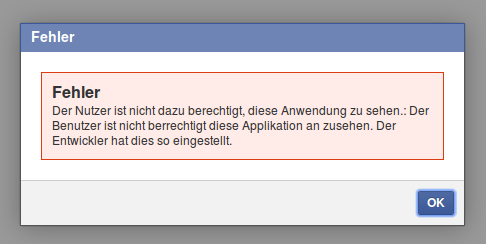
Du bist gerade bei Facebook über die folgende Fehlermeldung gestolpert:

Fehler
Der Nutzer ist nicht dazu berechtigt, diese Anwendung zu sehen.:
Der Benutzer ist nicht berrechtigt diese Applikation an zusehen. Der Entwickler hat dies so eingestellt.

Fehler Der Nutzer ist nicht dazu berechtigt, diese Anwendung zu sehen.: Der Benutzer ist nicht berrechtigt diese Applikation an zusehen. Der Entwickler hat dies so eingestellt.

Da dazu nichts bei Googel zu finden war, hier die einfache Erklärung, was da schief läuft:


Du hast die bei Facebook als Testbenutzer einer deiner Apps eingeloggt und das beim Zugriff auf eine andere App vergessen!

Die Testbenutzer einer App dürfen offensichtlich nur auf diese App und sonst auf keine Seiten/Apps in Facebook zugreifen – macht ja auch Sinn.
Verwirrend nur, dass Facebook behauptet, man hättte da etwas selber von Hand eingestellt…

Disable automatic p and br tags in the wordpress editor – and do it as early, as you can!

Why you should disable them as early, as you can

I don’t like visual HTML-editors, because they always mess up your HTML. So the first thing, that I’ve done in my wordpress-profile, was checking the check-box Disable the visual editor when writing.
But today I found out, that this is worth nothing.
Even when in text-mode, wordpress is adding some <p>- and <br>-tags automagically and, hence, is automagically messing up my neatly hand-crafted HTML-code.

Fuck wordpress! (Ehem – sorry for that outburst)

But what is even worse: after really turning off wordpress’s automagically-messup-functionality, nearly all my handwritten <p>-tags were gone, too.
So, if you want to turn of automatic <p>- and <br>-tags, you should really do it as early, as you can. Otherwise, you will have to clean up all your old posts afterwards like me. TI’ve lost some hours with usless HTML-editing today, because of that sh#%&*!

How to disable them

The wordpress-documentation of the build-in HTML-editor links to this post, which describs how to disable autmatic use of paragraph tags.
Simple open the file wp-includes/default-filters.php of you wordpress-installation and comment out the following line:


addfilter('the_content', 'wpautop');

If you are building your own wordpress-theme – like me – you alternatively can add the following to the functions.php-file of your theme:


remove_filter('the_content', 'wpautop');

Why you should disable automatic paragraph tags

For example, I was wondering a while, where all that whitespace in my posts were coming from.
Being used to handcraft my HTML, I often wrote one sentence per line, or put some empty lines inbetween to clearly arange my code.
There comes wordpress, messing everything up by automagically putting every sentence in its own paragraph, because it was written on its own line and putting <br> inbetween, to reflect my empty lines.

But even worse, wordpress also puts these unwanted <p>-tags arround HTML-code, that breaks because of it.
For example, I eventually found out about this auto-messup functionallity, because I was checking my blog-post with a html-validator and was wondering, why the validator was grumping about a <quote>-tag inside flow content, which I’ve never put there. It turned out, that wordpress had put it there for me…

Configure HTTPS for jetty-maven-plugin 9.0.x

For the impatient

If you do not want to know why it does not work and how I fixed it, just jump to the quick fix!

jetty-maven-plugin 9.0.x breaks the HTTPS-Connector

With Jetty 9.0.x the configuration of the jetty-maven-plugin (formaly known as maven-jetty-plugin) has changed dramatically. Since then, it is no more possible to configure a HTTPS-Connector in the plugin easily. Normally, connecting your development-container via HTTPS was not often necessary. But since Snowden, encryption is on everybodys mind. And so, testing the encrypted part of your webapp becomes more and more important.

Why it is “broken” in jetty-maven-plugin 9.0.x

A bug-report stats, that

Since the constructor signature changed for Connectors in jetty-9 to require the Server instance to be passed into it, it is no longer possible to configure Connectors directly with the plugin (because maven requires no-arg constructor for any <configuration> elements).

The documentation includes an example, how to configure a HTTPS Connector with the help of a jetty.xml-file. But unfortunatly, this example is broken. Jetty refuses to start with the following error: [ERROR] Failed to execute goal org.eclipse.jetty:jetty-maven-plugin:9.0.5.v20130815:run (default-cli) on project FOOBAR: Failure: Unknown configuration type: New in org.eclipse.jetty.xml.XmlConfiguration@4809f93a -> [Help 1].

Get HTTPS running again

So, here is, what you have to do to fix this broken example: the content shown for the file jetty.xml in the example is wrong. It has to look like the other example-files. That is, ith has to start with a <Configure>-tag. The corrected content of the file looks like this:


<?xml version="1.0"?>
<!DOCTYPE Configure PUBLIC "-//Jetty//Configure//EN" "http://www.eclipse.org/jetty/configure_9_0.dtd">

<!-- ============================================================= -->
<!-- Configure the Http Configuration                              -->
<!-- ============================================================= -->
<Configure id="httpConfig" class="org.eclipse.jetty.server.HttpConfiguration">
  <Set name="secureScheme">https</Set>
  <Set name="securePort"><Property name="jetty.secure.port" default="8443" /></Set>
  <Set name="outputBufferSize">32768</Set>
  <Set name="requestHeaderSize">8192</Set>
  <Set name="responseHeaderSize">8192</Set>
  <Set name="sendServerVersion">true</Set>
  <Set name="sendDateHeader">false</Set>
  <Set name="headerCacheSize">512</Set>

  <!-- Uncomment to enable handling of X-Forwarded- style headers
  <Call name="addCustomizer">
    <Arg><New class="org.eclipse.jetty.server.ForwardedRequestCustomizer"/></Arg>
  </Call>
  -->
</Configure>

But it’s not running!

If you are getting the error [ERROR] Failed to execute goal org.eclipse.jetty:jetty-maven-plugin:9.0.5.v20130815:run (default-cli) on project FOOBAR: Failure: etc/jetty.keystore (file or directory not found) -> [Help 1] now, this is because you have to create/get a certificate for your HTTPS-Connector. For development, a selfsigned certificate is sufficient. You can easily create one like back in the good old maven-jetty-plugin-times, with this command: keytool -genkey -alias jetty -keyalg RSA -keystore src/test/resources/jetty.keystore -storepass secret -keypass secret -dname "CN=localhost". Just be sure, to change the example file jetty-ssl.xml, to reflect the path to your new keystore file and password. Your jetty-ssl.xml should look like:


<?xml version="1.0"?>
<!DOCTYPE Configure PUBLIC "-//Jetty//Configure//EN" "http://www.eclipse.org/jetty/configure_9_0.dtd">

<!-- ============================================================= -->
<!-- Configure a TLS (SSL) Context Factory                         -->
<!-- This configuration must be used in conjunction with jetty.xml -->
<!-- and either jetty-https.xml or jetty-spdy.xml (but not both)   -->
<!-- ============================================================= -->
<Configure id="sslContextFactory" class="org.eclipse.jetty.util.ssl.SslContextFactory">
  <Set name="KeyStorePath"><Property name="jetty.base" default="." />/<Property name="jetty.keystore" default="src/test/resources/jetty.keystore"/></Set>
  <Set name="KeyStorePassword"><Property name="jetty.keystore.password" default="secret"/></Set>
  <Set name="KeyManagerPassword"><Property name="jetty.keymanager.password" default="secret"/></Set>
  <Set name="TrustStorePath"><Property name="jetty.base" default="." />/<Property name="jetty.truststore" default="src/test/resources/jetty.keystore"/></Set>
  <Set name="TrustStorePassword"><Property name="jetty.truststore.password" default="secret"/></Set>
  <Set name="EndpointIdentificationAlgorithm"></Set>
  <Set name="ExcludeCipherSuites">
    <Array type="String">
      <Item>SSL_RSA_WITH_DES_CBC_SHA</Item>
      <Item>SSL_DHE_RSA_WITH_DES_CBC_SHA</Item>
      <Item>SSL_DHE_DSS_WITH_DES_CBC_SHA</Item>
      <Item>SSL_RSA_EXPORT_WITH_RC4_40_MD5</Item>
      <Item>SSL_RSA_EXPORT_WITH_DES40_CBC_SHA</Item>
      <Item>SSL_DHE_RSA_EXPORT_WITH_DES40_CBC_SHA</Item>
      <Item>SSL_DHE_DSS_EXPORT_WITH_DES40_CBC_SHA</Item>
    </Array>
  </Set>

  <!-- =========================================================== -->
  <!-- Create a TLS specific HttpConfiguration based on the        -->
  <!-- common HttpConfiguration defined in jetty.xml               -->
  <!-- Add a SecureRequestCustomizer to extract certificate and    -->
  <!-- session information                                         -->
  <!-- =========================================================== -->
  <New id="sslHttpConfig" class="org.eclipse.jetty.server.HttpConfiguration">
    <Arg><Ref refid="httpConfig"/></Arg>
    <Call name="addCustomizer">
      <Arg><New class="org.eclipse.jetty.server.SecureRequestCustomizer"/></Arg>
    </Call>
  </New>

</Configure>

But it’s still not running!

Unless you are running mvn jetty:run as root, you should see another error now: [ERROR] Failed to execute goal org.eclipse.jetty:jetty-maven-plugin:9.0.5.v20130815:run (default-cli) on project FOOBAR: Failure: Permission denied -> [Help 1]. This is, because the ports are set to the numbers 80 and 443 of the privileged port-range.

You have to change jetty-http.xml like this:


<?xml version="1.0"?>
<!DOCTYPE Configure PUBLIC "-//Jetty//Configure//EN" "http://www.eclipse.org/jetty/configure_9_0.dtd">

<!-- ============================================================= -->
<!-- Configure the Jetty Server instance with an ID "Server"       -->
<!-- by adding a HTTP connector.                                   -->
<!-- This configuration must be used in conjunction with jetty.xml -->
<!-- ============================================================= -->
<Configure id="Server" class="org.eclipse.jetty.server.Server">

  <!-- =========================================================== -->
  <!-- Add a HTTP Connector.                                       -->
  <!-- Configure an o.e.j.server.ServerConnector with a single     -->
  <!-- HttpConnectionFactory instance using the common httpConfig  -->
  <!-- instance defined in jetty.xml                               -->
  <!--                                                             -->
  <!-- Consult the javadoc of o.e.j.server.ServerConnector and     -->
  <!-- o.e.j.server.HttpConnectionFactory for all configuration    -->
  <!-- that may be set here.                                       -->
  <!-- =========================================================== -->
  <Call name="addConnector">
    <Arg>
      <New class="org.eclipse.jetty.server.ServerConnector">
        <Arg name="server"><Ref refid="Server" /></Arg>
        <Arg name="factories">
          <Array type="org.eclipse.jetty.server.ConnectionFactory">
            <Item>
              <New class="org.eclipse.jetty.server.HttpConnectionFactory">
                <Arg name="config"><Ref refid="httpConfig" /></Arg>
              </New>
            </Item>
          </Array>
        </Arg>
        <Set name="host"><Property name="jetty.host" /></Set>
        <Set name="port"><Property name="jetty.port" default="8080" /></Set>
        <Set name="idleTimeout"><Property name="http.timeout" default="30000"/></Set>
      </New>
    </Arg>
  </Call>

</Configure>

… and jetty-https.xml like this:


<?xml version="1.0"?>
<!DOCTYPE Configure PUBLIC "-//Jetty//Configure//EN" "http://www.eclipse.org/jetty/configure_9_0.dtd">

<!-- ============================================================= -->
<!-- Configure a HTTPS connector.                                  -->
<!-- This configuration must be used in conjunction with jetty.xml -->
<!-- and jetty-ssl.xml.                                            -->
<!-- ============================================================= -->
<Configure id="Server" class="org.eclipse.jetty.server.Server">

  <!-- =========================================================== -->
  <!-- Add a HTTPS Connector.                                      -->
  <!-- Configure an o.e.j.server.ServerConnector with connection   -->
  <!-- factories for TLS (aka SSL) and HTTP to provide HTTPS.      -->
  <!-- All accepted TLS connections are wired to a HTTP connection.-->
  <!--                                                             -->
  <!-- Consult the javadoc of o.e.j.server.ServerConnector,        -->
  <!-- o.e.j.server.SslConnectionFactory and                       -->
  <!-- o.e.j.server.HttpConnectionFactory for all configuration    -->
  <!-- that may be set here.                                       -->
  <!-- =========================================================== -->
  <Call id="httpsConnector" name="addConnector">
    <Arg>
      <New class="org.eclipse.jetty.server.ServerConnector">
        <Arg name="server"><Ref refid="Server" /></Arg>
          <Arg name="factories">
            <Array type="org.eclipse.jetty.server.ConnectionFactory">
              <Item>
                <New class="org.eclipse.jetty.server.SslConnectionFactory">
                  <Arg name="next">http/1.1</Arg>
                  <Arg name="sslContextFactory"><Ref refid="sslContextFactory"/></Arg>
                </New>
              </Item>
              <Item>
                <New class="org.eclipse.jetty.server.HttpConnectionFactory">
                  <Arg name="config"><Ref refid="sslHttpConfig"/></Arg>
                </New>
              </Item>
            </Array>
          </Arg>
          <Set name="host"><Property name="jetty.host" /></Set>
          <Set name="port"><Property name="https.port" default="8443" /></Set>
          <Set name="idleTimeout"><Property name="https.timeout" default="30000"/></Set>
        </New>
    </Arg>
  </Call>
</Configure>

Now, it should be running, but…

That is all much to complex. I just want a quick fix to get it running!

So, now it is working. But you still have to clutter your project with several files and avoid some pitfalls (belive me or not: if you put the filenames in the <jettyXml>-tag of your pom.xml on separate lines, jetty won’t start!). Last but not least, the HTTP-Connector will stop working, if you forget to add the jetty-http.xml, that is mentioned at the end of the example.

Because of that, I’ve created a simple 6-step quick-fix-guide to get the HTTPS-Connector of the jetty-maven-plugin running.

Quick Fix

  1. Download jetty.xml or copy it from above and place it in src/test/resources/jetty.xml
  2. Download jetty-http.xml or copy it from above and place it in src/test/resources/jetty-http.xml
  3. Download jetty-ssl.xml or copy it from above and place it in src/test/resources/jetty-ssl.xml
  4. Download jetty-https.xml or copy it from above and place it in src/test/resources/jetty-https.xml
  5. Download jetty.keystore or generate it with the command keytool-command from above and place it in src/test/resources/jetty.keystore
  6. Update the configuration of the jetty-maven-plugin in your pom.xml to include the XML-configurationfiles. But be aware, the ordering of the files is important and there should be no newlines inbetween. You have been warned! It should look like:
    
    <plugin>
      <groupId>org.eclipse.jetty</groupId>
      <artifactId>jetty-maven-plugin</artifactId>
      <configuration>
        <jettyXml>
          ${project.basedir}/src/test/resources/jetty.xml,${project.basedir}/src/test/resources/jetty-http.xml,${project.basedir}/src/test/resources/jetty-ssl.xml,${project.basedir}/src/test/resources/jetty-https.xml
        </jettyXml>
      </configuration>
    </plugin>
      

That’s it. You should be done!

Rooting the hama 00054807 Internet TV Stick with the help of factory_update_param.aml

No Play Store – No Fun

Recently, I bought myself the Hama 00054807 Internet TV Stick. This stick is a low-budget option, to pimp your TV, if it has a HDMI-port, but no built in smart-tv functionality (or a crapy one). You just plug in the stick and connect its dc-port to a USB-port of the TV (or the included adapter) and there you go.

But one big drawback of the Hama 00054807 is, that there are nearly no usefull apps preinstalled and Google forbidds Hama to install the originalGoogle Play Store on the device. Hence, you are locked out of any easy access to all the apps, that constitute the usability of android.

Because of that, I decided to root my Hama00054807 as a first step on the way to fully utilize this neat little toy of mine.

I began with opening the device and found the device-ID B.AML8726.6B 12122. But there seems to be no one else, who ever tried it. But as it turned out, it is fairly easy, because stock recovery is not locked and so you can just install everything you want.

Boot Into Recovery

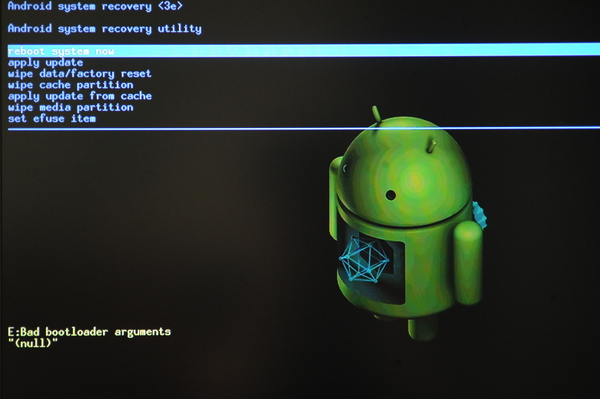
stock recovery screenshot
Screenshot of the stock recovery installed on the Hama 00054807 Intetnet TV Stick

I found out, that you can boot into recovery, by pressing the reset-button, while the stick is booting. You can reach the reset-button without the need to open the case through a little hole in the back of the device. Just hold the button pressed, until recovery shows up (see screenshot).

Unfortunatly, the keyboard does not work, while you are in recovery-mode. So at first glance, you can do nothing, expect looking at the nice picture of the android-bot being repaired.

Installing Updates Without Keyboard-Interaction

But I found out, that you can control stock recovery with the help of a file called factory_update_param.aml, which is read from the external sd-card and interpreted by stock recovery on startup. Just create a text-file with the following content (I think it should use unix stle newlines, aka LF):


--update_package=/sdcard/update.zip

Place this file on the sd-card and name it factory_update_param.aml. Now you can place any suitable correctly signed android-update on the sd-card and rename it to update.zip and stock recovery will install it upon boot, if you boot into recovery with the sd-card inserted.

If you want to wipe all data as well and factory reset your device, you can extend factory_update_param.aml like this:


--update_package=/sdcard/update.zip
--wipe_data
--wipe_cache
--wipe_media

But be carefull to remove these extra-lines later, because they are executed every time you boot into recovery with the sd-card inserted! You have been warned :)

Let’s root

So, actually rooting the device is fairly easy now. You just have to download any correclty signed Superuser-Update. For example this one from the superuser homepage: Superuser-3.1.3-arm-signed.zip. Then, put it on the sd-card, rename it to update.zip, boot into recovery with the sd-card inserted and that’s it, you’r root!

If you reboot your device, you should now find the superuser-app among your apps. To verify, that everything went right, you could install any app that requires root-privileges. If the app requests root-privileges, you should see a dialog from the superuser-app, that asks you if the privileges should be granted, or not. For example, you can install a terminal-app and type su and hit return to request root-privileges.

What’s next…

So now your device is rooted and you are prepared to install custom updates on it. But still the Google Play Store is missing. I hope I will find some time to accomplish that, too. Stay tuned!

Combining jetty-maven-plugin and wro4j-maven-plugin for Dynamic Reloading of LESS-Resources

Ever searched for a simple configuration, that lets you use your jetty-maven-plugin as you are used to, while working with LESS to simplify your stylesheets?

You cannot do both, use the Client-side mode of LESS to ease development and use the lesscss-maven-plugin to automatically compile the LESS-sources into CSS for production. That does not work, because your stylesheets must be linked in different ways if you are switching between the client-side mode – which is best for development – and the pre-compiled mode – which is best for production. For the client-side mode you need something like:


<link rel="stylesheet/less" type="text/css" href="styles.less" />
<script src="less.js" type="text/javascript"></script>

While, for the pre-compiled mode, you want to link to your stylesheets as usual, with:


<link rel="stylesheet" type="text/css" href="styles.css" />

While looking for a solution to this dilemma, I stumbled accross wro4j. Originally intended, to speed up page-delivery by combining and minimizing multiple resources into one through the use of a servlet-filter, this tool also comes with a maven-plugin, that let you do the same offline, while compiling your webapp.

The idea is, to use the wro4j-maven-plugin to compile and combine your LESS-sources into CSS for production and to use the wro4j filter, to dynamically deliver the compiled CSS while developing. This way, you do not have to alter your HTML-code, when switching between development and production, because you always link to the CSS-files.

So, lets get dirty!

Step 1: Configure wro4j

First, we configure wro4j, like as we want to use it to speed up our page. The details are explained and linked on wro4j’s Getting-Started-Page. In short, we just need two files: wro.xml and wro.properties.

wro.xml

wro.xml tells wro4j, which resources should be combined and how the result should be named. I am using the following configuration to generate all LESS-Sources beneath base/ into one CSS-file called base.css:


<groups xmlns="http://www.isdc.ro/wro">
  <group name="base">
    <css>/less/base/*.less</css>
  </group>

wro4j looks for /less/base/*.less inside the root of the web-context, which is equal to src/main/webapp in a normal maven-project. There are other ways to specifie the resources, which enable you to store them elswhere. But this approach works best for our goal, because the path is understandable for both: the wro4j servlet-filter, we are configuring now for our development-environment, and the wro4j-maven-plugin, that we will configure later for build-time compilation.

wro.properties

wro.properties in short tells wro4j, how or if it should convert the combined sources and how it should behave. I am using the following configuration to tell wro4j, that it should convert *.less-sources into CSS and do that on every request:


managerFactoryClassName=ro.isdc.wro.manager.factory.ConfigurableWroManagerFactory
preProcessors=cssUrlRewriting,lessCssImport
postProcessors=less4j
disableCache=true

First of all we specify the ConfigurableWroManagerFactory, because otherwise, wro4j would not pick up our pre- and post-processor-configuration. This is a little bit confusing, because wro4j is already reading the wro.properties-file – otherwise wro4j would never detect the managerFactoryClassName-directive – and you might think: “Why? He is already interpreting our configuration!” But belive me, he is not! You can read more about that in wro4j’s documentation. The disableCache=true is also crucial, because otherwise, we would not see the changes take effect when developing with jetty-maven-plugin later on. The pre-processors lessCssImport and cssUrlRewriting merge together all our LESS-resources under /less/base/*.less and do some URL-rewriting, in case you have specified paths to images, fonts or other resources inside your LESS-code, to reflect that the resulting CSS is found under /css/base.css and not /css/base/YOURFILE.css like the LESS-resources.

You can do much more with your resources here, for example minimizing. Also, there are countless configuration options to fine-tune the behaviour of wro4j. But for our goal, we are now only intrested in the compilation of our LESS-sources.

Step 2: Configure the wro4j servlet-filter

Configuring the filter in the web.xml is easy. It is explained in wro4j’s installation-insctuctions. But the trick is, that we do not want to configure that filter for the production-version of our webapp, because we want to compile the resources offline, when the webapp is build. To acchieve this, we can use the <overrideDescriptor>-Parameter of the jetty-maven-plugin.

<overrideDescriptor>

This parameter lets you specify additional configuration options for the web.xml of your webapp. I am using the following configuration for my jetty-maven-plugin:


<plugin>
  <groupId>org.eclipse.jetty</groupId>
  <artifactId>jetty-maven-plugin</artifactId>
  <configuration>
    <webApp>
      <overrideDescriptor>${project.basedir}/src/test/resources/jetty-web.xml</overrideDescriptor>
    </webApp>
  </configuration>
  <dependencies>
    <dependency>
      <groupId>ro.isdc.wro4j</groupId>
      <artifactId>wro4j-core</artifactId>
      <version>${wro4j.version}</version>
    </dependency>
    <dependency>
      <groupId>ro.isdc.wro4j</groupId>
      <artifactId>wro4j-extensions</artifactId>
      <version>${wro4j.version}</version>
      <exclusions>
        <exclusion>
          <groupId>javax.servlet</groupId>
          <artifactId>servlet-api</artifactId>
        </exclusion>
        <exclusion>
          <groupId>org.apache.commons</groupId>
          <artifactId>commons-lang3</artifactId>
        </exclusion>
        <exclusion>
          <groupId>commons-io</groupId>
          <artifactId>commons-io</artifactId>
        </exclusion>
        <exclusion>
          <groupId>org.springframework</groupId>
          <artifactId>spring-web</artifactId>
        </exclusion>
        <exclusion>
          <groupId>com.google.code.gson</groupId>
          <artifactId>gson</artifactId>
        </exclusion>
        <exclusion>
          <groupId>com.google.javascript</groupId>
          <artifactId>closure-compiler</artifactId>
        </exclusion>
        <exclusion>
          <groupId>com.github.lltyk</groupId>
          <artifactId>dojo-shrinksafe</artifactId>
        </exclusion>
        <exclusion>
          <groupId>org.jruby</groupId>
          <artifactId>jruby-core</artifactId>
        </exclusion>
        <exclusion>
          <groupId>org.jruby</groupId>
          <artifactId>jruby-stdlib</artifactId>
        </exclusion>
        <exclusion>
          <groupId>me.n4u.sass</groupId>
          <artifactId>sass-gems</artifactId>
        </exclusion>
        <exclusion>
          <groupId>nz.co.edmi</groupId>
          <artifactId>bourbon-gem-jar</artifactId>
        </exclusion>
        <exclusion>
          <groupId>org.codehaus.gmaven.runtime</groupId>
          <artifactId>gmaven-runtime-1.7</artifactId>
        </exclusion>
        <exclusion>
          <groupId>org.webjars</groupId>
          <artifactId>jshint</artifactId>
        </exclusion>
        <exclusion>
          <groupId>org.webjars</groupId>
          <artifactId>emberjs</artifactId>
        </exclusion>
        <exclusion>
          <groupId>org.webjars</groupId>
          <artifactId>handlebars</artifactId>
        </exclusion>
        <exclusion>
          <groupId>org.webjars</groupId>
          <artifactId>coffee-script</artifactId>
        </exclusion>
        <exclusion>
          <groupId>org.webjars</groupId>
          <artifactId>jslint</artifactId>
        </exclusion>
        <exclusion>
          <groupId>org.webjars</groupId>
          <artifactId>json2</artifactId>
        </exclusion>
        <exclusion>
          <groupId>org.webjars</groupId>
          <artifactId>jquery</artifactId>
        </exclusion>
      </exclusions>
    </dependency>
  </dependencies>
</plugin>

The dependencies to wro4j-core and wro4j-extensions are needed by jetty, to be able to enable the filter defined below. Unfortunatly, one of the transitive dependencies of wro4j-extensions triggers an uggly error when running the jetty-maven-plugin. Therefore, all unneeded dependencies of wro4j-extensions are excluded, as a workaround for this error/bug.

jetty-web.xml

And my jetty-web.xml looks like this:


<?xml version="1.0" encoding="UTF-8"?>
<web-app xmlns="http://java.sun.com/xml/ns/javaee"
  xmlns:xsi="http://www.w3.org/2001/XMLSchema-instance"
  xsi:schemaLocation="http://java.sun.com/xml/ns/javaee http://java.sun.com/xml/ns/javaee/web-app_2_5.xsd"
  version="2.5">
  <filter>
    <filter-name>wro</filter-name>
    <filter-class>ro.isdc.wro.http.WroFilter</filter-class>
  </filter>
  <filter-mapping>
    <filter-name>wro</filter-name>
    <url-pattern>*.css</url-pattern>
  </filter-mapping>
</web-app>

The filter processes any URI’s that end with .css. This way, the wro4j servlet-filter makes base.css available under any path, because for exampl /base.css, /css/base.css and /foo/bar/base.css all end with .css.

This is all, that is needed to develop with dynamically reloadable compiled LESS-resources. Just fire up your browser and browse to /what/you/like/base.css. (But do not forget to put some LESS-files in src/main/webapp/less/base/ first!)

Step 3: Install wro4j-maven-plugin

All that is left over to configure now, is the build-process. If you would build and deploy your webapp now, the CSS-file base.css would not be generated and the link to your stylesheet, that already works in our jetty-maven-plugin environment would point to a 404. Hence, we need to set up the wro4j-maven-plugin. I am using this configuration:


<plugin>
  <groupId>ro.isdc.wro4j</groupId>
  <artifactId>wro4j-maven-plugin</artifactId>
  <version>${wro4j.version}</version>
  <configuration>
    <wroManagerFactory>ro.isdc.wro.maven.plugin.manager.factory.ConfigurableWroManagerFactory</wroManagerFactory>
    <cssDestinationFolder>${project.build.directory}/${project.build.finalName}/css/</cssDestinationFolder>
  </configuration>
  <executions>
    <execution>
      <phase>prepare-package</phase>
      <goals>
        <goal>run</goal>
      </goals>
    </execution>
  </executions>
</plugin>

I connected the run-goal with the package-phase, because the statically compiled CSS-file is needed only in the final war. The ConfigurableWroManagerFactory tells wro4j, that it should look up further configuration options in our wro.properties-file, where we tell wro4j, that it should compile our LESS-resources. The <cssDestinationFolder>-tag tells wro4j, where it should put the generated CSS-file. You can adjust that to suite your needs.

That’s it: now the same CSS-file, which is created on the fly by the wro4j servlet-filter when using mvn jetty:run and, thus, enables dynamic reloading of our LESS-resources, is generated during the build-process by the wro4j-maven-plugin.

Cleanup and further considerations

lesscss-maven-plugin

If you already compile your LESS-resources with the lesscss-maven-plugin, you can stick with it and skip step 3. But I strongly recommend giving wro4j-maven-plugin a try, because it is a much more powerfull tool, that can speed up your final webapp even more.

Clean up your mess

With a configuration like the above one, your LESS-resources and wro4j-configuration-files will be packed into your production-war. That might be confusing later, because neither wro4j nor LESS is used in the final war. You can add the following to your pom.xml to exclude these files from your war for the sake of clarity:


<plugin>
  <artifactId>maven-war-plugin</artifactId>
  <configuration>
    <warSourceExcludes>
      WEB-INF/wro.*,
      less/**
    </warSourceExcludes>
  </configuration>
</plugin>

What’s next?

We only scrached the surface, of what can be done with wro4j. Based on this configuration, you can easily enable additional features to fine-tune your final build for maximum speed. You really should take a look at the list of available Processors!
hibernate4-maven-plugin 1.0.3 released!

Today we released the version 1.0.3 of hibernate4-maven-plugin to Central.

Scanning dependencies

This release of the plugin now supports scanning of dependencies. By default all dependencies in the scope compile are scanned for annotated classes. Thanks to Guido Wimmel, who pointed out, that this was really missing and supported the implementation with a little test-project for this use-case. Learn more…

Support for Hibernate Envers

Another new feature of this release is support for Hibernate Envers – Easy Entity Auditing. Thanks a lot to Victor Tatai, how implemented this, and Erik-Berndt Scheper, who helped integrating it and who supported the testin with a little test-project, that demonstrates the new feature. You can visit it at bitbucket as a starting point for your own experiments with this technique.

Less bugs!

Many thanks also to Stephen Johnson and Eduard Szente, who pointed out bugs and helped eleminating them…

Get your hands on – on central!

hibernate4-maven-plugin 1.0.3 is available in the Central Maven Repository.

Release notes:


commit adb20bc4da63d4cec663ca68648db0f808e3d181
Author: Kai Moritz
Date: Fri Oct 18 01:52:27 2013 +0200

Added missing documentation for skip-configuration

commit 99a7eaddd1301df0d151f01791e3d177297670aa
Author: Kai Moritz
Date: Fri Oct 18 00:38:29 2013 +0200

Added @since-Annotation to configuration-parameters

commit 221d977368ee1897377f80bfcdd50dcbcd1d4b83
Author: Kai Moritz
Date: Wed Oct 16 01:18:53 2013 +0200

The plugin now scans for annotated classes in dependencies too

commit ef1233a6095a475d9cdded754381267c5d1e336f
Author: Kai Moritz
Date: Wed Oct 9 21:37:58 2013 +0200

Project-Documentation now uses the own skin juplo-skin

commit 84e8517be79d88d7e2bec2688a8f965f591394bf
Author: Kai Moritz
Date: Wed Oct 9 21:30:28 2013 +0200

Reworked APT-Documentation: page-titles were missing

commit f27134cdec6c38b4c8300efb0bb34fc8ed381033
Author: Kai Moritz
Date: Wed Oct 9 21:29:30 2013 +0200

maven-site-plugin auf Version 3.3 aktualisiert

commit d38b2386641c7ca00f54d69cb3f576c20b0cdccc
Author: Kai Moritz
Date: Wed Sep 18 23:59:13 2013 +0200

Reverted to old behaviour: export is skipped, when maven.test.skip=true

commit 7d935b61a3d80260b9cacf959984e14708c3a96b
Author: Kai Moritz
Date: Wed Sep 18 18:15:38 2013 +0200

No configuration for hibernate.dialect might be a valid configuration too

commit caa492b70dc1daeaef436748db38df1c19554943
Author: Kai Moritz
Date: Wed Sep 18 18:14:54 2013 +0200

Improved log-messages

commit 2b1147d5e99c764c1f6816f4d4f000abe260097c
Author: Kai Moritz
Date: Wed Sep 18 18:10:32 2013 +0200

Variable "envers" should not be put into hibernate.properties

"hibernate.exoprt.envers" is no Hibernate-Configuration-Parameter.
Hence, it should not be put into the hibernate.properties-file.

commit 0a52dca3dd6729b8b6a43cc3ef3b69eb22755b0a
Author: Erik-Berndt Scheper
Date: Tue Sep 10 16:18:47 2013 +0200

Rename envers property to hibernate.export.envers

commit 0fb85d6754939b2f30ca4fc18823c5f7da1add31
Author: Erik-Berndt Scheper
Date: Tue Sep 10 08:20:23 2013 +0200

Ignore IntelliJ project files

commit e88830c968c1aabc5c32df8a061a8b446c26505c
Author: Victor Tatai
Date: Mon Feb 25 16:23:29 2013 -0300

Adding envers support (contribution from Victor Tatai)

commit e59ac1191dda44d69dfb8f3afd0770a0253a785c
Author: Kai Moritz
Date: Tue Sep 10 20:46:55 2013 +0200

Added Link to old Version 1.0.2 in documentation

commit 97a45d03e1144d30b90f2f566517be22aca39358
Author: Kai Moritz
Date: Tue Sep 10 20:29:15 2013 +0200

Execution is only skipped, if explicitly told so

commit 8022611f93ad6f86534ddf3568766f88acf863f3
Author: Kai Moritz
Date: Sun Sep 8 00:25:51 2013 +0200

Upgrade to Scannotation 1.0.3

commit 9ab53380a87c4a1624654f654158a701cfeb0cae
Author: Kai Moritz
Date: Sun Sep 8 00:25:02 2013 +0200

Upgrade to Hibernate 4.2.5.Final

commit 5715c7e29252ed230389cfce9c1a0376fec82813
Author: Kai Moritz
Date: Sat Aug 31 09:01:43 2013 +0200

Fixed failure when target/classes does not exist when runnin mvn test phase

Thanks to Stephen Johnson

Details from the original email:
---------
The following patch stops builds failing when target/classes (or no main java exists), and target/test-classes and src/tests exist.

So for example calling

mvn test -> invokes compiler:compile and if you have export bound to process-classes phase in executions it will fail. Maybe better to give info and carry on. Say for example they want to leave the executions in place that deal with process-classes and also process-test-classes but they do not want it to fail if there is no java to annotate in src/classes. The other way would be to comment out the executions bound to process-classes. What about export being bound to process-class by default? Could this also cause issues?

In either case I think the plugin code did checks for src/classes directory existing, in which case even call "mvn test" would fail as src/classes would not exist as no java existed in src/main only in src/test. Have a look through the patch and see if its of any use.

commit 9414e11c9ffb27e195193f5fa53c203c6297c7a4
Author: Kai Moritz
Date: Sat Aug 31 11:28:51 2013 +0200

Improved log-messages

commit da0b3041b8fbcba6175d05a2561b38c365111ed8
Author: Kai Moritz
Date: Sat Aug 31 08:51:03 2013 +0200

Fixed NPE when using nested classes in entities with @EmbeddedId/@Embeddable

Patch supplied by Eduard Szente

Details:
----------------
Hi,

when using your plugin for schema export the presence of nested classes
in entities (e.g. when using @EmbeddedId/@Embeddable and defining the Id
within the target entity class)
yields to NPEs.

public class Entity {

@EmbeddedId
private Id id;

@Embeddable
public static class Id implements Serializable {
....
}

}

Entity.Id.class.getSimplename == "Id", while the compiled class is named
"Entity$Id.class"

Patch appended.

Best regards,
Eduard

Log out from wrong Account with maven-appengine-plugin

Do you work with the maven-appengine-plugin and several google-accounts? If you do, or if you ever were logged in to the wrong google-account while executing mvn appengine:update, like me yesterday, you surely wondering, how to logout from maven-appengine-plugin.

maven-appengine-plugin somehow miracolously stores your credentials for you, when you attemp to upload an app for the first time. This comes in very handy, if you work with just one google-account. But it might get a “pain-in-the-ass”, if you work with several accounts. Because, if you once logged in into an account, there is no way (I mean: no goal of the maven-appengine-plugin) to log out, in order to change the account!

The solution: clear the credentials, that the maven-appengine-plugin stored on your behalf

Only after hard googling, i found a solution to this problem in a blog-post: maven-appengine-plugin stores its oauth2-credentials in the file .appcfg_oauth2_tokens_java in your home directory (on Linux – sorry Windows-folks, you have to figure out yourself, where the plugin stores the credentials on Windows).

Just delete the file .appcfg_oauth2_tokens_java and your logged out! The next time you call mvn appengine:upload you will be asked again to accept the request and, hence, can switch accounts. If you are not using oauth2, just look for .appcfg*-files in your home directory. I am sure, you will find another file with stored credentials, that you can delet to logout, like Radomir, who deleted .appcfg_cookiesy to log out.

Bidirectional Association with @ElementCollection

Have you ever wondered, how to map a bidirectional association from an entity to the instances of its element-collection? Actually, it is very easy, if you are using hibernate. It is just somehow hard to find in the documentation, if you are searching for it (look for chapter 2.4.3.4 in the Hibernate-Annotationss-Documentation).

Hibernate

So, here we go:
Just add the @Parent-annotation to the attribute of your associated @Embeddable-class, that points back to its parent.

@Entity
class Cat
{
  @Id
  Long id;

  @ElementCollection
  Set kittens;

  ...
}

@Embeddable
class Kitten
{
  // Embeddable's have no ID-property!

  @Parent
  private Cat mother;

  ...
}

Drawback

But this clean approach has a drawback: it only works with hibernate. If you work with other JPA-implementations or plain old JPA itself, it will not work. Hence, it will not work in googles appengine, for example!

Unfortunatly, there are no clean workarounds, to get bidirectional associations to @ElementCollections‘s working with JPA. The only workarounds I found, only work for directly embedded instances – not for collections of embedded instances:


If you want bidirectiona associations to the elements of your embedded collection, it works only with hibernate!